
Every so often, a theme lands in my hands that doesn’t just touch the surface; it actually rebuilds the experience from the ground up. Archon V2 HyperOS Theme is one of those. Designed by ELEVEN, this one goes well beyond a simple wallpaper and icon swap, and after spending real time with it, I think the Archon V2 HyperOS theme deserves a proper, detailed look rather than a quick mention.
Archon V2 HyperOS Theme First Impressions
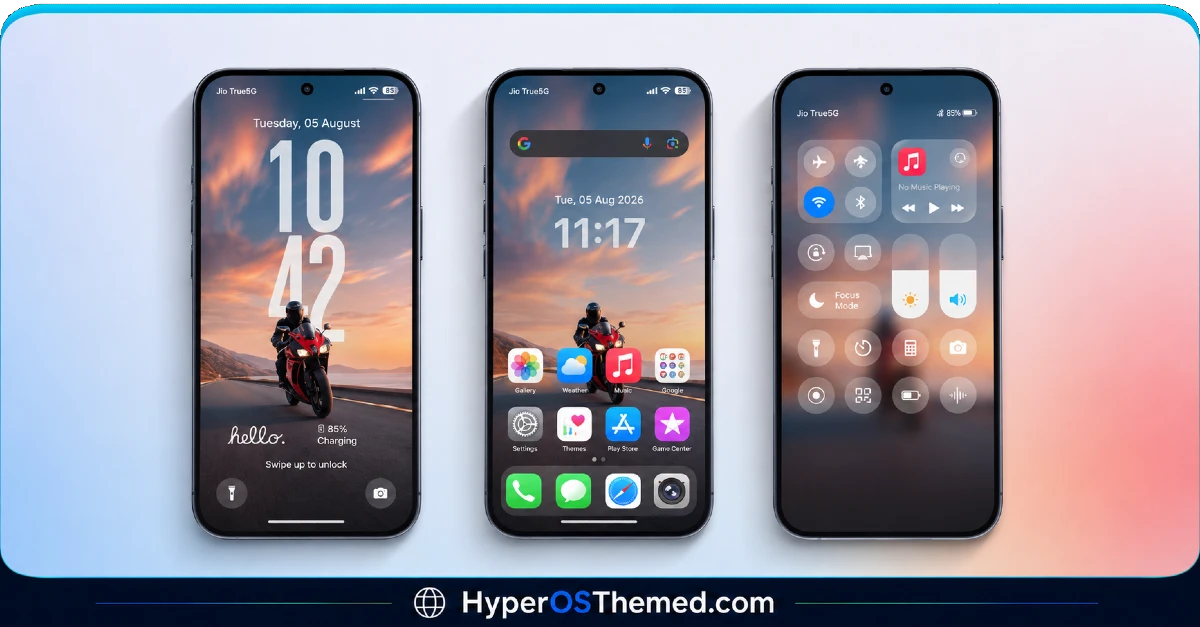
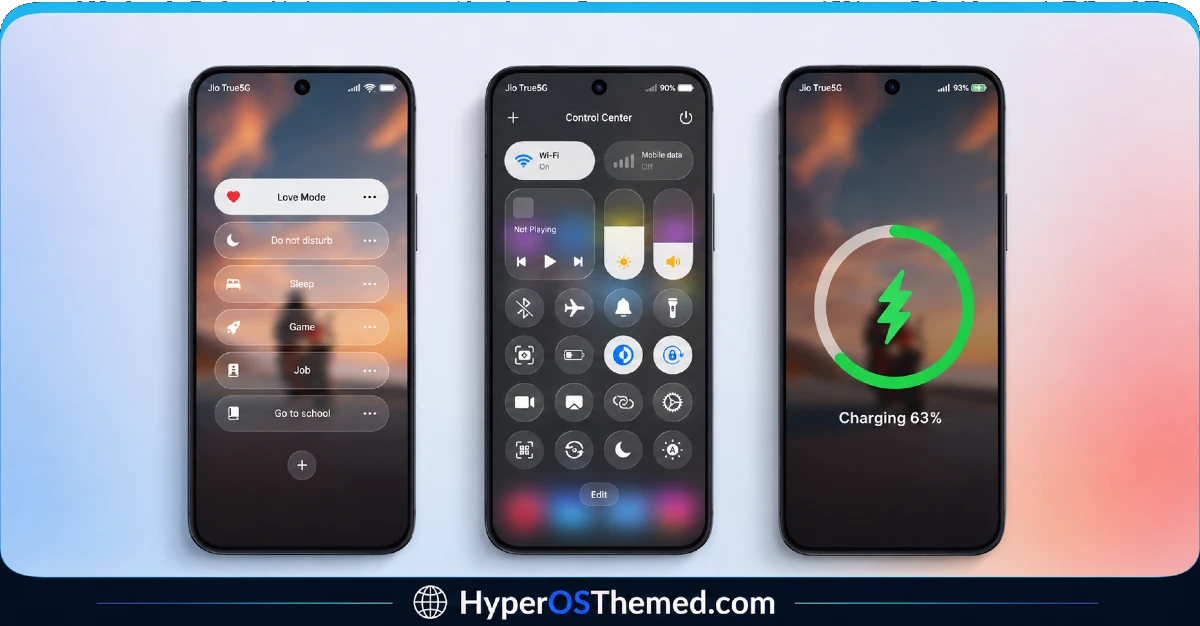
What struck me immediately is how far this redesign actually reaches. A lot of themes stop at the home screen, leave your Settings menu untouched, and call it done. Archon V2 doesn’t take that shortcut. The lock screen, icon set, Control Center, and even your Dialer and Messages app all get pulled into the same cohesive visual language. Nothing feels like an afterthought here.
The iOS-inspired icon pack is genuinely well made too, clean, rounded, and consistent enough that you won’t spot a random mismatched stock icon peeking out from a folder somewhere. That kind of thoroughness is exactly what separates a theme built with intention from one thrown together quickly.
Archon V2 HyperOS Theme Preview
Why the Archon V2 Theme Xiaomi Stands Out
Here’s what I appreciated most while actually using it on my own device:
- A fully redesigned lock screen — stylish, modern, and paired with a depth effect wallpaper that adds genuine dimension instead of sitting flat behind your clock
- Premium custom icons — not recolored defaults, but icons that feel purpose built for this specific theme
- A reworked Control Center — quick settings that actually look and feel upgraded, not just recolored toggles
- System-wide consistency — Dialer, Settings, and Messages all carry the same design language as your home screen
- A depth effect wallpaper included separately — so you get that extra layer of visual polish without needing to source it yourself
That last point matters more than it might seem. A lot of themes tease a “3D” or “depth” look in their screenshots, then hand you a flat static image once you actually download it. Archon V2 backs up the visuals with an actual dedicated wallpaper file.
A Small But Important Setup Detail
Before you get too far into installing this one, know that the lock screen requires a password to unlock during setup: “GOD HIMSELF.” It’s an easy step to miss if you’re rushing through the install, so keep it noted before you start, otherwise you might think something’s gone wrong when it’s just waiting on that password.
Theme Details
| Detail | Info |
|---|---|
| Theme Name | Archon V2 |
| Designer | ELEVEN |
| File Size | 39.1 MB |
| Compatibility | HyperOS |
| Supported Devices | Xiaomi, Redmi, POCO |
| Features | iOS-Style Icons, Redesigned Lock Screen, Depth Effect Wallpaper, Control Center Redesign, System-Wide UI Changes |
| Lock Screen Password | GOD HIMSELF |
Why This Theme Is Worth Your Time
If you’ve been hopping between themes that only half commit to their redesign, the Archon V2 HyperOS theme is a refreshing change. It’s genuinely complete:
- Works across Xiaomi, Redmi, and POCO devices without compatibility headaches
- Completely free through the official Theme Store
- Includes a dedicated depth wallpaper, not just a promise of one
- Reaches deep into your system apps instead of stopping at the home screen
Getting the Theme
Installing on Global Stable ROM
- Find the Official Theme Store Link in the download section and tap it.
- You’ll be prompted to choose which app opens the link.
- Select the Themes app.
- This redirects you into the Theme Store, where the theme download begins.
- Download the theme and apply it, then enter the lock screen password when prompted.
Installing on Custom ROMs
Running Xiaomi.eu, MIUIRoom, MIUI SR, HyperOS CN, or a similar custom build? Here’s the manual process:
- Download the Archon V2 mtz file from the link above.
- Open the Theme Store app on your device.
- Tap into the Themes section.
- Scroll down until you see Import, and tap it.
- Use your file manager to locate the downloaded mtz file.
- Wait for it to import. Once done, the theme will show up in your list.
- Tap on it to apply, then enter the password when the lock screen prompts you.
One thing worth remembering: restart your device if anything looks overlapped or glitchy after applying. A quick reboot usually clears it right up. This theme has been tested thoroughly and ran without any issues on my end, but if something looks off, drop a comment, and I’ll help sort it out.
Final Thoughts
The Archon V2 Theme Xiaomi isn’t just another wallpaper pack dressed up as a theme; it’s a genuine system-wide redesign that carries its iOS-inspired identity through nearly every screen you’ll actually use. Between the depth effect wallpaper, the redesigned Control Center, and that extra bit of care in the lock screen setup, ELEVEN clearly built this one to be lived with, not just glanced at. If you want a complete visual overhaul rather than a half measure, this is absolutely worth downloading.
You may Also Like:
- Kepal ApiiV2 HyperOS Theme — iOS-Style Theme For Redmi, Xiaomi and POCO
- Latest Breaking_V9 HyperOS Theme For Redmi, POCO And Xiaomi Phones
- Blackess Pro iOS Style Theme for HyperOS with Dynamic Island
- GODKING7 HyperOS Theme Best for POCO, Xiaomi & Redmi Phones
- Super26 HyperOS Theme iOS Style Skins For POCO, Redmi and Xiaomi Devices
