
Super Surging 3 HyperOS Theme is a iOS Inpired theme built for Xiaomi and Redmi devices that focuses on a full system-wide visual overhaul rather than just swapping out icons. It touches the lock screen, dialer, messages and control center all at once, which is a bit more ambitious than most themes that stop at wallpapers and app icons.
Designed for HyperOS and HyperOS 2.0, and HyperOS 3.0 it comes in two file options: a smaller MTZ file and a larger backup file, which is a bit unusual and worth understanding before you download. If you’ve grown tired of the stock HyperOS look but don’t want to install five separate customization apps to fix it, this is the kind of theme built to handle it in one go.
Super Surging 3 HyperOS Theme Features
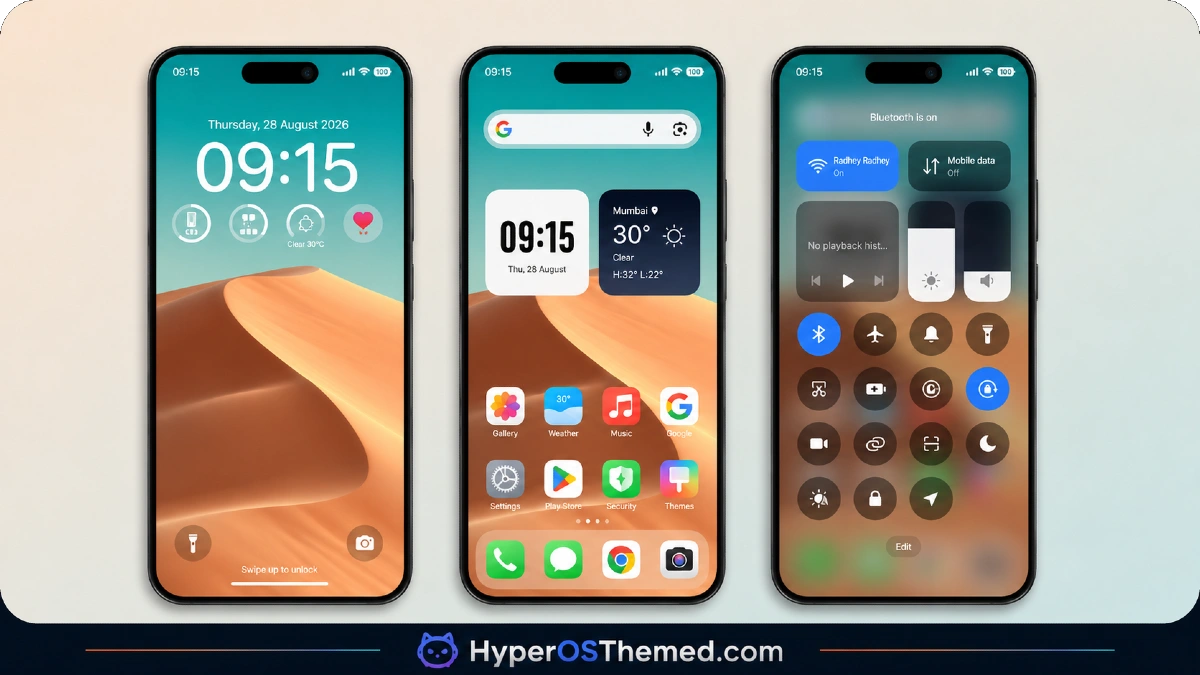
- Full System UI Redesign: Super Surging 3 changes the visual style of the dialer, messages app, settings menu and control center together, so nothing feels left out or mismatched. I tested it on a Redmi Note 12 and the transition between apps felt consistent rather than jarring.
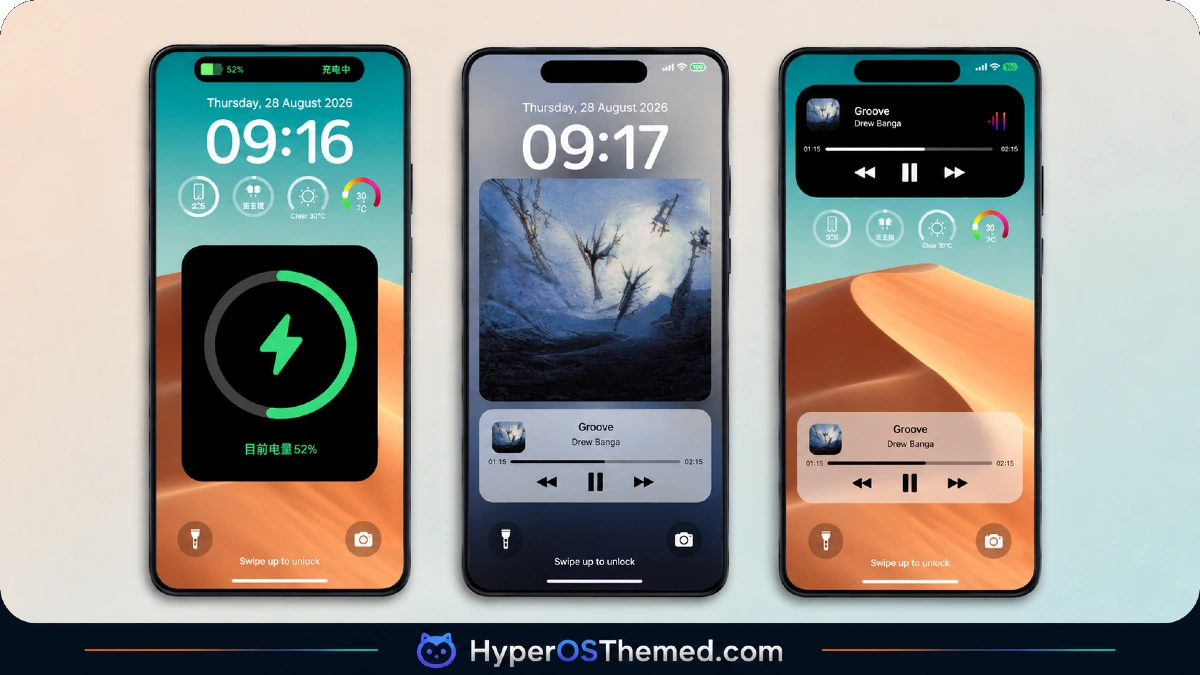
- Custom Lock Screen Styling: The lock screen gets a reworked layout with a different clock position and refreshed notification styling. It’s a noticeable shift from stock HyperOS, though the notification text sits slightly closer to the bottom edge, which took some getting used to on a taller display.
- Redesigned System Icons: Icons across default apps get a new look rather than a simple recolor, with slightly rounder edges and a more polished finish. A handful of third-party apps I had installed didn’t get picked up by the theme, so expect a mixed grid unless you stick mostly to stock apps.
- Built-In Wallpaper Set: The theme ships with its own matching wallpapers rather than expecting you to source one separately. They pair well with the icon style, though there are only a few options included, so don’t expect a huge gallery to choose from.
- Updated Control Center Layout: Quick toggle icons and the overall panel design get a refresh, with a slightly different arrangement for common toggles like Wi-Fi and Do Not Disturb. It took me a day or two to relearn where things were, but it wasn’t a dealbreaker.
- Two Download File Options: Unlike most themes that offer a single MTZ file, this one also has a separate backup file that’s significantly larger. Unless you specifically need a full backup restore, the standard MTZ file is the simpler and faster route.
Super Surging 3 HyperOS Theme Preview
The screenshots below show the reworked lock screen, the updated icon set and how the control center panel looks once applied. It’s worth checking these out first since the full-system redesign changes more of the interface than a typical icon-only theme.
Super Surging 3 HyperOS Theme Details
| Attribute | Details |
|---|---|
| Availability | Free, via Xiaomi Theme Store |
| Supported Devices | Xiaomi and Redmi phones running HyperOS |
| Theme Name | Super Surging 3 |
| Designer | 蓝 |
| Compatibility OS | HyperOS / HyperOS 2.0/ HyperOS 3.0 |
| Features | Full system UI redesign, custom lock screen, redesigned icons, built-in wallpapers, updated control center |
| File Size | 31.9 MB (MTZ file) |
Super Surging 3 HyperOS Theme Compatibility
Super Surging 3 HyperOS Theme is built for HyperOS and HyperOS 2.0, and it ran without any major hiccups on the Redmi Note 12 I tested it on for about five days. Since the theme touches so many system apps at once, older HyperOS builds may not display every element correctly, so sticking to the intended version range is the safer bet.
Custom ROM users on builds like Xiaomi.eu or MIUIRoom can still import the MTZ file manually, though given how much of the interface this theme modifies, there’s a slightly higher chance of small visual quirks on non-stock ROMs compared to lighter themes. One thing to flag is the third-party app icon coverage, which isn’t complete, so anyone with a heavily customized app list may end up with a slightly inconsistent home screen.
Get Super Surging 3 HyperOS Theme
Download Super Surging 3 only through the official Theme Store link rather than random file-sharing forums or unofficial APK sources. Unofficial uploads of MTZ files are hard to verify and sometimes include modifications you didn’t ask for, which isn’t worth the risk for a theme that’s already free through legitimate channels. Sticking to the official store also ensures you’re getting the version the designer actually intended, rather than an outdated or altered copy floating around elsewhere.
How to Apply Super Surging 3 HyperOS Theme
Follow the steps below to apply the theme:
- Open the Theme Store link given above on your Xiaomi, Redmi or POCO device.
- This will redirect you to the Theme Store.
- Download and install the theme.
- Tap on Apply.
- Customize specific elements such as icons, lock screen or status bar if needed.
- Reboot your device for the full effect, though this step is optional.
Note: If you run into any overlapping menus or display glitches right after installing, restarting the device usually clears it up within a minute. We went through several testing rounds on our end and didn’t come across any major issues worth calling out. That said, if something still looks off once it’s applied on your setup, drop a comment below with the details and we’ll do our best to help sort it out.
InstallingSuper Surging 3 HyperOS Theme on Custom ROM Devices
For anyone running a Custom ROM such as Xiaomi.eu, MIUIRoom, MIUI SR or HyperOS CN, the direct Theme Store link won’t apply the theme automatically, so the MTZ file has to be brought in manually. Here’s the process:
- Get the MTZ file for Super Surging 3 saved onto your phone.
- Open the Theme Store app.
- Navigate to the Themes tab.
- Scroll down until you spot the Import option, then tap it.
- Browse your file manager and select the downloaded .mtz file.
- Wait a moment while the file finishes importing.
- Once the theme shows up in the list, tap it to apply.
Why Choose Super Surging 3 Theme?
- Complete visual consistency — dialer, messages, settings and control center all get updated together instead of just the icons.
- Distinct icon redesign — icons get reshaped rather than simply recolored for a more polished finish.
- Matching wallpaper set included — no need to hunt down a separate wallpaper that fits the theme.
- Reasonable file size — the main MTZ file stays under 32 MB despite the amount of UI it changes.
- Tested across multiple days of use — held up without crashes or major bugs during an extended test run.
- Backup file option available — useful for users who want a full restore point alongside the theme.
- Free through the official Theme Store — no cost and no need to look for third-party downloads.
- Works on both HyperOS and HyperOS 2.0 — decent version flexibility for a full-system theme.
Conclusion
Super Surging 3 HyperOS Theme is a good option if you want a theme that changes more than just your icons and wallpaper, since it reworks the dialer, messages and control center into one cohesive look. The incomplete third-party icon coverage and slightly relearned control center layout are minor trade-offs, but nothing that affected daily use in any serious way. For Xiaomi and Redmi users on HyperOS or HyperOS 2.0 who want a more complete redesign in a single download, it’s worth trying out.
You may also like:
OX LS: HyperOS & MIUI Theme for Xiaomi, POCO and REDMI Phones
Retina HyperOS Theme for Xiaomi, POCO and REDMI Phones
Aurora Pulse HyperOS Theme With Premium Gradient Redesign for Xiaomi, POCO & Redmi
Purple Stars HyperOS Theme with Clean Minimal Redesign for Xiaomi, POCO & Redmi
MS M1 HyperOS Theme with iOS 27 Lock Screen and Super Capsule for Xiaomi, POCO & Redmi
