
There’s a small mismatch worth flagging upfront: the theme’s title promises a “deep-space vortex,” but the designer’s own one-line description just says “blue flowers.” That gap between marketing name and internal notes made me curious which one actually described what I’d see after installing, so I put Pure Blue on a POCO X6 to settle it myself.
Pure Blue HyperOS Theme Features
- Deep-Space Vortex Wallpaper: The wallpaper shows radiant blue light beams converging toward a central point, closer to a vortex or funnel effect than anything floral. Whatever the internal “blue flowers” note refers to, what actually renders on screen reads as abstract space imagery, not botanical.
- Minimalist Dark Blue Icons: Icons keep to simple, uncluttered shapes rendered in dark blue tones that match the wallpaper’s overall palette. Coverage across commonly used apps was solid, with only a couple of less common apps holding onto their default color icons.
- iOS-Inspired Control Centre: Pulling down the control center reveals a layout clearly influenced by iOS’s design language, with rounded toggle groupings rather than the boxier stock HyperOS grid. It stayed responsive through repeated quick toggling without any lag.
- Bold Abstract Dark-Mode Aesthetic: The overall visual direction leans hard into abstract, high-contrast dark mode design rather than photography-based wallpapers. Everything from the lock screen to system menus stays visually consistent with that same deep blue, abstract identity.
- Compact File Size for the Visual Detail: At just under 22 MB, the file size stays modest despite the layered wallpaper effect and full system theming. Installation on the POCO X6 was quick, without the longer wait times some of the larger, more elaborate themes require.
Pure Blue HyperOS Theme Preview
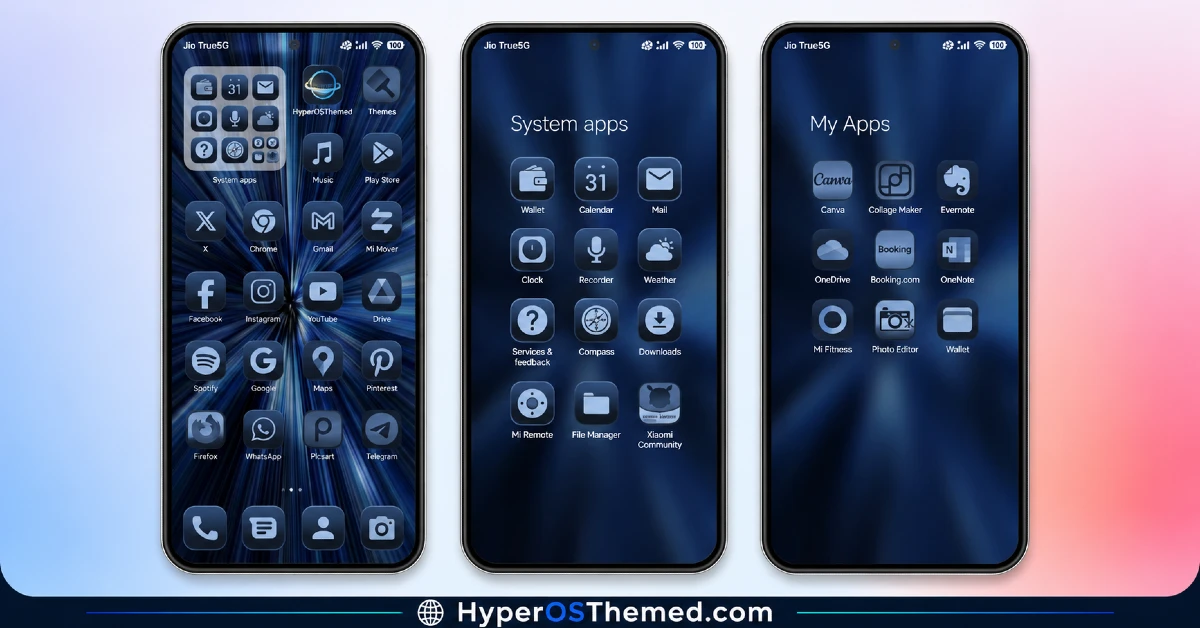
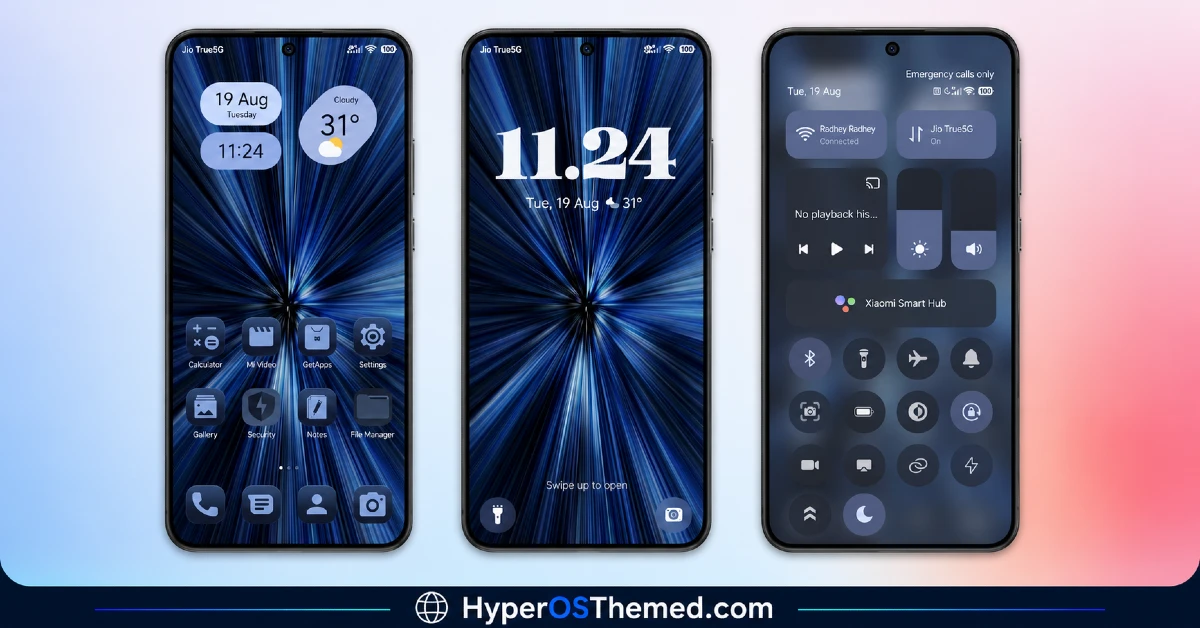
Deep blue and black dominate every screen, with the vortex wallpaper’s radiating light beams acting as the visual anchor for the whole design. Icons and system menus stay dark and minimal, letting the wallpaper carry most of the visual interest rather than competing with busy icon work.
It has a genuinely immersive, almost hypnotic quality to it, more cosmic than floral despite whatever the “Flower” tag in the feature list is referencing.
Pure Blue HyperOS Theme Details
| Detail | Info |
|---|---|
| Theme Name | Pure Blue |
| Designer | TwelvyUI |
| Compatibility | HyperOS, HyperOS 2.0, HyperOS 3.0 |
| Features | Dark, Abstract, Black, Blue, Flower |
| File Size | 21.86 MB |
Pure Blue HyperOS Theme Performance
Given the abstract wallpaper and full dark system theming, I expected at least a small battery hit, but drain on the POCO X6 stayed close to my usual baseline across a normal day of browsing, messaging, and some gaming. The control center’s rounded toggle layout held up fine under repeated quick switching between Wi-Fi and Bluetooth, with no delay or visual stutter. Home screen transitions stayed smooth throughout, and I didn’t run into any rendering issues with the wallpaper itself despite its layered light-beam effect.
Pure Blue HyperOS Theme Compatibility Notes
HyperOS, HyperOS 2.0, and HyperOS 3.0 are all listed as supported, which covers most current Xiaomi, Redmi, and POCO devices, and the POCO X6 ran it without any stability problems. MIUI 12, 13, and 14 aren’t supported, so don’t expect it to behave properly on older firmware. Xiaomi.eu and similar custom ROM users should be able to import the MTZ file without much friction given the compact file size and straightforward theming approach.
Downloading Pure Blue HyperOS Theme
Go through the Official Theme Store Link rather than a third-party mirror or forum upload claiming to host the same file. Given how small this download is, it’s an easy target for repackaging on unofficial sites, so sticking with the verified source is worth the extra step even for a lightweight theme like this one.
Note: If the Official Theme Store Link doesn’t redirect properly, try opening the page in Chrome or the default Xiaomi browser, since other browsers may not handle the redirect correctly.
Steps to Apply Pure Blue HyperOS Theme
- Open the Theme Store Link given above on your Xiaomi / REDMI / POCO device
- This will redirect you to Theme Store.
- Download and install the theme
- Tap on Apply
- Customize specific elements (icons, lock screen, status bar) if needed
- Reboot your device (optional for full effect)
What Makes Pure Blue Worth Considering
- The vortex wallpaper delivers genuine cosmic depth rather than a flat gradient effect
- iOS-inspired control center layout stays responsive under repeated quick toggling
- Minimalist dark blue icons keep the whole interface visually cohesive
- Compact file size means faster downloads and installs than larger premium themes
- Abstract dark-mode design carries through system menus, not just the home screen
Final Verdict
Whatever “blue flowers” refers to in the designer’s notes, what actually shows up on a POCO X6 is a genuinely striking deep-space aesthetic that lives up to the vortex name in the title far better than the internal description suggests. It’s compact, easy to install, and didn’t cost me anything noticeable in battery life despite the abstract wallpaper work. For anyone chasing a bold, immersive dark blue look without committing to a heavier premium download, Pure Blue delivers more than its confusing back-of-box description lets on.
You may also like:
HyperBlack HyperOS Theme with Pitch-Black Minimalism for Xiaomi, POCO & Redmi
Super Fruit Powder 27 HyperOS Theme with iOS-Style 3D Depth Wallpapers for Xiaomi, POCO & Redmi
Moon Glass HyperOS Theme with Premium Abstract Teal Glass Design for Xiaomi, POCO & Redmi
Gravemoon HyperOS Theme With iOS-Style Premium Look for Xiaomi, POCO & Redmi
Blue HOS3 HyperOS Theme with 3D Depth-of-Field Look for Xiaomi, POCO & Redmi
