
Names don’t get much stranger than “Super Fruit Powder 27” for a phone theme, and nothing about it hints at what’s actually inside, a genuine 3D depth-of-field effect on the wallpapers. That gap between naming and substance is exactly why I grabbed it for a POCO X6, curious whether the visual trick lived up to being called “premium” or was just a filter slapped over a flat image.
Super Fruit Powder 27 Theme Features
- 3D Depth-of-Field Wallpapers: Subjects in the wallpaper pack sit visually in front of the clock rather than behind it, creating genuine layered depth instead of a flat backdrop. A rainy street scene and a shot of a dog both rendered this convincingly, with the foreground subject clearly separated from the blurred background behind the time display.
- Varied Subject Matter: The wallpaper set doesn’t stick to one mood, cycling through rainy urban scenes, a playful dog shot, and a soaring plane among others included in the pack. Having genuinely different subjects rather than five variations on the same photo made switching between them worth actually doing.
- Bold iOS-Style Time Display: The clock uses a large, confident font that holds its own against busy or high-contrast wallpapers instead of getting visually lost. Testing it against both the rainy street scene and the brighter plane wallpaper, legibility stayed consistent either way.
- Layered Foreground and Background Rendering: Beyond the wallpaper itself, the depth effect extends to how elements interact with the lock screen UI, not just a static photo trick. This is the part that actually justifies the “premium” label, since flat depth-of-field filters are common but this layering felt more deliberate.
- China-Region Packaging with Backup Support: Being sourced from the China server rather than Global, a few elements didn’t apply cleanly without the separate backup file provided alongside the main download. Once that backup was installed, the remaining inconsistencies cleared up.
Super Fruit Powder 27 Theme Preview
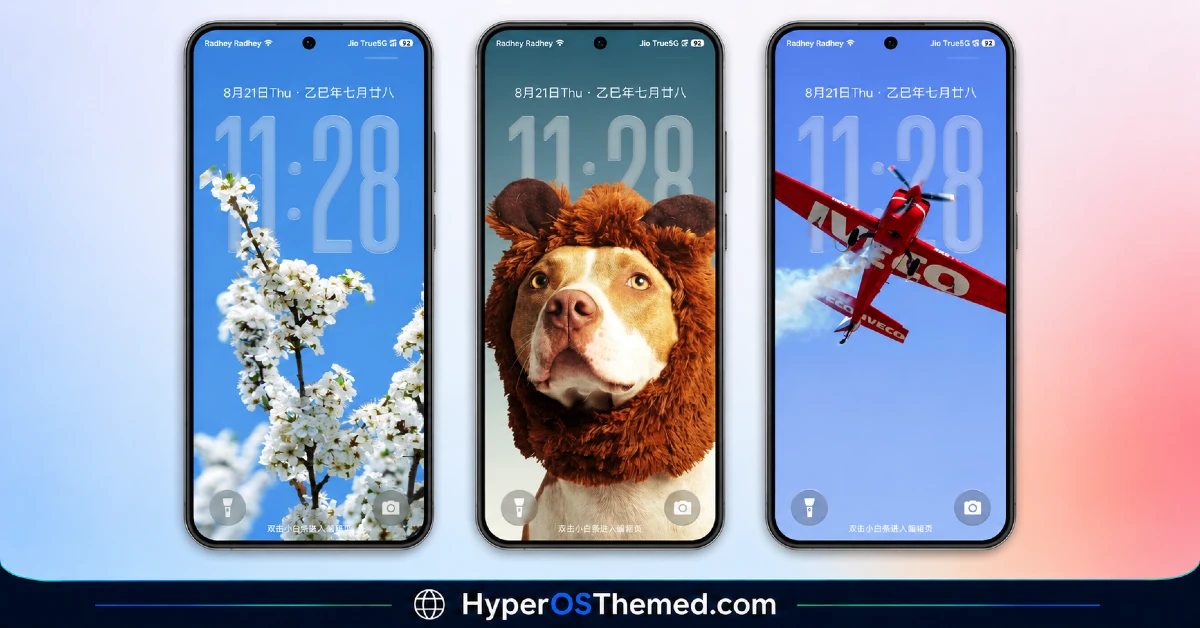
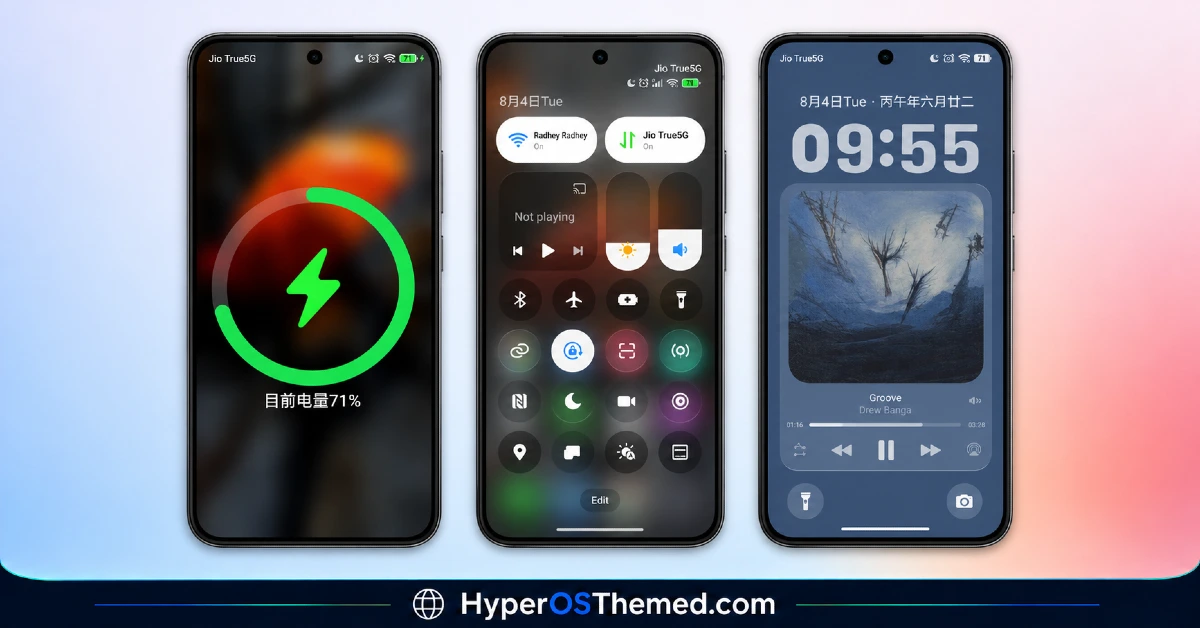
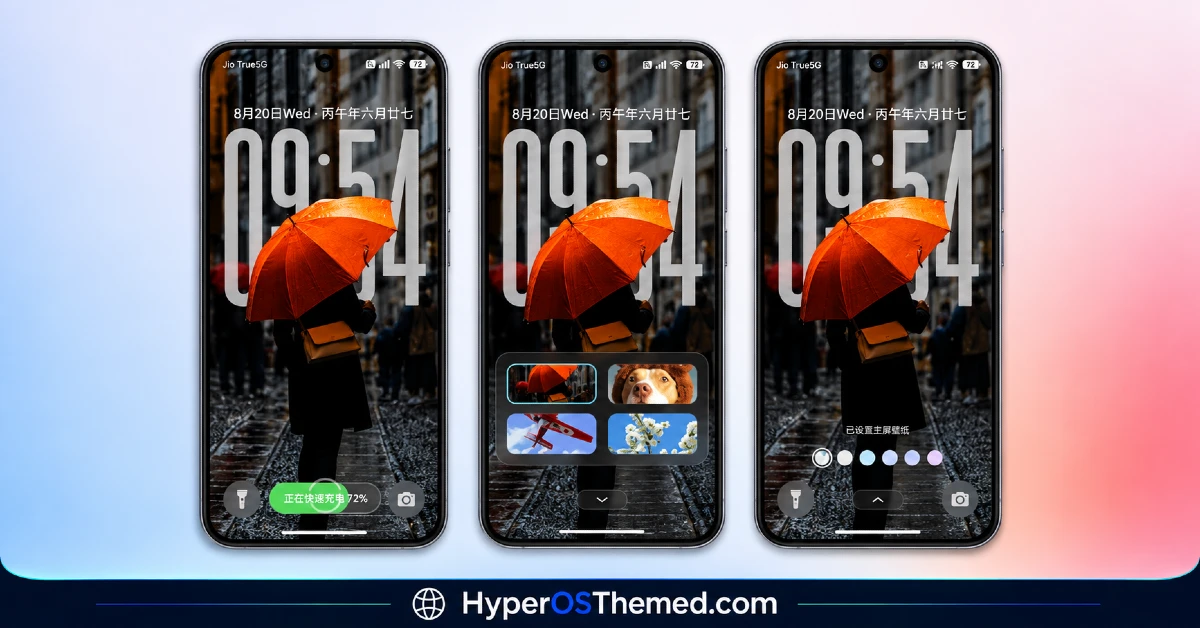
The visual identity leans entirely on that depth-of-field trick, with each wallpaper built around a clear subject sitting forward of a softly blurred background and the bold clock threading through the layers.
There’s real variety across the included scenes rather than one style repeated with different color grading, giving the whole thing a curated, almost photography-portfolio feel instead of a single fixed mood. It’s more visually ambitious than most wallpaper-focused themes manage on a free download.
Super Fruit Powder 27 HyperOS Theme Details
| Detail | Info |
|---|---|
| Theme Name | Super Fruit Powder 27 |
| Designer | LIUI |
| Compatibility | HyperOS, HyperOS 2.0, HyperOS 3.0 |
| Features | Premium, iOS Style, Wallpapers, 3D Depth of Field |
| File Size | 70.42 MB |
Super Fruit Powder 27 HyperOS Theme Performance
Given the layered rendering work happening behind each wallpaper, I expected some drag on performance, and there was a bit, home screen transitions took slightly longer to settle than with a flat static wallpaper, though nothing that felt sluggish during normal use on the POCO X6.
Battery drain landed a few percentage points above my usual baseline over a full day, which tracks given how much rendering work goes into maintaining that depth effect continuously. The region-specific icon quirks were the main hiccup, resolved once the backup file was applied rather than being a persistent issue.
Super Fruit Powder 27 HyperOS Theme Compatibility Notes
HyperOS, HyperOS 2.0, and HyperOS 3.0 are all listed as supported, covering most current Xiaomi, Redmi, and POCO devices, and the POCO X6 ran it without major issues once the backup file was in place. Because this one ships from the China Theme Store region rather than Global, expect some icon or asset quirks on a Global ROM unless you install the backup alongside the main MTZ file.
MIUI 12, 13, and 14 aren’t supported here. Custom ROM users on Xiaomi.eu or similar builds should plan for the same backup file requirement, and given the file size, allow more installation time than a lighter theme would need.
Downloading Super Fruit Powder 27 theme Xiaomi safely
Grab both the Official Theme Store Link and the separate backup file together, since skipping the backup is what causes the region-related inconsistencies mentioned above. Avoid third-party mirrors offering the file without the backup attached, since a large theme like this is exactly the kind that gets re-uploaded incomplete or altered on unofficial sites.
Note: If the Official Theme Store Link doesn’t redirect properly, try opening the page in Chrome or the default Xiaomi browser, since other browsers may not handle the redirect correctly.
Steps to Apply the Super Fruit Powder 27 theme
- Open the Theme Store Link given above on your Xiaomi / REDMI / POCO device
- This will redirect you to Theme Store.
- Download and install the theme
- Tap on Apply
- Customize specific elements (icons, lock screen, status bar) if needed
- Reboot your device (optional for full effect)
What Makes Super Fruit Powder 27 Worth Considering
- Genuine 3D depth-of-field rendering rather than a flat blur filter pretending to be layered
- Wallpaper variety spans multiple subjects instead of repeating one visual idea
- Bold iOS-style clock stays legible across every included wallpaper style
- Backup file resolves the region-specific quirks that come with China-server themes
- Detailed enough to justify its larger file size rather than feeling padded out
Final Verdict
Whatever inspired the name, Super Fruit Powder 27 backs theme up its “premium” claim with a depth effect that’s genuinely more convincing than most wallpaper tricks I’ve tested on HyperOS.
The region-specific setup requiring the backup file is a real extra step, and the battery cost is worth knowing about upfront given how much rendering is happening constantly. Still, on a POCO X6, the payoff in visual depth and wallpaper variety made the extra install effort worthwhile, and it’s one of the more technically interesting free themes I’ve come across recently.
You may also like:
Moon Glass HyperOS Theme with Premium Abstract Teal Glass Design for Xiaomi, POCO & Redmi
Gravemoon HyperOS Theme With iOS-Style Premium Look for Xiaomi, POCO & Redmi
Blue HOS3 HyperOS Theme with 3D Depth-of-Field Look for Xiaomi, POCO & Redmi
Dark HOS3 HyperOS Theme with Premium AMOLED Minimalist Look for Xiaomi, POCO & Redmi
Trichloroethane V2 HyperOS Theme with Glass Liquid Effect Look for Xiaomi, POCO & Redmi
