
Most city-themed wallpapers I’ve come across lean either too dark or too washed out to actually read well behind icons, so the twilight skyline preview for HyperBlue HyperOS Theme caught my eye specifically because of how much color contrast it showed off. I put it on my POCO X6 mainly to test whether that orange-and-blue dusk sky held up once a full grid of app icons was sitting on top of it.
HyperBlue HyperOS Theme Features
- Twilight City Skyline Wallpaper: The wallpaper captures a city skyline glowing against a deep blue and orange dusk sky, giving it real visual depth rather than a flat gradient pretending to be a sunset. It held up surprisingly well behind a full row of icons, staying legible without the buildings turning into a muddy silhouette.
- Bold Red Clock Accent: Both the home and lock screen clocks use a striking red accent that stands out sharply against the blue-toned wallpaper. It’s a deliberate contrast choice that works better than I expected, red against blue could easily have looked clashing, but here it reads as intentional and confident.
- Sleek Teal Circular Icon Pack: Icons follow a circular shape in teal tones that ties back into the wallpaper’s cooler color palette. Coverage across my commonly used apps was solid, though a couple of local service apps kept their default icons and stood out a bit against the uniform teal set.
- Full UI Theming: The color scheme carries through system menus rather than stopping at the home screen, keeping the cool blue and teal tones consistent as you move between apps. I didn’t run into any jarring white or default-styled screens breaking the mood during testing.
- Stylish Always-On Display: The AOD option carries the twilight color palette into standby mode instead of defaulting to plain black and white. It looked good glancing at it in low light without being distracting overnight.
HyperBlue HyperOS Theme Preview
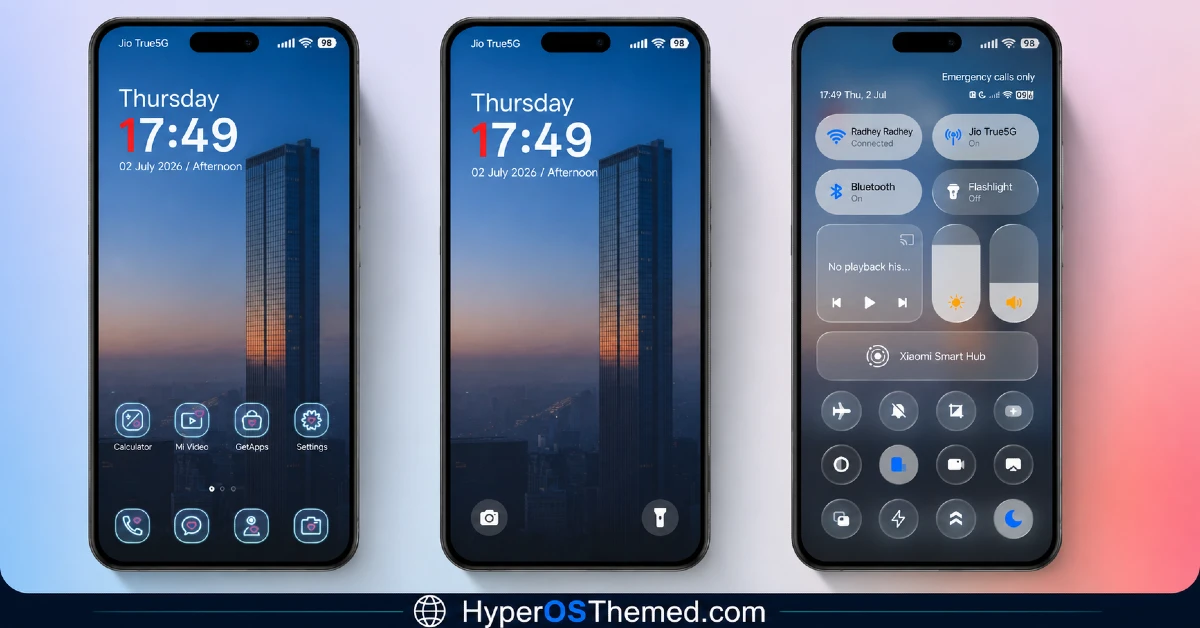
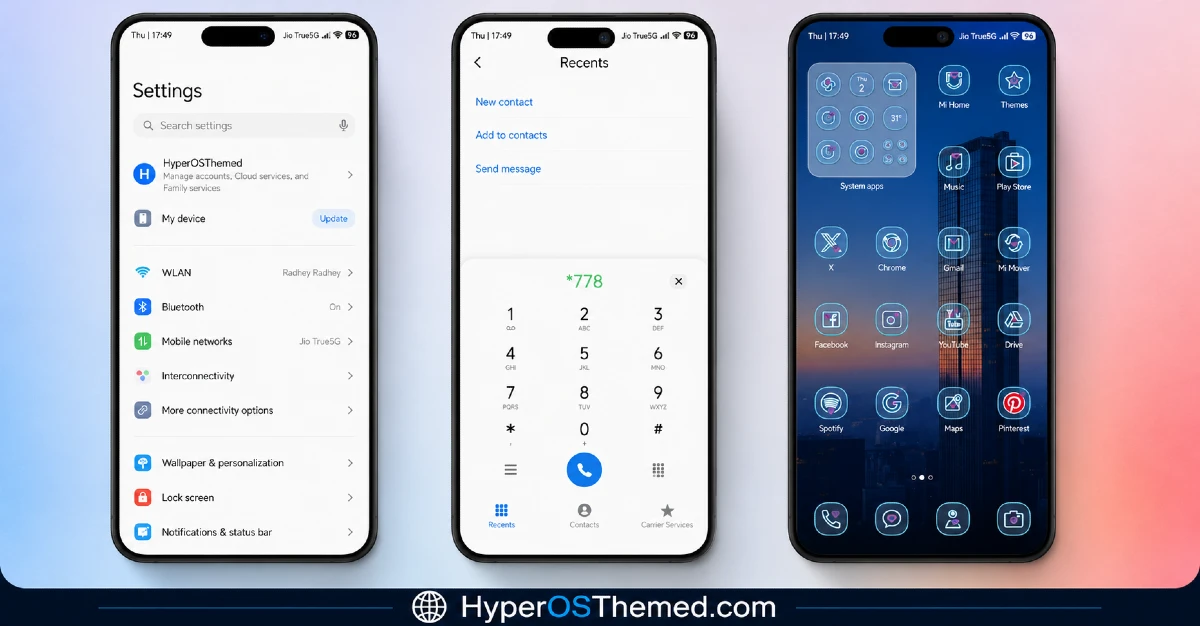
The visual identity centers on that twilight city skyline, blending deep blue dusk tones with warm orange highlights along the horizon for genuine contrast rather than a flat single-color backdrop. The bold red clock accent cuts through the cooler palette deliberately, giving both the home and lock screens a clear focal point instead of letting the wallpaper do all the work alone. Icons and system menus stick to teal and blue, keeping the whole look cohesive and distinctly urban rather than generic.
HyperBlue HyperOS Theme Details
| Detail | Info |
|---|---|
| Theme Name | HyperBlue |
| Designer | Saktie |
| Compatibility | HyperOS, HyperOS 2.0, HyperOS 3.0 |
| Features | Cool, Blue, City, New Icons |
| File Size | 16.64 MB |
HyperBlue HyperOS Theme Performance
I used the HyperBlue HyperOS Theme on a POCO X6 through daily use covering messaging, gaming, and regular browsing to check how the theme’s static but detailed wallpaper affected performance.
Given the modest 16.64 MB file size, installation was quick and performance stayed smooth throughout, no lag in the app drawer or delayed transitions between home screens.
Battery drain sat close to my usual baseline, within a percent or two, which tracks given there’s no animated wallpaper or heavy transparency work involved despite the visual detail in the twilight scene. The only real annoyance was the couple of local service app icons that never picked up the teal styling, standing out a bit whenever I opened the drawer.
HyperBlue HyperOS Theme’s Compatibility
HyperBlue supports HyperOS, HyperOS 2.0, and HyperOS 3.0, covering a wide range of current Xiaomi, Redmi, and POCO devices. I tested it on a POCO X6 without any stability issues.
It’s not built for MIUI 12, 13, or 14, so applying it on older firmware isn’t recommended. Custom ROM users on Xiaomi.eu or similar HyperOS-based builds should be able to import the MTZ file without much trouble given the compact file size and straightforward design.
Get HyperBlue HyperOS Theme
Download HyperBlue through the official Xiaomi Theme Store link rather than third-party APK sites or random file-sharing pages claiming to host the same theme. Sideloaded theme installers from unverified sources are a common way people end up with unnecessary permissions or bundled software, so the official Theme Store route keeps things clean even for a smaller file like this one.
Note: If the Official Theme Store Link doesn’t redirect properly, try opening the page in Chrome or the default Xiaomi browser, since other browsers may not handle the redirect correctly.
How to Apply HyperBlue HyperOS Theme
Follow the steps below to apply the theme:
- Open the Theme Store Link given above on your Xiaomi / REDMI / POCO device
- This will redirect you to Theme Store.
- Download and install the theme
- Tap on Apply
- Customize specific elements (icons, lock screen, status bar) if needed
- Reboot your device (optional for full effect)
Why Choose HyperBlue HyperOS Theme?
- The twilight city wallpaper delivers genuine color depth rather than a flat gradient
- Red clock accent creates a bold, deliberate contrast against the cooler palette
- Teal circular icon pack keeps the whole look cohesive and distinctly urban
- Compact 16.64 MB file size means fast installs even on a weaker connection
- Full UI theming carries the mood through system menus instead of stopping at the home screen
Conclusion
HyperBlue HyperOS Theme turned out to be one of the more visually confident city themes I’ve tested on my POCO X6, mainly thanks to that red clock accent actually working against the blue-orange twilight backdrop instead of clashing with it.
The couple of unthemed local service icons were a small but noticeable gap, and it’s not a theme with much beyond the wallpaper and icon work in terms of extra features.
Compared to other city or skyline themes I’ve tried, this one commits to a genuinely striking color contrast rather than playing it safe with a single dominant tone. If you want a cool, urban look with some real visual punch, it’s worth trying.
You may also like:
Guofeng 18 HyperOS Theme for Xiaomi, POCO and REDMI Phones with iOS-Styled
Bintang HyperOS Theme for Xiaomi, POCO and Redmi Phones
Green HOS3 HyperOS Theme for Xiaomi, POCO and REDMI Phones
Floating Stone HyperOS Theme for Xiaomi, Redmi and POCO
Blackness HyperOS Theme: A Dark iOS-Style Look for Xiaomi, POCO & Redmi
