
I came across Codename X HyperOS Theme on a Chinese theming forum that a friend translated for me after I asked him for iOS-style theme recommendations. The name alone made it sound like a leaked prototype rather than a public theme, which got my attention more than the actual preview images did at first.
I downloaded it onto my Redmi Note 13 and used it, mostly curious whether a China-region theme would apply cleanly on my Global ROM device or cause the usual headaches that region-locked themes sometimes bring.
Check Our Collection of More iOS Themes for HyperOS
Codename X HyperOS Theme Features
- Dynamic Lock Screen: Unlike a static lock screen background, this one shifts subtly depending on the time of day, cycling through slightly different lighting tones. It’s a detail I didn’t expect from a theme this size, and it was the first thing that made this feel different from other iOS-style themes I’ve tried.
- iOS-Style Icon Set: The icons follow the familiar rounded square shape with clean, minimal detailing that closely mirrors iOS’s actual icon language. Coverage across my apps was strong, though as usual with region-specific themes, a couple of my Global-exclusive apps kept their default icons.
- Customizable Wallpaper Options: Rather than locking you into one wallpaper, the theme includes several variations you can switch between through its settings menu. I ended up using three different ones depending on my mood, which is more flexibility than most themes offer out of the box.
- Premium Visual Polish: Small details like icon shadows, spacing, and font choices all feel deliberately matched rather than thrown together. It’s the kind of attention to detail that’s hard to describe in a feature list but noticeable the moment you start using the phone daily.
- Large, Content-Rich Package: At 38.64 MB, this sits in the mid-to-large range for HyperOS themes, and it’s clear the size comes from the dynamic lock screen and wallpaper variety rather than bloat. Installation took a bit longer than smaller themes, but not excessively so on my Redmi.
Codename X HyperOS Theme Preview
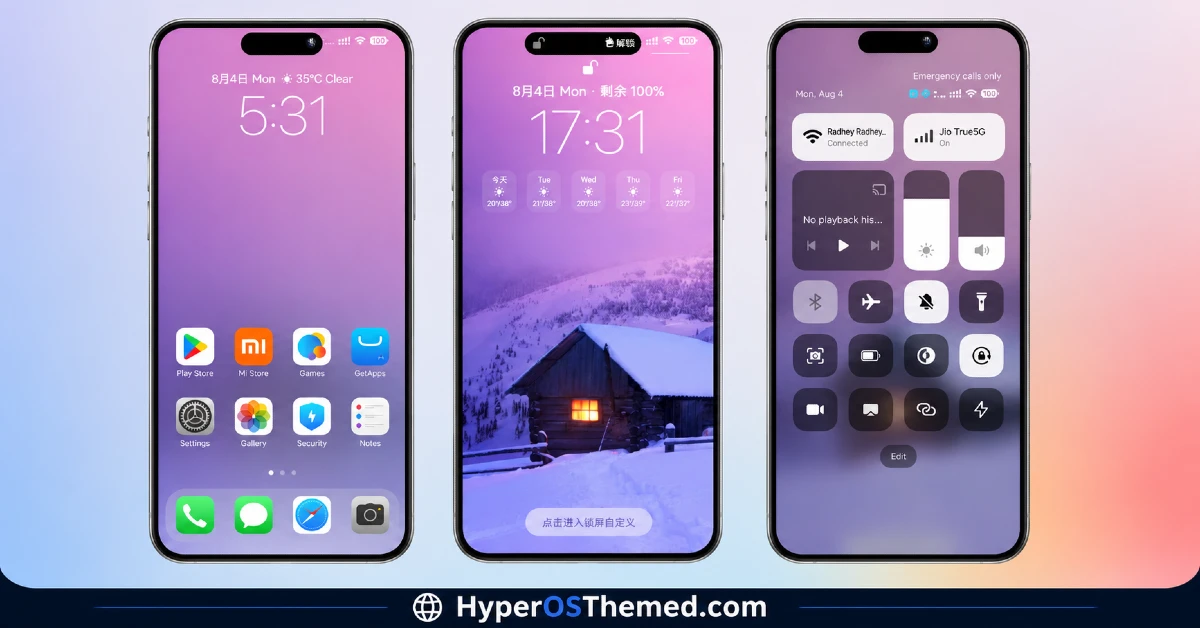
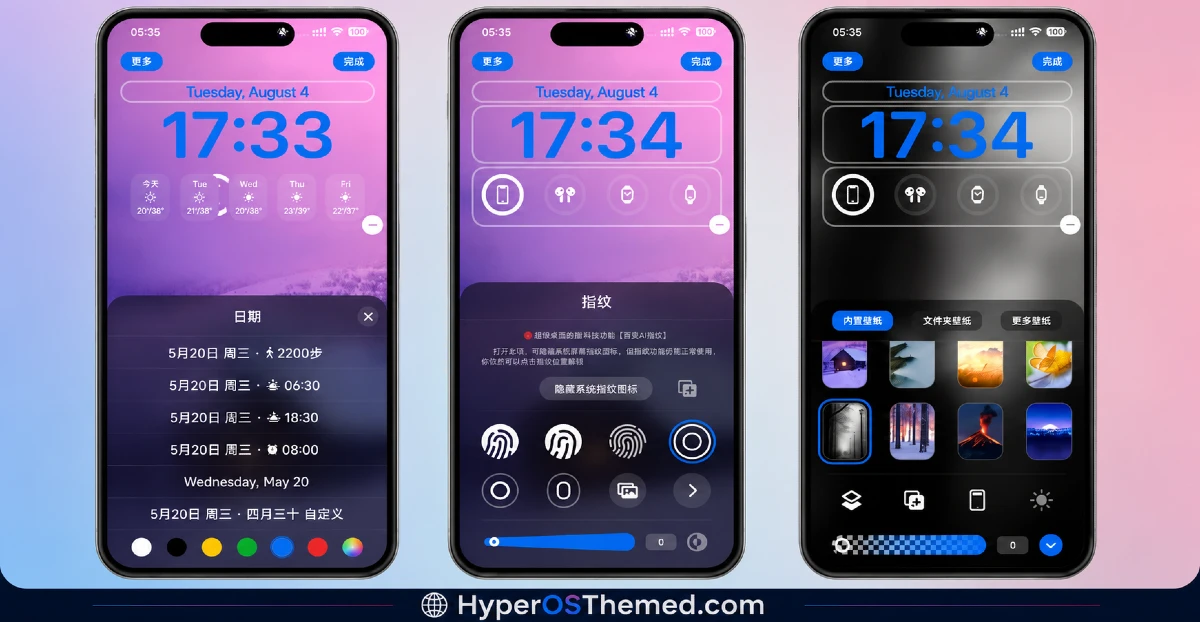
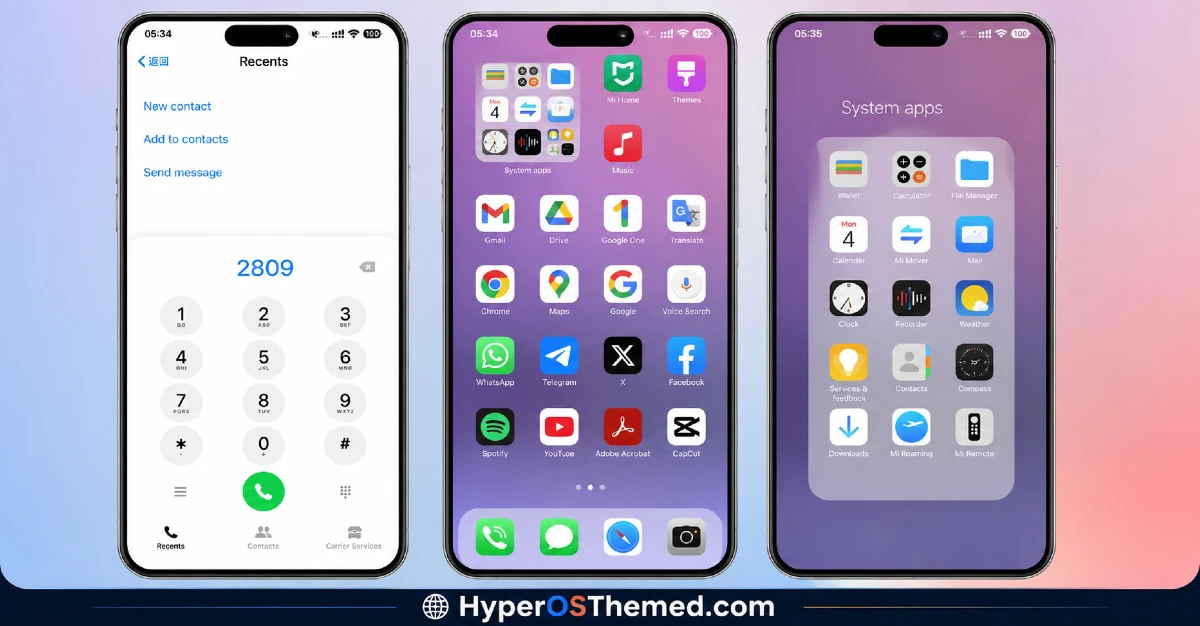
The visual style closely mirrors iOS’s clean, minimal aesthetic, with rounded icons, careful spacing, and a lock screen that subtly shifts tone throughout the day rather than sitting static. The included wallpaper variations keep the overall look from feeling repetitive, ranging from lighter tones to deeper, more dramatic backgrounds depending on which one you pick. It comes across as more polished and deliberate than a typical icon-swap iOS clone, closer to what an actual iOS user might expect from their lock screen experience.
Codename X HyperOS Theme Details
| Detail | Info |
|---|---|
| Theme Name | Codename X |
| Designer | 逐梦画师 |
| Compatibility | HyperOS, HyperOS 2.0, HyperOS 3.0 |
| Features | iOS Style, Premium, Dynamic Lock Screen, Customizable, Wallpapers |
| File Size | 38.64 MB |
Codename X Theme Performance
I tested Codename X HyperOS Theme on a Redmi Note 13 running HyperOS 3.0, through regular daily use including messaging, browsing, and a handful of gaming sessions. Given the dynamic lock screen behavior, I expected some battery impact, and it did come in around 5 percent higher than my usual baseline over a full day.
Performance otherwise stayed smooth, with no lag in the app drawer or noticeable stutter when the lock screen transitioned between its lighting variations. The main issue I ran into was tied to the region tagging, a couple of Global-exclusive apps needed their icons manually reset since the theme initially didn’t recognize them, which the included backup file mostly resolved.
Codename X HyperOS Theme Compatibility
Codename X HyperOS Theme supports HyperOS and HyperOS 2.0, and HyperOS 3.0. I tested it on a Redmi Note 13 running HyperOS 3.0 without major issues once I applied the backup file the designer provides alongside the main MTZ download.
Given the China region tag, Global ROM users may run into occasional icon or wallpaper application quirks, which is fairly typical for region-specific themes and something I’d recommend planning for rather than being caught off guard by. It is not designed for MIUI 12, 13, or 14, and custom ROM users on Xiaomi.eu or similar builds should expect to need the backup file as well for full functionality.
Get Codename X HyperOS Theme
Download Codename X HyperOS Theme through the official Xiaomi Theme Store link, and make sure to also grab the separate backup file provided alongside it, since the China region packaging can cause a few elements to not apply correctly on Global ROM devices without it.
Avoid third-party APK sites or unofficial repackaged versions of this theme, since sideloaded installers are a common source of unnecessary permissions or corrupted files, particularly with region-specific themes like this one.
Note: If the Official Theme Store Link doesn’t redirect properly, try opening the page in Chrome or the default Xiaomi browser, since other browsers may not handle the redirect correctly.
How to Apply Codename X HyperOS Theme
Follow the steps below to apply the theme:
- Open the Theme Store Link given above on your Xiaomi / REDMI / POCO device
- This will redirect you to Theme Store.
- Download and install the theme
- Tap on Apply
- Customize specific elements (icons, lock screen, status bar) if needed
- Reboot your device (optional for full effect)
Why Choose Codename X HyperOS Theme?
- Dynamic lock screen that shifts throughout the day is a genuinely rare feature among free themes
- Multiple wallpaper variations included instead of being locked into a single image
- iOS icon styling is detailed and closely matches the real thing rather than a rough approximation
- Backup file provided by the designer helps smooth over region compatibility issues
- Visual polish across spacing, shadows, and fonts feels more deliberate than typical icon-pack themes
Conclusion
After using this theme name on my Redmi Note 13, Codename X HyperOS Theme earned its “Premium” label more than most themes that use that word loosely, mainly thanks to the dynamic lock screen and genuine wallpaper variety. The region-specific quirks were a real hassle initially, and the slightly higher battery drain is worth knowing about upfront.
Compared to other iOS-style themes I’ve tested, though, this one has more actual depth to it rather than just a rounded icon swap. If you don’t mind applying the backup file for full compatibility, it’s one of the more impressive iOS-style options currently available for HyperOS.
You may also like:
Archon HyperOS Theme: A Dark iOS-Style Look for Xiaomi, POCO & Redmi
LIUI Sicily HyperOS Theme: 3D Depth Wallpapers For Xiaomi, Redmi and POCO
ItapasV15 HyperOS Theme: An Abstract Purple-Black Look for Xiaomi, POCO & Redmi
