
Cool tones and abstract patterns tend to age better than trend heavy designs, and Colorful 26S seems to know that. Built by DAMI, this theme wraps your phone in blue toned abstract visuals paired with a dynamic lock screen, aiming for something that feels lively without tipping into chaotic. It is the kind of theme that looks just as good six months from now as it does the day you install it.
What You Get With Colorful 26S HyperOS Theme
- Blue Toned Abstract Design: The theme’s visual identity centers on cool blue shades mixed with abstract shapes, giving your phone a modern look that stays easy on the eyes rather than overwhelming.
- Dynamic Lock Screen: Instead of a plain static image, the lock screen carries a bit of motion, making that first glance at your phone feel more engaging than usual.
- Vibrant Yet Balanced Color Scheme: While the theme is described as colorful, the blue base keeps everything grounded, so it reads as lively rather than loud.
- Reworked Status Bar and Icons: Icons and the status bar are redesigned to match the theme’s abstract blue aesthetic, keeping the whole interface visually consistent.
- Stylish Always-on Display: The AOD carries the same color palette and design language as the rest of the theme, so it still looks put together even when your screen is mostly idle.
Colorful 26S HyperOS Theme Preview
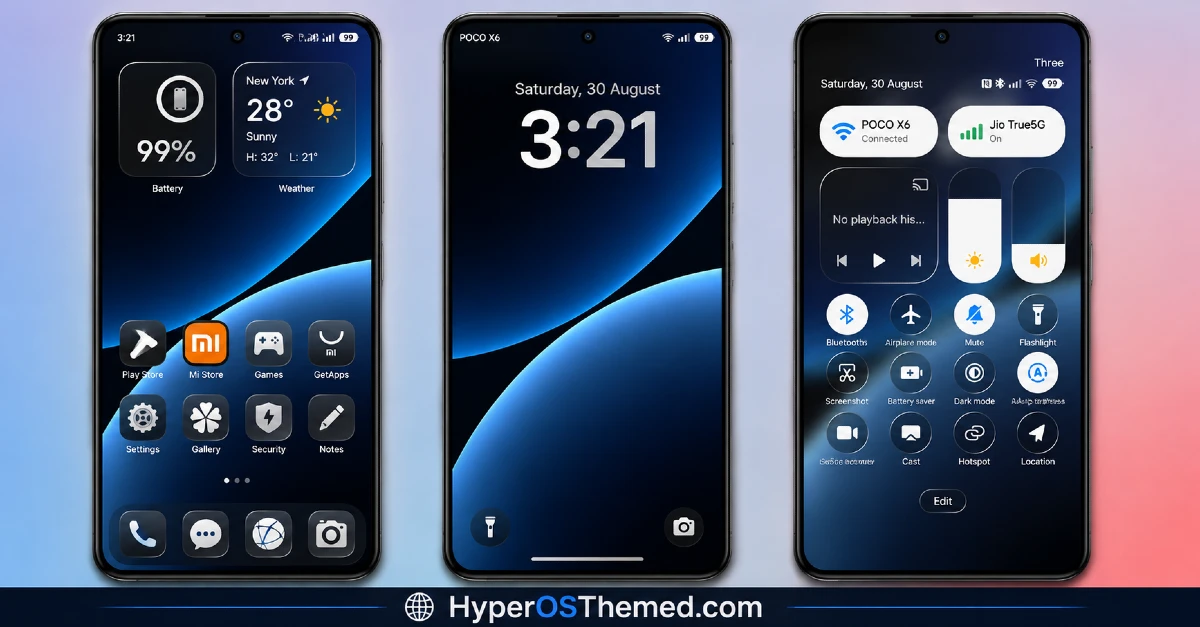
Colorful 26S HyperOS Theme Information
| Detail | Info |
|---|---|
| Theme Name | Colorful 26S HyperOS Theme |
| File Size | 37.33 MB |
| Created By | DAMI |
| Server Region | Global |
| Works With | HyperOS, HyperOS 2.0 |
| Style | Dynamic Lock Screen, Cool, Blue, Abstract, Color |
| Unlock Password | @MINH |
A Quick Note on the Creator
Colorful 26S comes from DAMI, who shares more themes and updates through the Telegram channel Hyperos Themes by Minh. Worth a follow if you want to catch new releases from the same creator.
Get the Theme
Installing Colorful 26S HyperOS Theme on Stock HyperOS or MIUI (Official ROM Users)
If your phone is running the official Global Stable build of HyperOS or MIUI, follow these steps.
- Open this page using the Firefox browser on your phone.
- Tap the official Theme Store link in the download section above.
- You’ll land on a Xiaomi theme page written in Chinese, that’s normal. Tap the three dots in the top right corner and choose “Open in app.”
- This hands off to your Themes Store app, where the download starts automatically.
- Once it finishes downloading, tap Apply.
Heads up: If the Theme Store link doesn’t open properly, try switching to Chrome or your phone’s default Xiaomi browser. Some third party browsers block this redirect.
Installing Colorful 26S HyperOS Theme on Custom ROM
Running a custom build like Xiaomi.eu, MIUIRoom, or another MIUI or HyperOS based ROM? Sideload the file manually instead.
- Download the .mtz file from the link above (remember the password: @MINH).
- Open the Theme Store app and go to the Themes tab.
- Scroll to the bottom and tap Import.
- Select the .mtz file you just downloaded.
- Tap Apply.
Tip: Restart your phone after applying the theme. If any icon, wallpaper, or lock screen element looks slightly off right after applying, a quick restart almost always fixes it. This theme has been tested and applies cleanly with no reported issues.
Final Thoughts
Colorful 26S HyperOS Theme is a solid pick if you want something visually interesting without going overboard on the color palette. The blue abstract design gives it a distinct identity, and the dynamic lock screen adds just enough movement to keep things feeling fresh. It is free, lightweight, and an easy way to give your Xiaomi, Redmi, or POCO phone a genuinely different look. Just keep that password handy when you go to unlock the file.
You may also like:
- Senja HyperOS Theme iOS Inspired For POCO, Redmi & Xiaomi Phone
- Black Flower HyperOS Theme Best For POCO, Redmi & Xiaomi
- Solana HyperOS Theme with Premium Design for Xiaomi, Redmi & POCO
- CardM HyperOS Theme With Premium Wallpaper, Dynamic Lock Screen, Control Centre & More
- OX Mix HyperOS Theme: Premium iOS-Styled Premium Theme
