
RS1 HyperOS Theme is designed by suhel, and this theme is built for devices running HyperOS 3. It combines dramatic mountain peak wallpapers, iOS-inspired home screen widgets, and an extensive lock screen customization suite, giving the interface a polished, modern look across the entire system.
The theme is aimed at users who want more than just an icon pack, offering functional lock screen widgets, shortcut mapping, and multiple wallpaper options alongside a full squircle-style icon redesign.
RS1 HyperOS Theme Key Features
1. Interactive Lock Screen Widget Panel: The lock screen displays real-time status widgets, including UV index, alarm status, battery percentage, and step counter, all presented in translucent frosted glass cards. This gives the lock screen a functional layer beyond just time and notifications.
2. Weather and Media Controls: A 3-day weather forecast layout sits on the lock screen alongside a bottom music player bar for media controls. Both elements are positioned to stay out of the way of notifications while remaining easy to access.
3. Time Font and Glass Effect Settings: Dedicated controls allow adjustment of time font height along with Liquid Glass transparency effects for lock screen overlays. This gives users more control over how the clock and background elements blend together.
4. Custom Shortcut Manager: A separate settings panel lets users assign left and right lock screen shortcut buttons, with trigger options including double-click, single click, or long-press. This adds a layer of functional customization not found in most icon-focused themes.
5. Multi-Option Wallpaper Gallery: The lock screen gallery includes mountain vistas, sunsets, city highways, and nature landscapes, each using depth-of-field effects for a layered visual appearance. Users can switch between these directly from the lock screen customization menu.
6. Dual Clock and Calendar Widgets: The home screen includes an analog smartwatch-style clock widget paired with a bold digital date card. Both widgets follow an iOS-influenced design approach while remaining functional on the HyperOS home screen.
7. Squircle Icon Pack with Gradient Fills: App icons use a rounded-square squircle shape with bright gradient fills and white glyphs. Icon coverage extends beyond native system apps to third-party services including Telegram, Facebook, Chrome, TikTok, ChatGPT, Binance, bKash, and Discord.
8. Translucent App Folders: Desktop app folders use a clean, translucent glass background that matches the overall visual language of the icon pack and lock screen widgets. This keeps folder appearance consistent with the rest of the theme.
RS1 HyperOS Theme Preview
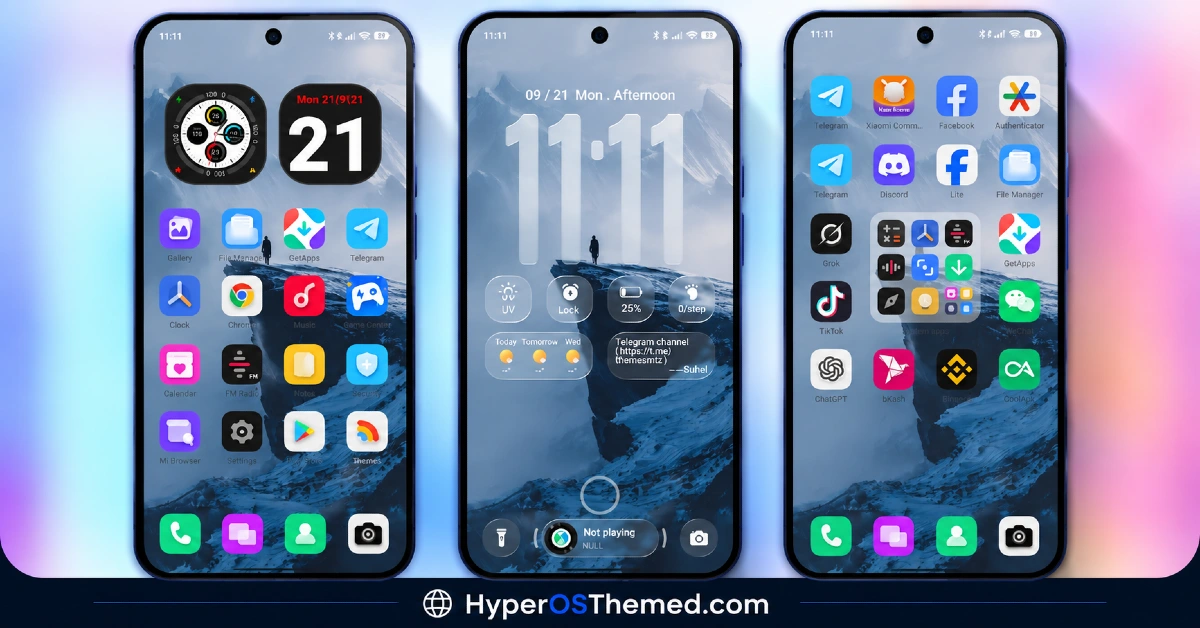
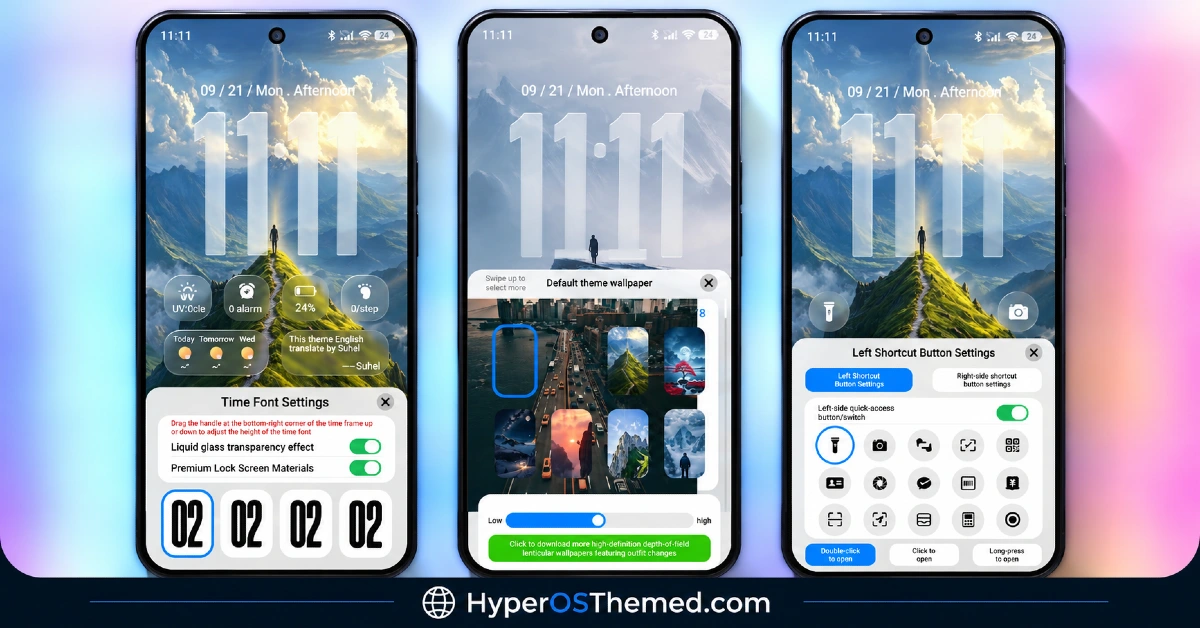
The visual style centers on dramatic depth-of-field wallpapers featuring mountain peaks, sunsets, and city landscapes, paired with vibrant gradient-filled squircle icons. Frosted glass elements appear throughout the lock screen and folders, giving the interface a layered, translucent appearance rather than a flat one.
RS1 HyperOS Theme Overview
| Attribute | Details |
|---|---|
| Availability | Free, via Xiaomi Theme Store |
| Supported Devices | Xiaomi, Redmi and POCO phones running HyperOS |
| Theme Name | RS1 |
| Designer | suhel |
| Region | Global |
| Compatibility OS | HyperOS 3 |
| Features | Dynamic lock screen widgets, weather and media controls, custom shortcut manager, multi-option wallpaper gallery, squircle icon pack, translucent folders |
| File Size | Approx. 53.8 MB |
Get RS1 HyperOS Theme
RS1 can be downloaded directly through the official Xiaomi Theme Store using the link provided above. Sticking to the official store link ensures the lock screen scripts, shortcut mappings, and widget elements install correctly without compatibility issues.
RS1 HyperOS Theme Compatibility
RS1 is built specifically for HyperOS 3 and is compatible with Xiaomi, Redmi, and Poco devices running this version. Since several of its features, including shortcut mapping and lock screen widgets, rely on HyperOS 3 system components, devices still running HyperOS 2 may not support the full feature set. Theme availability may also vary slightly by region depending on Xiaomi’s staged Theme Store rollout.
How to Apply RS1 HyperOS Theme
- Open the Theme Store link given above on your Xiaomi, Redmi, or Poco device.
- This will redirect you to the Theme Store.
- Download and install the theme.
- Tap on Apply.
- Customize specific elements such as icons, lock screen widgets, or shortcut mapping if needed.
- Reboot your device to ensure all lock screen scripts and widgets render properly, though this step is optional.
Why Choose RS1 HyperOS Theme?
- Functional lock screen widgets — UV index, battery, steps, and alarm status displayed in frosted glass cards instead of purely decorative elements.
- Built-in weather and media controls — a 3-day forecast and music player bar included directly on the lock screen.
- Custom shortcut mapping — left and right lock screen buttons can be assigned different actions based on click type.
- Multiple depth-of-field wallpapers — mountain, sunset, city, and nature options included in one gallery switcher.
- Wide app icon coverage — squircle icons extend to major third-party apps like Telegram, TikTok, and Discord, not just system apps.
- iOS-inspired home screen widgets — analog clock and digital date card add functional variety beyond standard app grids.
- Liquid Glass transparency effects — adjustable font height and overlay transparency for a more layered lock screen look.
- Free official download — available directly through the Xiaomi Theme Store at no cost.
Conclusion
RS1 HyperOS Theme combines a functional lock screen customization suite with a visually rich squircle icon pack, making it one of the more feature-dense HyperOS themes available. Its widget panel, shortcut manager, and multi-option wallpaper gallery go beyond basic icon theming to offer real customization depth.
The theme is limited to HyperOS 3, so devices running earlier versions may not access the full set of lock screen features. For Xiaomi, Redmi, and Poco users on HyperOS 3 looking for a theme with both visual polish and functional lock screen tools, RS1 HyperOS Theme is a solid option available through the official Theme Store.
Also Check These Themes:
- Aquarel HyperOS Theme with Aquatic Glassmorphism Look for Xiaomi, POCO, Redmi
- AJ Pink HyperOS Theme For Xiaomi, POCO and Redmi Phones
- OX BM HyperOS Theme with Premium Wallpapers, 3D Depth, Customizable,Black icons
- Bodrex-3 HyperOS Theme: Bright, Minimal HyperOS Theme
- Poi Poi MIUI Theme HyperOS with 3D Effects, Dozen Customization Sliders & More
