
Most HyperOS themes hand you a fixed color palette and expect you to like it, but SE1 HyperOS Theme flips that entirely, building an actual color-matching engine around the Material You philosophy so the whole interface adapts to whatever hue you pick rather than the other way around.
Designed by suhel, it pairs that adaptive color system with a bold aerial highway wallpaper backdrop and stacked, oversized clock typography for a look that leans into stock-Android energy rather than HyperOS’s usual visual identity. At roughly 30.4 MB, it’s built specifically for HyperOS 3, covering Xiaomi, Redmi and POCO devices.
SE1 Theme Key Features
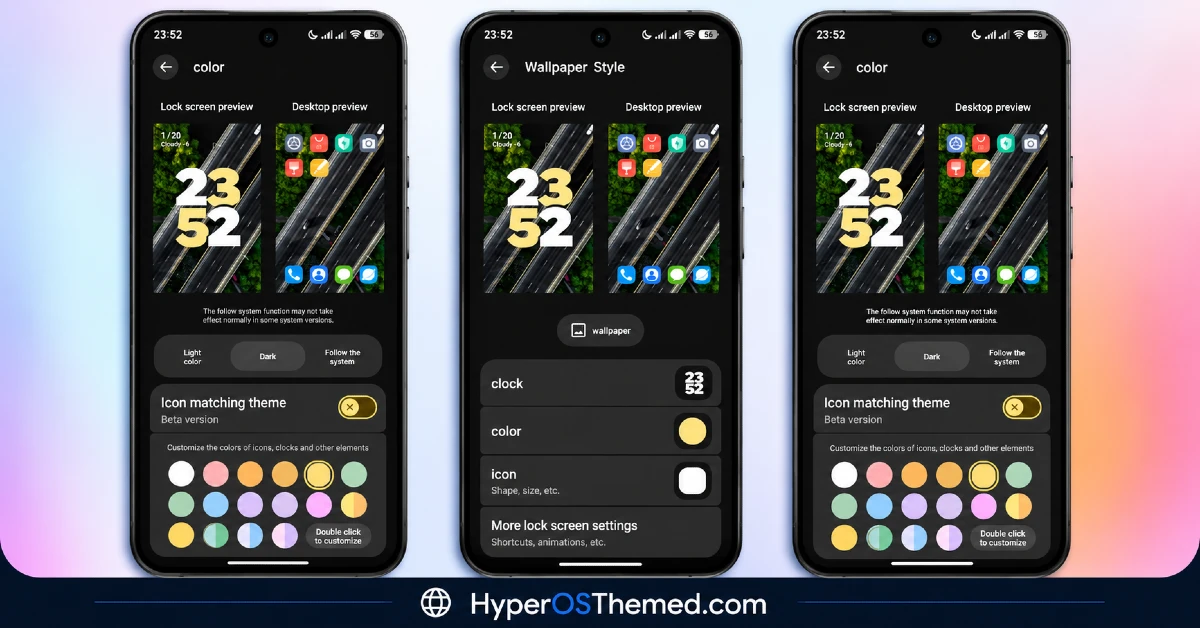
- Material You Color Matching: An advanced color picker automatically tunes system accent colors, icons and clock widgets to whatever hue is selected, rather than locking users into one fixed palette. That’s genuinely closer to how Material You works on stock Android than most HyperOS themes bother attempting.
- Dynamic Palette Selection: Multiple color options are available, from soft pastels and warm yellows to greens, blues, purples and dual-tone accents. That range gives real flexibility beyond just picking between two or three preset themes.
- System Color Sync Options: Colors can be set to follow Light mode, Dark mode, or the system default automatically, so the theme adapts rather than staying fixed regardless of what mode the phone is actually in.
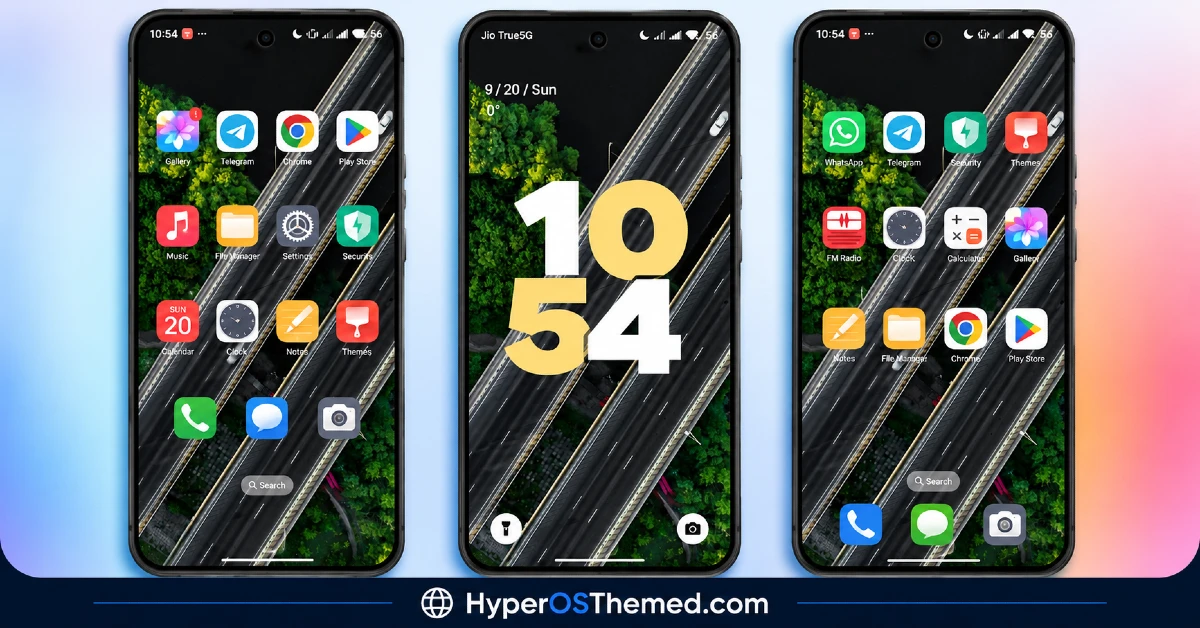
- Stacked Big-Clock Lock Screen: The lock screen displays a large, two-line bold digital clock in warm yellow accent tones by default, giving it a distinctly bold, stock-Android feel rather than a subtle HyperOS-style display.
- Dedicated Wallpaper Preview Panels: Separate lock screen and desktop preview management panels sit right in the settings menu, letting you see changes before committing to them rather than guessing how a wallpaper choice will actually look.
- Quick Access Bottom Shortcuts: Clean shortcuts for Flashlight and Camera sit at the bottom of the lock screen, cutting down on the steps needed to reach commonly used tools without fully unlocking the device.
- Vibrant Rounded-Square Icon Pack: Icons use bright, high-contrast glyphs with extensive coverage extending to Telegram, Facebook, Chrome, TikTok, ChatGPT, Binance, bKash and Discord, not just the obvious big names. That kind of broad third-party coverage is worth flagging since plenty of icon packs stop well short of it.
- Translucent Glass App Folders: Home screen folders use translucent glass container backgrounds rather than plain solid boxes, tying the organizational elements back into the same visual polish as the rest of the theme.
SE1 HyperOS Theme Preview
The screenshots below show the aerial highway wallpaper, the stacked clock typography and how the Material You color matching plays out across icons and widgets once the theme is applied. Given how central the adaptive color system is here, it’s worth spending time in the settings menu after installing to see the full range of palette options.
SE1 HyperOS Theme Overview
| Attribute | Details |
|---|---|
| Availability | Free, via Xiaomi Theme Store |
| Supported Devices | Xiaomi, Redmi and POCO phones running HyperOS |
| Theme Name | SE1 |
| Designer | suhel |
| Compatibility OS | HyperOS 3 |
| Features | Material You color matching, dynamic palette selection, system color sync, stacked big-clock lock screen, translucent glass folders |
| File Size | ~30.4 MB |
SE1 HyperOS Theme Compatibility
SE1 HyperOS Theme is built specifically for HyperOS 3 and works across Xiaomi, Redmi and POCO devices running that version. Since the theme wasn’t designed with older HyperOS builds in mind, applying it on HyperOS 1.0 or 2.0 devices may result in the color matching engine and wallpaper preview panels rendering incompletely.
Custom ROM users can still attempt manual installation, though results may vary given how specifically this theme targets HyperOS 3’s rendering capabilities. As with most themes modifying the lock screen this extensively, restarting the device after installation helps ensure the color-matching scripts, status bar icons and home screen widgets all load properly.
Get SE1 HyperOS Theme
Download SE1 HyperOS Theme Xiaomi only through the official Theme Store link rather than random third-party file hosts or unofficial APK uploads. Files sourced outside verified channels are difficult to confirm as unaltered and may not reflect what suhel actually released. Sticking to the official Theme Store link keeps the installed version consistent with the intended design and ensures future updates remain accessible.
A note on installation access: if the Official Theme Store link doesn’t open automatically into the Themes app, check that your default mobile browser has permission to open system applications, since that’s the most common reason the redirect fails to trigger properly.
How to Apply SE1 HyperOS Theme
Follow the steps below to apply the theme:
- Open the Theme Store link given above on your Xiaomi, Redmi or POCO device.
- This will redirect you to the Theme Store.
- Tap the Free or Download button to begin fetching the theme resources.
- Once downloaded, tap Apply to install the theme system-wide.
- Customize specific elements such as icons, lock screen or status bar if needed.
- Reboot your device after applying, this step is recommended specifically here to make sure all color-matching scripts, status bar icons and home screen widgets load properly.
Note: If anything looks overlapped or doesn’t display correctly right after installing, restarting the device usually clears it up without further steps. This theme has been checked on HyperOS 3 without any major issues turning up during that process. Still, if something looks off on a specific device once it’s applied, leaving a comment with the details helps get it looked into.
Why Choose SE1 HyperOS Theme?
- Genuine Material You adaptability — a real color-matching engine, not just a handful of fixed palette presets.
- Flexible color sync — automatically follows Light mode, Dark mode, or system default.
- Bold, stock-Android inspired clock — a stacked two-line design that stands apart from typical HyperOS clock widgets.
- Broad third-party icon coverage — apps like Discord, Binance and ChatGPT all get matching vibrant icons.
- Built-in wallpaper preview panels — see lock screen and desktop changes before committing to them.
- Translucent glass folder design — organizational elements match the rest of the theme’s visual polish.
- Free official download — no cost involved through a legitimate Theme Store link.
Conclusion
SE1 HyperOS Theme stands out through genuine adaptability rather than a fixed aesthetic, the Material You color matching engine and flexible palette options mean this theme can actually shift to match personal taste rather than locking users into one designer’s color choices.
The bold clock typography and broad icon coverage round out a theme built for people who want a stock-Android feel with real customization depth. For Xiaomi, Redmi and POCO users on HyperOS 3 who want a theme that adapts to them rather than the other way around, SE1 HyperOS Theme is well worth trying.
You may also like:
Nebula Noir HyperOS Theme – Animated Lock Screen with Liquid Glass Icons for Xiaomi, POCO, Redmi
Super Pink R2 HyperOS Theme – Clean Pink-Accented System Design for Xiaomi, POCO, Redmi
iOS 26 HyperOS Theme with Premium iOS-Style Lock Look for Xiaomi, POCO, Redmi
Sakurafall HyperOS Theme with Best Dark iOS-Inspired Look for Xiaomi, POCO, Redmi
