
Full iOS conversions are common enough in HyperOS theming, but most stop at icons and a wallpaper swap. Captain Cook Super 3D HyperOS Theme goes considerably further, working in genuine 3D depth effects, a charging animation and even its own lockscreen character alongside the expected iOS-style icon overhaul.
Designed by 库克船长, it’s distributed as both a hefty 85.6 MB backup file and a lighter 69.3 MB standalone MTZ, giving Xiaomi, Redmi and POCO users more than one path into installing it. Given how much ground this one covers, the designer even provides two separate video walkthroughs, one for HyperOS 1.0 and another for HyperOS 2.0 and 3.0, rather than expecting a single guide to cover every version cleanly.
Theme Features
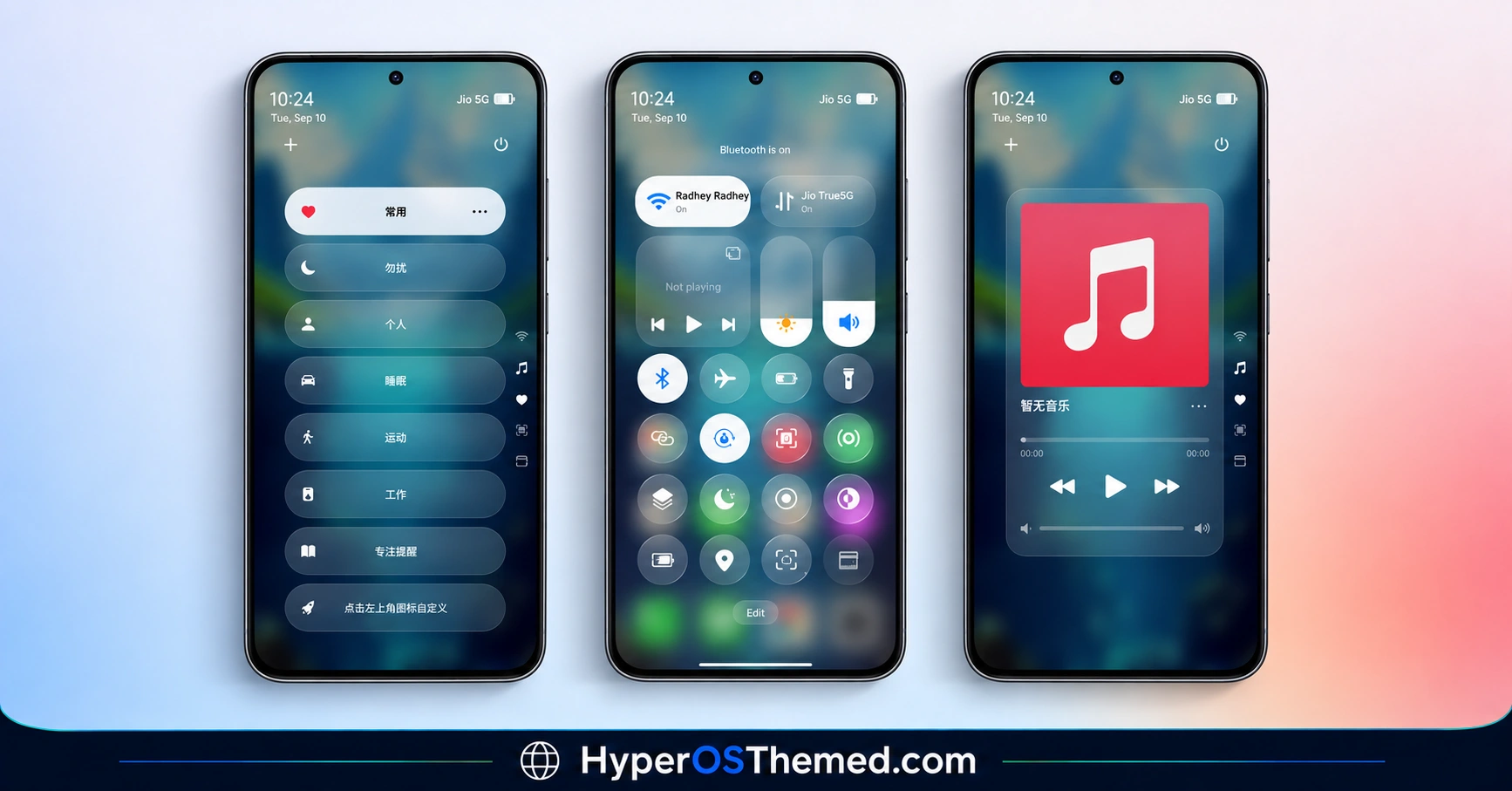
- Complete iOS-Style Interface: Rather than a partial icon swap, this theme aims for a full iOS conversion across the system, touching icons, layout and general visual language rather than leaving obvious HyperOS-native elements behind. That thoroughness is really what separates a “complete” iOS theme from the many partial attempts floating around.
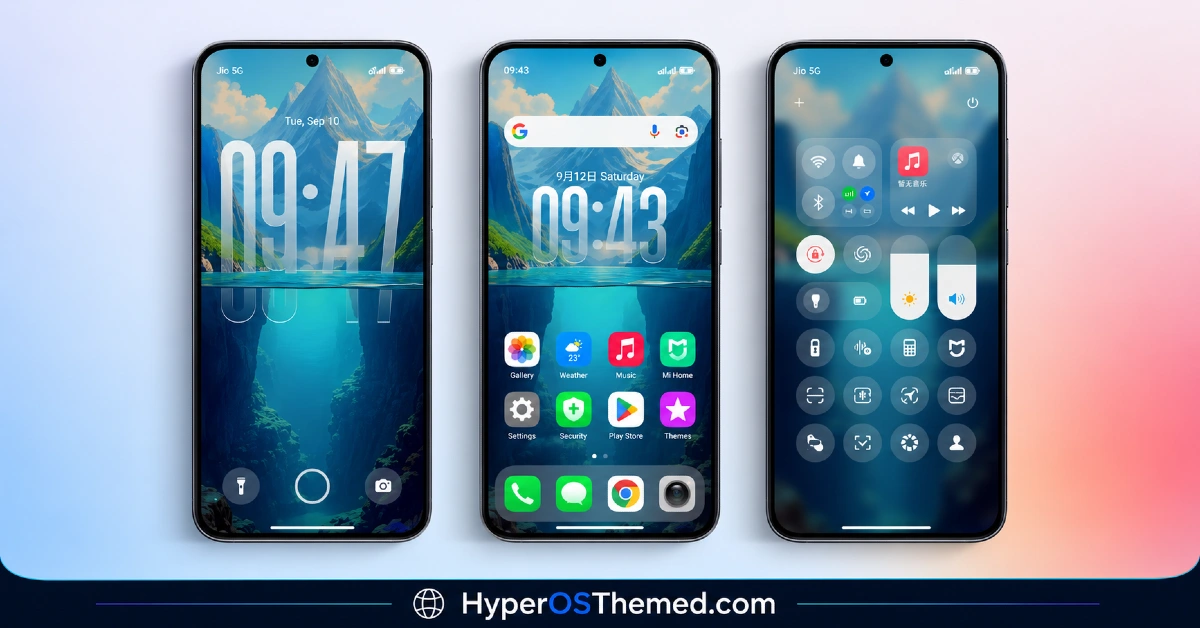
- 3D Depth Effect Wallpapers: The wallpaper collection uses genuine depth rendering, giving scenes a layered, dimensional quality rather than a flat static image. It’s a detail that shows up clearly across the screenshot set, and it’s central enough to the theme’s identity that it made it into the name itself.
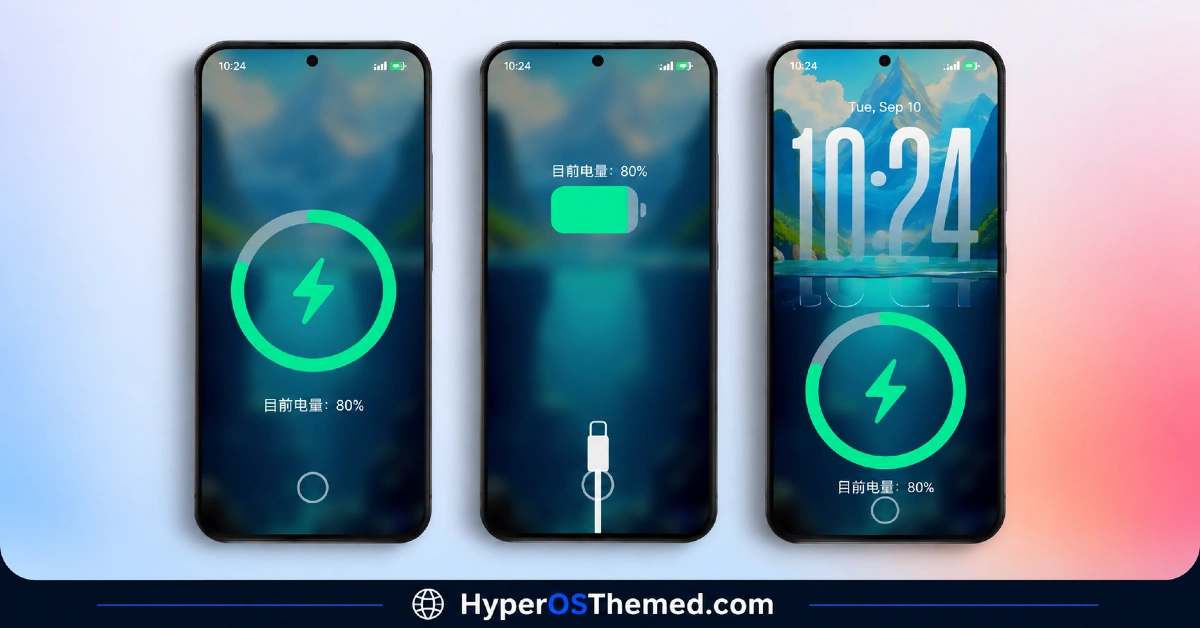
- Charging Animation Included: A custom charging animation comes bundled with the theme, which is a feature a lot of icon-focused theme packs skip entirely. It’s a small addition, but one that extends the theme’s reach into moments beyond just looking at the home screen.
- Redesigned Lock Screen: The lock screen gets its own distinct styling that ties into the overall iOS aesthetic rather than being an afterthought bolted onto the icon pack. Given the depth effect wallpapers, this is likely where that 3D rendering shows up most clearly.
- Dual File Distribution: Captain Cook Super 3D comes as both a standard MTZ file and a separate, considerably larger backup file. Most people installing through the usual method will only need the 69.3 MB MTZ, with the backup mainly useful for anyone wanting a full restore point.
- Broad HyperOS Compatibility: The theme covers HyperOS 1.0 through 3.0, giving it noticeably wider reach than themes built exclusively for the newest release. That range matters for anyone still holding onto an older device that hasn’t been updated to the latest HyperOS version yet.
- Extensive Screenshot Preview Set: With a full gallery of preview screenshots covering multiple angles of the theme, there’s more than enough visual reference to judge the 3D effect and iOS styling before committing to the download, rather than relying on just one or two images.
To experience iOS on your device, Try iOS Themes Collection.
Captain Cook Super 3D HyperOS Theme Preview
The screenshots below show the complete iOS-style interface, the 3D depth effect wallpapers and how the redesigned lock screen and charging animation come together once the theme is applied. Given how much detail this theme packs in, it’s worth browsing through the full preview gallery rather than just the first image to appreciate the depth rendering properly.
Captain Cook Super 3D Theme Details
| Attribute | Details |
|---|---|
| Availability | Free, via Xiaomi Theme Store |
| Supported Devices | Xiaomi, Redmi and POCO phones running HyperOS |
| Theme Name | Captain Cook Super 3D |
| Designer | 库克船长 (Captain Cook) |
| Compatibility OS | HyperOS 1.0, HyperOS 2.0 and HyperOS 3.0 |
| Features | Complete iOS-style interface, 3D depth effect wallpapers, charging animation, redesigned lock screen |
| File Size | 69.3 MB (MTZ file), 85.6 MB (Backup file) |
Captain Cook Super 3D Theme Compatibility
Captain Cook Super 3D covers a wide compatibility range, supporting HyperOS 1.0, HyperOS 2.0 and HyperOS 3.0 across Xiaomi, Redmi and POCO devices. Since the installation process genuinely differs between HyperOS 1.0 and the newer 2.0/3.0 builds, it’s worth following the specific video guide that matches your installed version rather than assuming a single method works everywhere.
Custom ROM users on setups like Xiaomi.eu, MIUIRoom, MIUI SR or HyperOS CN can still bring the theme in manually through the MTZ file, though given how much this theme relies on 3D depth rendering, results may look slightly less sharp outside the official global stable ROM. Given the larger file sizes involved, particularly if downloading the backup as well, it’s worth confirming there’s enough storage available before starting.
Get Captain Cook Super 3D Theme
Download Captain Cook Super 3D only through the official Theme Store link rather than random third-party file-sharing sites or unofficial APK sources. Files circulating outside official channels are difficult to verify and may not match the version 库克船长 actually released, sometimes carrying unwanted changes. Sticking to the official Theme Store keeps the installed version consistent with the intended design and ensures future updates remain accessible.
How to Apply Captain Cook Super 3D Theme
Follow the steps below to apply the theme:
- Open the Theme Store link given above on your Xiaomi, Redmi or POCO device.
- This will redirect you to the Theme Store.
- Download and install the theme.
- Tap on Apply.
- Customize specific elements such as icons, lock screen or status bar if needed.
- Reboot your device for the full effect, though this step is optional.
Note: If anything looks overlapped or fails to display correctly right after installing, restarting the device usually clears it up without further steps. This theme has gone through checks across its supported HyperOS versions without any major issues turning up in that process. Still, if something looks off on a specific device once it’s applied, leaving a comment with the details helps get it looked into.
Installing Captain Cook Super 3D on Custom ROM Devices
Devices running a Custom ROM such as Xiaomi.eu, MIUIRoom, MIUI SR or HyperOS CN aren’t able to use the direct Theme Store link, so the MTZ file needs to be brought in manually through the Theme Store app. Here’s how that works:
- Grab the MTZ file for Captain Cook Super 3D from the download section.
- Open the Theme Store app.
- Go into the Themes tab.
- Scroll down to find the Import option, then tap it.
- Use the file manager to locate the downloaded .mtz file.
- Wait for the import process to finish.
- Tap the theme once it appears in the list to apply it.
Why Choose Captain Cook Super 3D Theme?
- Genuine full iOS conversion — a complete interface overhaul rather than a partial icon swap.
- Real 3D depth rendering — wallpapers have actual dimensional layering, not just a flat filter.
- Charging animation included — a bonus most icon-focused theme packs leave out entirely.
- Version-specific video guides — dedicated walkthroughs for HyperOS 1.0 versus 2.0/3.0.
- Broad HyperOS support — works across HyperOS 1.0 through HyperOS 3.0.
- Two file options available — choose between the standard MTZ file or the full backup depending on need.
- Extensive preview gallery — plenty of screenshots to judge the depth effect before downloading.
- Free through the official Theme Store — no cost involved and no need for third-party sources.
Conclusion
Captain Cook Super 3D theme delivers on its name by pairing a genuinely complete iOS-style conversion with real 3D depth effects across the wallpapers and lock screen, backed by dedicated installation guides for older and newer HyperOS builds alike. The Captain Cook Super 3D theme Xiaomi community has plenty to explore here, between the charging animation, dual file options and thorough version support. For Xiaomi, Redmi and POCO users chasing a thorough iOS transformation with real visual depth, this one is well worth trying.
You may also like:
Purple G HyperOS Theme with Dark Mode Gradient & Depth Effect for Xiaomi, POCO, Redmi
Lake Frame HyperOS Theme with Gradient Icons For Xiaomi, POCO, Redmi
OX F3 V2 HyperOS Theme with Cartoon One UI Style with Dynamic Lock Screen for Xiaomi, POCO, Redmi
Bitcoin HyperOS Theme with Cartoon 3D Depth of Field for Xiaomi, POCO, Redmi
LTC HyperOS Theme – Depth Effect Lock Screen for Xiaomi, POCO, Redmi
