
I found Seasonal Raster Effect on a Chinese theming forum a friend pointed me toward after I mentioned wanting something with more variety than a single fixed wallpaper. The idea of cycling through four full seasons of mountain scenery sounded ambitious for a free theme, so I installed it on my POCO X6 mainly to see if it actually delivered that variety or just included one or two token seasonal images tacked onto a standard layout.
Seasonal Raster Effect HyperOS Theme Features
- Four-Season Wallpaper Collection: The wallpaper pack genuinely spans misty mountain cliffs, lush green hillsides, red blossom trees, and snowy winter peaks rather than offering a single seasonal image with a “seasonal” label slapped on. Switching between them gave the home screen a completely different mood each time, which is more variety than I’ve seen packed into one theme before.
- Oversized 3D Clock: The lock screen clock uses a 3D rendered style that adds real depth against the mountain backgrounds rather than sitting flat on top of them. It stayed legible across every seasonal wallpaper I tried, even the busier snowy and stormy variants.
- Detailed Widget Panel: Beyond the clock, the lock screen includes a panel showing UV index, battery, step count, and a 3-day weather forecast all in one place. This is easily the most functional lock screen I’ve tested recently, since most themes offer one or two data points at most rather than a full panel like this.
- Cinematic Lock Screen Pairing: Each seasonal wallpaper is paired specifically with the 3D clock and widget panel in a way that feels deliberately composed rather than randomly assigned. The stormy peaks variant paired with darker widget styling in particular gave off a genuinely cinematic feel on my POCO X6’s display.
- Nature-Themed Icon Set: Icons carry subtle seasonal color cues that shift depending on which wallpaper is active, tying the whole visual experience together. Coverage across my commonly used apps was solid, though a couple of region-specific apps kept their default icons regardless of season.
- Large, Content-Dense File Size: At 74.45 MB, this is one of the larger themes I’ve tested, and it’s clearly justified by the sheer amount of wallpaper and widget content included. Installation took noticeably longer than smaller themes, which is worth planning for given the amount of content being unpacked.
Seasonal Raster Effect HyperOS Theme Preview
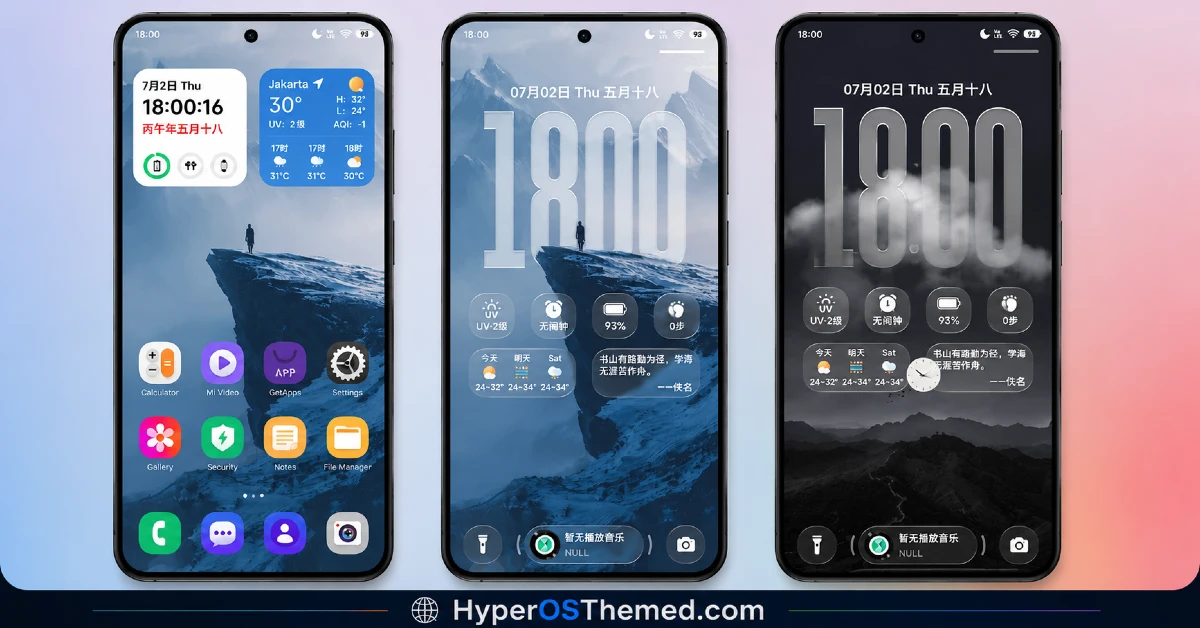
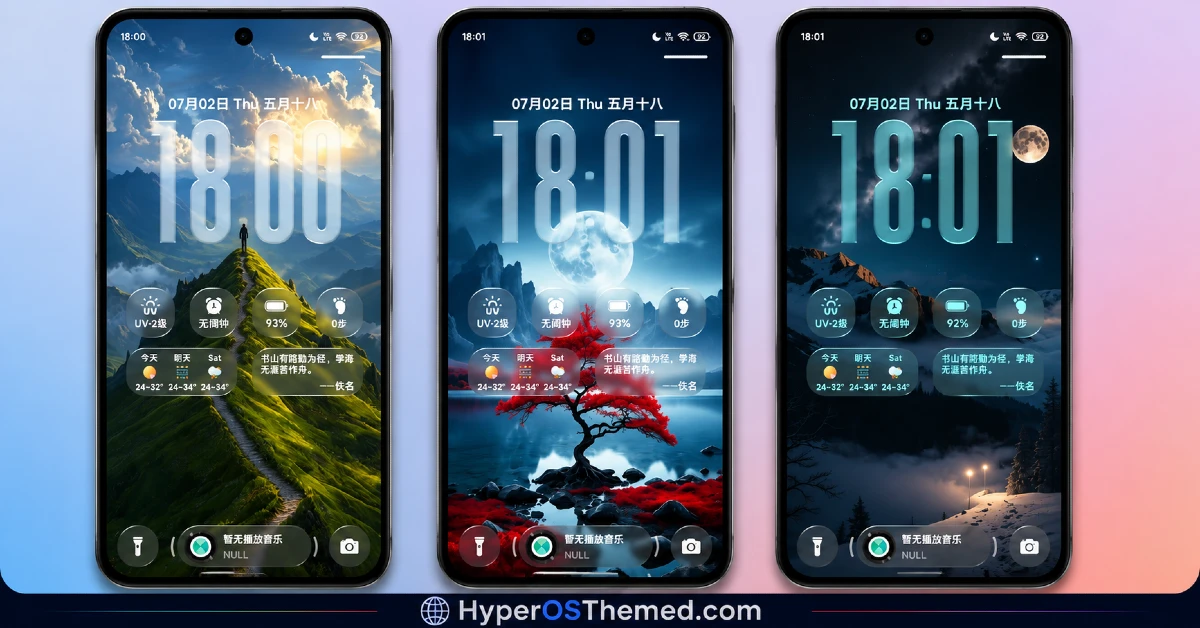
The visual identity is built entirely around dramatic nature photography rendered across four distinct seasonal moods, from soft green hillsides to stark snowy peaks and moody storm-covered mountains.
The oversized 3D clock and detailed widget panel give every lock screen a composed, almost cinematic quality rather than looking like a wallpaper with a clock pasted on top. It’s easily one of the most visually ambitious themes I’ve come across, closer to a curated nature photography collection than a typical phone theme.
Seasonal Raster Effect HyperOS Theme Details
| Detail | Info |
|---|---|
| Theme Name | Seasonal Raster Effect |
| Designer | 8°余温 |
| Compatibility | HyperOS, HyperOS 2.0, HyperOS 3.0 |
| Features | Premium, Cool, Wallpapers, Nature, 3D, Customizable |
| File Size | 74.45 MB |
Seasonal Raster Effect HyperOS Theme Performance
I tried Seasonal Raster Effect HyperOS Theme on a POCO X6 running HyperOS 2.0, testing it through regular daily use including gaming, streaming, and normal browsing to check for slowdown given the large file size.
Home screen transitions and lock screen loading stayed smooth throughout, with no noticeable lag despite the amount of wallpaper and widget content packed in.
Battery drain came in a few percentage points higher than my usual baseline, which tracks given the detailed widget panel constantly refreshing weather, UV index, and step data. The main issue I ran into was tied to the China region tagging, a couple of region-specific apps needed manual icon resets, which the included backup file helped resolve.
Seasonal Raster Effect HyperOS Theme Compatibility
Seasonal Raster Effect HyperOS Theme supports HyperOS, HyperOS 2.0, and HyperOS 3.0, covering a wide range of current Xiaomi, Redmi, and POCO devices. I tested it on a POCO X6 running HyperOS 2.0 without major stability issues once I applied the backup file provided alongside the main download.
Given the China region tag, Global ROM users may run into occasional icon or widget application quirks, which is fairly typical for region-specific themes of this scale. It is not designed for MIUI 12, 13, or 14, and custom ROM users on Xiaomi.eu or similar builds should plan on needing the backup file as well, especially given how much content this theme is packing in.
Get Seasonal Raster Effect HyperOS Theme
Download Seasonal Raster Effect HyperOS Theme through the official Xiaomi Theme Store link, and make sure to also grab the separate backup file provided alongside it, since the China region packaging can cause a few widget or icon elements to not apply correctly on Global ROM devices without it. Avoid third-party APK sites or unofficial repackaged versions of this theme, since sideloaded installers are a common source of unnecessary permissions or corrupted files, particularly with a large, detailed theme like this one.
Note: If the Official Theme Store Link doesn’t redirect properly, try opening the page in Chrome or the default Xiaomi browser, since other browsers may not handle the redirect correctly.
How to Apply Seasonal Raster Effect HyperOS Theme
Follow the steps below to apply the theme:
- Open the Theme Store Link given above on your Xiaomi / REDMI / POCO device
- This will redirect you to Theme Store.
- Download and install the theme
- Tap on Apply
- Customize specific elements (icons, lock screen, status bar) if needed
- Reboot your device (optional for full effect)
Why Choose Seasonal Raster Effect HyperOS Theme?
- Four full seasonal wallpaper sets deliver real variety instead of one image with minor tweaks
- The detailed widget panel packs UV index, battery, steps, and forecast into a single view
- 3D clock rendering adds genuine depth rather than sitting flat over the scenery
- Each seasonal wallpaper feels deliberately paired with matching widget styling
- Backup file included by the designer helps resolve region-specific compatibility issues
Conclusion
Testing Seasonal Raster Effect HyperOS Theme on my POCO X6 turned out to be one of the more content-rich theme experiences I’ve had, mainly thanks to the sheer variety across all four seasonal wallpaper sets and how functional the widget panel actually is. The region-specific quirks required some troubleshooting with the backup file, and the higher battery drain is a real trade-off worth knowing about upfront.
Compared to other nature or wallpaper-focused themes I’ve tried, this one delivers noticeably more actual content rather than a single flashy scene dressed up as a full package. If you want genuine variety and don’t mind the larger download, it’s one of the more rewarding themes currently available.
You may also like:
Floating Stone HyperOS Theme for Xiaomi, Redmi and POCO
Blackness HyperOS Theme: A Dark iOS-Style Look for Xiaomi, POCO & Redmi
