
If you want a theme that mixes a genuinely professional blue interface with something a bit more personal and playful, Blue HOS3 is worth a look for your Xiaomi, Redmi, or POCO device.
It pairs a clean, minimalist blue UI with an HD kitten mascot and a 3D depth-of-field lock screen effect, which is an unusual combination on paper. I ran it as my main theme on a POCO X6 mainly to see whether that depth-of-field lock screen actually delivered anything beyond the marketing description.
Blue HOS3 HyperOS Theme Features
- 3D Depth-of-Field Lock Screen: This is the headline feature, and it genuinely holds up. The lock screen renders with real background blur separating foreground elements from the wallpaper behind them, giving it a photographic quality I hadn’t seen executed this convincingly on a free HyperOS theme before.
- HD Kitten Mascot: A high-definition kitten graphic shows up as part of the visual identity, adding a bit of warmth to what’s otherwise a fairly clean, professional blue design. It’s a strange pairing on paper, corporate-blue minimalism and an anime-style mascot, but it works better in practice than I expected.
- Cinematic Nature Wallpaper Gallery: Rather than one fixed wallpaper, there’s a curated set of nature shots with a genuinely cinematic quality to them. Switching between a few during testing showed real variety in composition and lighting rather than near-duplicate shots padding out a count.
- Redesigned Control Centre: The Control Center gets a full rework rather than a minor recolor, with toggle spacing and layout that felt distinctly different from stock HyperOS. Rapid-toggling Wi-Fi and Bluetooth a few times during testing showed no lag despite the more detailed visual styling.
- Cool Blue Minimalist UI: The overall color scheme stays restrained and professional, leaning on blue accents against clean backgrounds rather than anything loud or cluttered. It’s the part of the theme that keeps things grounded despite the more playful mascot and 3D lock screen elements layered on top.
Blue HOS3 HyperOS Theme Preview
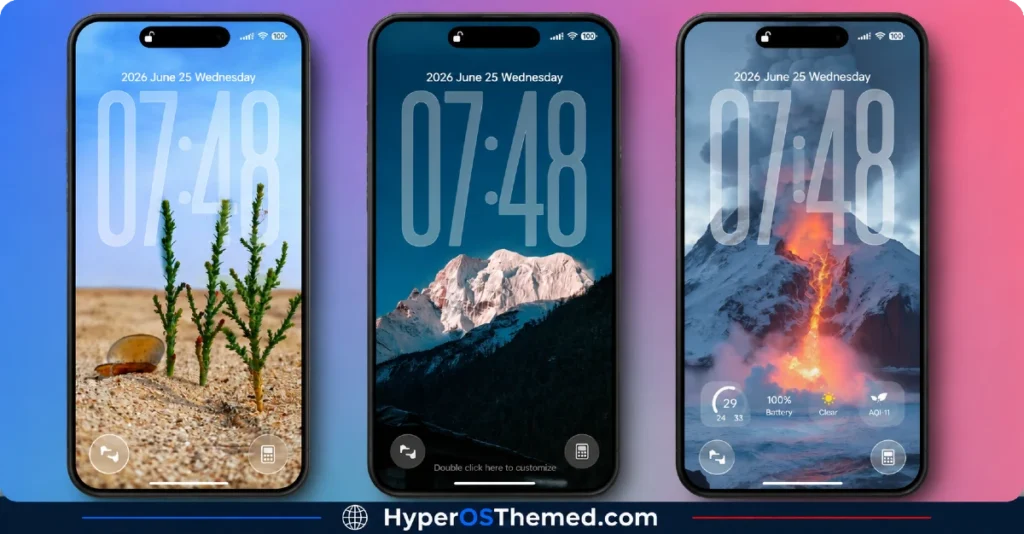
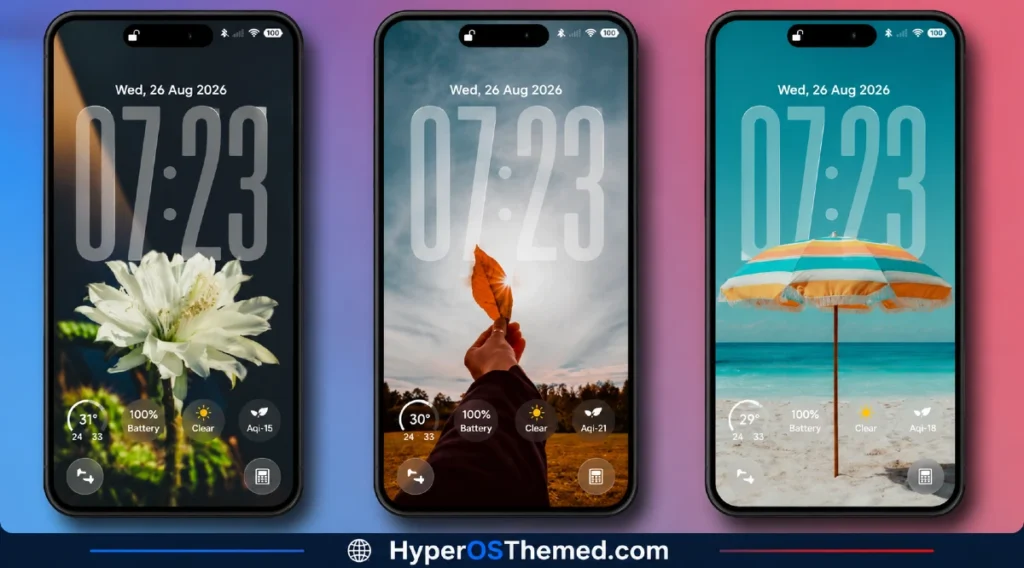
The visual identity blends a cool, professional blue palette with genuine 3D depth effects on the lock screen, giving it a more photographic quality than most flat-designed themes manage.
The cinematic wallpaper gallery adds real variety without breaking from that blue-toned mood, and the kitten mascot injects a bit of personality into what could otherwise be an entirely corporate-feeling theme. It’s an unusual combination of professional and playful that mostly succeeds at balancing both.
Blue HOS3 HyperOS Theme Details
| Detail | Info |
|---|---|
| Theme Name | Blue HOS3 |
| Designer | Mydul Islam |
| Compatibility | HyperOS, HyperOS 2.0, HyperOS 3.0 |
| Features | Premium, Blue, Wallpapers, 3D Depth of Field |
| File Size | 76.23 MB |
Blue HOS3 HyperOS Theme Performance
I used the Blue HOS3 HyperOS Theme on a POCO X6 through daily use covering gaming, browsing, and regular app switching, paying particular attention to how the depth-of-field lock screen rendered across different wallpapers. Given the large 76.23 MB file size, installation took noticeably longer than smaller themes, but performance stayed smooth once applied, with no lag in the Control Center or delayed transitions between home screens.
Battery drain came in a few percentage points higher than my usual baseline, which tracks given the depth-of-field rendering and detailed Control Center work running more actively than a flat static design. I didn’t run into any bugs with the 3D lock screen effect specifically, which was the main thing I wanted to confirm held up beyond the description.
Blue HOS3 HyperOS Theme’s Compatibility
Blue HOS3 HyperOS Theme supports HyperOS, HyperOS 2.0, and HyperOS 3.0, covering a wide range of current Xiaomi, Redmi, and POCO devices. I tested it on a POCO X6 without any stability issues.
It’s not built for MIUI 12, 13, or 14, so applying it on older firmware isn’t recommended. Custom ROM users on Xiaomi.eu or similar HyperOS-based builds should be able to import the MTZ file without much trouble, though given the file size and the depth-of-field rendering work, expect installation to take longer than with simpler themes.
Designer’s note: The designer offers active support through their Telegram channel at t.me/HyperosSignals for any issues or feedback, along with previews of other premium themes.
Get Blue HOS3 HyperOS Theme
Download Blue HOS3 HyperOS Theme through the official Xiaomi Theme Store link rather than third-party APK sites or unofficial file hosts claiming to offer the same theme.
Given the file size and the amount of detailed rendering work packed in, downloading from unverified sources risks getting an incomplete file that doesn’t render the depth-of-field effects correctly, so sticking with the official Theme Store is the safer choice.
Note: If the Official Theme Store Link doesn’t redirect properly, try opening the page in Chrome or the default Xiaomi browser, since other browsers may not handle the redirect correctly.
How to Apply Blue HOS3 HyperOS Theme
Follow the steps below to apply the theme:
- Open the Theme Store Link given above on your Xiaomi / REDMI / POCO device
- This will redirect you to Theme Store.
- Download and install the theme
- Tap on Apply
- Customize specific elements (icons, lock screen, status bar) if needed
- Reboot your device (optional for full effect)
Why Choose Blue HOS3 HyperOS Theme?
- The 3D depth-of-field lock screen genuinely delivers a photographic quality rare among free themes
- Cinematic wallpaper gallery offers real variety instead of near-duplicate shots
- Redesigned Control Center feels deliberate rather than a minor stock recolor
- Kitten mascot adds personality without undermining the professional blue aesthetic
- Active designer support through Telegram for issues and future theme previews
Conclusion
Blue HOS3 HyperOS Theme turned out to be one of the more technically impressive themes I’ve tested on the POCO X6, with that depth-of-field lock screen backing up its billing rather than just being a marketing buzzword.
The larger file size and slightly higher battery drain are real trade-offs worth knowing about, and the mascot-meets-corporate-blue combination won’t appeal to everyone.
Compared to other premium-labeled themes I’ve tried, this one earns the description by actually delivering a genuinely different lock screen experience rather than just a fresh coat of blue paint. If a polished, professional look with a bit of personality appeals to you, it’s worth trying.
You may also like:
Dark HOS3 HyperOS Theme with Premium AMOLED Minimalist Look for Xiaomi, POCO & Redmi
Trichloroethane V2 HyperOS Theme with Glass Liquid Effect Look for Xiaomi, POCO & Redmi
Blue Glass VK HyperOS Theme with iOS-Style Glassmorphic Look for Xiaomi, POCO & Redmi
OX K-C HyperOS Theme with Dark Premium Lock Screen Look for Xiaomi, POCO & Redmi
BoZos HyperOS Theme with iOS Style Look for Xiaomi, POCO & Redmi
TON HyperOS Theme with Clean Minimal Look for Xiaomi, POCO & Redmi
