
A colleague showed me his lock screen at work, and the clock took up so much of the display I genuinely assumed he’d installed some kind of accessibility feature by mistake. Turned out it was Moshyper HyperOS Theme, deliberately designed that way, so I grabbed it for my POCO X6 that same day just to see if a clock that dominant could actually work in daily use rather than just looking dramatic in a demo screenshot.
Moshyper HyperOS theme Features
- Massive Oversized Lock Screen Clock: The clock genuinely takes up a huge portion of the display, and surprisingly it works better than I expected rather than feeling like a gimmick. It stayed legible across every wallpaper I tried, though it did eat noticeably into space for notification previews when I had several stacked at once.
- Extensive Wallpaper Variety: The pack includes a genuinely wide mix, fiery orange abstracts, desert highway shots, golden sunsets, a dog photo that felt oddly out of place among the rest, and mountain meadow scenes. Switching between them kept things feeling fresh rather than settling into one fixed mood.
- Warm Red and Orange Home Screen UI: The overall color scheme leans into warm, energetic tones rather than the cooler blues and blacks most themes default to. It gave the home screen a genuinely different feel from anything else I’ve tested recently, more lively than premium in the traditional dark-theme sense.
- iOS-Inspired Icon Pack: Icons follow the familiar rounded square iOS shape with clean detailing that ties the varied wallpaper collection together visually. Coverage was solid across my main apps, though a couple of niche apps kept their default icons and stood out against the red-orange tint on the rest.
- Full Customization Options: Beyond just picking a wallpaper, several elements can be adjusted through the theme’s settings menu rather than being locked into one fixed configuration. I spent a good chunk of time testing different combinations before settling on the desert highway wallpaper paired with a slightly smaller clock variant.
Moshyper HyperOS theme Preview
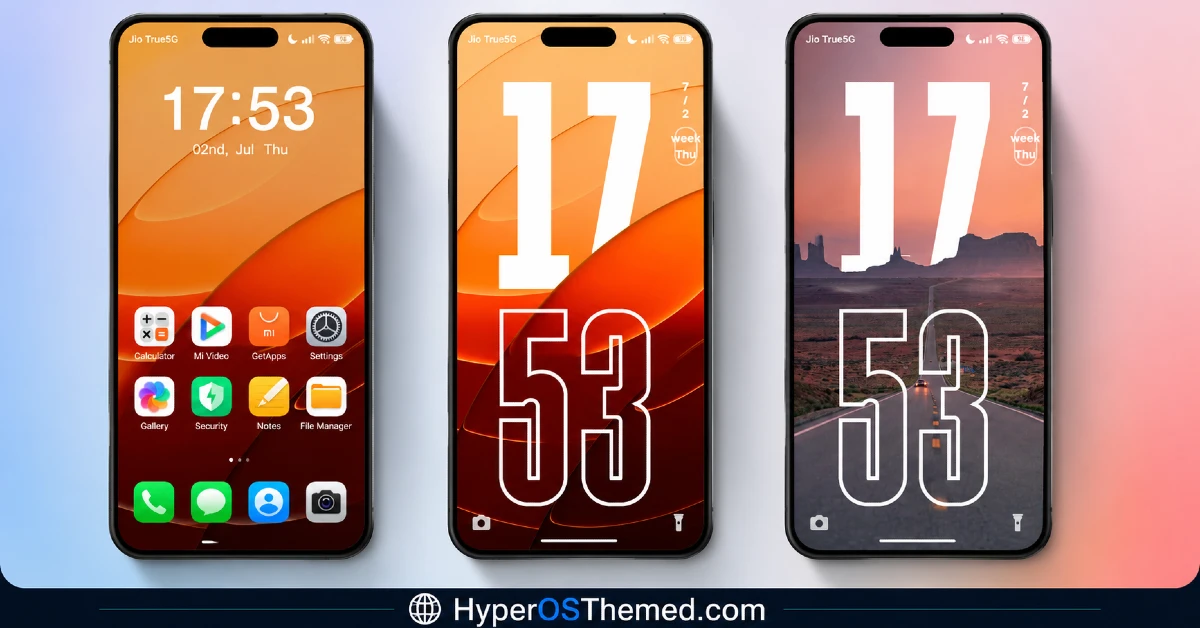
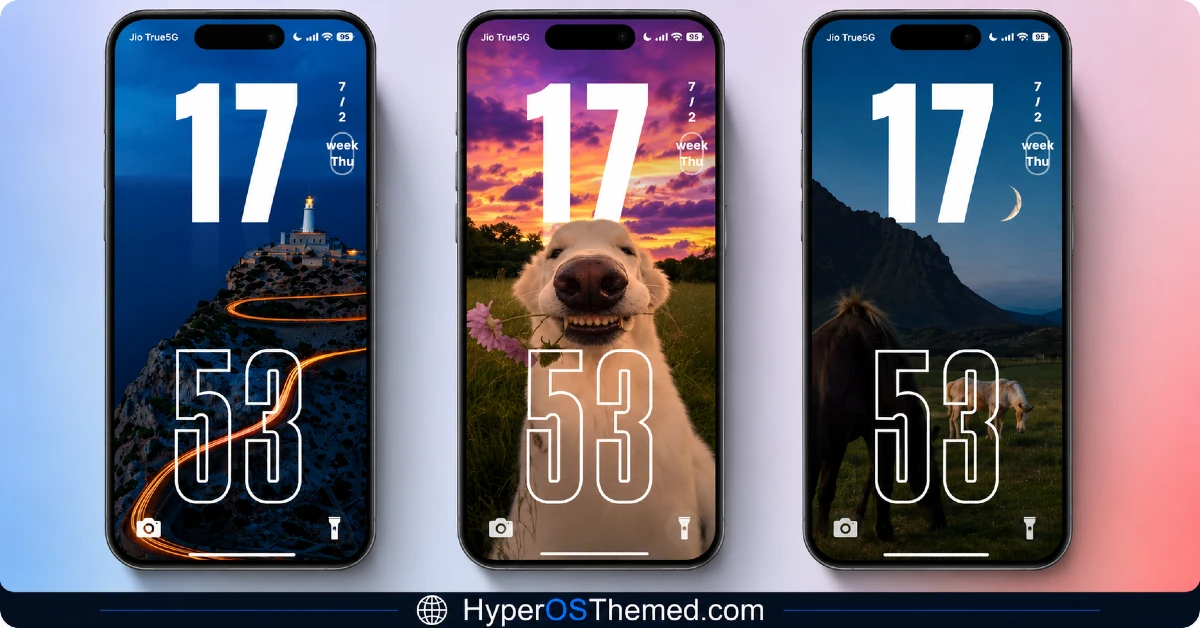
The visual identity is bold and warm, built around fiery oranges and reds that give the whole interface an energetic, almost sunset-lit quality rather than the cooler tones most themes lean toward.
The oversized lock screen clock is the clear centerpiece, dominating the display in a way that feels deliberate rather than accidental once you’re actually using it.
Between the wallpaper variety and the warm color scheme, it reads as a theme built for people who want their phone to feel lively rather than restrained.
Moshyper HyperOS Theme Details
| Detail | Info |
|---|---|
| Theme Name | Moshyper |
| Designer | MISANS |
| Compatibility | HyperOS, HyperOS 2.0, HyperOS 3.0 |
| Features | Premium, Wallpapers, Customizable, Dynamic Lock Screen, 3D |
| File Size | 21.15 MB |
Moshyper Theme Performance
I ran Moshyper HyperOS theme on a POCO X6 through daily use covering messaging, gaming, and regular browsing, testing a handful of the included wallpapers along the way.
Performance stayed smooth throughout, with no lag switching between wallpaper options or opening the app drawer despite the moderate 21.15 MB file size.
Battery drain came in a percent or two higher than my usual baseline, which is reasonable given the dynamic lock screen and 3D clock rendering running more actively than a flat static design. The main recurring issue was that oversized clock overlapping with notification previews whenever I had more than a couple stacked up, similar to what I’ve run into with other bold-clock themes before.
Moshyper HyperOS theme’s Compatibility
Moshyper supports HyperOS, HyperOS 2.0, and HyperOS 3.0, covering a wide range of current Xiaomi, Redmi, and POCO devices. I tested it on a POCO X6 without major issues beyond the notification overlap mentioned above. It’s not built for MIUI 12, 13, or 14, so applying it on older firmware isn’t recommended. Custom ROM users on Xiaomi.eu or similar HyperOS-based builds should be able to import the MTZ file without much trouble, and the designer also provides a separate backup file alongside the main download, which is worth keeping in case any wallpaper or clock elements don’t apply cleanly on your specific device.
Get Moshyper HyperOS theme
Download Moshyper through the official Xiaomi Theme Store link, and grab the separate backup file as well in case any wallpaper or lock screen elements need to be reapplied manually. Avoid third-party APK sites or random file-sharing pages offering the same theme, since sideloaded installers from unverified sources are a common way people end up with unnecessary permissions or bundled software on their phone.
Note: If the Official Theme Store Link doesn’t redirect properly, try opening the page in Chrome or the default Xiaomi browser, since other browsers may not handle the redirect correctly.
How to Apply Moshyper HyperOS theme
Follow the steps below to apply the theme:
- Open the Theme Store Link given above on your Xiaomi / REDMI / POCO device
- This will redirect you to Theme Store.
- Download and install the theme
- Tap on Apply
- Customize specific elements (icons, lock screen, status bar) if needed
- Reboot your device (optional for full effect)
Why Choose Moshyper HyperOS Theme?
- The oversized lock screen clock is a genuinely bold design choice that actually works in daily use
- Wallpaper variety spans multiple moods instead of one fixed aesthetic
- Warm red and orange color scheme stands out from the usual cool-toned theme defaults
- Full customization lets you mix and match wallpapers with different clock configurations
- Backup file included by the designer helps resolve any elements that don’t apply cleanly
Conclusion
Moshyper HyperOS theme ended up being more practical on my POCO X6 than I expected going in, since that oversized clock is easy to dismiss as a gimmick until you actually live with it and see how confidently it anchors the lock screen.
The notification overlap issue is a real annoyance worth knowing about, and the warm color scheme won’t be for everyone who prefers something more subdued.
Compared to other wallpaper-variety themes I’ve tested, Moshyper commits harder to a specific mood and clock design instead of playing it safe, and that commitment mostly pays off. If you want a lock screen that actually makes a statement, it’s worth trying.
You may also like:
HyperBlue HyperOS Theme for Xiaomi, POCO and REDMI Phones
Guofeng 18 HyperOS Theme for Xiaomi, POCO and REDMI Phones with iOS-Styled
Bintang HyperOS Theme for Xiaomi, POCO and Redmi Phones
Green HOS3 HyperOS Theme for Xiaomi, POCO and REDMI Phones
Floating Stone HyperOS Theme for Xiaomi, Redmi and POCO
Blackness HyperOS Theme: A Dark iOS-Style Look for Xiaomi, POCO & Redmi
