
I picked up Blackness HyperOS Theme after browsing through a batch of iOS-style themes on the Theme Store, mostly comparing icon quality across a handful of similarly named dark themes.
The name itself is about as literal as it gets, but the dynamic lock screen mentioned in the feature list caught my attention enough to actually download it onto my POCO X6 and used as my daily theme.
Blackness HyperOS Theme Features
- iOS-Style Black Icon Set: The icons follow the familiar rounded square shape found in iOS, rendered entirely in black with minimal detailing. Coverage across my commonly used apps was solid, though two apps tied to local services kept their default icons and stood out against the otherwise uniform black set.
- Dynamic Lock Screen: Rather than sitting completely static, the lock screen shifts subtly depending on how it’s configured. It wasn’t as dramatic a change as some other dynamic lock screens I’ve tested, but it added enough movement that the lock screen didn’t feel lifeless during daily use.
- All-Black System Interface: Settings, notification shade, and other system menus commit fully to black rather than mixing in grey or white elements. I didn’t run into any jarring bright screens interrupting the flow while switching between apps.
- Simple, Uncluttered Layout: Beyond the icon set and lock screen, the theme doesn’t try to overload the interface with extra widgets or transparency effects. It’s a fairly straightforward black theme once installed, which some users will appreciate and others might find plain compared to more decorated options.
- Moderate File Size: At 18.03 MB, installation took a reasonable amount of time on my Redmi, longer than the smallest icon-only themes I’ve tested but nowhere near the larger wallpaper-heavy packages. It felt appropriately sized given the dynamic lock screen behavior included.
Blackness HyperOS Theme Preview
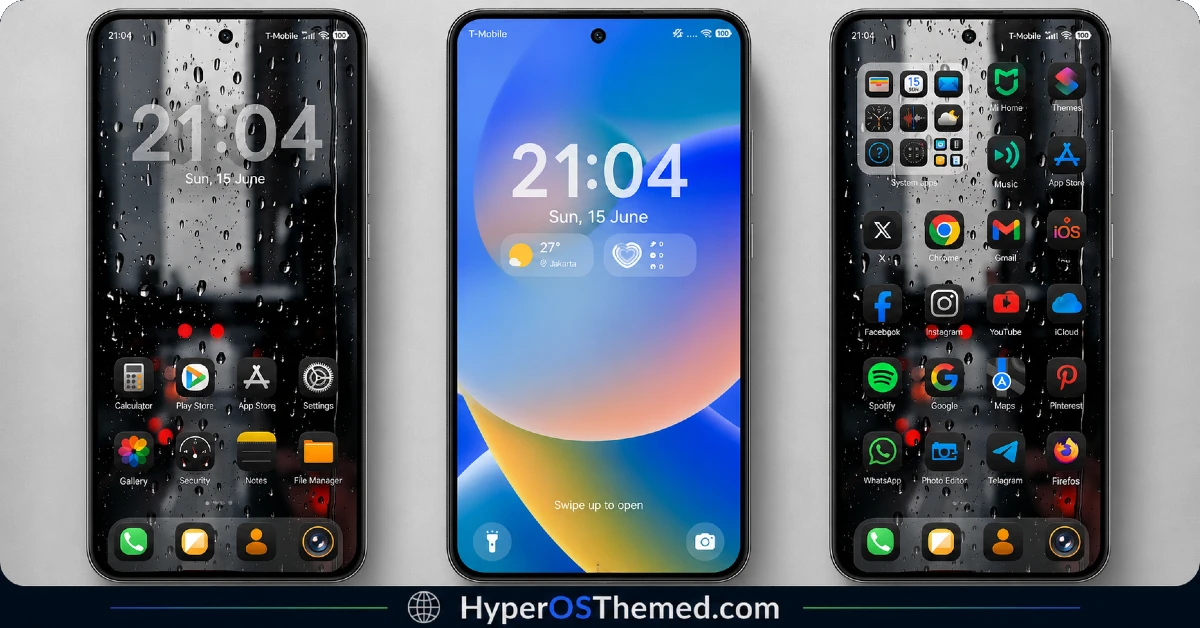
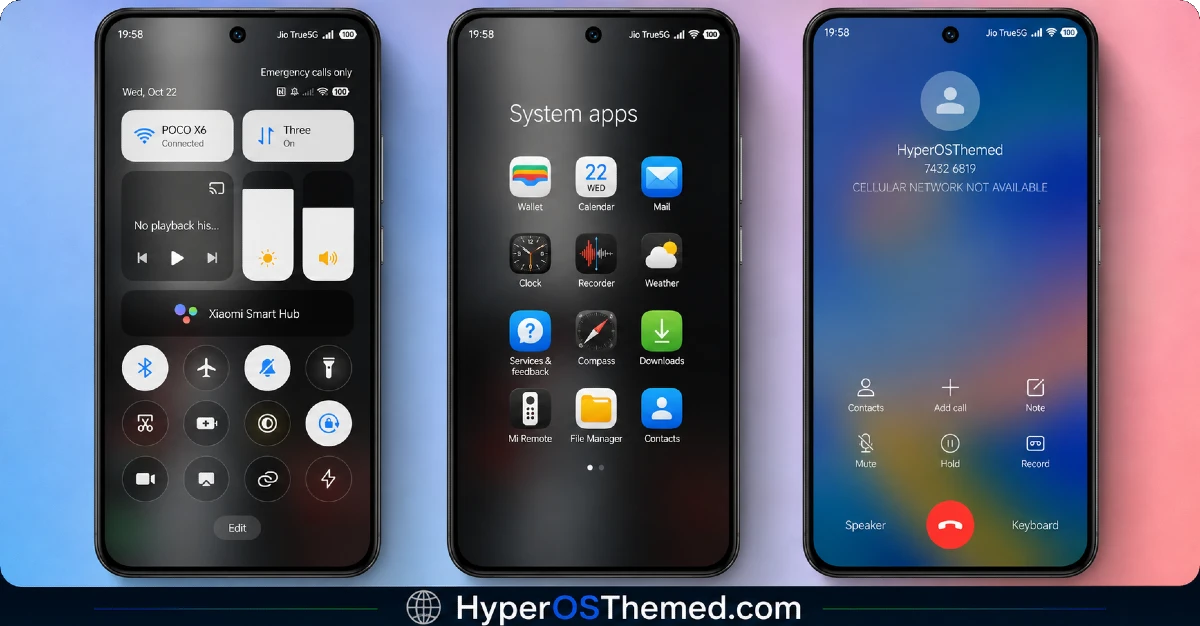
The visual style is exactly what the name suggests, a fully committed black interface from icons through system menus, with no accent color breaking up the monochrome look. The dynamic lock screen adds a bit of subtle movement to what would otherwise be a completely static design, giving it slightly more life than a typical flat black theme. It reads as disciplined and consistent rather than decorative, closer to a utility skin than an artistic statement.
Blackness HyperOS Theme Details
| Detail | Info |
|---|---|
| Theme Name | Blackness |
| Designer | Masuod.B |
| Compatibility | HyperOS, HyperOS 2.0 |
| Features | iOS Style, Black Icons, Dynamic Lock Screen |
| File Size | 18.03 MB |
Blackness HyperOS Theme Performance
I used Blackness HyperOS Theme on POCO X6 running HyperOS 3.0, through regular daily use including messaging, browsing, and a few gaming sessions. Given the moderate file size and dynamic lock screen behavior, performance stayed smooth throughout, with no lag in the app drawer or delayed transitions between home screens.
Battery drain came in close to my stock theme baseline, maybe a percent higher, which is reasonable given the mostly static black design outside of the lock screen animation. The recurring issue was the two local service app icons that never picked up the black styling, which meant they stood out a bit whenever I opened the drawer.
Blackness HyperOS Theme Compatibility
Blackness supports HyperOS, HyperOS 2.0, and HyperOS 3.0, so it’s aimed at relatively current Xiaomi, Redmi, and POCO devices rather than older MIUI builds. I tested it on a POCO X6 running HyperOS 3.0 without major issues.
Custom ROM users on Xiaomi.eu or similar HyperOS-based builds should be able to import the MTZ file without much trouble given the moderate file size, though results may vary slightly depending on how closely the ROM matches stock HyperOS system UI.
Designer’s note: Feedback for this theme can be sent via Telegram to @englishthemesoxfury.
Get Blackness HyperOS Theme
Download Blackness HyperOS Theme through the official Xiaomi Theme Store link rather than third-party APK sites or file-sharing forums claiming to offer the same theme. Sideloaded theme installers from unverified sources are a common way people end up with unnecessary permissions or bundled software, so sticking with the official Theme Store keeps installation clean even for a moderately sized file like this one.
Note: If the Official Theme Store Link doesn’t redirect properly, try opening the page in Chrome or the default Xiaomi browser, since other browsers may not handle the redirect correctly.
How to Apply Blackness HyperOS Theme
Follow the steps below to apply the theme:
- Open the Theme Store Link given above on your Xiaomi / REDMI / POCO device
- This will redirect you to Theme Store.
- Download and install the theme
- Tap on Apply
- Customize specific elements (icons, lock screen, status bar) if needed
- Reboot your device (optional for full effect)
Why Choose Blackness HyperOS Theme?
- Fully committed black design stays consistent across every system app, not just the home screen
- Dynamic lock screen adds subtle movement instead of a completely static layout
- iOS-style icon shapes give it a clean, recognizable look
- Moderate file size balances feature inclusion with reasonable install times
- Active feedback channel via Telegram suggests the designer is responsive to user input
Conclusion
After using it on my POCO X6, Blackness HyperOS Theme turned out to be a dependable, no-frills black theme that does exactly what it promises without overcomplicating things. It’s not going to stand out next to more decorated iOS-style themes, and the two local service icons that never picked up the black styling were a small but consistent gap.
Compared to other black icon themes I’ve tested, the dynamic lock screen gives this one a slight edge in feeling less static. If you want a straightforward, fully black iOS-style theme without extra visual noise, it’s a solid pick.
You may also like:
