
I noticed Planet Sail HyperOS Theme while scrolling through the Theme Store’s space category, and the preview showing app icons arranged in an actual orbit pattern around a planet widget was different enough from anything I’d tried before that I had to see it working in person.
I downloaded it onto my Redmi Note 13 that same evening and used it as my daily theme for nine days, mostly curious whether the orbiting icon concept would still feel novel after the first day or get old fast.
Planet Sail HyperOS Theme Features
- Orbiting Icon Widget: This is the standout feature, a circular widget where selected app icons rotate slowly around a central point like satellites. It genuinely holds attention the first few times you see it, though I’ll admit by day five it became more of a background detail than something I actively noticed.
- Dark Planet Wallpaper: The default wallpaper shows a large, detailed planet set against a dark starfield background. It paired well with the orbiting widget conceptually, and held up nicely as a backdrop even with icons layered over parts of it.
- Screen Animation on Unlock: There’s a distinct animation that plays when the screen turns on, adding a bit of visual flair to what would otherwise be a static unlock sequence. It’s subtle enough not to feel slow or delay actually getting into the phone.
- Double-Tap Mode Switching: Double-tapping the screen switches between different visual modes, according to the theme’s own description. I tested this a handful of times and it worked consistently, though I mostly stuck with the default mode since I didn’t find a strong reason to switch during daily use.
- Year-Countdown Widget: A small widget tracks progress through the current year, which is a nice practical touch alongside the more decorative space elements. It’s a detail I hadn’t seen paired with a space theme before, and it updated correctly throughout my testing period.
- Compact File Size: At 9.14 MB, Planet Sail installed in just a few seconds on my Redmi. Given the animated widget and unlock animation, I expected something a bit heavier, so the small size was a pleasant surprise.
Planet Sail HyperOS Theme Preview
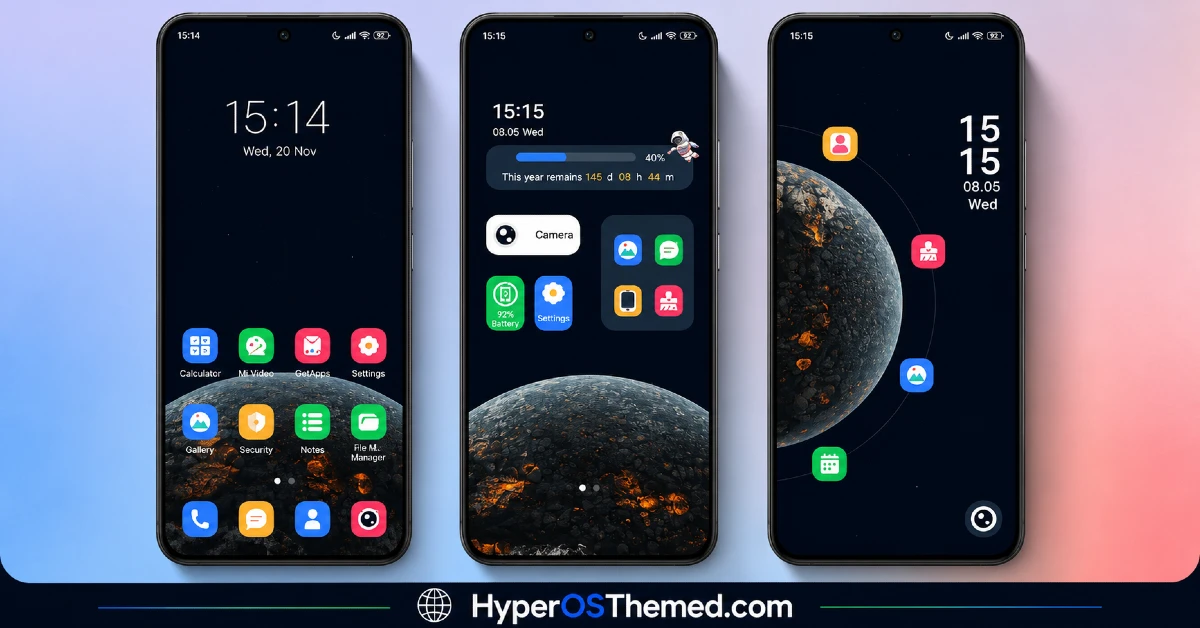
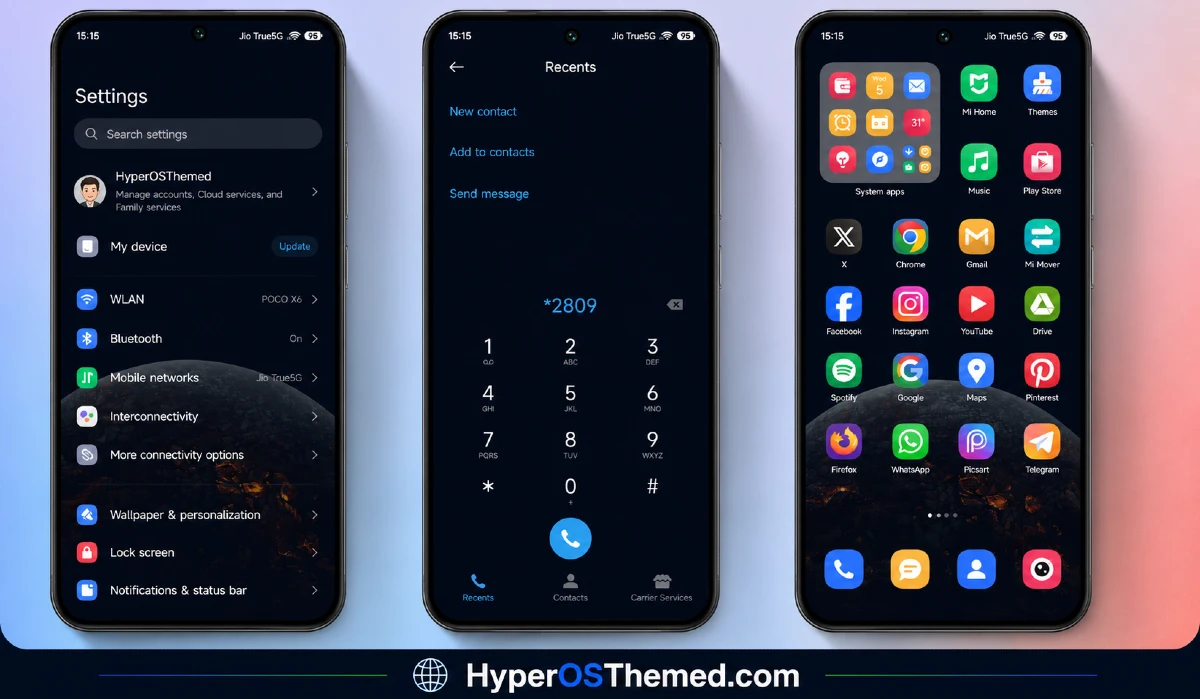
The visual identity is dark and space-focused, built around a detailed planet wallpaper and a genuinely unique orbiting icon widget that gives the home screen some real motion instead of sitting completely static. The overall look stays minimal outside of that central widget, avoiding clutter and letting the orbit animation stand out as the clear focal point. It has a calm, slightly sci-fi feel rather than anything loud or busy, closer to a screensaver aesthetic brought into daily use.
Planet Sail HyperOS Theme Details
| Detail | Info |
|---|---|
| Theme Name | Planet Sail |
| Designer | esuny |
| Compatibility | HyperOS, HyperOS 2.0, HyperOS 3.0 |
| Features | Simple, Dynamic Lock Screen, Space, Widget |
| File Size | 9.14 MB |
Planet Sail HyperOS Theme Performance
I tested Planet Sail HyperOS Theme on a Redmi Note 13 running HyperOS 3.0 for nine days, through regular daily use including messaging, browsing, and a handful of gaming sessions. Given the orbiting widget’s constant animation, I expected some battery impact, and it came in about 2 to 3 percent higher than my usual baseline over a full day.
Performance otherwise stayed smooth, with no lag or stutter in the orbit animation itself, and the unlock screen animation played consistently without delay throughout testing. I didn’t run into any bugs or glitches worth reporting, which was a pleasant change from some of the heavier animated themes I’ve tested before.
Planet Sail HyperOS Theme Compatibility
Planet Sail HyperOS Theme supports HyperOS, HyperOS 2.0, and HyperOS 3.0, covering a wide range of current Xiaomi, Redmi, and POCO devices. I tested it on a Redmi Note 13 running HyperOS 3.0 without any stability issues over the full nine day period. It is not built for MIUI 12, 13, or 14, so applying it on older firmware isn’t recommended.
Custom ROM users on Xiaomi.eu or similar HyperOS-based builds should be able to import the MTZ file without much trouble given the compact file size, though the orbiting widget animation specifically may perform slightly differently depending on how closely the ROM matches stock HyperOS behavior.
Designer’s note: “Theme Features: Open screen animation, double-click the screen to switch between different modes, click the icon to quickly jump. Unlock Method: Slide to unlock.”
Get Planet Sail HyperOS Theme
Download Planet Sail HyperOS Theme through the official Xiaomi Theme Store link rather than third-party APK sites or random file hosts claiming to offer the same theme. Sideloaded theme installers from unverified sources are a common way people end up with unnecessary permissions or bundled software, so the official Theme Store route keeps things clean even for a small file like this one.
Note: If the Official Theme Store Link doesn’t redirect properly, try opening the page in Chrome or the default Xiaomi browser, since other browsers may not handle the redirect correctly.
How to Apply Planet Sail HyperOS Theme
Follow the steps below to apply the theme:
- Open the Theme Store Link given above on your Xiaomi / REDMI / POCO device
- This will redirect you to Theme Store.
- Download and install the theme
- Tap on Apply
- Customize specific elements (icons, lock screen, status bar) if needed
- Reboot your device (optional for full effect)
Why Choose Planet Sail HyperOS Theme?
- The orbiting icon widget is a genuinely unique feature not found in most free HyperOS themes
- Year-countdown widget adds a practical touch alongside the decorative space design
- Double-tap mode switching gives some flexibility without complicating the interface
- Tiny 9.14 MB file size keeps installation fast despite the animated elements
- Screen unlock animation adds polish without slowing down actual phone use
Conclusion
After trying this theme on my Redmi Note 13,Planet Sail HyperOS Theme held up as one of the more genuinely creative themes I’ve tested this year, mostly thanks to that orbiting icon widget actually working as well in daily use as it looked in the preview. The slightly higher battery drain from the constant animation is worth knowing about, and the novelty of the orbit effect did fade a bit by the second week, though it never became annoying.
Compared to other space or dark themes I’ve tried, this one takes a genuinely different approach instead of just slapping a planet wallpaper on a standard layout. If you want something with real visual personality and don’t mind a small battery trade-off, it’s worth checking out.
You may also like:
Kiyumta HyperOS Theme: Bold Typography Tested on Redmi
Free Canvas HyperOS Theme: A Customizable Colorful Look for Xiaomi, PCOO & Redmi
