
The Halloween Express HyperOS Theme gives compatible Xiaomi, Redmi and POCO smartphones a dramatic Halloween-inspired appearance, featuring a glowing pumpkin steam train, misty forests and warm orange lighting. Designed by Evanc, this theme combines spooky seasonal artwork with customised lock screen elements and a coordinated interface for users who want something distinctive on their phone.
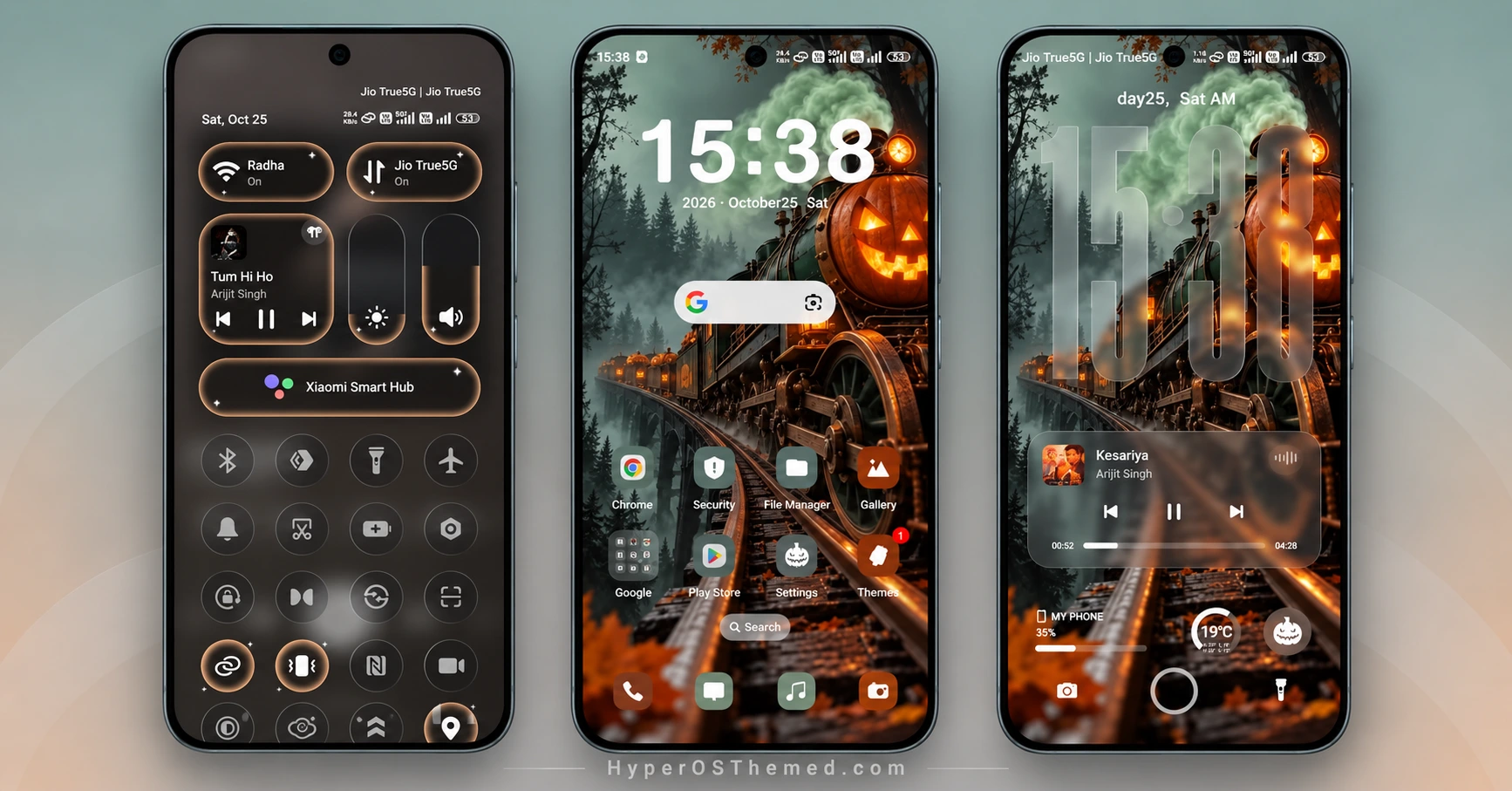
The lock screen is the main attraction. A large translucent clock sits over the atmospheric train wallpaper, while music controls, battery information, weather details and shortcut icons add useful elements to the layout. The theme also offers different clock styles, including a bold digital display, giving the lock screen a cinematic look.
Beyond the wallpaper, Halloween Express changes the appearance of the Control Centre, Settings, dialler and notification interface. Its dark panels, warm amber accents and coordinated icons complement the Halloween artwork, creating a consistent style across multiple parts of the system. The theme is designed for HyperOS, HyperOS 2.0 and HyperOS 3.0 on supported devices.
Halloween Express HyperOS Theme Key Highlights
Halloween Lockscreen and Wallpaper
- Spooky steam train artwork surrounded by misty trees and glowing pumpkin details.
- Oversized translucent clock styling for a dramatic lock screen.
- Date, battery and weather information integrated into the layout.
- Music player controls and shortcuts for convenient access.
Dark Control Centre Design
- Customised Control Centre with dark panels and warm amber highlights.
- Redesigned brightness and volume sliders.
- Updated quick-setting icons and connectivity controls.
- A Xiaomi Smart Hub panel featured in the preview.
Customised System Interface
- Coordinated app icons for a more consistent home screen.
- Modified Settings interface with matching visual elements.
- Custom dialler and call-screen appearance.
- Changes to notification elements and other parts of the system interface.
Halloween Express HyperOS Theme Preview
The preview images show the pumpkin-lit train wallpaper, oversized lock screen clock, music player, customised home screen and dark Control Centre. Additional screenshots demonstrate the redesigned dialler, Settings page and volume controls, giving you a closer look at the theme beyond its main wallpaper.
Halloween Express Theme Overview
| Detail | Information |
|---|---|
| Theme Name | Halloween Express |
| Designer | Evanc |
| Theme Size | 22.56 MB |
| Region | Global |
| Compatibility | HyperOS, HyperOS 2.0 and HyperOS 3.0 |
| Compatible Devices | Supported Xiaomi, Redmi and POCO smartphones |
| Main Features | Halloween wallpaper, custom lock screen, music controls, redesigned Control Centre, custom icons and dialler |
| Availability | Xiaomi official Store, subject to regional availability |
Get Halloween Express HyperOS Theme
Halloween Express HyperOS Theme Compatibility
Halloween Express is designed for compatible Xiaomi, Redmi and POCO smartphones running HyperOS. Its stated compatibility includes HyperOS, HyperOS 2.0 and HyperOS 3.0, with Global listed as its region.
Some elements, such as the lock screen layout, quick settings and system interface, may look different depending on your phone model and software version. Check the preview and confirm that the theme is available in your Themes app before applying it.
How to Install Halloween Express on Global Stable ROM
If your phone runs a compatible Global Stable HyperOS ROM, follow these steps to apply the theme through Xiaomi’s built-in Themes app:
- Click the “OFFICIAL THEME STORE LINK” button above.
- When prompted, select the Themes app to open the link.
- You will be redirected to the theme’s page in the Xiaomi Theme Store.
- Tap Download, wait for the download to finish, and then tap Apply to activate the theme.
- Check the lock screen, home screen and Control Centre to make sure the theme has been applied correctly.
Note: If elements overlap or do not display properly after applying the theme, restart your phone. If the issue persists, leave a comment with your device model and HyperOS version so you can get further help.
Why Choose Halloween Express HyperOS Theme?
- Halloween-inspired design: A glowing pumpkin steam train, misty forest and dramatic seasonal wallpaper.
- Custom lock screen: Oversized clock, battery and weather information, music controls and shortcuts.
- Redesigned Control Centre: Dark panels, amber accents and customised brightness and volume sliders.
- Updated system appearance: Matching icons, a customised dialler and changes to the Settings interface.
- HyperOS compatibility: Designed for supported Xiaomi, Redmi and POCO devices running HyperOS, HyperOS 2.0 and HyperOS 3.0.
Conclusion
The Halloween Express HyperOS Theme combines spooky train artwork with a customised lock screen, dark Control Centre and coordinated system interface. Designed by Evanc, it is a distinctive option for Xiaomi, Redmi and POCO users who enjoy Halloween-inspired personalisation. Review the screenshots and check compatibility with your device before applying it.
You may also like:
Lake Frame HyperOS Theme with Dynamic Lock Screens and Multi-Wallpaper Designs
K-C Material HyperOS Theme: Get Material-Style Icons
Uniswap HyperOS Theme with Premium 3D Glossy Icons and AI Wallpapers
S4u10 HyperOS Theme with a Stylish Lock Screen and Custom Icons
Crimson ObsidianV3 HyperOS Theme with Red Glass Icons and Dark Aesthetics
