
The Lake Frame HyperOS Theme brings a nature-inspired look to compatible Xiaomi, Redmi and POCO smartphones, combining scenic mountain wallpapers with custom lock screen layouts and personalised interface elements. Designed by Acapella, this theme centres on a beautiful lake and mountain landscape, with different seasonal backgrounds that create a fresh appearance while keeping the overall design cohesive.
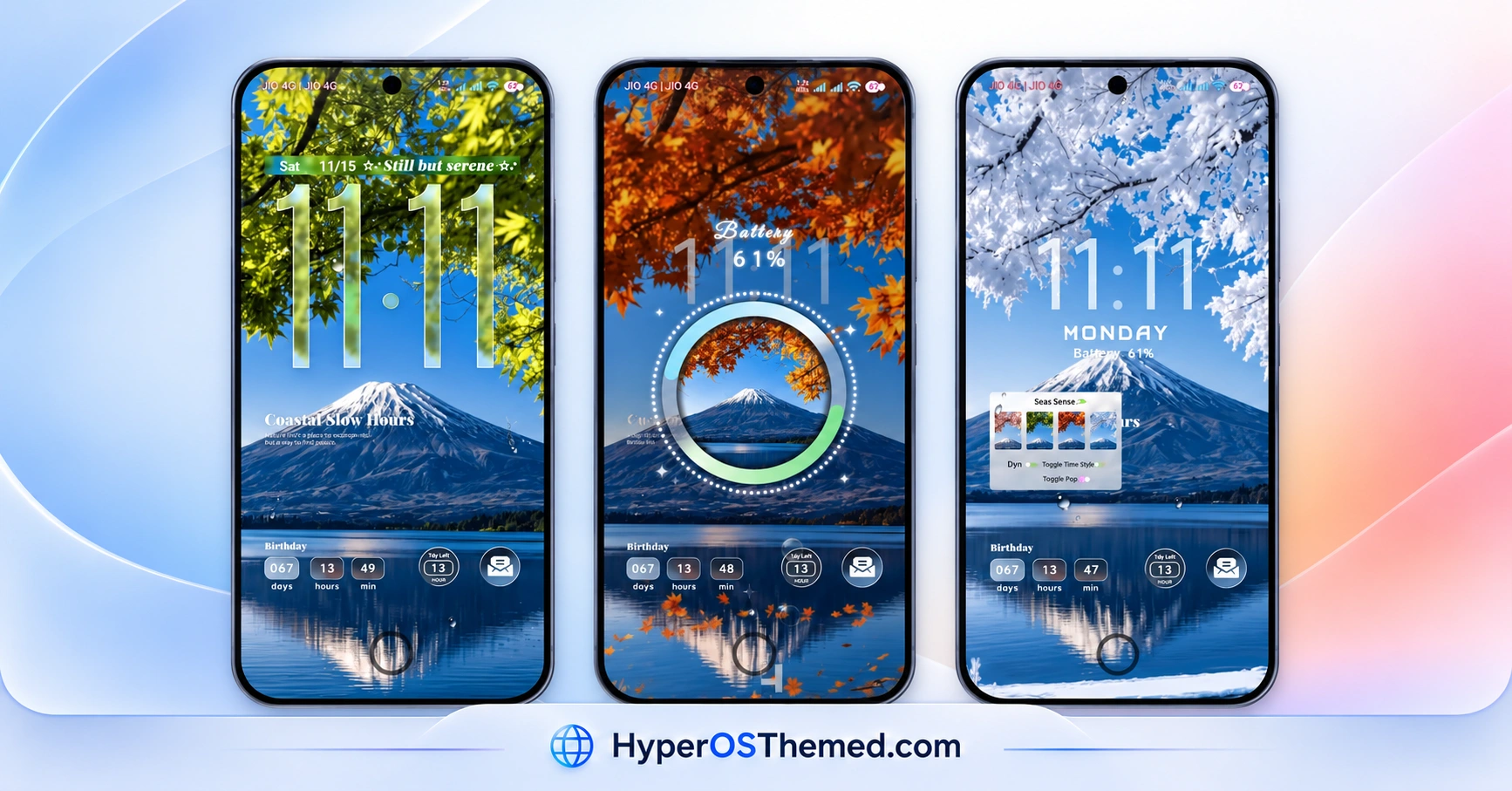
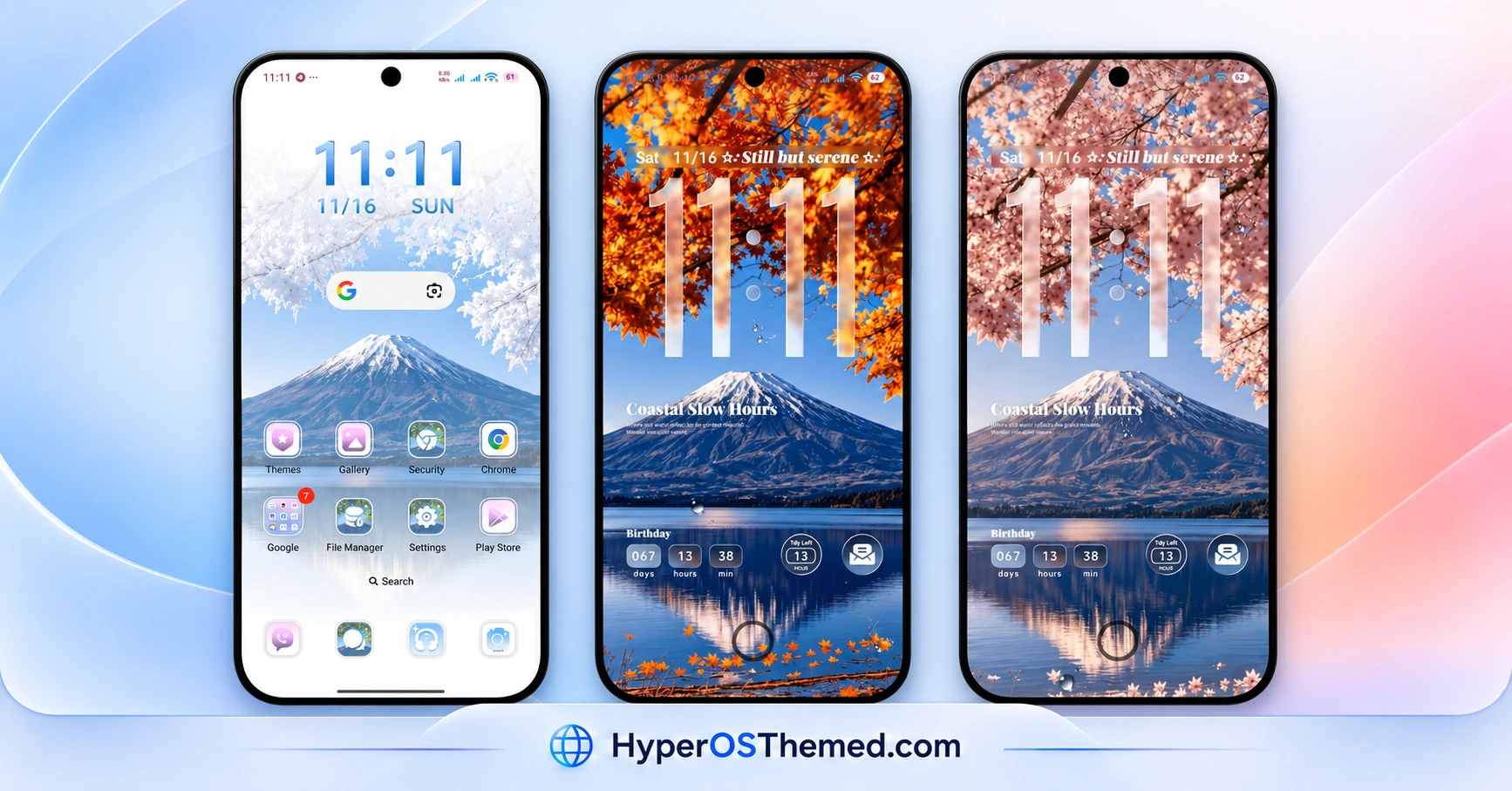
One of Lake Frame’s standout features is its lock screen customisation. The preview showcases oversized clocks, date and battery information, decorative text, and useful widgets arranged over the landscape backgrounds. Some layouts also feature a circular battery display, while the wallpaper selection includes snowy branches, autumn leaves, pink blossoms and lush green scenery.
Lake Frame HyperOS Theme also changes several parts of the system interface, including the Control Centre, notification area, icons, Settings and dialler pad. With support for HyperOS, HyperOS 2.0 and HyperOS 3.0, it offers a coordinated visual refresh for users who enjoy dynamic-looking lock screens and nature-themed personalisation.
Lake Frame HyperOS Theme Key Highlights
Dynamic Lockscreen and Widgets
- Oversized digital clocks with distinctive typography and date displays.
- Additional information such as battery status and countdown-style widgets.
- Multiple lock screen layouts, including a circular battery visualisation.
- Decorative details that complement the scenic backgrounds.
Multi-Wallpaper Nature Collection
- Mountain and lake scenery with snow-covered branches.
- Autumn-inspired orange foliage and soft pink blossoms.
- Green woodland backgrounds with a bright, peaceful atmosphere.
- Different wallpaper combinations for a varied lock screen appearance.
Updated System Interface
- Redesigned Control Centre and notification area.
- Custom icons for a more consistent visual style.
- Changes to the Settings interface and dialler pad.
- Additional theme customisation options accessible by swiping down, as described in the theme details.
Lake Frame HyperOS Theme Preview
The preview images showcase Lake Frame HyperOS Theme’s scenic wallpapers, large lock screen clocks, battery widgets and customised home screen. The different backgrounds give the theme a seasonal feel, while the matching interface elements help maintain a consistent appearance.
Lake Frame Theme Overview
| Detail | Information |
|---|---|
| Theme Name | Lake Frame |
| Designer | Acapella |
| Theme Size | 32.64 MB |
| Region | Global |
| Compatibility | HyperOS, HyperOS 2.0 and HyperOS 3.0 |
| Compatible Devices | Supported Xiaomi, Redmi and POCO smartphones |
| Main Features | Dynamic lock screen, multiple wallpapers, widgets, redesigned Control Centre, custom icons and dialer |
| Availability | Xiaomi Themes app, subject to regional availability |
Get Lake Frame HyperOS Theme
You can look for Lake Frame in the Xiaomi Themes app on your compatible smartphone. Availability may vary by device, software version and region.
Lake Frame HyperOS Theme Compatibility
Lake Frame is designed for the Xiaomi HyperOS ecosystem, with compatibility specified for HyperOS, HyperOS 2.0 and HyperOS 3.0. It is intended for supported Xiaomi, Redmi and POCO smartphones.
The appearance of certain elements may differ depending on your phone model and system version. Before applying the theme, check its availability in the Themes app and review the preview to see whether its lock screen and interface style suit your device.
How to Install Lake Frame on Global Stable ROM
If your smartphone runs a compatible Global Stable HyperOS ROM, follow these steps to apply Lake Frame through the official Xiaomi Themes app:
- Click the “OFFICIAL THEME STORE LINK” button above.
- When prompted, select the Themes app to open the link.
- You will be redirected to the theme’s page in the Xiaomi Theme Store.
- Tap Download, wait for the download to finish, and then tap Apply to activate the theme.
- Check the lock screen, home screen and system interface to confirm that the theme has been applied correctly.
Important note: If you notice overlapping elements or parts of the interface that do not display correctly after applying the theme, restart your phone. If the issue persists, leave a comment with your phone model and HyperOS version so you can receive more specific help.
Why Choose Lake Frame HyperOS Theme?
- Dynamic lock screen: Oversized clocks, date displays and battery widgets for a distinctive look.
- Multiple scenic wallpapers: Mountain and lake backgrounds featuring snowy, autumnal, floral and green landscapes.
- Customised interface: Redesigned Control Centre, notification area, icons and dialler pad.
- HyperOS compatibility: Designed for supported Xiaomi, Redmi and POCO devices running HyperOS, HyperOS 2.0 and HyperOS 3.0.
- Easy personalisation: Apply the theme through Xiaomi’s built-in Themes app without replacing your launcher.
Conclusion
The Lake Frame HyperOS Theme combines scenic mountain wallpapers, dynamic-looking lock screens, useful widgets and a refreshed system interface. Designed by Acapella, it is worth exploring if you want to personalise your compatible Xiaomi, Redmi or POCO smartphone with a calm, landscape-inspired style. Check the preview and confirm compatibility with your device before applying it.
You may also like:
K-C Material HyperOS Theme: Get Material-Style Icons
Uniswap HyperOS Theme with Premium 3D Glossy Icons and AI Wallpapers
S4u10 HyperOS Theme with a Stylish Lock Screen and Custom Icons
Crimson ObsidianV3 HyperOS Theme with Red Glass Icons and Dark Aesthetics
ss24 HyperOS Theme with an Animated Clock and Minimal Wallpapers
