
The OX G3 HyperOS Theme by oxfury brings a minimalist black aesthetic to Xiaomi, Redmi and POCO smartphones. Its design combines layered glass shapes, an outline-style clock, monochrome icons and a frosted home-screen dock to create a dark, coordinated interface.
Rather than relying on bright colours, OX G3 HyperOS Theme focuses on contrast, transparency and clean lines. The Control Centre follows the same visual direction, making this theme a suitable option for users who prefer a simple, dark appearance across their device.
OX G3 Key Highlights
1. Minimal Black Lock Screen and Glass Effects
- Deep Dark Wallpaper: A dark background creates contrast for the theme’s lighter interface details.
- Outline Clock: The lock screen features a distinctive outline-style clock that complements the minimalist design.
- Layered Glass Shapes: Floating, glass-inspired shapes add depth to the dark visual style.
- Coordinated Lock Screen: The clock and background work together to keep the look clean and understated.
2. Monochrome Icons and Frosted Dock
- Monochrome Glass Icons: App icons use a restrained, monochrome style with glass-inspired details.
- Frosted Home-Screen Dock: A translucent, frosted dock complements the dark wallpaper and icon pack.
- Minimalist Appearance: Limited colours and simple line details keep the home screen visually consistent.
- Unified Styling: The icons and dock follow the same black-and-glass design direction.
3. Clear Control Centre and System Interface
- Clean Control Centre: The Control Centre follows the theme’s minimal visual approach.
- Glass-Inspired Styling: Translucent elements complement the layered glass effects used elsewhere in the theme.
- Consistent Dark Design: The Control Centre extends the overall aesthetic beyond the lock and home screens.
OX G3 HyperOS Theme Preview
The OX G3 HyperOS Theme preview gallery includes single screenshot showcasing its black glass-inspired design. The dark wallpaper, outline clock, and monochrome icons create a restrained appearance, while layered glass shapes add visual depth.
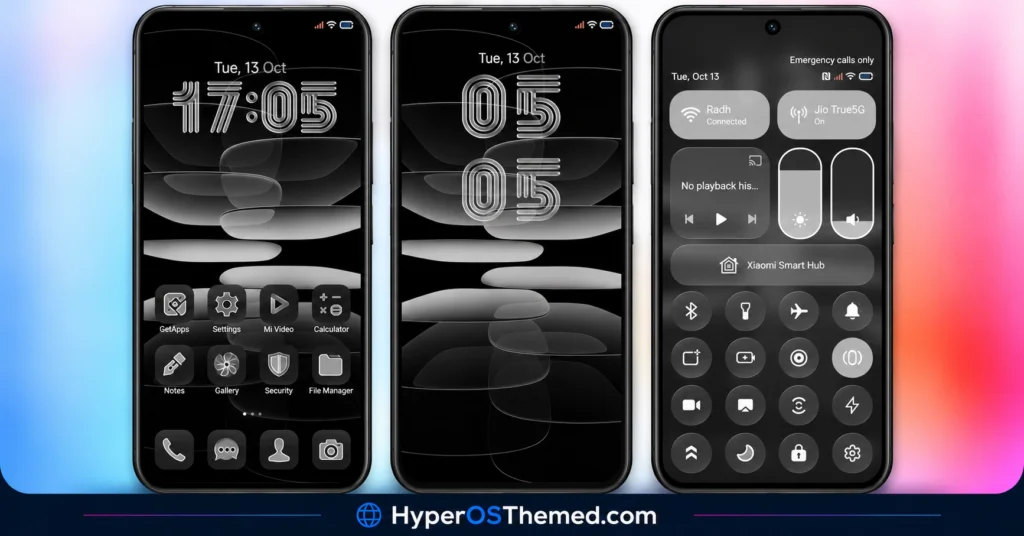
The frosted dock helps separate the home-screen icons from the background, and the Control Centre continues the theme’s clean styling. The result is a cohesive dark interface for users who prefer minimal colours and glass-inspired details over bright, colourful themes.
OX G3 Theme Overview
| Detail | Information |
|---|---|
| Theme Name | OX G3 |
| Designer | oxfury |
| Additional Contributor | masuod |
| Availability | Official Xiaomi Theme Store |
| Region | Global |
| Supported Devices | Xiaomi, Redmi and POCO |
| Compatibility | HyperOS, HyperOS 2 and HyperOS 3 |
| Main Features | Black glass UI, monochrome icons, outline clock, frosted dock and clean Control Centre |
| File Size | 64.56 MB |
| Price | Free |
Get OX G3 HyperOS Theme
For additional themes, visit the English Themes by Oxfury Telegram channel. Feedback can be shared through the Oxfury theme feedback channel.
Important Copyright Notice
The theme’s description credits oxfury and Masuod and states that some resources come from other creators. It also explicitly prohibits copying, re-uploading or modifying the theme without permission and warns that unauthorised use may be reported to Xiaomi for copyright violation.
Please respect the creators’ work. Downloading a theme for personal use does not automatically grant permission to redistribute it, modify it or claim it as your own.
OX G3 HyperOS Theme Compatibility
OX G3 Xiaomi Theme is compatible with HyperOS, HyperOS 2 and HyperOS 3 on Xiaomi, Redmi and POCO devices. However, the appearance of individual elements may vary depending on the phone model, system version and Themes app.
How to Install OX G3 on Global Stable ROM
If your Xiaomi, Redmi or POCO smartphone runs a compatible Global Stable ROM, follow these steps to install OX G3 through the official Xiaomi Theme Store.
- Click the OFFICIAL THEME STORE LINK button above using your phone.
- When prompted to choose an application, select the Themes app to open the link.
- You will be redirected to OX G3’s page in the Xiaomi Theme Store.
- Tap Download and wait for the download to finish.
- Tap Apply to activate the theme on your device.
Note: If the link opens in a browser instead, check whether the browser allows links to open in system applications. Restart your phone if you encounter display issues after applying the theme. If the problem persists, leave a comment describing your device and HyperOS version so others can help troubleshoot it.
Why Choose OX G3?
- Minimal black aesthetic: A dark design with restrained monochrome details.
- Glass-inspired interface: Layered shapes and a frosted dock add visual depth.
- Distinctive clock: An outline-style clock complements the minimalist lock screen.
- Monochrome icons: A consistent icon style helps maintain a coordinated home screen.
- Broad listed compatibility: Designed for HyperOS, HyperOS 2 and HyperOS 3.
Conclusion
The OX G3 HyperOS Theme by oxfury, with contributions from masuod, combines a deep black aesthetic with glass-inspired shapes and monochrome line icons. Its outline clock and frosted dock add detail without making the interface look overly busy.
The clean Control Centre extends the same visual style across the system. With compatibility listed for HyperOS, HyperOS 2 and HyperOS 3, it is worth considering if you prefer a minimalist dark theme. Before installing or sharing the package, check compatibility and respect the copyright restrictions stated by the creators.
You may also like:
iOS-Style NOX_V3 HyperOS Theme for Xiaomi, Redmi and POCO Devices
Luxury VK HyperOS Theme with Premium Icons, Custom Clocks and Charging Animation
