
The ss24 Theme, modified by suhel with credit to the original creator Wang Xiaoshuai, brings a bright and playful style to Xiaomi, Redmi and POCO smartphones. It combines colourful rounded icons, scenic wallpapers and a customisable lock screen with useful widgets for a more personalised interface.
ss24 HyperOS Theme‘s standout features include wallpapers featuring sunset forests and a lighthouse, adjustable clock colours, options to hide selected lock-screen modules, and sunrise or wind widgets. Its simple visual style makes ss24 Xiaomi Theme worth exploring if you prefer a colourful home screen without an overly complicated design.
ss24 Theme Key Highlights
1. Customisable Lock Screen and Scenic Wallpapers
- Scenic Wallpaper Collection: Choose from calming images featuring sunset forests and a lighthouse.
- Adjustable Clock Colours: Change the clock’s colour to suit your chosen wallpaper and preferred appearance.
- Hide Lock Screen Modules: Hide supported modules to create a cleaner layout.
- Sunrise and Wind Widgets: Add weather-related information to the lock screen using the available widgets.
- Dynamic Lock Screen: Dynamic lock-screen styling is listed among the theme’s features.
2. Colourful Rounded Icons and Home Screen
- Rounded App Icons: The theme includes redesigned icons with a rounded appearance.
- Colourful Visual Style: Bright icon colours complement the scenic wallpapers and playful overall design.
- Simple Layout: The theme focuses on a clean, uncluttered appearance rather than an excessively busy interface.
- Coordinated Design: Its wallpapers, icons and lock-screen elements work together to create a consistent look.
3. Clean Control Centre and System Styling
- Simple Control Centre: The interface follows the theme’s clean visual direction.
- Updated Status Bar: Status bar styling is included among the theme’s listed system changes.
- Always-on Display: A customised Always-on Display is mentioned in the theme description, although its exact design options are not specified.
- System-Wide Personalisation: The theme aims to refresh more than just the wallpaper by changing several visual elements across the interface.
ss24 Theme Preview
The ss24 HyperOS Theme preview gallery contains two screenshots showing the theme’s visual design. Its overall appearance combines scenic backgrounds with colourful rounded icons and a customisable lock screen.
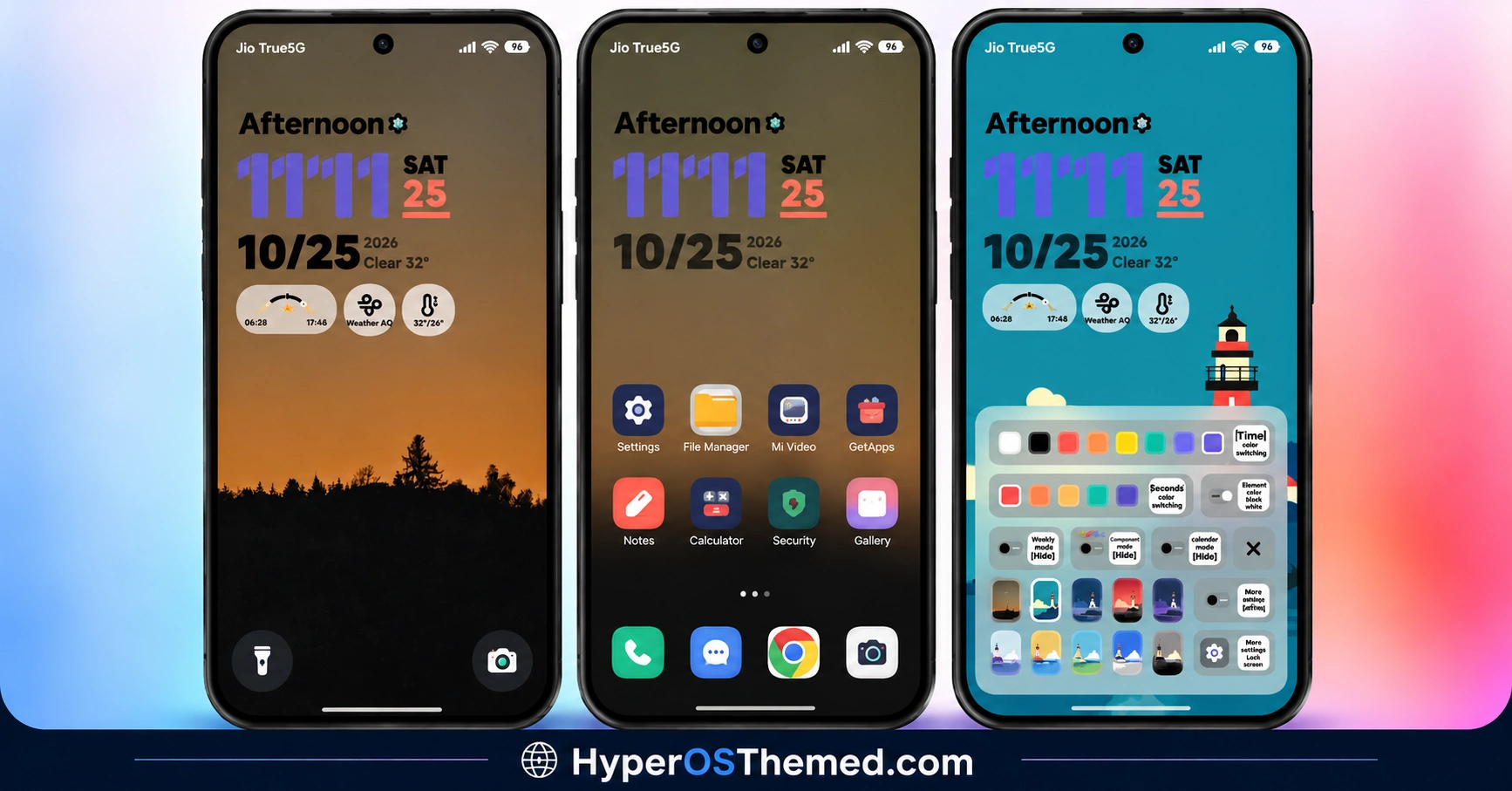
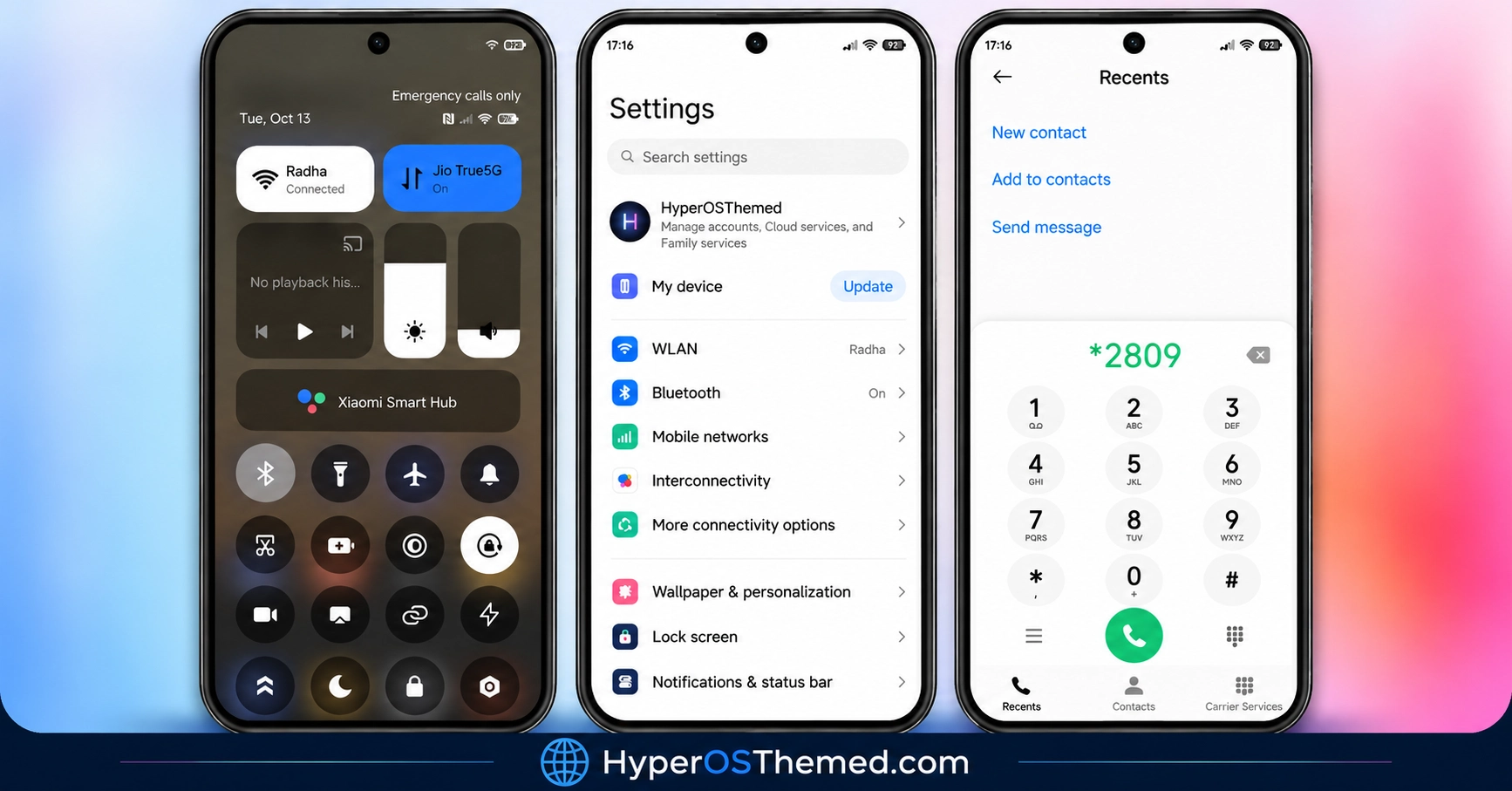
The wallpaper choices provide a calm backdrop, while adjustable clock colours and hideable modules give users more control over the lock-screen layout. Sunrise and wind widgets add another layer of personalisation for users who prefer glanceable information on their display.
ss24 Theme Overview
| Detail | Information |
|---|---|
| Theme Name | ss24 |
| Designer / Modifier | suhel |
| Original Creator | Wang Xiaoshuai |
| Availability | Official Xiaomi Theme Store |
| Region | Global |
| Supported Devices | Xiaomi, Redmi and POCO |
| Compatibility | HyperOS, HyperOS 2 and HyperOS 3 |
| Main Features | Colourful icons, scenic wallpapers, customisable lock screen and widgets |
| File Size | 21.14 MB |
| Price | Free |
Get ss24 HyperOS Theme
The theme description credits Wang Xiaoshuai as the original creator and suhel as the modifier. You can find additional themes from the modifier through the Themes MTZ Telegram channel: https://t.me/themesmtz
Copyright notice: Please respect the original creator’s work. Do not redistribute, modify or re-upload the theme without the necessary permission, and retain appropriate credit when discussing its design.
ss24 HyperOS Theme Compatibility
ss24 Xiaomi Theme is compatible with HyperOS, HyperOS 2 and HyperOS 3 on Xiaomi, Redmi and POCO smartphones. Actual behaviour can vary depending on the device, system version and Themes app.
Before applying the theme, check its availability through the official listing on your phone. Some customisation options may differ between devices, so confirm that the lock-screen features you want are supported by your system.
How to Install ss24 on Global Stable ROM
If your Xiaomi, Redmi or POCO smartphone runs a compatible Global Stable ROM, follow these steps to install ss24 through the official Xiaomi Theme Store.
- Click the OFFICIAL THEME STORE LINK button above.
- When prompted to choose an application, select the Themes app to open the link.
- You will be redirected to the ss24 Xiaomi Theme page in the Xiaomi Theme Store.
- Tap Download and wait for the download to finish.
- Tap Apply to activate the theme on your device.
Important notice: Restart your device if elements overlap or fail to display correctly after applying the theme. If the problem persists, leave a comment with your device model and HyperOS version for troubleshooting help.
Why Choose ss24?
- Calming wallpapers: Sunset forests and lighthouse imagery offer a relaxed visual style.
- Customisable lock screen: Adjust clock colours and hide supported modules.
- Useful widgets: Sunrise and wind widgets add weather-related information.
- Colourful icons: Rounded app icons create a bright, coordinated home screen.
- Compact package: The reported 21.14 MB size is smaller than many feature-rich themes.
Conclusion
The ss24 HyperOS Theme by suhel, with credit to Wang Xiaoshuai, combines scenic wallpapers, colourful rounded icons and practical lock-screen customisation. Its adjustable clock colours and hideable modules let you create a layout that suits your preferences, while sunrise and wind widgets add useful weather-related details.
The clean visual style makes it a good option for users who prefer a bright, uncluttered interface. With compatibility listed for HyperOS, HyperOS 2 and HyperOS 3, ss24 is worth considering if you want a fresh look for your Xiaomi, Redmi or POCO phone. Check compatibility before installing and respect the original creator’s work when sharing the theme.
You may also like:
iOS-Style NOX_V3 HyperOS Theme for Xiaomi, Redmi and POCO Devices
Luxury VK HyperOS Theme with Premium Icons, Custom Clocks and Charging Animation
Premium sk dark HyperOS Theme for Xiaomi, Redmi & POCO
S4u24 HyperOS Theme with Custom Lock Screen, Redesigned Icons and Control Centre
