
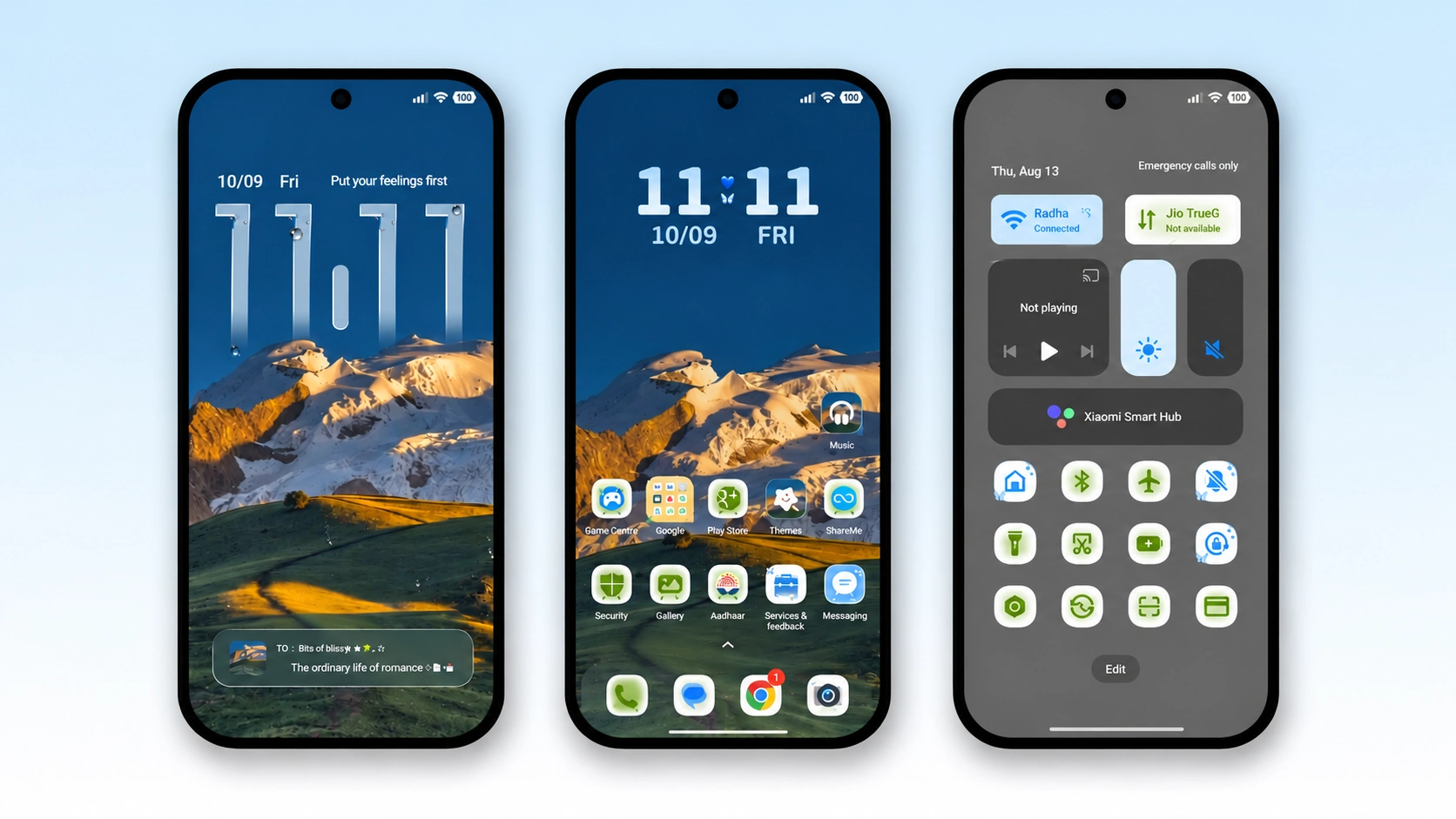
Snow Peak HyperOS Theme is a feature-rich theme that focuses on lock screen customisation, animated visual effects and a mountain-inspired design. Created by YES, it combines custom wallpapers, redesigned icons, interactive lock screen elements, widgets and charging animations to give the standard HyperOS interface a different appearance.
One of the main highlights of Snow Peak HyperOS Theme is its dynamic lock screen, which includes GIF effects and customisable controls. The theme also changes the appearance of selected interface elements, including the Control Center, while its gradient wallpapers and coordinated icon styling provide a consistent visual direction. It is available as an MTZ package with a listed file size of 44.87 MB.
Snow Peak HyperOS Theme Key Features
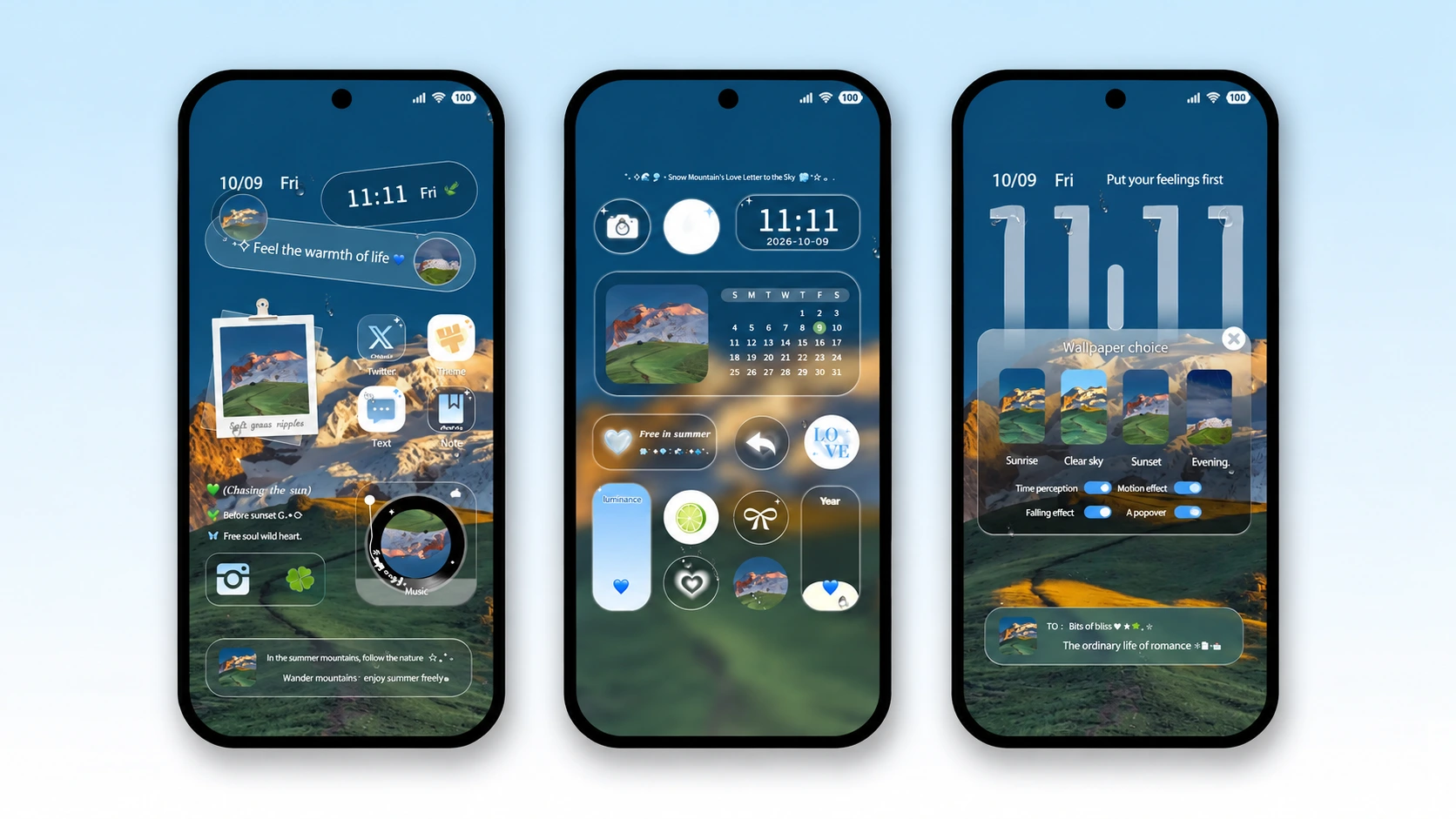
- Dynamic Lock Screen: Snow Peak places particular emphasis on lock screen customisation. Its dynamic layout provides a more interactive alternative to the standard lock screen, with custom elements that allow users to change aspects of its appearance and behaviour.
- GIF Animation Effects: The theme includes GIF effects that add animated visuals to supported lock screen elements. These effects provide more movement than a conventional static wallpaper, although the exact appearance and behaviour can depend on the installed HyperOS version.
- Custom Lock Screen Widgets: Snow Peak includes custom widgets designed to complement its lock screen layout. These elements add information and visual details to the display, giving users more options for arranging the lock screen instead of relying entirely on the default clock and notification layout.
- Custom Application Icons: The theme features a large collection of redesigned application icons. The icons follow a coordinated visual style that complements the theme’s wallpapers and interface elements, helping the home screen look more consistent than a mixture of unrelated icon designs.
- Gradient Wallpapers: Snow Peak includes wallpapers with gradient colours and a mountain-inspired visual direction. The colour transitions give the backgrounds more depth than plain, single-colour wallpapers, while the matching interface accents help maintain a consistent appearance across the theme.
- Custom Control Center: The theme also includes changes to the HyperOS Control Center. This extends the customisation beyond the home screen and lock screen, giving selected system controls a visual style that matches the rest of the theme. The exact changes may vary according to the installed ROM and system version.
- Charging Animations: Snow Peak includes charging animation effects as part of its customisation features. These animations add a visual element when the phone is connected to a charger, providing another themed detail beyond wallpapers, icons and lock screen styling.
- Additional Interface Changes: The theme modifies several parts of the overall interface rather than concentrating exclusively on one screen. Its combination of custom icons, wallpapers, lock screen elements and selected system UI changes is intended to create a more unified appearance across the device.
Snow Peak HyperOS Theme Preview
Snow Peak HyperOS Theme combines mountain-inspired imagery with gradient wallpapers, custom icons and an interactive lock screen. Animated GIF effects and charging visuals add movement, while the redesigned Control Center extends the theme’s styling into the system interface. The result is a customisation package that places greater emphasis on the lock screen and animated details than a basic wallpaper theme.
Snow Peak HyperOS Theme Overview
| Attribute | Details |
|---|---|
| Availability | Free, through the provided theme download link |
| Supported Devices | Xiaomi, Redmi and POCO phones running compatible HyperOS software |
| Theme Name | Snow Peak |
| Designer | YES |
| Region | Global |
| Compatibility OS | HyperOS; exact version compatibility may vary |
| Features | Dynamic lock screen, GIF effects, custom widgets, application icons, gradient wallpapers, Control Center changes and charging animations |
| File Size | 44.87 MB |
Get Snow Peak HyperOS Theme
Snow Peak is available through the theme download link provided with its listing. The available MTZ package is approximately 44.87 MB. Download the file from the supplied source and check that your device supports importing third-party themes before proceeding with installation.
Snow Peak HyperOS Theme Compatibility
Snow Peak Xiaomi Theme is listed for Xiaomi, Redmi and POCO devices running HyperOS, with Global region availability. However, the original listing does not establish guaranteed compatibility with every HyperOS release or device model. Dynamic lock screens, GIF effects and other customised components may behave differently across software versions. The publisher also warns that lock screen modifications can occasionally cause errors, including boot loops on some configurations. Back up important data and confirm compatibility with your specific ROM before applying the theme.
How to Install Snow Peak HyperOS Theme on Global Stable ROM
For devices running the official Global Stable ROM, use the official Theme Store link when the theme is available in your region.
- Open the Download Links section and locate the Official Theme Store Link for Snow Peak.
- Tap the link and allow your phone to open the destination.
- If prompted to choose an application, select the Themes app.
- The theme page should open in Xiaomi Theme Store.
- Tap Download and wait for the theme to finish downloading.
- Once the download is complete, select Apply to activate Snow Peak.
If the theme page is unavailable, check regional availability and confirm that the link is supported by your installed Theme Store version.
How to Install Snow Peak HyperOS Theme on Custom ROMs
For compatible Custom ROMs such as Xiaomi.eu, MIUIRoom, MIUI SR or HyperOS CN, you may be able to install Snow Peak by importing its MTZ package.
- Download the Snow Peak MTZ file from the provided download section.
- Open the Themes application on your device.
- Enter the Themes section and look for the Import option.
- Tap Import to open your phone’s file manager.
- Navigate to the folder containing the downloaded
.mtzfile. - Select the file and wait for the Themes app to complete the import.
- Find Snow Peak in the list of available themes once the import finishes.
- Open the theme and tap Apply to activate it.
- If problems occur, stop using the theme and follow a recovery method appropriate for your device and ROM.
If the Import option is missing or the file is rejected, check whether your ROM supports MTZ imports. Because Snow Peak uses customised lock screen components, compatibility checks are particularly important before installation.
Why Choose Snow Peak HyperOS Theme?
- Dynamic lock screen elements offer more customisation than a static layout.
- GIF effects introduce animation into supported lock screen components.
- Custom widgets provide additional lock screen styling options.
- A large collection of redesigned icons creates a coordinated home screen.
- Gradient wallpapers support the mountain-inspired visual design.
- Charging animations add another layer of visual customisation.
- Control Center changes extend the theme beyond the home screen.
- The 44.87 MB MTZ package provides a single download for compatible installations.
Conclusion
Snow Peak HyperOS Theme is a HyperOS theme built around interactive lock screen customisation and animated visual effects. Its main features include GIF effects, custom widgets, redesigned application icons, gradient wallpapers and charging animations. Changes to the Control Center extend the design into selected system interface elements.
Compatibility should be checked carefully because customised lock screen components can cause problems on some software configurations. Users should confirm that their ROM supports the theme and keep a recovery option available before applying it. For those who want a more animated lock screen and a coordinated set of interface changes, Snow Peak HyperOS Theme Xiaomi offers several customisation features in one package.
Also Check These Themes:
- Cool OS Raster Wallpaper HyperOS Theme For Xiaomi, Redmi and POCO
- ColorV16 HyperOS Theme with Dark AMOLED UI, Neon Clock and Circular Icons
- Liquid Beauty X HyperOS Theme with Liquid Wallpapers For Xiaomi, Redmi and POCO
- Gass BiZ 3 HyperOS Theme For Xiaomi, Redmi and POCO
- VK Blue Bloom HyperOS Theme With Blue Gradient Wallpapers For Xiaomi, Redmi and POCO
- Hyper Grayish 3 HyperOS Theme For Xiaomi, Redmi and POCO
