
Cool OS Raster Wallpaper HyperOS Theme is a custom theme designed for Xiaomi smartphones, featuring a distinctive visual style and interface customisation. It is available as a backup package and an MTZ file, giving users different installation options depending on their device and software environment.
The theme is listed for HyperOS and includes a dedicated set of preview screenshots to help users examine its appearance before downloading. With a package focused on wallpaper and interface customisation, Cool OS Raster Wallpaper HyperOS Theme offers an alternative to the default system design. Its backup and MTZ versions have different file sizes, so users should choose the appropriate package for their installation method.
Cool OS Raster Wallpaper Key Features
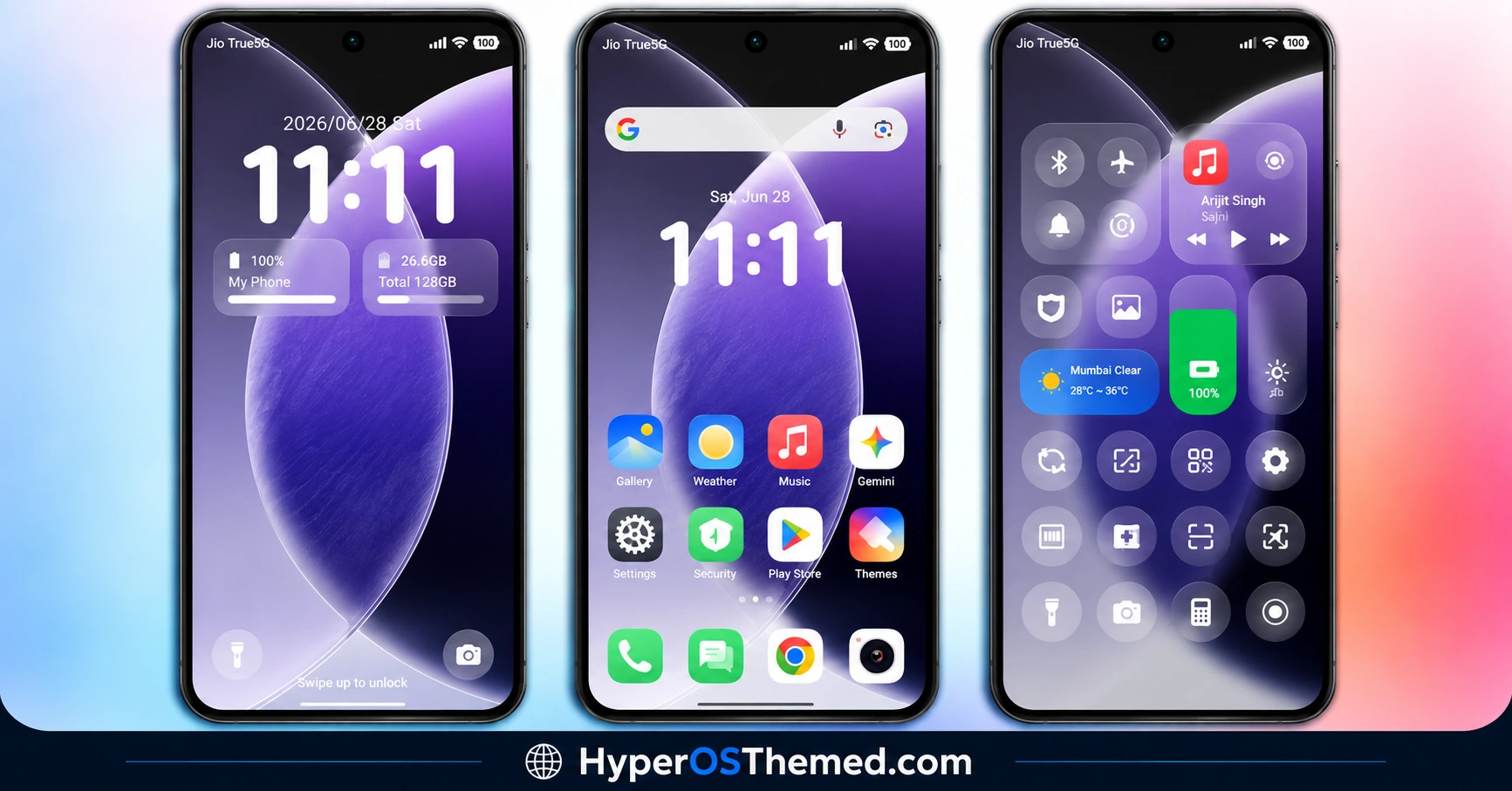
- Distinctive Raster Wallpaper Design: The theme’s main visual identity centres on its raster wallpaper presentation. Raster artwork uses pixel-based visual information to create patterns, textures and detailed imagery. The supplied screenshots provide a useful way to examine the actual wallpaper design before applying the theme.
- Customised Home Screen Appearance: Cool OS Raster Wallpaper changes the visual presentation of the home screen through its theme resources. The wallpaper serves as the foundation of the design, allowing users to give their device a different appearance without manually changing individual interface elements.
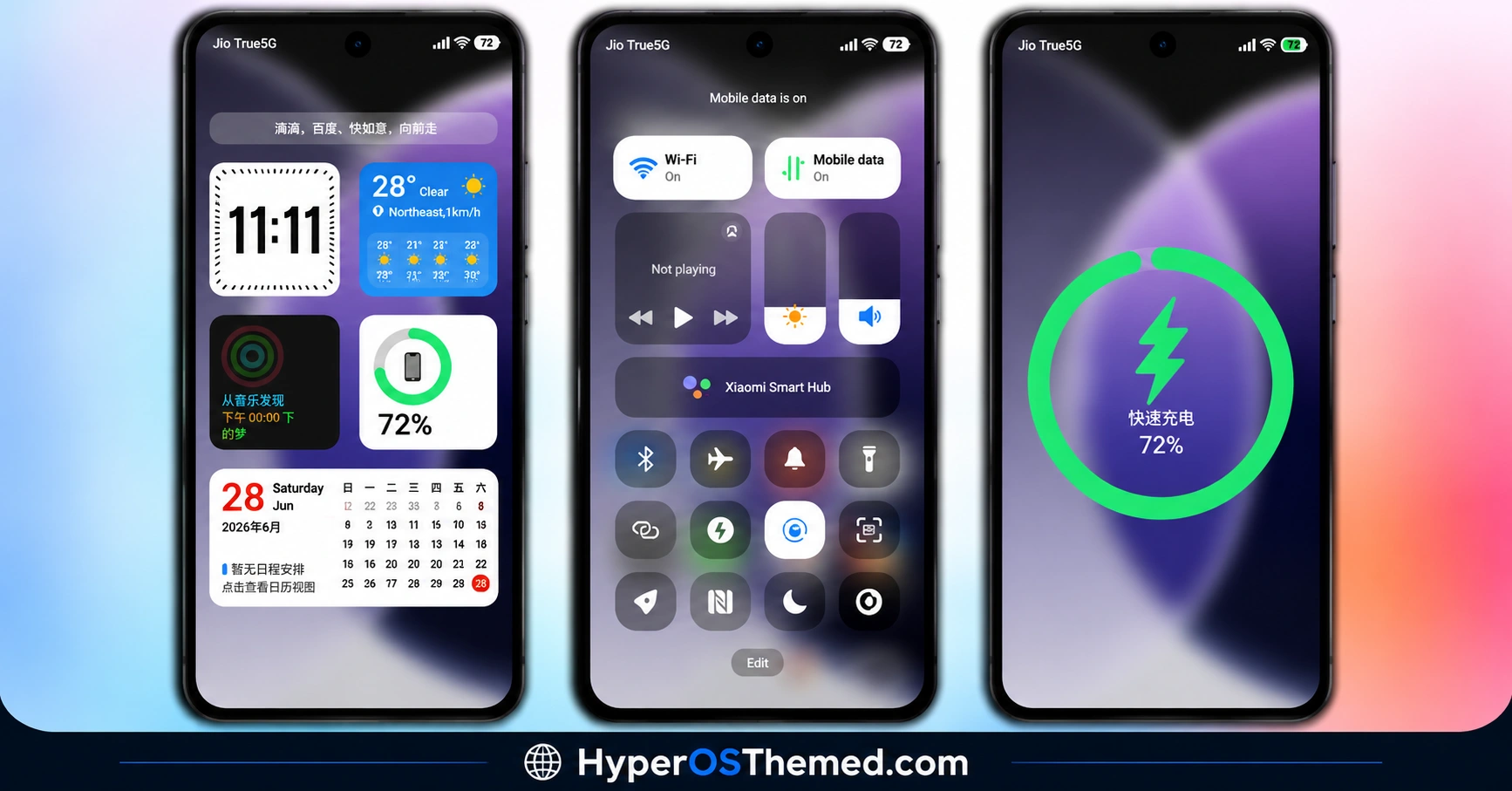
- Theme Resources Beyond Wallpapers: A HyperOS theme package can include additional resources for supported interface components. The exact extent of customisation depends on the resources included in this particular package and the device’s software version, so the preview screenshots should be checked before installation.
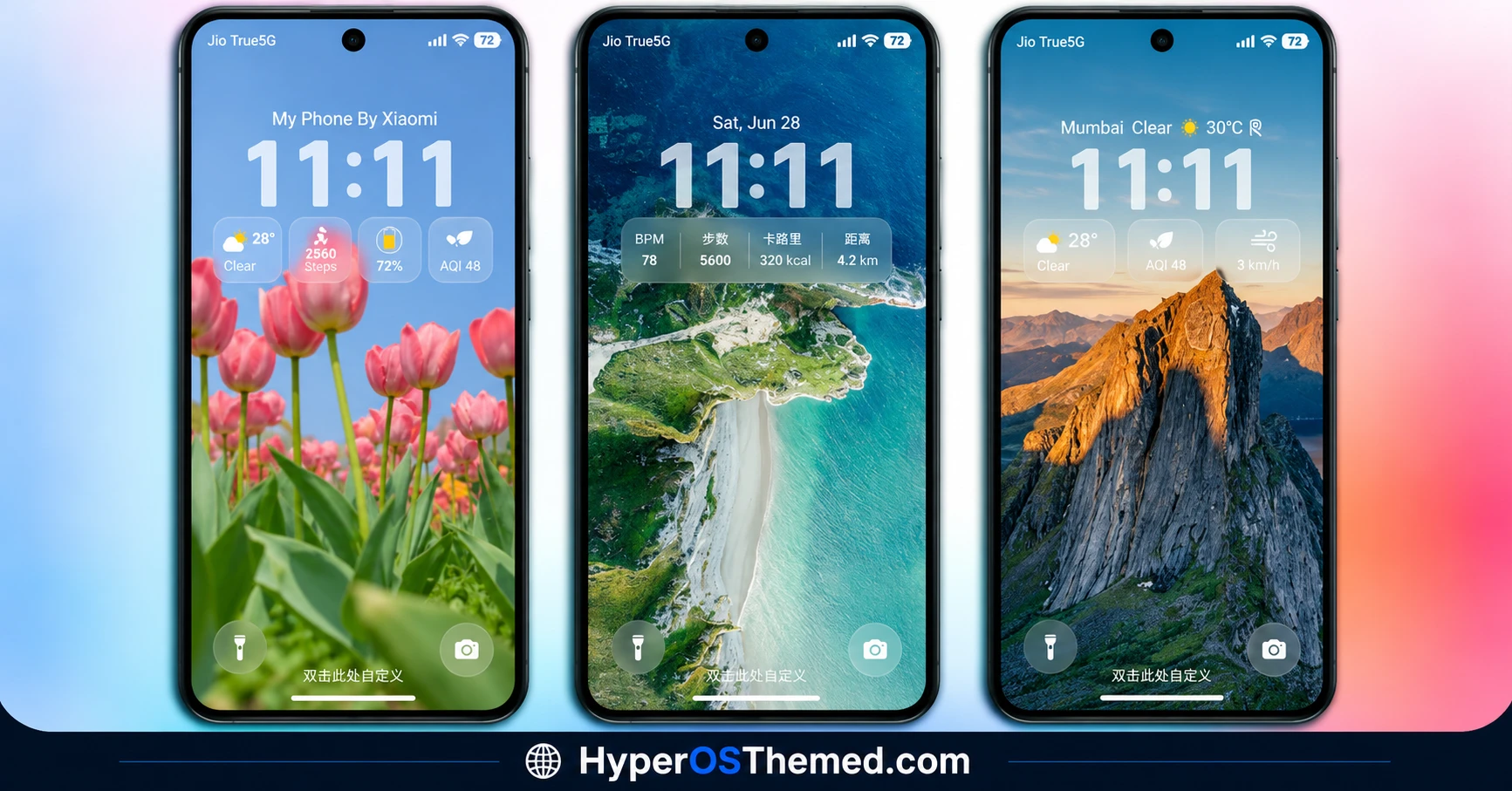
- Dedicated Theme Preview Screenshots: The theme listing includes seven preview images showing different parts of the interface. These images help users inspect the available visual design and understand how the theme is presented across the device before downloading it.
- Backup Package Availability: Cool OS Raster Wallpaper is available as a backup package measuring approximately 95.4 MB. This provides an alternative installation route for devices that support restoring compatible theme backups. Users should follow the instructions for their specific HyperOS version when restoring the package.
- MTZ File Availability: The MTZ version has a listed size of 79.9 MB. This format can be imported through the Themes application on compatible ROMs that support third-party MTZ packages. The smaller file size compared with the backup package also makes it important to select the correct download for the intended installation method.
- HyperOS Version Specific Installation Guides: The original listing provides separate video guides for HyperOS 1.0 and HyperOS 2.0 or 3.0. Following the appropriate guide can help users account for differences in the Themes application and installation process across software versions.
Cool OS Raster Wallpaper Preview
The Cool OS Raster Wallpaper preview contains seven screenshots illustrating the theme’s visual presentation. These images allow users to examine the wallpaper artwork and visible interface elements before installing the package. Reviewing the screenshots is recommended because the actual colours, icon styling and system changes should be judged from the supplied preview rather than assumed from the theme name alone.
Cool OS Raster Wallpaper Overview
| Attribute | Details |
|---|---|
| Availability | Free, through the provided download links |
| Supported Devices | Xiaomi, Redmi and POCO phones with compatible HyperOS software |
| Theme Name | Cool OS Raster Wallpaper |
| Designer | 橘柚 |
| Region | Not specified in the supplied listing |
| Compatibility OS | HyperOS 1.0, HyperOS 2.0 and HyperOS 3.0 installation guides are provided |
| Features | Raster wallpaper design, theme customisation, backup package and MTZ file |
| Backup File Size | 95.4 MB |
| MTZ File Size | 79.9 MB |
Get Cool OS Raster Wallpaper Theme
Cool OS Raster Wallpaper is available through the download links provided with the theme listing. The backup package is approximately 95.4 MB, while the MTZ file is 79.9 MB. Choose the format compatible with your device and installation method, and avoid downloading modified packages from untrusted sources.
Cool OS Raster Wallpaper Compatibility
Cool OS Raster Wallpaper is listed for HyperOS, with separate installation videos provided for HyperOS 1.0 and HyperOS 2.0 or 3.0. The designer is identified as 橘柚 in the supplied listing. Although these installation guides indicate the software versions covered by the publisher, they do not independently guarantee that every theme component will work on every Xiaomi, Redmi or POCO model. Compatibility may depend on the ROM region, Themes application version and whether the device supports restoring the backup or importing the MTZ file.
How to Install Cool OS Raster Wallpaper on Global Stable ROM
For devices running the official Global Stable ROM, the Theme Store method is the preferred route when the official theme link is available for the device.
- Open the Download Links section and find the Official Theme Store Link for Cool OS Raster Wallpaper.
- Tap the link and allow the phone to display the available applications for opening it.
- Select the Themes application to continue.
- The corresponding theme page should open in Xiaomi Theme Store.
- Tap Download and wait for the theme to finish downloading.
- Once the download is complete, select Apply to activate the theme.
If the Theme Store page does not open, try opening the link again in your browser. Theme availability can vary by region, so the official link may not work on every Global ROM installation.
How to Install Cool OS Raster Wallpaper on Custom ROMs
For compatible Custom ROMs such as Xiaomi.eu, MIUIRoom, MIUI SR or HyperOS CN, the MTZ version can be imported through the Themes application if the ROM supports this feature.
- Download the Cool OS Raster Wallpaper MTZ file from the provided download section.
- Open the Themes application on your smartphone.
- Enter the Themes section and look for the Import option.
- Tap Import to access your device’s file manager.
- Browse to the folder where the downloaded
.mtzfile is stored. - Select the MTZ package and wait for the Themes application to import it.
- After importing, locate Cool OS Raster Wallpaper in the available themes.
- Open the theme and tap Apply to activate it.
- If the interface does not update correctly, restart the device and check the theme again.
If the Import option is unavailable or the package is rejected, check whether the installed ROM and Themes application support MTZ imports. The process can differ between ROM versions, and importing an MTZ file is not supported on every device.
Why Choose Cool OS Raster Wallpaper?
- Offers an alternative to the standard HyperOS visual appearance.
- Includes a dedicated set of seven preview screenshots.
- Provides a backup package for supported restoration methods.
- Includes an MTZ version for compatible theme importing.
- Has separate installation video guides for HyperOS 1.0 and HyperOS 2.0 or 3.0.
- Provides two package options with different file sizes.
- Allows users to review the theme’s actual appearance before installing it.
Conclusion
Cool OS Raster Wallpaper is a HyperOS customisation option distributed in both backup and MTZ formats. Its listing includes seven preview screenshots and separate installation guides for HyperOS 1.0, HyperOS 2.0 and HyperOS 3.0.
The two download formats offer different installation routes, depending on the device’s capabilities and installed ROM. Checking the preview images and selecting the correct package are important steps before installation.
Confirm compatibility against the phone’s software and Themes app rather than assuming it from the HyperOS version alone. For users interested in trying a different visual style, the available previews and installation options provide a starting point for evaluating this theme.
Also Check These Themes:
- ColorV16 HyperOS Theme with Dark AMOLED UI, Neon Clock and Circular Icons
- Liquid Beauty X HyperOS Theme with Liquid Wallpapers For Xiaomi, Redmi and POCO
- Gass BiZ 3 HyperOS Theme For Xiaomi, Redmi and POCO
- VK Blue Bloom HyperOS Theme With Blue Gradient Wallpapers For Xiaomi, Redmi and POCO
- Hyper Grayish 3 HyperOS Theme For Xiaomi, Redmi and POCO
- Mamba BiZ 3 HyperOS Theme with Obsidian Business and Translucent Control Center
