
Flowing Star Trail HyperOS Theme is a Free theme designed by moscreen, built for devices running HyperOS, HyperOS 2.0, and HyperOS 3.0. It uses a dark, star-inspired color scheme paired with multiple widget and wallpaper options, giving the interface a futuristic look rather than a flat single-tone reskin.
Flowing Star Trail HyperOS Theme covers several system areas beyond the home screen, including the status bar, notification panel, dialer, and settings menu, keeping the visual style consistent across the device rather than limited to icons alone.
Flowing Star Trail HyperOS Theme Features
1. Multiple Widget Options: The theme includes several widget styles that can be placed on the home screen, giving more layout flexibility than a single default clock widget. This allows the home screen to be arranged differently depending on which widgets are selected.
2. Multiple Wallpaper Choices: More than one wallpaper option is included, so the background is not locked to a single design. This lets the purple star aesthetic be adjusted slightly while keeping the same icon and UI style throughout.
3. Redesigned Control Center: The Control Center is rebuilt with a new toggle arrangement and panel structure, moving away from the stock HyperOS quick settings layout. This changes both the appearance and grouping of toggles when the panel is pulled down.
4. Updated Status Bar: The status bar is changed from the stock layout to a style that matches the theme’s dark, elegant color scheme. Adjusted the signal, battery, and network icons to match this updated look.
5. Changed Notification Bar: The notification bar layout is modified from the default HyperOS design, keeping alerts visible while fitting the overall star-inspired visual style of the theme.
6. Unique Lock Screen: The lock screen is redesigned to stand apart from the stock HyperOS lock screen, with layout changes that give it a more distinct appearance. This is one of the most noticeable changes once you apply the theme.
7. Beautiful Icon Pack: App icons are redesigned with a dark, elegant style that matches the rest of the theme instead of using bright or high contrast colors. The icon set covers core system apps as part of the overall visual package.
8. Dialer Pad Redesign
The dialer pad interface is changed from the stock layout to match the theme’s dark color scheme, giving the calling screen a different look from the default HyperOS dialer.
9. Settings Menu Changes: The Settings app is also modified as part of the theme, extending the dark, star-inspired style into menus that are checked less often.
Flowing Star Trail HyperOS Theme Preview
The visual style leans on a dark, purple-toned color scheme with star-inspired graphics running through the icon pack, lock screen, and Control Center. The overall look stays consistent and low contrast rather than relying on bright or saturated colors.
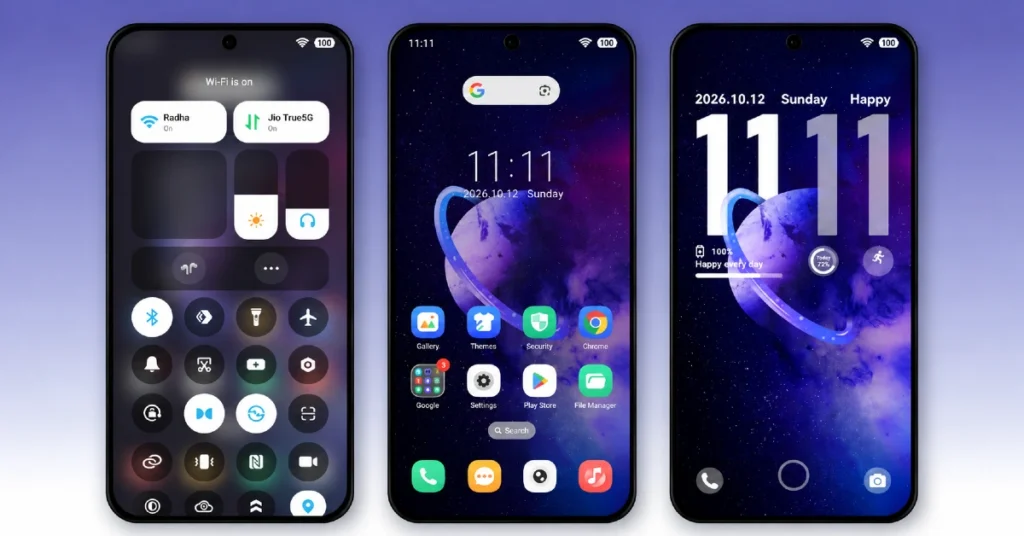
Flowing Star Trail HyperOS Theme Overview
| Attribute | Details |
|---|---|
| Availability | Free, via Xiaomi Theme Store or MTZ file |
| Supported Devices | Xiaomi, Redmi and POCO phones running HyperOS |
| Theme Name | Flowing Star Trail |
| Designer | moscreen |
| Region | Global |
| Compatibility OS | HyperOS, HyperOS 2.0 & HyperOS 3.0 |
| Features | Multiple widgets, multiple wallpapers, redesigned Control Center, updated status bar, unique lock screen, dialer pad redesign, settings menu changes |
| File Size | 9.10 MB |
Get Flowing Star Trail Theme
Flowing Star Trail HyperOS Theme can be downloaded directly through the official Xiaomi Theme Store link given above, or installed manually using the MTZ file for devices where the Theme Store link does not open as expected. Using either official source helps avoid the icon or lock screen glitches that can come with unverified theme files.
Flowing Star Trail Compatibility
Flowing Star Trail HyperOS Theme is compatible with Xiaomi, Redmi, and POCO devices running HyperOS, HyperOS 2.0, and HyperOS 3.0, making it one of the more broadly supported themes across different HyperOS builds. The file size stays under 10 MB, which keeps installation quick regardless of device storage.
Since it covers several system areas including the dialer and settings menu, some elements may appear slightly different depending on the exact HyperOS build and region installed on the device.
How to Apply Flowing Star Trail HyperOS Theme
- Open the Theme Store link given above on your Xiaomi, Redmi, or Poco device.
- This will redirect you to the Theme Store.
- Download and install the theme.
- Tap on Apply.
- Customize specific elements such as icons, lock screen, or widgets if needed.
- Reboot your device if any elements do not render correctly after applying, though this step is optional.
Why Choose Flowing Star Trail HyperOS Theme?
- Unique star-inspired lock screen – stands apart from the default HyperOS lock screen with a distinct layout.
- Redesigned Control Center – toggle arrangement and panel structure differ from the stock quick settings layout.
- Dark elegant icon pack – consistent low contrast style applied across core system apps.
- Multiple widgets and wallpapers – more layout and background choices than a single default option.
- Dialer pad redesign – calling screen matches the theme’s overall dark color scheme.
- Broad HyperOS compatibility – works across HyperOS, HyperOS 2.0, and HyperOS 3.0.
- Small file size – at 9.10 MB, installation stays quick even on storage-limited devices.
- Free official download – available through the Theme Store or a verified MTZ file link.
Conclusion
Flowing Star Trail HyperOS Theme brings a dark, purple-toned redesign to HyperOS that extends beyond the icon pack, covering the Control Center, status bar, dialer, and settings menu in a consistent style. Its unique lock screen and redesigned Control Center are the two changes most users will notice first after applying it.
Compatibility across HyperOS, HyperOS 2.0, and HyperOS 3.0 makes it accessible to a wide range of Xiaomi, Redmi, and POCO devices without needing a specific software version. The file size stays small at 9.10 MB, which keeps the download and install process quick.
For users who prefer a dark, star-inspired look with multiple widget and wallpaper choices, Flowing Star Trail is a solid theme available through both the official Theme Store and MTZ file.
Also Check These Themes:
- Super Mi Duo HyperOS Theme with iOS-Style Icons, Redesigned Lock Screen
- GIN SAND v2 HyperOS Theme for Xiaomi, POCO, Redmi
- Surge AP27 Pro HyperOS Theme with iOS-Style Depth Effect & Premium Widgets for Xiaomi, POCO, Redmi
- Regular-3 HyperOS Theme For Xiaomi, POCO, Redmi
- Original-3 HyperOS Theme with Clean iOS and Liquid Glass Blend for Xiaomi, POCO, Redmi
