
Aviation and mechanical design themes are a fairly niche corner of HyperOS theming, and Star Voyage Code leans into that niche fully, building plane-inspired widgets and a mechanical visual style into a business-leaning package rather than the usual gradient or nature wallpaper approach. Designed by moscreen, it’s remarkably compact at just 5.34 MB, built for Xiaomi, Redmi and POCO devices covering HyperOS, HyperOS 2.0 and HyperOS 3.0.
Star Voyage Code HyperOS Theme Key Features
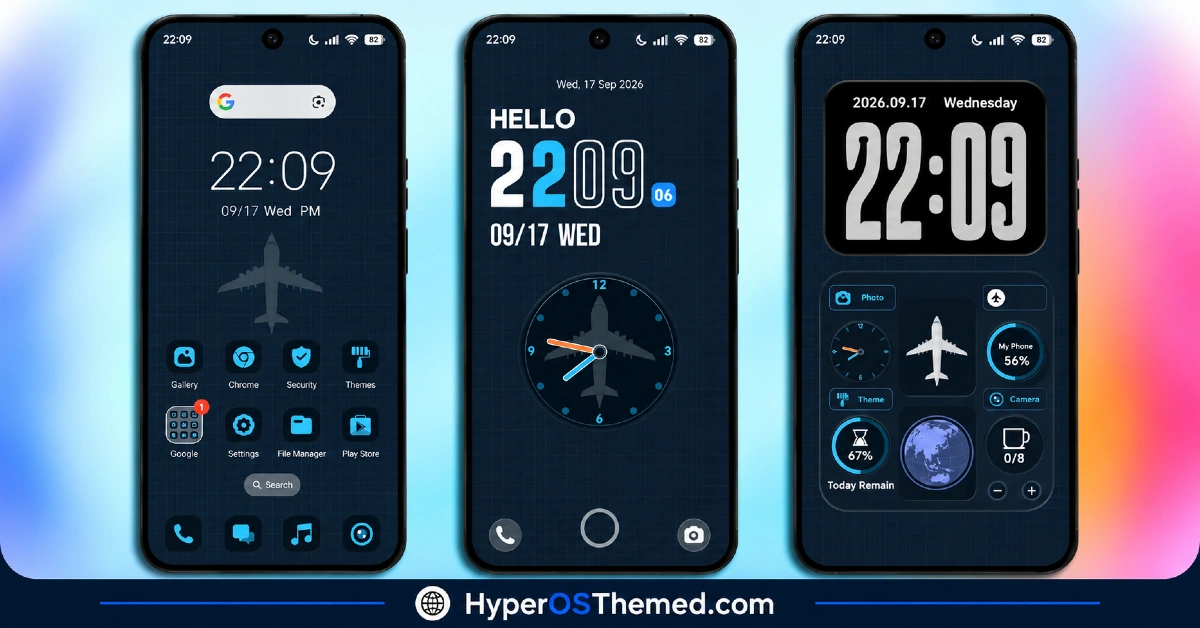
- Plane-Inspired Widget Design: The widgets carry an aviation-themed visual identity rather than the generic clock and weather boxes most themes default to. That specific inspiration gives Star Voyage Code HyperOS Theme Code a distinct personality that’s genuinely uncommon in this space.
- Mechanical Visual Style: Beyond the plane motif, the broader aesthetic leans into mechanical, engineered-looking design elements throughout. It ties into the overall “business meets aviation” tone the theme is clearly going for.
- Redesigned Control Centre: The Control Centre gets its own visual overhaul, keeping quick toggles aligned with the rest of the theme rather than sticking with the default flat HyperOS panel.
- Enhanced Notification Panel: Notifications get updated styling as well, so the mechanical, business-leaning aesthetic carries through more of the daily interaction points rather than stopping at the home screen.
- Updated Settings Interface: The Settings menu picks up its own visual refresh, improving both usability and consistency with the rest of the theme rather than leaving that section looking untouched and default.
- Custom Dialer Pad: The dialer gets its own styling pass, a detail plenty of themes skip entirely in favor of focusing purely on the home screen and lock screen. It’s a small addition that extends the theme’s reach into a genuinely functional part of daily phone use.
- Refined Icon Pack: Icons are styled to match the mechanical, business aesthetic rather than being left as a mismatched default set. That coordination helps the whole system feel like one cohesive package.
- Remarkably Compact Build: At 5.34 MB, Star Voyage Code HyperOS Theme Code is one of the lightest full-featured themes around, especially given how much of the system it touches, Control Centre, Notification Panel, Settings and the Dialer Pad included.
Star Voyage Code HyperOS Theme Preview
The screenshots below show the plane-inspired widgets, the mechanical styling and how the redesigned Control Centre and icon pack look once the theme is applied. Given how compact the file size is relative to what’s included, it’s worth browsing the preview to see just how much detail moscreen packed into so little space.
Star Voyage Code HyperOS Theme Details
| Attribute | Details |
|---|---|
| Availability | Free, via Xiaomi Theme Store |
| Supported Devices | Xiaomi, Redmi and POCO phones running HyperOS |
| Theme Name | Star Voyage Code |
| Designer | moscreen |
| Region | Global |
| Compatibility OS | HyperOS, HyperOS 2.0 and HyperOS 3.0 |
| Features | Plane-inspired widgets, mechanical visual style, redesigned Control Centre, enhanced Notification Panel, custom Dialer Pad |
| File Size | 5.34 MB |
Star Voyage Code Theme Compatibility
Star Voyage Code supports HyperOS, HyperOS 2.0 and HyperOS 3.0, giving it solid reach across Xiaomi, Redmi and POCO devices running any of those versions. Given how small the file size is relative to the number of elements it modifies, there’s generally less to go wrong during installation compared to heavier, effect-laden themes.
The theme also includes slide-down access to additional customization options, so it’s worth exploring those settings after applying to get the most out of the design. As with most themes touching the Dialer Pad and Control Centre, a quick restart after installation is a sensible step if anything looks slightly off on the first try.
Get Star Voyage Code HyperOS Theme
Download Star Voyage Code only through the official Theme Store link or the direct MTZ file link rather than random third-party file hosts or unofficial APK uploads. Files sourced outside verified channels are difficult to confirm as unaltered and may not reflect what moscreen actually released. Sticking to the official Theme Store link keeps the installed version consistent with the intended design and ensures any future updates remain accessible.
How to Apply Star Voyage Code HyperOS Theme
Follow the steps below to apply the theme:
- Open the Theme Store link given above on your Xiaomi, Redmi or POCO device.
- This will redirect you to the Theme Store.
- Download and install the theme.
- Tap on Apply.
- Customize specific elements such as icons, lock screen or status bar if needed.
- Reboot your device for the full effect, though this step is optional.
Note: If anything looks overlapped or doesn’t display correctly right after installing, restarting the device usually clears it up without further steps. Star Voyage Code has been checked across its supported HyperOS versions without any major issues turning up. Still, if something looks off on a specific device once it’s applied, leaving a comment with the details helps get it looked into.
Installing Star Voyage Code HyperOS Theme on Custom ROM Devices
Devices running a Custom ROM aren’t able to use the direct Theme Store link, so the MTZ file needs to be brought in manually through the Theme Store app instead. Here’s how that works:
- Grab the MTZ file for Star Voyage Code from the download section.
- Open the Theme Store app.
- Go into the Themes tab.
- Scroll down to find the Import option, then tap it.
- Use the file manager to locate the downloaded .mtz file.
- Wait for the import process to finish.
- Tap the theme once it appears in the list to apply it.
Why Choose Star Voyage Code HyperOS Theme?
- Distinctive aviation-inspired widgets — a plane and mechanical motif that stands apart from generic clock displays.
- Remarkably small file size — 5.34 MB is tiny given how much of the system this theme touches.
- Custom Dialer Pad styling — a detail many themes overlook entirely.
- Full system coverage — Control Centre, Notification Panel and Settings all get updated, not just the home screen.
- Coordinated icon design — icons match the mechanical, business-leaning aesthetic throughout.
- Broad HyperOS compatibility — works across HyperOS, HyperOS 2.0 and HyperOS 3.0.
- Quick, effortless installation — the tiny file size means near-instant downloads.
- Free official download — no cost involved and distributed through legitimate channels.
Conclusion
Star Voyage Code HyperOS Theme Code carves out a genuinely distinctive niche with its plane-inspired widgets and mechanical visual style, packed into a file size a fraction of what most comparable themes require. The Dialer Pad, Control Centre and Notification Panel all get real attention rather than being left as an afterthought. For Xiaomi, Redmi and POCO users who want a theme with real character and a business-meets-aviation edge, Star Voyage Code Xiaomi Theme Code is well worth trying.
You may also like:
GeloBlackPlay HyperOS Theme with AMOLED Black & 3D Icons for Xiaomi, POCO, Redmi
Red Moon HyperOS Theme ~ Red-Toned Dark One UI Style for Xiaomi, POCO, Redmi
Default-3 HyperOS Theme with Blue Liquid Glass effect for Xiaomi, POCO, Redmi
FiftyK HyperOS Theme ~ iOS-Style Control with Floral Mediterranean Look for Xiaomi, POCO, Redmi
