
Blosug v2 HyperOS Theme is a HyperOS theme designed by Nata, built specifically for devices running HyperOS 2 and HyperOS 3. It focuses on a minimal, low-contrast visual style that reworks icons, the lock screen, and system menus without adding unnecessary visual clutter across the interface.
The theme is aimed at users who prefer a calm, distraction-free look over bold colors or heavy customization. It applies consistently across core system apps, giving the phone a more unified appearance rather than a patchwork of themed and untouched elements.
Blosug v2 HyperOS Theme Key Features
1. System Wide Icon Consistency: Blosug v2 HyperOS Theme reworks icon shapes and spacing so that stock app icons, including the dialer, messages, camera, and settings, follow a uniform rounded-square style. This creates a more even home screen grid compared to themes that simply resize icons without adjusting spacing.
2. Redesigned Lock Screen Layout: The lock screen clock is repositioned higher on the display, leaving more room below for notification stacks. This layout keeps multiple notifications readable without overlapping text, even when several apps send alerts at once.
3. Control Center Toggle Spacing: Quick settings toggles are spaced further apart than the default HyperOS layout. This makes the panel easier to navigate for one-handed use, though it does reduce the number of toggles visible per row.
4. Settings App Reorganization: Menu items within Settings use slightly heavier section dividers, making individual categories easier to scan. The change is subtle but improves navigation when locating specific toggles.
5. Status Bar Icon Clarity: Signal, WiFi, and battery icons are drawn thinner with increased contrast against both light and dark wallpapers. This improves readability at a glance, particularly outdoors or in bright lighting.
6. Lightweight Animation Set: Menu transitions and app-open animations are toned down rather than removed entirely. The animation set is designed to maintain smooth performance without adding unnecessary motion.
7. Dual Mode Color Handling: Light and dark modes share the same muted color palette rather than dark mode simply inverting the light mode colors. This keeps icon and UI colors consistent regardless of which mode is active.
Blosug v2 HyperOS Theme Preview
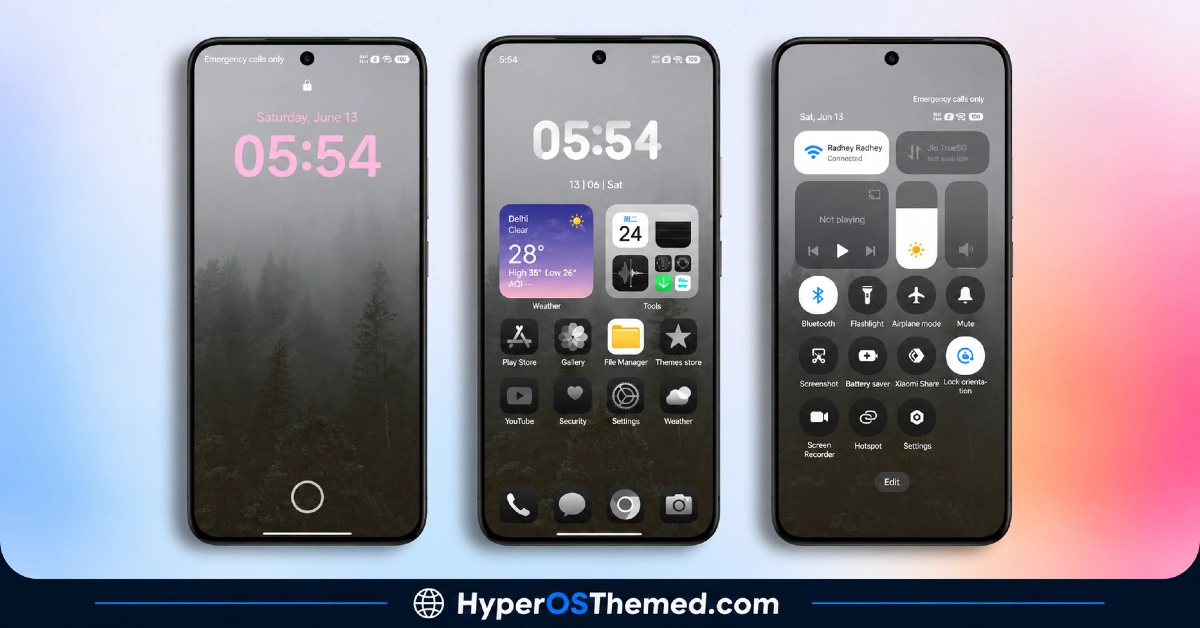
The visual style relies on soft neutrals, primarily off-white and warm gray tones, paired with a muted coral accent that appears on toggles and the lock screen clock. The overall palette avoids strong contrast or saturated colors, keeping the interface understated throughout.
Blosug v2 HyperOS Theme Overview
| Attribute | Details |
|---|---|
| Availability | Free, via Xiaomi Theme Store |
| Supported Devices | Xiaomi, Redmi and POCO phones running HyperOS |
| Theme Name | Blosug v2 |
| Designer | Nata |
| Region | Global |
| Compatibility OS | HyperOS 2 & HyperOS 3 |
| Features | Minimal icon pack, redesigned lock screen, refined control center, settings UI reorganization, status bar clarity, lightweight animations |
| File Size | Approx. 45–60 MB (varies by device) |
Get Blosug v2 HyperOS Theme
Blosug v2 can be downloaded directly through the official Xiaomi Theme Store using the link provided above. Downloading themes only from the official store helps avoid compatibility issues or icon glitches that can occur with unofficial theme files.
Blosug v2 HyperOS Theme Compatibility
Blosug v2 HyperOS Theme xiaomi is compatible with Xiaomi, Redmi, and Poco devices running HyperOS 2, which is based on Android 14, as well as HyperOS 3, which rolls out on Android 15 and 16 based builds. Some UI elements may render slightly differently depending on the specific device model or system version installed. Theme availability can also vary by region, since Xiaomi rolls out Theme Store listings in stages rather than all at once.
How to Apply Blosug v2 HyperOS Theme
- Open the Theme Store link given above on your Xiaomi, Redmi, or Poco device.
- This will redirect you to the Theme Store.
- Download and install the theme.
- Tap on Apply.
- Customize specific elements such as icons, lock screen, or status bar if needed.
- Reboot your device for full effect, though this step is optional.
Why Choose Blosug v2 HyperOS Theme
- Consistent icon design — every stock app icon shares the same rounded-square shape and spacing instead of a mismatched mix.
- Redesigned lock screen — clock sits higher, leaving more room for notification stacks to stay readable.
- Wider control center spacing — toggles are easier to tap one-handed, unlike the tighter default HyperOS layout.
- Unified light and dark palette — both modes use the same muted tones instead of a jarring inverted look.
- Lightweight animation set — transitions are toned down, not removed, keeping things smooth without extra motion.
- Clearer settings navigation — heavier section dividers make specific toggles faster to find.
- No root or third-party tools needed — installs directly through the official Theme Store.
- Stable across HyperOS 2 and HyperOS 3 — same consistent performance on Xiaomi, Redmi and POCO devices.
Conclusion
Blosug v2 offers a minimal, icon-consistent HyperOS experience aimed at users who prefer a clean and understated interface. Its redesigned lock screen and refined control center spacing address common usability points without disrupting system performance. The theme supports HyperOS 2 and HyperOS 3 across Xiaomi, Redmi, and Poco devices, making it accessible to a wide range of users within the Xiaomi ecosystem.
While the color palette stays limited to soft neutrals and a single accent tone, this keeps the overall design cohesive and distraction-free. For users looking for a stable, lightweight theme without a steep learning curve, Blosug v2 is a practical option available through the official Theme Store.
You may also like:
Whitedust HyperOS Theme with Minimalist Green Gradient and Custom Widgets for Xiaomi, POCO, Redmi
GIN SAND HyperOS Theme with Minimal Liquid Glass effect for Xiaomi, POCO, Redmi (2026)
iP26 Super 3D Depth of Field HyperOS Theme for Xiaomi, POCO, Redmi
FrostedRealm HyperOS Theme with 3D Liquid Glass Effect for Xiaomi, POCO, Redmi
TNV1 HyperOS Theme with Feature-Rich Lock Screen for Xiaomi, POCO, Redmi
