A smartphone lock screen doesn’t have to be limited to a clock, wallpaper and a couple of shortcuts. With the right theme, it can become a personalised space where the time, widgets and background artwork work together. The OX G6 V2 HyperOS Theme takes this approach with a large liquid glass clock, scenic depth-effect wallpapers and movable lock screen elements, bringing a more detailed design to Xiaomi, Redmi and POCO smartphones.
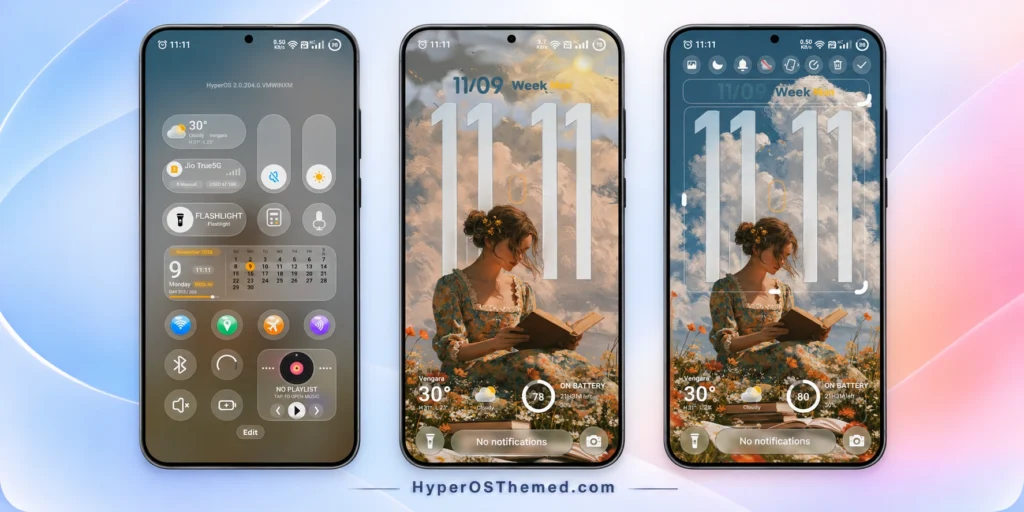
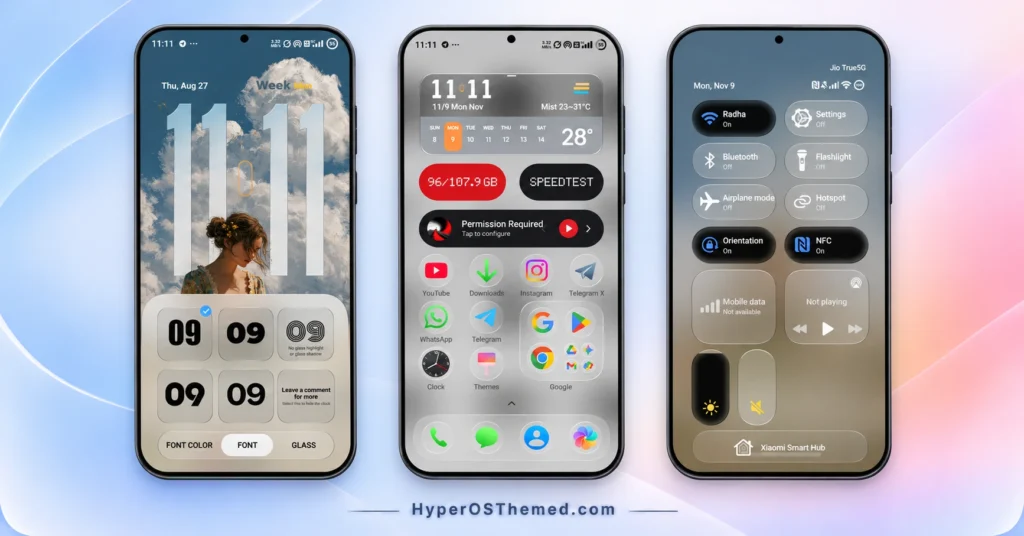
Created by OX × MS Premium Themes, OX G6 V2 combines oversized clock typography with soft glass effects, animated wallpapers and several layout customisation options. The theme also features an interactive Dynamic Island, transparent rounded app icons and a redesigned Control Centre. Its screenshots show a scenic lock screen with a woman reading among flowers, a translucent home screen with colourful icons and a Control Centre built around rounded glass-style controls.
OX G6 V2 is designed for HyperOS 2 and HyperOS 3 on compatible devices. It may appeal to users who enjoy photography-inspired wallpapers, large clock designs and more control over their lock screen layout. The theme also uses a password-protected customisation system, so there is an additional setup step after installation. Below, we’ll explore its main features, preview design, compatibility and the correct way to activate its lock screen settings.
OX G6 V2 HyperOS Theme Key Highlights
1. Liquid Glass Clock and Customisable Lock Screen
- Large Liquid Glass Clock: OX G6 V2 features an oversized digital clock with translucent styling. The large numerals stand out against the wallpaper while allowing parts of the background artwork to remain visible through the clock design.
- Multiple Clock Styles: The theme includes different clock designs and visual effects, giving users more flexibility than a single fixed time display. The screenshots highlight a tall, bold clock with a layered appearance.
- Adjustable Clock Position: Users can change the position of the lock screen clock to suit their selected wallpaper. This is particularly useful when the background contains a person or another prominent subject that would otherwise be covered by the time display.
- Movable Date and Widgets: The theme allows supported date elements and lock screen widgets to be repositioned. This helps users arrange information around the wallpaper rather than keeping everything in one predefined layout.
- Custom Notification and Shortcut Placement: Notification elements and shortcut buttons can also be adjusted, allowing users to create a more open layout or keep frequently used controls close to the bottom of the screen.
2. Scenic Wallpapers, Depth Effects and Animations
- Depth-Effect Wallpaper Support: OX G6 V2 uses layered wallpaper effects that create the impression of foreground subjects appearing in front of the large clock. In the preview, the woman reading among flowers overlaps the clock numerals, making the time display appear behind the subject.
- Multiple Wallpaper Animations: The theme includes different wallpaper animation options, allowing users to change the visual movement of supported backgrounds without replacing the entire theme.
- Customisable Gravity Effects: Gravity-based animation options are included among the lock screen settings. These effects add another interactive element to the wallpaper presentation, with their appearance depending on the selected configuration.
- Scenic Lock Screen Design: The showcased wallpaper combines soft clouds, flowers and a reading scene with warm colours. The oversized translucent clock complements the artwork while keeping the main subject visible.
3. Dynamic Island and Interactive Lock Screen Elements
- Interactive Dynamic Island: OX G6 V2 includes a Dynamic Island-style element designed to display music and notification information near the top of the screen. Its appearance follows the theme’s rounded, translucent styling.
- Animated Notification Presentation: The Dynamic Island includes animation effects that give supported notifications and music information a more interactive presentation.
- Glass-Style Lock Screen Notifications: The preview shows notifications inside rounded, semi-transparent panels. These panels sit over the scenic wallpaper without completely hiding the artwork beneath them.
- Weather and Battery Information: The showcased lock screen includes weather information near the lower portion of the display, alongside a circular battery indicator. These details add useful information around the main clock.
- Simulated Control Centre Panel: The theme also includes a fake Control Centre-style panel on the lock screen with blur and glass effects. This is a visual lock screen feature and should not be confused with the phone’s actual system Control Centre.
4. Transparent Glass Icons and Custom Home Screen
- Rounded Glass-Style App Icons: OX G6 V2 includes a transparent icon pack with rounded backgrounds. The screenshots show colourful application symbols placed inside translucent circular surfaces, giving the home screen a glass-inspired appearance.
- Custom Home Screen Clock Widget: A large information widget appears at the top of the showcased home screen, combining a digital clock, date details, weather information and a small calendar strip.
- Additional Information Cards: The home screen preview includes separate cards displaying storage information and a Speedtest shortcut, alongside a music panel. The music card shown in the screenshot requires configuration before use.
- Frosted Home Screen Dock: The dock uses a wide, rounded translucent background that visually separates frequently used applications from the wallpaper while maintaining the theme’s transparent design.
5. Redesigned Glass Control Centre
- Eight Large Glass-Inspired Tiles: OX G6 V2 features a customised Control Centre built around larger rounded control elements. The layout uses translucent backgrounds and softened edges to create a glass-like appearance.
- Custom Brightness and Volume Sliders: The Control Centre preview shows tall, rounded sliders with light grey surfaces. Their appearance matches the surrounding translucent panels and keeps the controls visually distinct.
- Weather and Calendar Panels: The showcased Control Centre includes weather information and a calendar widget, extending the interface beyond conventional quick-setting buttons.
- Custom Music Controls: A music panel with playback controls appears in the lower portion of the Control Centre, following the same rounded design as the other tiles.
- Colourful Quick Settings Icons: Several controls use colourful circular icons against the muted glass background, adding contrast without changing the overall translucent appearance.
OX G6 V2 HyperOS Theme Preview
The OX G6 V2 preview screenshots highlight three main areas of the theme: the lock screen, home screen and Control Centre.
The lock screen is the most distinctive part of the design. It features a large translucent digital clock positioned behind a woman reading in a field of flowers. Weather details, battery information, notifications and rounded shortcut buttons appear around the artwork, demonstrating how the theme combines decorative elements with everyday information.
The home screen uses a soft grey background with transparent circular icons and a custom clock widget. In contrast, the redesigned Control Centre features rounded translucent panels, vertical sliders, weather information, calendar details and a music player. Together, these screens show how the glass-inspired styling extends beyond the lock screen.
OX G6 V2 HyperOS Theme Overview
| Attribute | Details |
|---|---|
| Theme Name | OX G6 V2 |
| Designer | OX × MS Premium Themes |
| Release Date | November 9, 2026 |
| Compatibility OS | HyperOS 2 and HyperOS 3 |
| Supported Devices | Compatible Xiaomi, Redmi and POCO smartphones |
| Design Style | Liquid Glass, Depth Effect, Transparent Icons |
| Main Features | Customisable lock screen, liquid glass clock, animated wallpapers, Dynamic Island, glass icons, redesigned Control Centre |
| Lock Screen Password | Masuod |
| Availability | Xiaomi Theme Store, subject to device and region |
Get OX G6 V2 HyperOS Theme
Click the OFFICIAL THEME STORE LINK button below to view OX G6 V2 in the Xiaomi Themes app and apply it to your compatible smartphone.
The theme’s advanced lock screen customisation is password-protected. After applying the theme, you must enter the password in its lock style settings to access the protected customisation features.
OX G6 V2 HyperOS Theme Compatibility
OX G6 V2 is designed for HyperOS 2 and HyperOS 3 on supported Xiaomi, Redmi and POCO smartphones. The theme includes lock screen animations, depth effects and custom system panels, so the appearance of individual elements may vary depending on the device and installed software version.
Some preview elements also depend on supported system functions and permissions. For example, music and notification information may require additional configuration before it appears correctly.
Although the designer describes the rounded glass icons as HyperOS 4-style icons, this refers to their visual design and does not confirm compatibility with HyperOS 4.
How to Enter the OX G6 V2 Lock Screen Password
OX G6 V2 uses a password-protected lock screen configuration. The password shown in the designer’s announcement is:
Password: Masuod
You can also find the password in the designer’s Telegram announcement.
Follow these steps to enter it:
- Open the Xiaomi Themes app.
- Go to My Account.
- Open Lock Styles.
- Select the OX G6 V2 lock style and tap Customize.
- Scroll to the bottom of the customisation options.
- Find the password-entry section and enter Masuod.
- Confirm the password, then access the available lock screen customisation options.
Once the protected settings are accessible, you can explore the supported clock styles, wallpaper effects, widget positions and other layout adjustments.
Important Note: If the lock screen clock, widgets, notification panels or other theme elements overlap or display incorrectly after installation, restart your smartphone and check again. If the issue continues, leave a comment with your device model and HyperOS version so the problem can be investigated.
Why Choose OX G6 V2 HyperOS Theme?
- Large Liquid Glass Clock: Oversized translucent numerals create a distinctive lock screen design.
- Flexible Lock Screen Layout: Adjust supported clock, date, widget, notification and shortcut positions.
- Depth-Effect Wallpapers: Layered artwork allows foreground subjects to appear in front of the clock.
- Animated Visual Effects: Wallpaper animations and configurable gravity effects offer additional personalisation.
- Interactive Dynamic Island: Music and notification information can appear in a custom animated display.
- Transparent Rounded Icons: Glass-style app icons give the home screen a coordinated appearance.
- Redesigned Control Centre: Rounded tiles, custom sliders and information panels continue the translucent design.
Conclusion
The OX G6 V2 HyperOS Theme places most of its attention on the lock screen, combining a large liquid glass clock with scenic depth-effect wallpapers and extensive layout customisation. Its movable widgets, adjustable shortcut positions and animation options make it particularly interesting for users who prefer to personalise individual interface elements rather than keep a fixed design.
The theme also extends its glass-inspired styling to the home screen and Control Centre through transparent icons, rounded information cards and customised quick settings. For Xiaomi, Redmi and POCO users running a supported HyperOS version, OX G6 V2 offers a detailed visual design with plenty of options to explore. Just remember to enter the lock screen password after installation to access its protected customisation settings.
Frequently Asked Questions
1. What is the OX G6 V2 lock screen customisation password?
The password is Masuod. In Xiaomi’s Themes app, go to My Account → Lock Styles → OX G6 V2 → Customize, then scroll to the password-entry section. Enter it exactly as shown to access the protected settings.
2. Can I move the clock and widgets away from the wallpaper’s subject?
Yes. OX G6 V2 lets you reposition supported clock, date, widget, notification and shortcut elements. This gives you room to arrange information around the wallpaper’s main subject while preserving its layered appearance.
3. Why isn’t music information appearing in the Dynamic Island?
Music information may require additional configuration and supported permissions before it appears. Check the theme’s music settings and any permission prompts; applying the theme alone may not activate every music-related element.
4. Is the Control Centre panel on the lock screen the actual system Control Centre?
No. The lock screen includes a simulated Control Centre-style panel with glass and blur effects. It is separate from the phone’s actual Control Centre, so you should not assume that every displayed element provides the same system controls.
5. Does OX G6 V2 support HyperOS 4?
Compatibility is specified for HyperOS 2 and HyperOS 3. The phrase “HyperOS 4-style icons” describes their appearance and does not confirm HyperOS 4 support. Check compatibility on your device before applying the theme to another version.
You may also like:
OX GRAY HyperOS Theme with Premium Gray Icons and a Minimal Lock Screen
ARBITRUM HyperOS Theme with Custom Lock Screen, Scenic Wallpapers & Glass Control Centre
s4u16 HyperOS Theme with iOS 27-Inspired Lock Screen, Custom Widgets & Control Centre
Spark HyperOS Theme with Purple Gradients, Frosted Glass & Custom Widgets