Xiaomi’s HyperOS themes offer a simple way to change a phone’s appearance without installing a different launcher or making major system changes. Some themes focus on icons and wallpapers, while others go further by changing the lock screen, widgets, and Control Center. ARBITRUM HyperOS Theme is one such theme, with a design built around scenic wallpapers and a more detailed lock screen experience.
The ARBITRUM HyperOS Theme, created by maidul, combines large depth-effect clock numerals with a collection of landscape wallpapers, dark-style app icons, and a frosted-glass interface. Its lock screen also includes customization options for changing wallpapers, clock fonts, and visual effects, so users can adjust the appearance rather than stick to a single layout.
If you prefer photography-inspired backgrounds and a darker interface over the standard HyperOS appearance, ARBITRUM HyperOS Theme is worth exploring. Below, you can take a closer look at its screenshots, customization options, compatibility, and installation process.
Key Highlights of ARBITRUM HyperOS Theme
1. Customisable Lock Screen with Large Clock
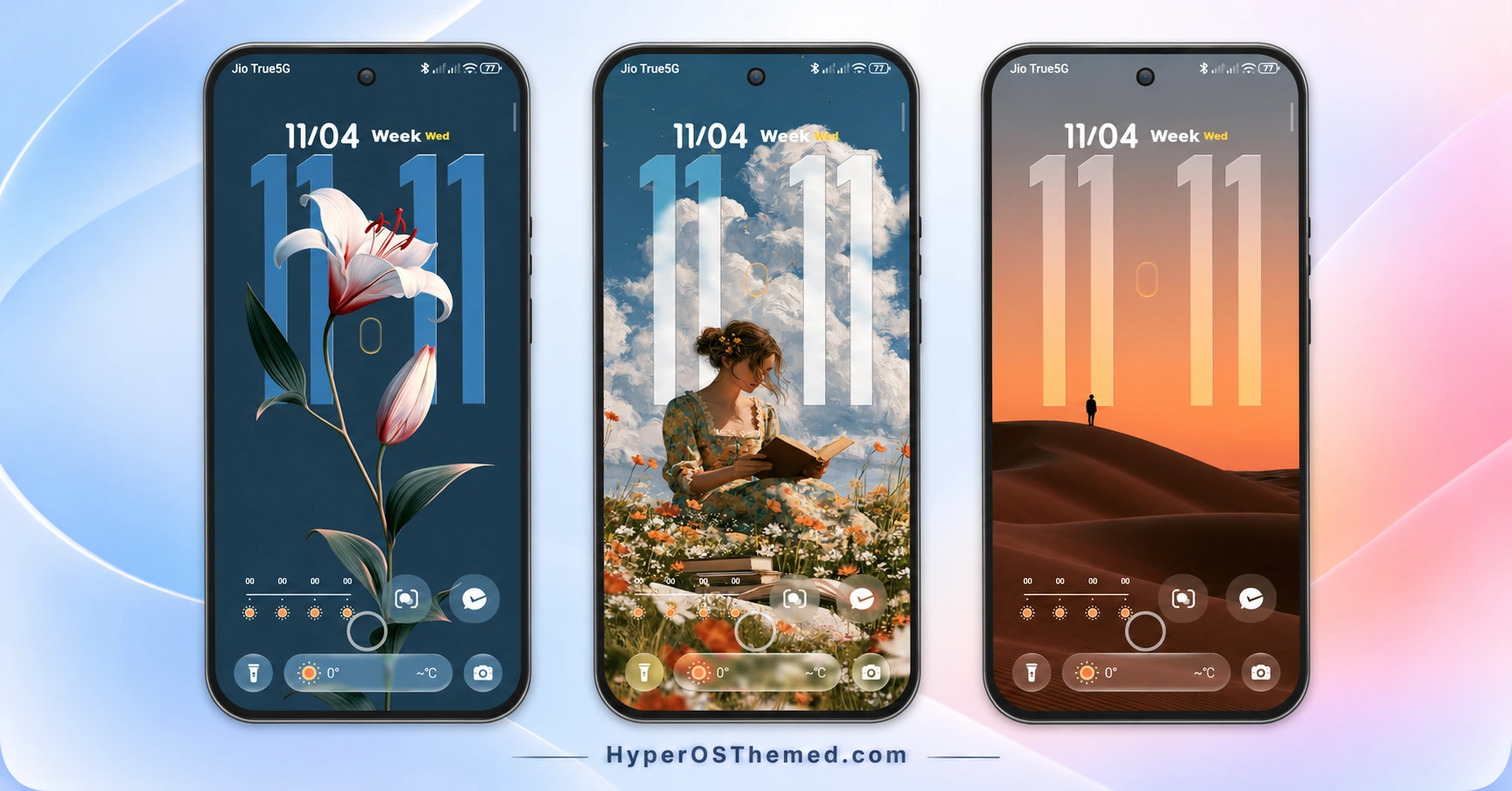
- Oversized clock design: The lock screen features a large vertical clock with tall numerals that dominate the layout while allowing the wallpaper to remain visible.
- Multiple wallpaper choices: Switch between different scenic backgrounds, including a Nordic-style coastal cabin, a woman reading in a flower field, a desert sunset and elegant white lilies.
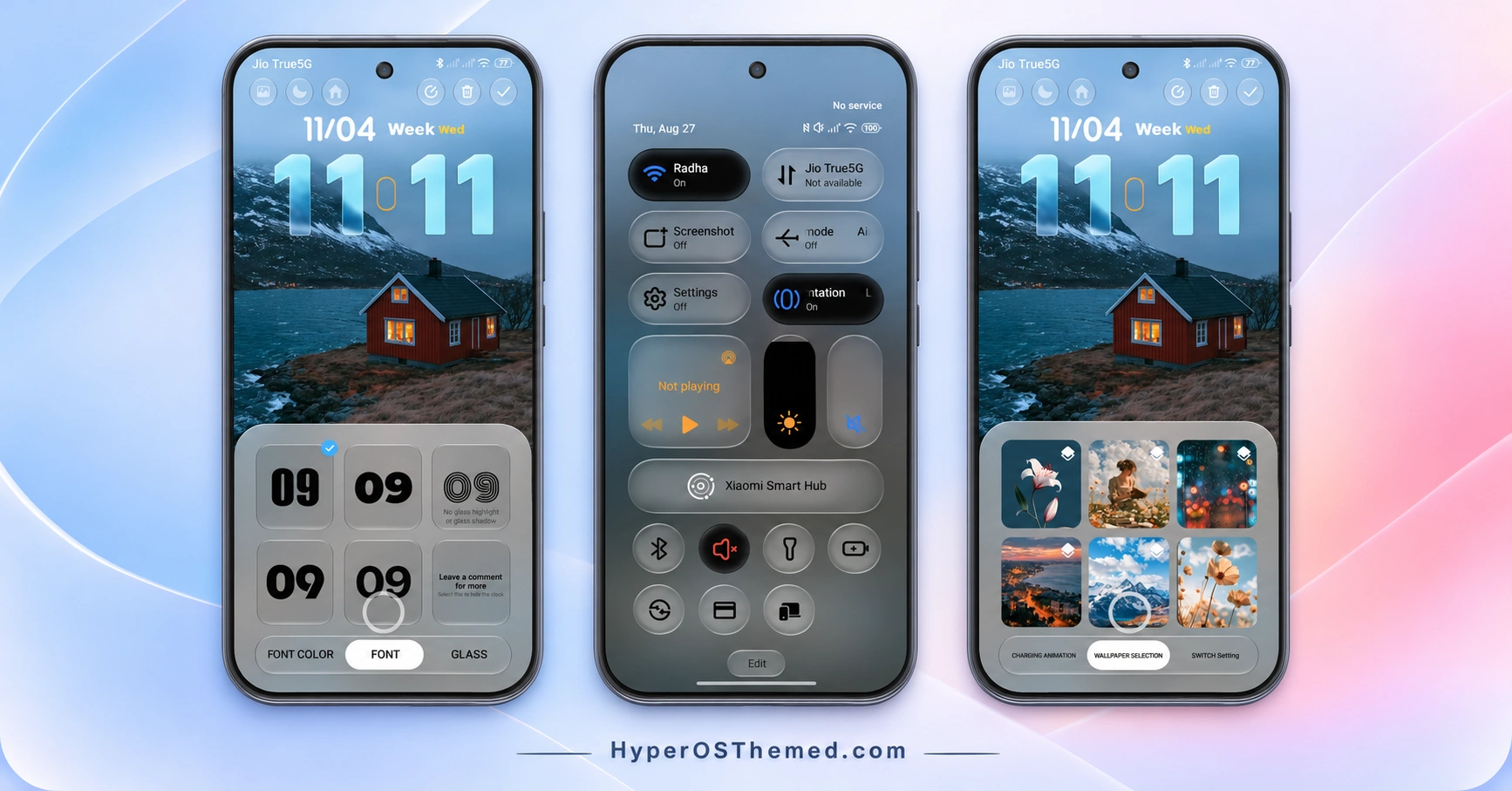
- Clock font selection: The customisation panel provides several typography styles, including bold numerals, outlined designs and alternative clock appearances.
- Font colour controls: Adjust the clock colour to complement the selected wallpaper.
- Glass effect settings: Choose from different glass presets to change the clock’s visual appearance.
- Lock screen shortcuts: The bottom area includes quick access to the flashlight and camera, along with weather information.
2. Dark Custom Icons & Home Screen Layout
- Dark rounded app icons: The icon pack uses black, rounded-square backgrounds with colourful application symbols.
- Popular app coverage: The screenshots show custom designs for Telegram, Chrome, TikTok, Facebook, Binance, Bybit, bKash, Daraz and several Xiaomi system apps.
- System app folder: A dedicated folder groups frequently used system applications into one compact layout.
- Customised dock: The bottom dock uses matching dark icons and a translucent rounded background.
3. Clock and Calendar Widgets
- Digital clock widget: A large digital clock card displays the current time and date.
- Analogue clock widget: An additional widget offers a traditional clock-face design.
- Calendar information: The home screen includes a calendar-style card with the date and additional information.
- Weather details: The widget arrangement also displays weather-related information, including temperature and other readings.
4. Redesigned Frosted Glass Control Centre
- Translucent appearance: The Control Centre uses a grey, frosted-glass-style background with rounded panels.
- Rounded quick settings: Wi-Fi, mobile data, screenshot, rotation and other shortcuts appear in large, easy-to-recognise tiles.
- Integrated media player: A dedicated panel displays music playback status and media controls.
- Vertical brightness and volume sliders: Separate sliders provide quick access to display brightness and sound levels.
- Smart Hub panel: A Xiaomi Smart Hub section appears between the main controls and additional quick settings.
ARBITRUM HyperOS Theme Preview
The screenshots provide a look at ARBITRUM across the lock screen, home screen and Control Centre. They also show the wallpaper selection panel, clock font options and different glass styles, giving you an idea of how much of the lock screen can be personalised.
ARBITRUM Theme Details
| Detail | Information |
|---|---|
| Theme Name | ARBITRUM |
| Designer | maidul |
| Theme Size | Approximately 75.2 MB |
| Compatibility | HyperOS 3 |
| Compatible Devices | Supported Xiaomi, Redmi and POCO smartphones |
| Main Features | Custom lock screen, scenic wallpapers, clock editor, dark icons, widgets and frosted-glass Control Centre |
| Availability | Official Xiaomi Theme Store |
Get ARBITRUM HyperOS Theme
ARBITRUM is available through the official Xiaomi Theme Store. Open the official theme link on your compatible Xiaomi, Redmi or POCO smartphone to check its availability and download the theme.
ARBITRUM HyperOS Theme Compatibility
ARBITRUM is designed for HyperOS 3 and is intended for compatible Xiaomi, Redmi and POCO smartphones. Its appearance and individual features may vary depending on your device model, screen size and software build.
The theme has a relatively large download size of approximately 75.2 MB, so make sure you have enough free storage before downloading it.
How to Install ARBITRUM on Global Stable ROM
If your smartphone runs a compatible HyperOS Global Stable ROM, you can install ARBITRUM directly through the official Xiaomi Theme Store:
- Click on the OFFICIAL THEME STORE LINK button above using your Xiaomi, Redmi or POCO smartphone.
- When prompted, select the Themes app to open the link.
- The official Xiaomi Theme Store will open the ARBITRUM theme page.
- Tap Download and wait for the theme resources to finish downloading.
- Once the download is complete, tap Apply to activate the theme.
Note: If the link does not open automatically in the Themes app, try opening it with Chrome or your phone’s default browser. You can also check whether your browser is permitted to open supported system apps.
After applying the theme, restart your device if the clock, icons or other interface elements overlap or do not display correctly. If the issue continues, mention your device model and HyperOS version in the comments.
Why Choose ARBITRUM HyperOS Theme?
ARBITRUM is particularly interesting if you prefer custom lock screens over themes that only replace app icons and wallpapers. Its large clock, multiple font styles, colour controls and glass presets give you several ways to change the lock screen’s appearance.
The wallpaper collection is another strong point. You can move between completely different scenes, from a coastal cabin and a flower-filled landscape to a warm desert sunset, without changing the overall clock layout. The dark icon pack and translucent Control Centre help maintain a consistent visual style across the rest of the interface.
If you want a theme with scenic backgrounds, a prominent custom clock and a more refined system interface, ARBITRUM is worth exploring.
Conclusion
The ARBITRUM HyperOS Theme brings together a customisable lock screen, multiple scenic wallpapers, dark app icons and a redesigned frosted-glass Control Centre. Its clock editor is one of its most useful features, offering different typography, colour and glass options rather than restricting you to a single appearance.
Designed by maidul for HyperOS 3, this approximately 75.2 MB theme is a good option for Xiaomi, Redmi and POCO users who enjoy personalising their smartphone’s interface. Check its official Theme Store availability before downloading.
1. Will ARBITRUM work on my Xiaomi, Redmi or POCO phone?
ARBITRUM is designed for HyperOS 3, but its appearance and features can vary by phone model, screen size and software build. Check its official Xiaomi Themes app listing on your phone before downloading. Compatibility with other HyperOS versions is not confirmed in the available details.
2. Can I change ARBITRUM’s clock font, colour and wallpaper?
Yes. The lock screen customisation panel includes different clock fonts, colour controls, glass presets and scenic wallpapers. You can change the background and adjust the clock’s appearance without switching to another theme.
3. Does ARBITRUM include the widgets and glass Control Centre shown in the screenshots?
The previews show digital and analogue clock widgets, calendar and weather information, and a frosted-glass Control Centre. These are listed among the theme’s features, although individual elements may look different or depend on your device’s software support.
4. Can I install ARBITRUM on a Global Stable ROM without a separate launcher?
Yes, provided the theme is available for your device running a compatible HyperOS Global Stable ROM. Open its official link in the Xiaomi Themes app, tap Download, then Apply. No separate launcher is required, and the download is approximately 75.2 MB.
5. What should I do if ARBITRUM’s clock or icons overlap after applying it?
Restart your phone and check the layout again. If the problem continues, report your phone model, HyperOS version and the affected elements in the article’s comments. Those details help identify whether the issue is specific to your device or software build.
You may also like:
s4u16 HyperOS Theme with iOS 27-Inspired Lock Screen, Custom Widgets & Control Centre
Spark HyperOS Theme with Purple Gradients, Frosted Glass & Custom Widgets
s4u14 HyperOS Theme with Customisable Clock, Music Player & Control Centre