A smartphone theme can make a noticeable difference when its wallpaper, lock screen and app icons are designed to work together. For users who prefer darker colours and scenic backgrounds, the BTTC HyperOS Theme offers a distinctive combination of mountain photography, oversized clock typography and customised interface elements. Rather than relying on bright gradients or elaborate animations, it uses a dramatic alpine landscape to give the lock screen its visual identity.
Designed by maidul, BTTC HyperOS Theme features a snow-covered mountain wallpaper with a large translucent clock positioned behind the summit, creating a three-dimensional depth effect. The theme also includes selectable lock screen widgets, dark rounded-square app icons, home screen information cards and a redesigned frosted-glass Control Centre. These elements carry the same charcoal and muted grey styling across several parts of the interface.
BTTC is designed for HyperOS 3 on compatible Xiaomi, Redmi and POCO smartphones. It may appeal to users who enjoy mountain wallpapers but also want practical lock screen information and a coordinated dark home screen. Below, we’ll explore its main features, screenshot previews, compatibility and installation steps.
BTTC HyperOS Theme Key Highlights
1. Mountain Wallpaper and 3D Depth Lock Screen
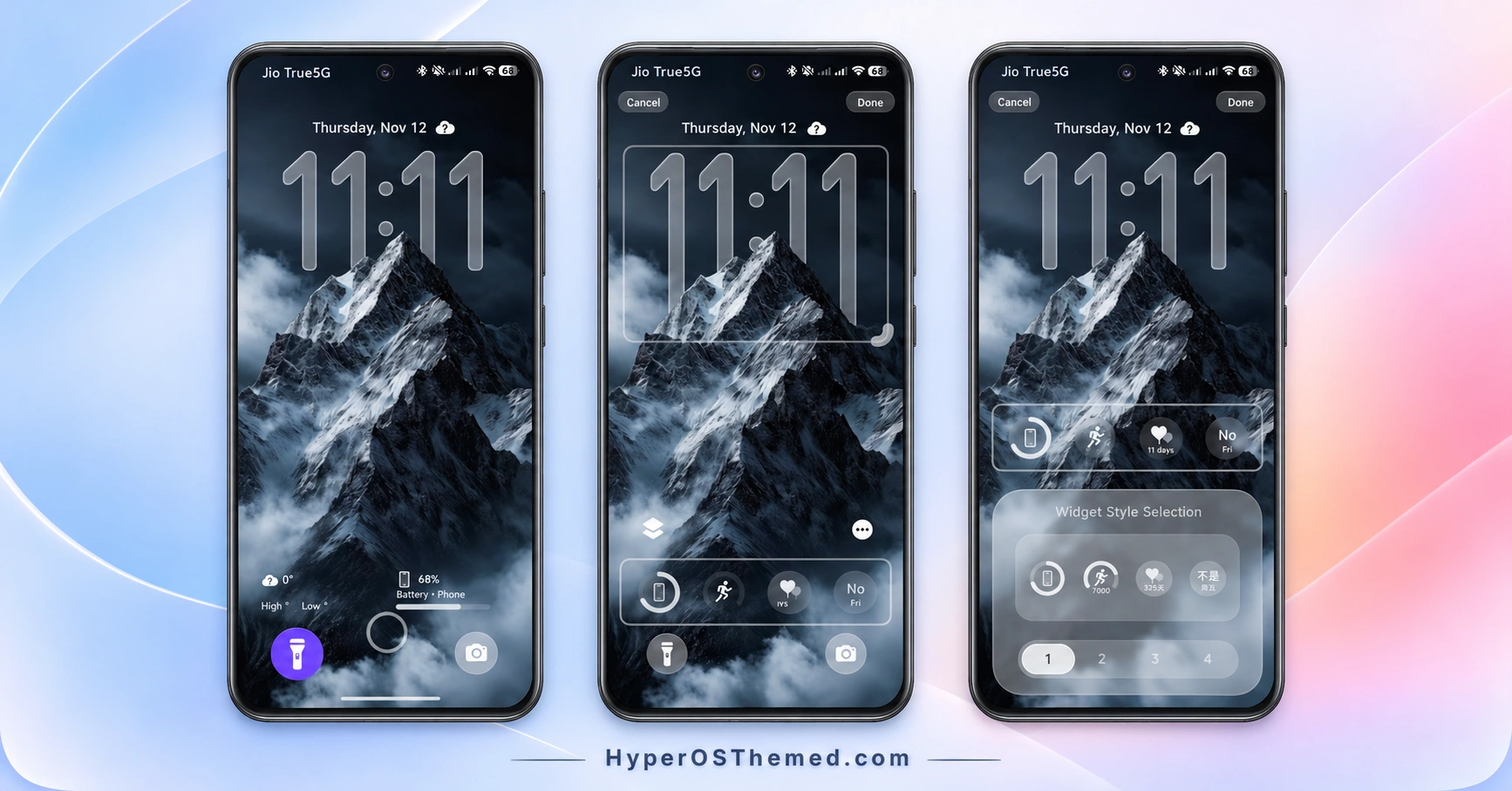
- Snow-Covered Mountain Wallpaper: BTTC HyperOS Theme uses a dramatic alpine landscape featuring a steep, snow-covered mountain peak surrounded by clouds. The dark sky and grey mountain textures create a high-contrast background without relying on bright colours.
- Oversized Translucent Clock: The lock screen features tall digital clock numerals with a semi-transparent, outlined appearance. Their light grey styling makes the time prominent while allowing parts of the mountain wallpaper to remain visible.
- 3D Depth Clock Effect: The mountain summit appears in front of portions of the clock, giving the impression that the time is positioned behind the landscape. This layered effect adds depth to the lock screen while keeping the mountain as its main visual element.
- Minimal Date Display: The day and date appear above the large clock in smaller white text, maintaining a clear information hierarchy without distracting from the wallpaper.
2. Custom Lock Screen Widgets and Notification Layout
- Four Widget Layout Options: BTTC includes a lock screen widget selector with four available styles. Users can switch between these layouts to change how supported information elements are presented.
- Battery and Activity Widgets: The showcased widget bar includes a circular battery-style indicator, an activity or step-count icon, a heart-shaped information element and a compact event or date card. These are presented in a translucent panel near the lower part of the lock screen.
- Built-In Widget Style Selector: The screenshots show a customisation interface labelled Widget Style Selection, with numbered options for choosing different widget arrangements. This gives users a way to adjust the lock screen without replacing the theme.
- Frosted Notification Banners: Notifications appear inside rounded, semi-transparent panels that complement the mountain background. One preview shows a flashlight notification displayed over the lower portion of the lock screen.
- Weather and Battery Information: An alternative lock screen arrangement displays weather information and battery percentage near the bottom of the screen, making these details visible alongside the wallpaper and clock.
- Flashlight and Camera Shortcuts: Circular flashlight and camera buttons appear near the bottom corners, keeping these familiar controls accessible from the lock screen.
3. Dark Frosted Icons and Custom Home Screen
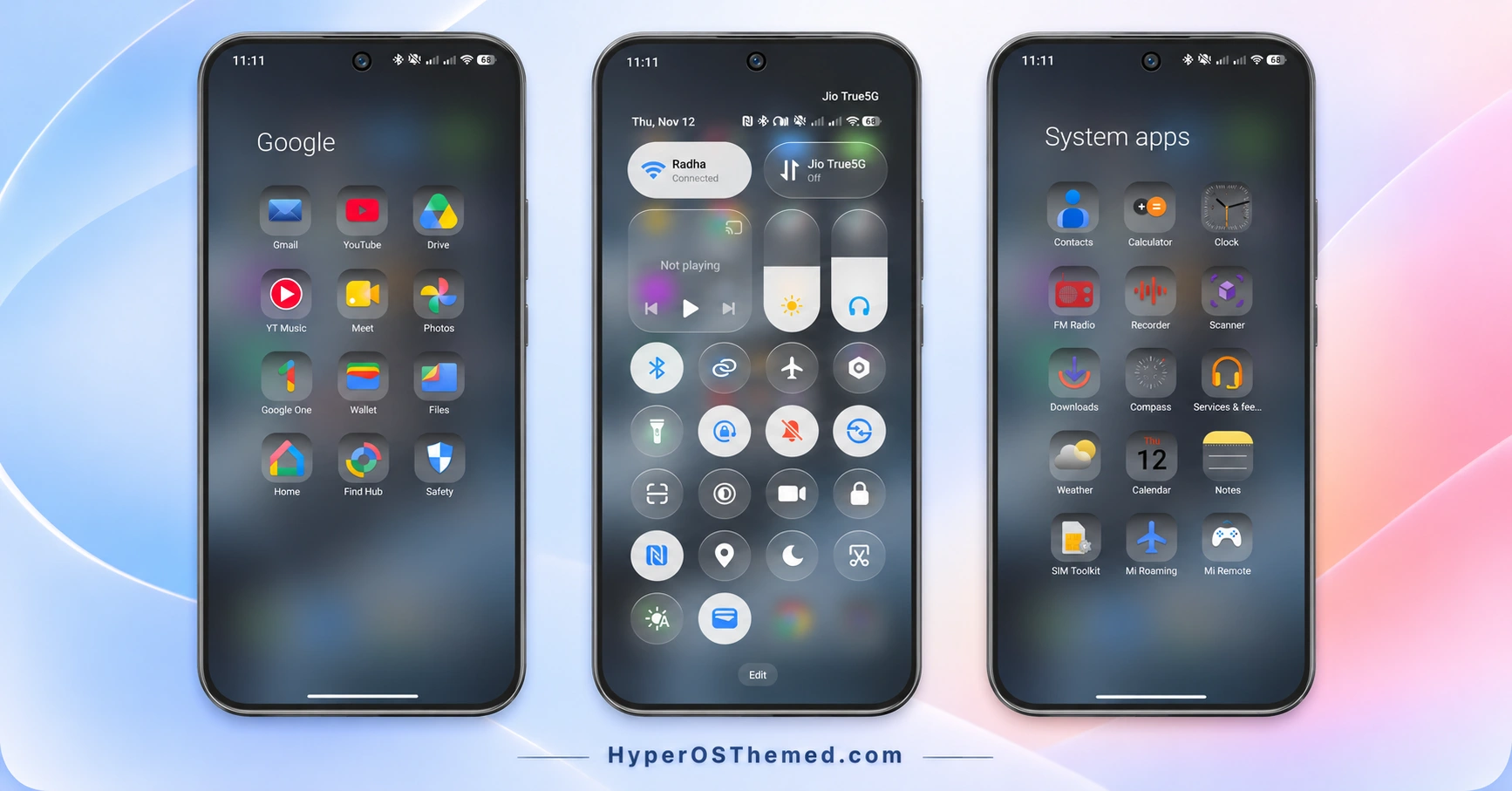
- Rounded-Square App Icons: BTTC features custom application icons with dark, softly rounded backgrounds. The muted icon surfaces complement the charcoal wallpaper while allowing individual app symbols to remain colourful and recognisable.
- Custom System App Icons: The screenshots show redesigned icons for Xiaomi applications such as Calendar, Calculator, Clock, Notes, File Manager, Security, Gallery and Settings. These changes help the built-in applications follow the theme’s dark styling.
- Third-Party App Styling: Popular applications including Telegram, Chrome, Facebook, TikTok, Binance, Bybit, bKash and Daraz appear with matching dark icon backgrounds. This helps the home screen maintain a coordinated appearance across different types of applications.
- Calendar and Weather Widgets: The home screen preview includes two compact information cards near the top. One displays the date and calendar details, while the other shows current weather information and a short forecast.
- Translucent Home Screen Dock: Frequently used applications sit inside a rounded, frosted dock at the bottom of the screen. Its semi-transparent background separates the shortcuts from the wallpaper without introducing a solid, contrasting panel.
4. Redesigned Frosted Glass Control Centre
- Translucent Dark Control Centre: BTTC includes a customised Control Centre with a blurred charcoal background. The frosted appearance allows faint background colours to remain visible while keeping quick-setting controls easy to identify.
- Custom Connectivity Controls: The upper section features rounded Wi-Fi and mobile data tiles. Their light and dark surfaces distinguish the different states while following the theme’s glass-inspired styling.
- Vertical Brightness and Volume Sliders: Two tall, pill-shaped controls provide access to brightness and volume adjustments. Their rounded design complements the surrounding quick-setting tiles.
- Redesigned Quick Settings Icons: Bluetooth, airplane mode, flashlight, location, rotation lock and other controls appear as circular buttons arranged in a grid. The mix of translucent and light-filled buttons creates visual contrast against the dark background.
- Custom Media Panel: The Control Centre includes a rounded music player with playback controls, extending its frosted styling to media management.
- Matching Status Bar: Compact Wi-Fi, signal and battery indicators appear along the top edge, maintaining a restrained appearance above the customised interface.
BTTC HyperOS Theme Preview
The BTTC HyperOS Theme screenshots show the lock screen, home screen, widget customisation panel and redesigned Control Centre.
The most distinctive preview is the lock screen, where a tall translucent clock sits behind the snow-covered mountain summit. Clouds surround the lower portion of the peak, creating a dramatic background for the oversized clock. Rounded shortcuts and information widgets appear near the bottom without covering much of the landscape.
The widget editor screenshots provide a closer look at the available customisation controls. A selection panel shows four widget-style options, while another preview displays a notification banner, weather information and battery details.
The home screen uses dark frosted icons against a blurred charcoal background. Calendar and weather cards sit above the app grid, while the Control Centre features translucent controls, rounded quick-setting buttons and vertical sliders.
BTTC HyperOS Theme Overview
| Attribute | Details |
|---|---|
| Theme Name | BTTC |
| Designer | maidul |
| File Size | Approximately 53.2 MB |
| Availability | Free via Xiaomi Theme Store |
| Supported Devices | Compatible Xiaomi, Redmi and POCO smartphones |
| Compatibility OS | HyperOS 3 |
| Design Style | Dark Alpine, 3D Depth Effect, Frosted Glass |
| Main Features | Mountain wallpaper, depth-effect clock, four lock screen widget styles, dark icons, calendar and weather cards, customised Control Centre |
Get BTTC HyperOS Theme
Click the OFFICIAL THEME STORE LINK button below to open the BTTC HyperOS Theme in the Xiaomi Themes app and apply it to your compatible Xiaomi, Redmi or POCO smartphone.
BTTC HyperOS Theme Compatibility
BTBTTC HyperOS Theme is designed for HyperOS 3 on compatible Xiaomi, Redmi and POCO smartphones. The theme includes custom lock screen widgets, a depth-effect clock and redesigned system controls, so individual elements may appear differently depending on the device and its installed software version.
Compatibility with HyperOS 2 or earlier versions has not been confirmed. If your phone runs another HyperOS version, check whether BTTC is available for your device in the official Xiaomi Theme Store before attempting to apply it.
The theme has a package size of approximately 53.2 MB, which includes its custom wallpapers, icon resources and interface styling.
Important Note: If the clock, depth effect, widgets or Control Centre elements overlap or do not display correctly after applying BTTC, restart your smartphone and check again. If the problem continues, leave a comment with your phone model and HyperOS version.
Why Choose BTTC HyperOS Theme?
- Dramatic Mountain Wallpaper: A snow-covered alpine peak and cloudy background give the lock screen a distinctive appearance.
- 3D Depth Clock: Large translucent numerals appear behind the mountain summit, creating a layered visual effect.
- Four Lock Screen Widget Styles: Switch between available widget arrangements through the built-in selection panel.
- Useful Lock Screen Information: Battery, activity, weather and notification elements add practical details around the clock.
- Dark Frosted App Icons: Rounded-square icons maintain a consistent appearance across supported system and third-party applications.
- Calendar and Weather Cards: Compact home screen widgets display useful daily information.
- Custom Glass Control Centre: Translucent tiles, rounded toggles and vertical sliders continue the dark styling throughout quick settings.
Conclusion
The BTTC HyperOS Theme combines a dramatic mountain wallpaper with a large 3D depth clock and a customisable lock screen layout. Its selectable widget styles, weather details and notification panels add useful information without distracting from the alpine artwork.
The dark frosted icon pack and redesigned Control Centre also carry the theme’s styling beyond the lock screen, creating a coordinated appearance across several parts of HyperOS. If you enjoy scenic mountain wallpapers, oversized clock designs and dark interface elements, BTTC is worth exploring on a compatible HyperOS 3 smartphone.
Frequently Asked Questions
1. How do I change BTTC’s lock screen widget layout?
Use the built-in Widget Style Selection panel to choose from four numbered layouts. The exact gesture or menu path for opening this panel has not been confirmed, so check the theme’s available lock screen customisation options.
2. Is the mountain covering part of the clock a display problem?
No. The mountain summit deliberately overlaps parts of the large clock to create a layered depth effect. This is part of BTTC’s design, rather than an incorrectly positioned time display.
3. Does the heart-shaped lock screen widget measure heart rate?
A heart-shaped element appears in the preview, but its function has not been confirmed. Its presence does not establish heart-rate measurement support, and the theme should not be assumed to add health-tracking capabilities.
4. Can I use BTTC on HyperOS 2?
BTTC is designed for HyperOS 3. Compatibility with HyperOS 2 and earlier versions has not been confirmed, so check whether your device’s Themes app offers a compatible version before applying it.
5. Are the calendar and weather cards available on the home screen?
Yes. The home screen preview includes separate calendar and weather cards above the app grid. These are distinct from the four lock screen widget layouts, so changing a lock screen style does not necessarily change the home screen cards.
You may also like:
OX G6 V2 HyperOS Theme with Liquid Glass Clock, Depth Effects and Custom Lock Screen
OX GRAY HyperOS Theme with Premium Gray Icons and a Minimal Lock Screen
ARBITRUM HyperOS Theme with Custom Lock Screen, Scenic Wallpapers & Glass Control Centre