The S4u16 HyperOS Theme gives compatible Xiaomi, Redmi and POCO smartphones a distinctive visual makeover, centred around an oversized lock screen clock, scenic city wallpapers and a collection of colourful interface elements. Its blue-toned backgrounds and clean typography create a fresh appearance, while the customisation options let you adjust several parts of the lock screen instead of being limited to one fixed layout.
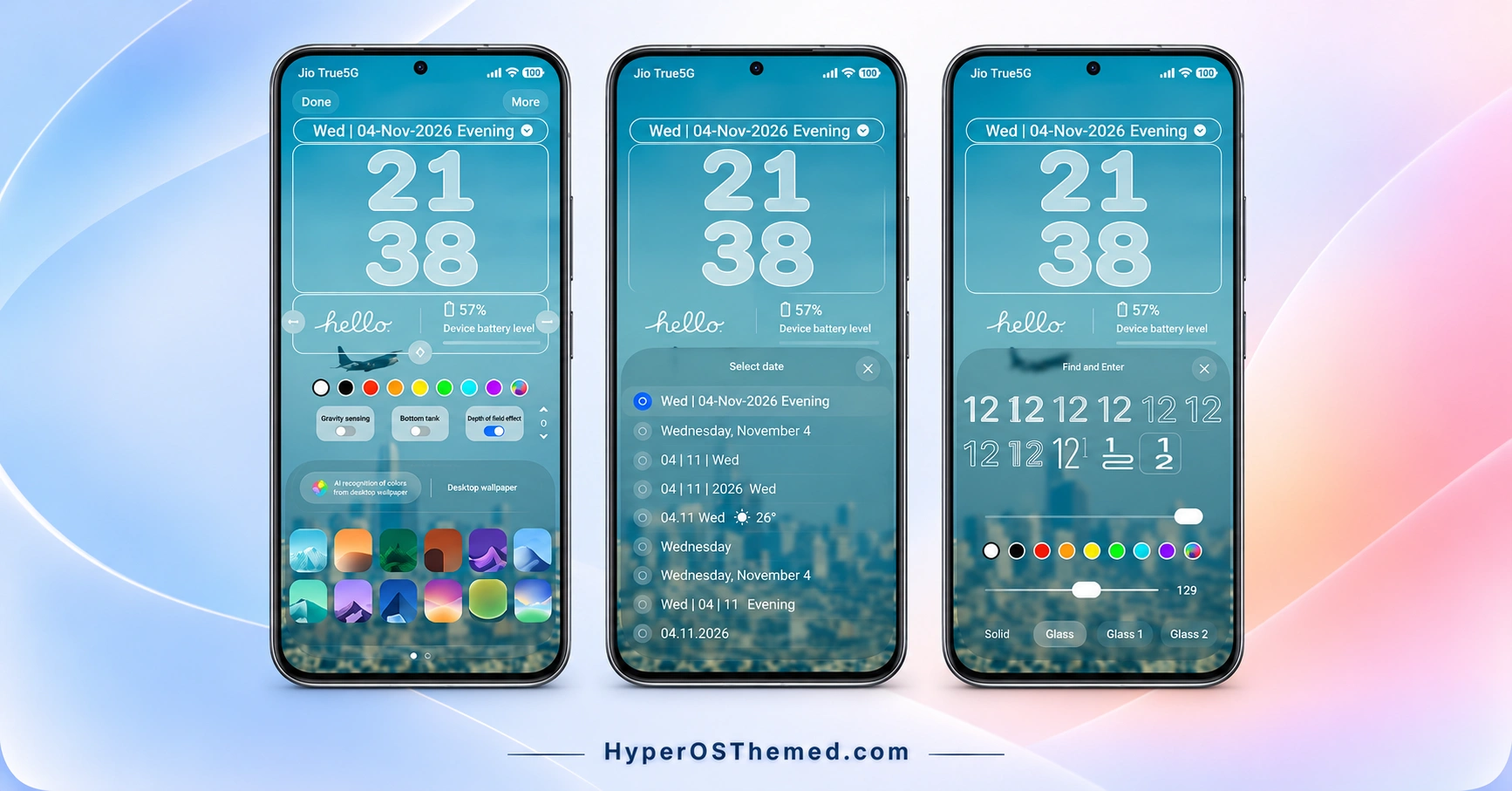
One of the most interesting parts of s4u16 HyperOS Theme is its lock screen editor. You can change the clock alignment and style, experiment with different number designs and colours, and adjust details such as the date, seconds, battery level and weather display. The theme also includes music controls, shortcut buttons and multiple wallpaper options, making the lock screen more than just a place to check the time.
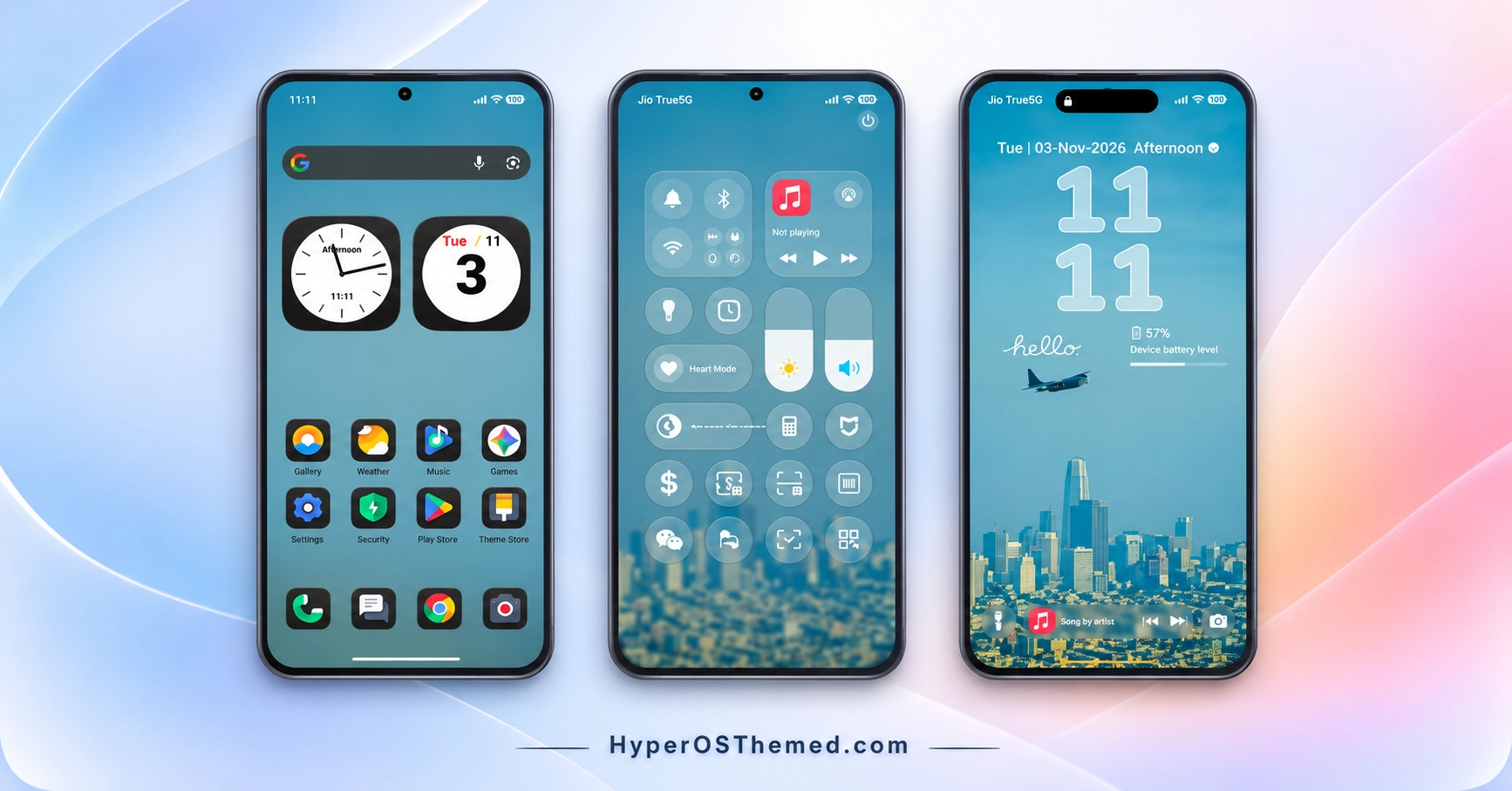
Beyond the lock screen, S4u16 changes the home screen with colourful app icons, clock and calendar widgets, and a redesigned Control Centre. The translucent blue Control Centre includes quick settings, media controls and separate brightness and volume sliders. If you enjoy experimenting with different HyperOS layouts, s4u16 HyperOS Theme offers several interesting details to explore.
S4u16 HyperOS Theme Key Highlights
1. Oversized Lock Screen Clock & Personalisation
- Large stacked clock: A prominent two-line clock gives the lock screen its distinctive appearance, with a contrasting colour used to highlight part of the time.
- Multiple clock styles: The customisation panel offers different clock layouts, including bold and outlined number styles.
- Clock positioning: Choose left-aligned, centred or right-aligned clock placement to change the overall composition.
- Colour controls: Adjust the second-colour styling with several colour choices, including yellow, red, pink, blue and green.
- Information toggles: Enable or disable seconds, battery level, date and weather information.
- Clock adjustment tools: Additional controls let you fine-tune the clock position and appearance.
2. Scenic Wallpapers, Music & Lock Screen Widgets
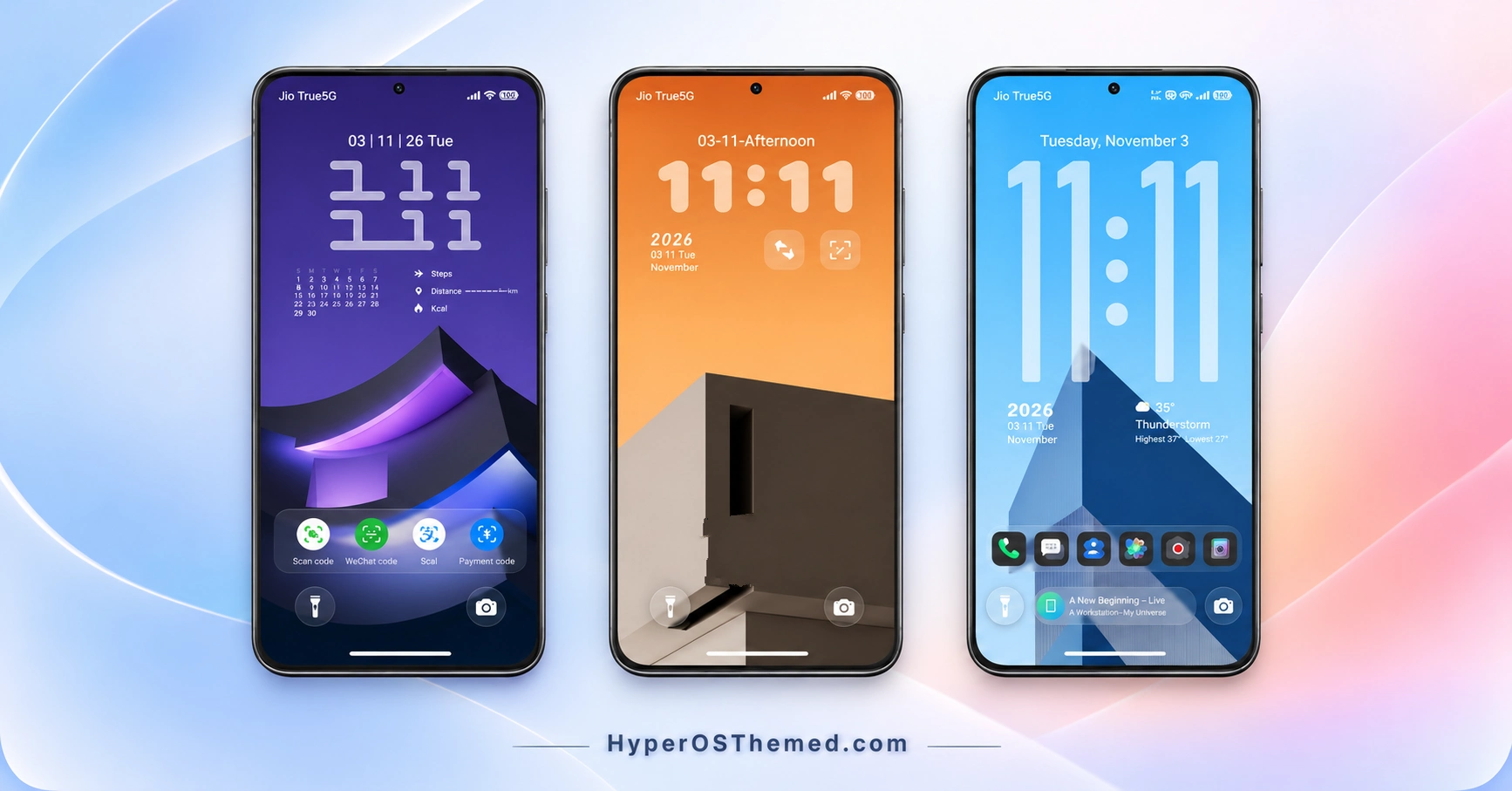
- Multiple wallpaper styles: Switch between different illustrated landscapes, including mountain views, a winding lakeside scene and layered blue scenery.
- Matching colour themes: Several background colour options are available, allowing you to change the atmosphere of the lock screen.
- Music player: A large music card displays playback information and controls directly on the lock screen.
- Battery display: A dedicated battery screen uses a circular progress indicator with a charging-style lightning symbol.
- Quick shortcuts: Flashlight and camera shortcuts remain available at the bottom of the lock screen.
3. Custom Home Screen & App Icons
- Colourful app icons: The home screen uses a collection of bright, rounded icons for common apps such as Gallery, Weather, Music, Settings, Security, Play Store and Themes.
- Clock and calendar widgets: Two prominent widgets sit near the top of the home screen, combining an analogue clock with a date display.
- Clean app layout: The icons are arranged against a blue-green background, with a simple bottom dock for frequently used apps.
4. Translucent Control Centre & System Interface
- Redesigned Control Centre: A blue-tinted translucent panel gives the quick settings area a different appearance.
- Media controls: Music playback information and controls are integrated into the panel.
- Brightness and volume sliders: Separate vertical sliders make it easy to adjust display brightness and sound.
- Quick setting tiles: Common controls are arranged in rounded tiles, keeping the panel organised and easy to scan.
- Updated system appearance: The screenshots also show a redesigned dialer interface and other visual changes beyond the home screen.
S4u16 HyperOS Theme Preview
The screenshots show the theme across several parts of the interface, including the lock screen, home screen, clock editor, music player, dialer and Control Centre. They also give a closer look at the available clock layouts and wallpaper customisation options.
s4u16 HyperOS Theme Overview
| Detail | Information |
|---|---|
| Theme Name | S4u16 |
| Designer | suhel |
| Theme Size | 83.3 MB |
| Compatibility | HyperOS 3.0 |
| Compatible Devices | Supported Xiaomi, Redmi and POCO smartphones |
| Main Features | Custom lock screen, clock editor, wallpapers, music player, widgets, colourful icons and redesigned Control Centre |
| Availability | Official Xiaomi Theme Store |
Get S4u16 HyperOS Theme
S4u16 is available through the official Xiaomi Theme Store. Use the official link below on your compatible smartphone to open its theme page and check availability for your device and region.
S4u16 HyperOS Theme Compatibility
s4u16 HyperOS Theme is designed for HyperOS 3.0 and is intended for compatible Xiaomi, Redmi and POCO smartphones. Theme appearance and the availability of individual elements can vary depending on your phone model, software build and regional Theme Store support.
Before applying it, check that your device is running a compatible HyperOS version. Some visual elements may also appear differently across devices with different screen sizes or system configurations.
Why Choose S4u16 HyperOS Theme?
The strongest reason to try s4u16 HyperOS Theme is its lock screen customisation. Rather than offering only a new wallpaper and clock, it provides controls for clock alignment, number styles, colours and the information displayed on screen. The wallpaper choices and integrated music player add further variety.
Its home screen and Control Centre also have their own visual identity. Colourful icons, clock and calendar widgets, translucent quick settings and vertical sliders make the theme feel more complete than a simple icon replacement.
If you prefer a colourful interface with a large customisable clock and several wallpaper options, S4u16 is worth checking out. Just remember that its advertised compatibility is HyperOS 3.0, so check your software version before installing.
Conclusion
S4u16 is a feature-rich HyperOS theme that puts lock screen personalisation at the centre of its design. Its oversized clock, adjustable colours, multiple clock layouts and scenic wallpapers offer plenty of room to create a setup that suits your taste. The music player, battery display and quick shortcuts make the lock screen more useful, while the colourful icons, home screen widgets and translucent Control Centre complete the visual makeover.
Designed by suhel and weighing 83.3 MB, S4u16 is an interesting option for HyperOS 3.0 users who enjoy customising their Xiaomi, Redmi or POCO smartphones. Open the official Theme Store link to check whether it is available for your device.
1. Will S4u16 work on my Xiaomi, Redmi or POCO phone?
S4u16 is designed for HyperOS 3.0. Availability and support for individual features depend on your phone model, software build and region. Open its official listing in the Xiaomi Themes app to check compatibility before downloading. Support for other HyperOS versions is not confirmed in the provided details.
2. Can I move the large lock screen clock or change its number style?
Yes. S4u16’s lock screen editor offers left, centre and right alignment, along with different number styles, including bold and outlined designs. You can also adjust the clock’s position and accent colour to suit your chosen wallpaper.
3. Can I hide the seconds, weather or battery information on the lock screen?
Yes. The customisation panel includes separate toggles for seconds, battery level, date and weather. You can turn off information you don’t need to keep the lock screen simpler.
4. Does S4u16 include lock screen music controls?
Yes. The theme includes a large lock screen music card that shows playback information and controls. Music controls also appear in its redesigned Control Centre. Their appearance and availability may vary with your phone’s software build.
5. How do I install S4u16, and what if the layout looks wrong?
Open the official S4u16 link in the Xiaomi Themes app, download the 83.3 MB theme and tap Apply. If the clock, icons or other elements overlap, restart your phone and check again. If the issue remains, include your phone model and HyperOS version when reporting it in the comments.
You may also like:
Spark HyperOS Theme with Purple Gradients, Frosted Glass & Custom Widgets
s4u14 HyperOS Theme with Customisable Clock, Music Player & Control Centre
suhel13 HyperOS Theme with Scenic Wallpapers and Black Glossy Icons
s4u dark by suhel HyperOS Theme with Black UI for Xiaomi & Redmi
Glossix HyperOS Theme with Dark Glossy Icons and Advanced Lockscreen Customisation