
Guofeng 26 HyperOS Theme goes further than most iOS-style HyperOS themes in one specific way, it’s built as a genuinely complete recreation of the iOS 26 look rather than a partial icon swap with a few Apple-style touches sprinkled in. Designed by 周凡, it’s a substantial theme at 78.1 MB, distributed as both a standalone MTZ file and a considerably larger 120 MB backup file, built for Xiaomi, Redmi and POCO devices running HyperOS. One thing worth knowing before anything else: this theme is exclusive to the China Themes Store, with no Global store link available at all, which changes how you’ll need to go about installing it.
Guofeng 26 HyperOS Theme Key Features
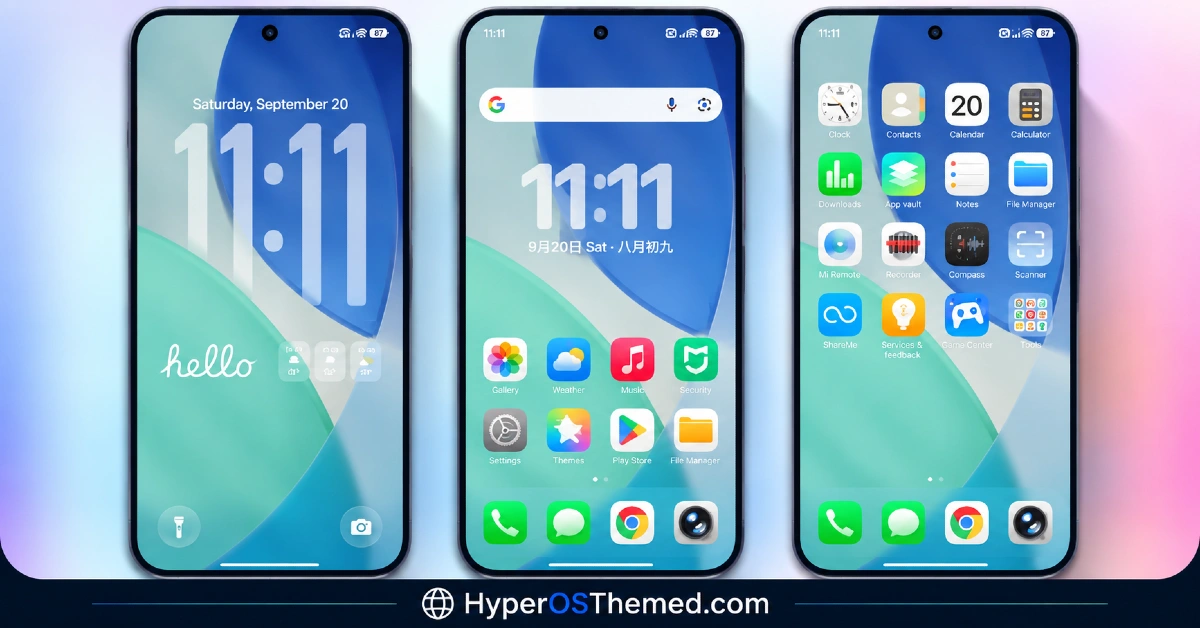
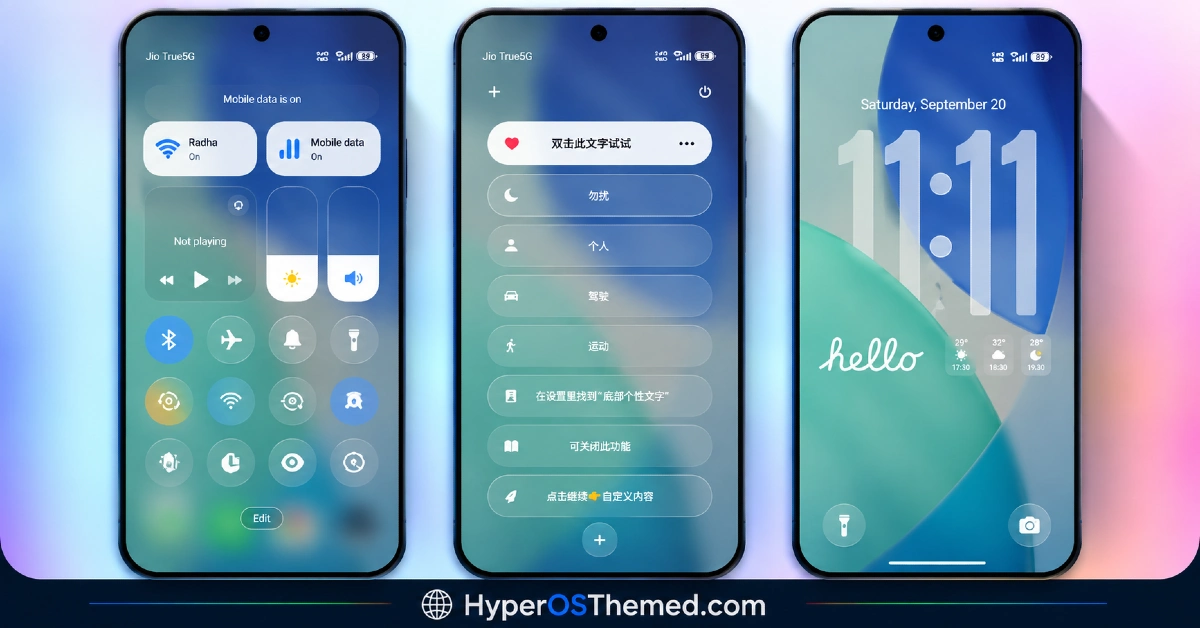
- Complete iOS 26 Interface Recreation: Rather than borrowing a few visual cues, Guofeng 26 HyperOS Theme Xiaomi commits to a full recreation of the iOS 26 aesthetic across icons, layout and system visuals. That thoroughness is really what the “complete” in the theme’s own title is referring to.
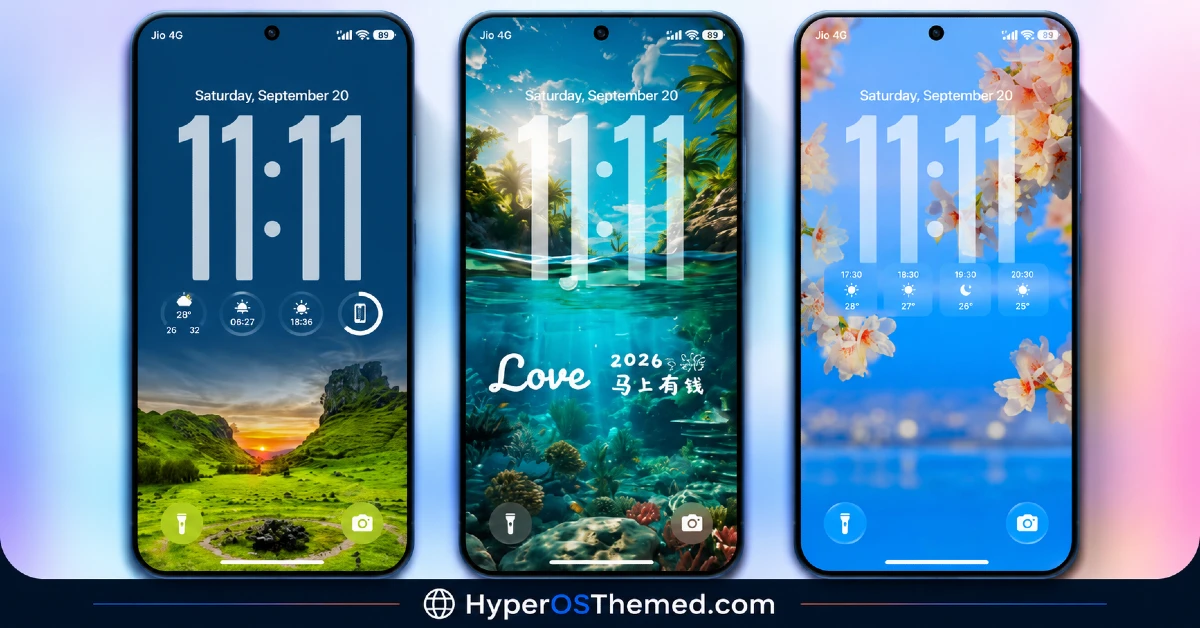
- Extensive Lock Screen Styling: The lock screen gets detailed customization built to match Apple’s current design language, going beyond a simple wallpaper and clock font swap into genuine layout and styling work.
- Premium System App Redesign: Beyond the home screen, system apps carry their own visual updates in line with the overall iOS conversion, keeping the whole experience consistent rather than leaving obvious HyperOS-native elements behind.
- Dual File Distribution: Guofeng 26 HyperOS Theme comes as both a 78.1 MB MTZ file and a separate 120 MB backup file. Given the China-exclusive access situation, having both options matters more here than it would for a typical Global-region theme.
- Dedicated Video Installation Guide: Because this theme requires manual installation rather than a direct Theme Store link, the designer provides a full video walkthrough covering the process step by step, genuinely necessary given how the standard install method doesn’t apply here.
- Custom Lock and Home Screen Wallpaper Support: The MTZ file can be manually edited to swap in your own wallpapers for both the lock screen and home screen, a workaround worth knowing about if you want the lock screen background to actually match your home screen rather than defaulting to a mismatched system wallpaper during password entry.
Guofeng 26 HyperOS Theme Preview
The screenshots below show the complete iOS 26 interface recreation, from the icon design through to the lock screen styling. Given how thorough this conversion is, it’s worth watching the installation video as well, since it also shows the theme running live on a device rather than just static images.
Guofeng 26 HyperOS Theme Overview
| Attribute | Details |
|---|---|
| Availability | China Themes Store only (no Global store link) |
| Supported Devices | Xiaomi, Redmi and POCO phones running HyperOS |
| Theme Name | Guofeng 26 |
| Designer | 周凡 |
| Compatibility OS | HyperOS, HyperOS 2.0, HyperOS 3.0 |
| Features | Complete iOS 26 interface recreation, extensive lock screen styling, premium system app redesign |
| File Size | 78.1 MB (MTZ file), 120 MB (Backup file) |
Guofeng 26 HyperOS Theme Compatibility
Guofeng 26 supports HyperOS, HyperOS 2.0 and HyperOS 3.0 across Xiaomi, Redmi and POCO devices. A genuine and important caveat here: this theme is exclusive to the China region and does not have a Global Theme Store link at all, unlike many other China-listed themes that can at least be reached with some browser troubleshooting.
Installing it requires downloading the backup file and following the dedicated video installation guide rather than the usual Theme Store redirect method. It’s also worth knowing that because the theme is China-exclusive, its interface text stays in Chinese and cannot be translated to English or any other language.
Get Guofeng 26 HyperOS Theme
Since there’s no official Global Theme Store link for this one, download Guofeng 26 HyperOS Theme through the backup file provided rather than searching for an alternate direct store link, which doesn’t exist for this release. Files sourced from unrelated third-party sites are difficult to confirm as unaltered and may not reflect what 周凡 actually released, so sticking to the verified backup file link and following the video guide is the safest and really the only reliable route in.
Installing Guofeng 26 HyperOS Theme on Custom ROM Devices
Devices running a Custom ROM won’t be able to rely on the direct Theme Store link, so the MTZ file needs to be added manually through the Theme Store app instead. Here’s how that works:
- Save the MTZ file for Guofeng 26 HyperOS Theme onto the device.
- Open the Theme Store app.
- Head into the Themes section.
- Scroll to the bottom and tap the Import option once it appears.
- Use the file manager to locate the downloaded .mtz file.
- Wait for the import process to finish.
- Select the theme once it appears in the list to apply it.
Note: If you’d like the lock screen wallpaper to match your home screen wallpaper rather than defaulting to something different during password entry, this can be adjusted manually: extract the .mtz file, place your chosen wallpapers into the “wallpaper” folder, rename them to “default_lock_wallpaper” and “default_wallpaper,” re-zip the folder, rename the file extension back to .mtz, and import it as usual. If anything looks overlapped or fails to display correctly right after installing, restarting the device usually clears it up.
Why Choose Guofeng 26 HyperOS Theme?
- Genuinely complete iOS 26 conversion — a full interface recreation, not a partial icon-only swap.
- Detailed lock screen styling — goes beyond a simple wallpaper and clock font change.
- Dedicated video installation guide — necessary and genuinely helpful given the non-standard install process.
- Two file options available — both the standard MTZ and a full backup file are provided.
- Manual wallpaper customization possible — the lock and home screen wallpapers can be edited to match if desired.
Conclusion
Guofeng 26 HyperOS Theme delivers one of the more thorough iOS 26 recreations available for HyperOS, but it comes with a real trade-off worth understanding upfront, no Global Theme Store access, Chinese-only interface text, and a manual installation process that requires following a video guide rather than a simple redirect. For Xiaomi, Redmi and POCO users willing to work through that extra setup for a genuinely complete Apple-style look, Guofeng 26 is worth the effort.
You may also like:
OX M-STONE HyperOS Theme with Depth Effect For Xiaomi, POCO, Redmi
OX G5 HyperOS Theme with iOS-Style Liquid Glass For Xiaomi, POCO, Redmi
TIME HyperOS Theme with Minimal Premium Look & Custom Lock Screen for Xiaomi, POCO, Redmi
SE1 HyperOS Theme – Material You Color Matching Engine for Xiaomi, POCO, Redmi
Nebula Noir HyperOS Theme – Animated Lock Screen with Liquid Glass Icons for Xiaomi, POCO, Redmi
