
I found Xeon Slay HyperOS theme while browsing the Theme Store’s blue-toned category after getting a bit tired of the black and glass themes I usually gravitate toward. The water splash wallpaper in the preview looked more dynamic than a typical solid blue background, so I downloaded it onto my POCO X6 that afternoon. I used it for eleven days as my daily theme to see whether the bold lock screen numbers and dark iOS styling actually held up beyond the first impression.
Xeon Slay HyperOS theme Features
- Blue Water Splash Wallpaper: The default wallpaper captures a water splash frozen mid-motion in cool blue tones, giving it a dynamic, almost photographic quality rather than a flat gradient. It held up well behind icons on my home screen and looked especially sharp on the lock screen where there’s more open space to show it off.
- Oversized Lock Screen Numbers: The lock screen clock uses large, bold numbers that dominate the screen, similar in scale to what I saw on the Black-3 theme I tested previously. It’s easy to read at a glance, though like that theme, the size did occasionally eat into space for notification previews when I had several stacked up.
- Dark iOS-Style Control Centre: Pulling down the control center gives a clean, dark panel styled after iOS’s actual Control Center layout rather than a generic HyperOS quick settings grid. Toggles stayed responsive when I tested rapid switching between Wi-Fi and Bluetooth a few times during testing.
- Consistent Dark iOS Interface: Beyond the control center, the broader system interface follows the same dark iOS-inspired look, keeping things visually consistent rather than mixing bright and dark elements. I didn’t run into any jarring white screens interrupting the flow while navigating between apps.
- Simple, Uncluttered Icon Set: Icons stick to a clean, minimal iOS-style shape without excessive decoration, letting the blue wallpaper and bold typography carry most of the visual interest. Coverage was solid across my main apps, though two apps tied to local services kept their default icons throughout testing.
Xeon Slay HyperOS theme Preview
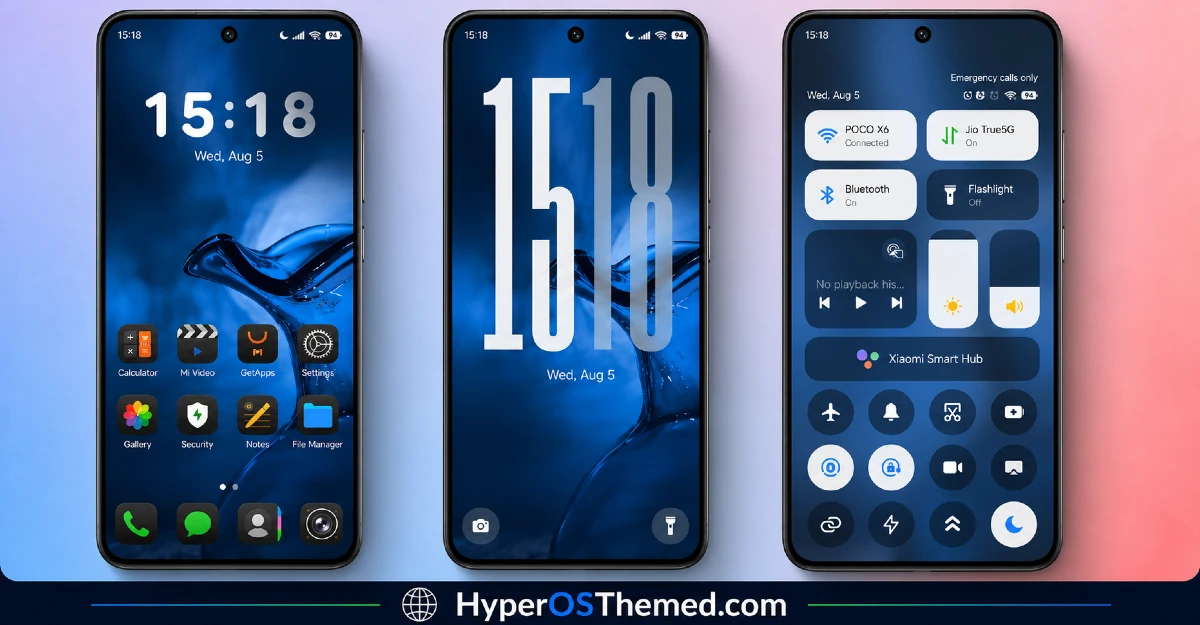
The visual identity centers on cool blue tones brought to life through the water splash wallpaper, paired with bold, oversized lock screen typography that immediately draws the eye. The rest of the interface stays dark and restrained, letting the wallpaper and clock act as the main visual statement rather than spreading color across every element. It has a clean, confident look that feels more deliberate than a simple blue recolor of a standard dark theme.
Xeon Slay HyperOS Theme Details
| Detail | Info |
|---|---|
| Theme Name | Xeon Slay |
| Designer | MISANS |
| Compatibility | HyperOS, HyperOS 2.0, HyperOS 3.0 |
| Features | Simple, Dark, iOS Style, Blue, Cool |
| File Size | 38.23 MB |
Xeon Slay HyperOS theme Performance
I tested Xeon Slay on a POCO X6 running HyperOS 3.0 for eleven days, through daily use including gaming, video calls, and regular browsing. Given the 38.23 MB file size, installation took a bit longer than smaller themes, though nothing excessive. Performance stayed smooth throughout testing, with no lag in home screen transitions or app drawer scrolling.
Battery drain came in close to my stock theme baseline, maybe a percent or two higher, which is reasonable given there’s no constant animation beyond the static wallpaper and interface styling. The main recurring issue was the oversized lock screen numbers occasionally overlapping with notification previews when I had more than two or three stacked up, similar to what I noticed with other bold-typography lock screens I’ve tested.
Xeon Slay HyperOS theme’s Compatibility
Xeon Slay HyperOS theme supports HyperOS, HyperOS 2.0, and HyperOS 3.0, covering a wide range of current Xiaomi, Redmi, and POCO devices. I tested it on a POCO X6 running HyperOS 3.0 without major issues beyond the notification overlap mentioned above.
It is not built for MIUI 12, 13, or 14, so applying it on older firmware isn’t recommended and will likely cause layout problems with the lock screen typography specifically. Custom ROM users on Xiaomi.eu or similar HyperOS-based builds should be able to import the MTZ file without much trouble, though results may vary slightly depending on how closely the ROM matches stock HyperOS system UI.
Designer’s note: The theme is credited to designer MISANS, with updates and future releases shared via their Telegram channel @MISANS_96.
Get Xeon Slay HyperOS theme
Download Xeon Slay through the official Xiaomi Theme Store link rather than third-party APK sites or unofficial file hosts claiming to offer the same theme. Sideloaded theme installers from unverified sources are a common way people end up with unnecessary permissions or bundled software, so sticking with the official Theme Store keeps installation clean and safe.
Note: If the Official Theme Store Link doesn’t redirect properly, try opening the page in Chrome or the default Xiaomi browser, since other browsers may not handle the redirect correctly.
How to Apply Xeon Slay HyperOS theme
Follow the steps below to apply the theme:
- Open the Theme Store Link given above on your Xiaomi / REDMI / POCO device
- This will redirect you to Theme Store.
- Download and install the theme
- Tap on Apply
- Customize specific elements (icons, lock screen, status bar) if needed
- Reboot your device (optional for full effect)
Why Choose Xeon Slay HyperOS Theme?
- The blue water splash wallpaper feels more dynamic than a typical flat blue background
- Bold lock screen numbers give it a confident, distinct visual identity
- Dark iOS-style Control Center feels authentic rather than a rough reskin
- Consistent dark interface avoids jarring white screens breaking the flow
- Actively credited designer with a Telegram channel suggests ongoing support
Conclusion
After using it in POCO X6, Xeon Slay HyperOS theme held up as one of the more visually striking blue themes I’ve tested, mainly thanks to that water splash wallpaper and the bold lock screen typography. The oversized numbers occasionally clashing with notification previews was a recurring minor annoyance, similar to issues I’ve run into with other bold-clock themes before. Compared to other dark iOS-style themes I’ve tried, this one’s blue color identity gives it more personality than the usual black or grey defaults. If you want a cool-toned dark theme with some real visual confidence, it’s worth trying.
You may also like:
Is Planet Sail Worth It? Planet Sail HyperOS Theme for Xiaomi, POCO and Redmi Phones
