
Nothing Phone built its whole identity around one idea, strip away the color, keep the design razor-clean, and let the black-and-white contrast do the talking. If that aesthetic has ever made you a little jealous while using your Xiaomi or Redmi device, AchromaticUI is basically the closest you’ll get to a genuine Nothing theme for HyperOS. It takes that same grayscale, minimal design philosophy and applies it across your entire interface, no Nothing Phone hardware required.
Why This Nothing theme for HyperOS Works So Well
There’s something satisfying about a phone that doesn’t try to grab your attention with every color in the spectrum. AchromaticUI leans into that restraint. icons, wallpapers, and system menus all sit within a tight black, white, and gray palette, which ends up looking sharper and more deliberate than most themes packed with color. It’s also genuinely easy to live with day to day: the layout stays intuitive, so you’re not relearning where anything is just because the color scheme changed.
AchromaticUI (Nothing-style theme for HyperOS) Preview
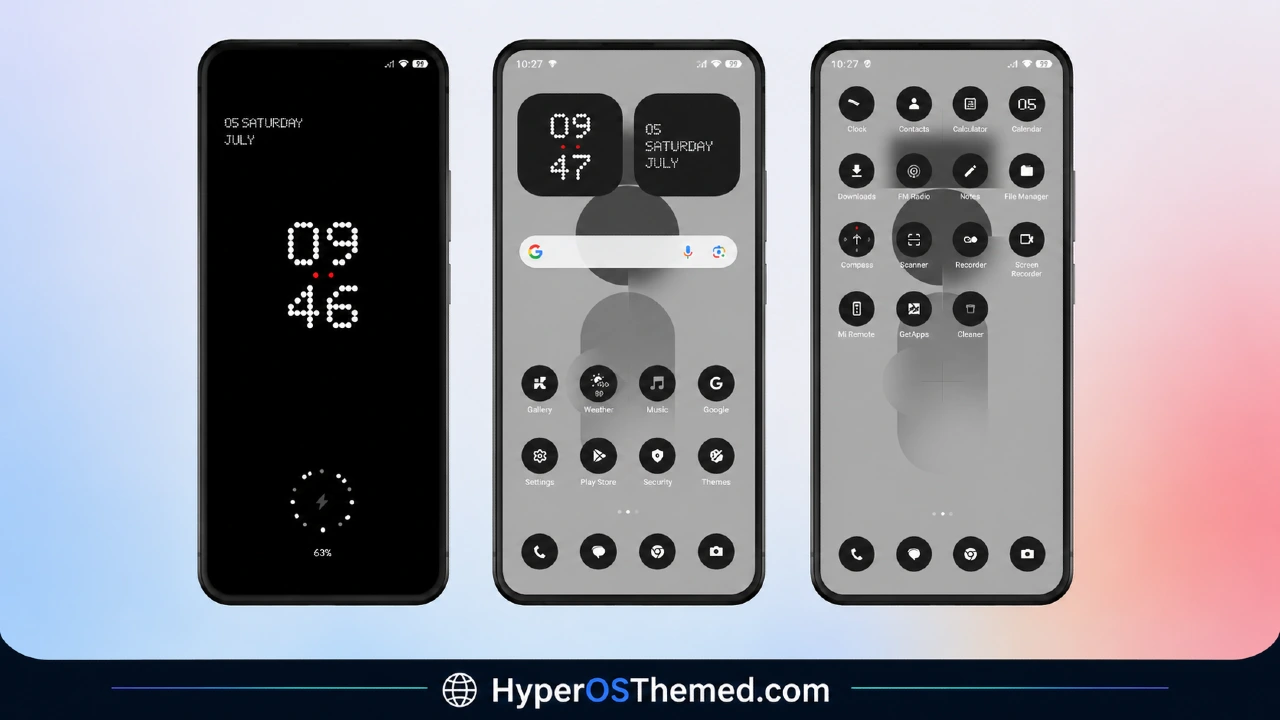
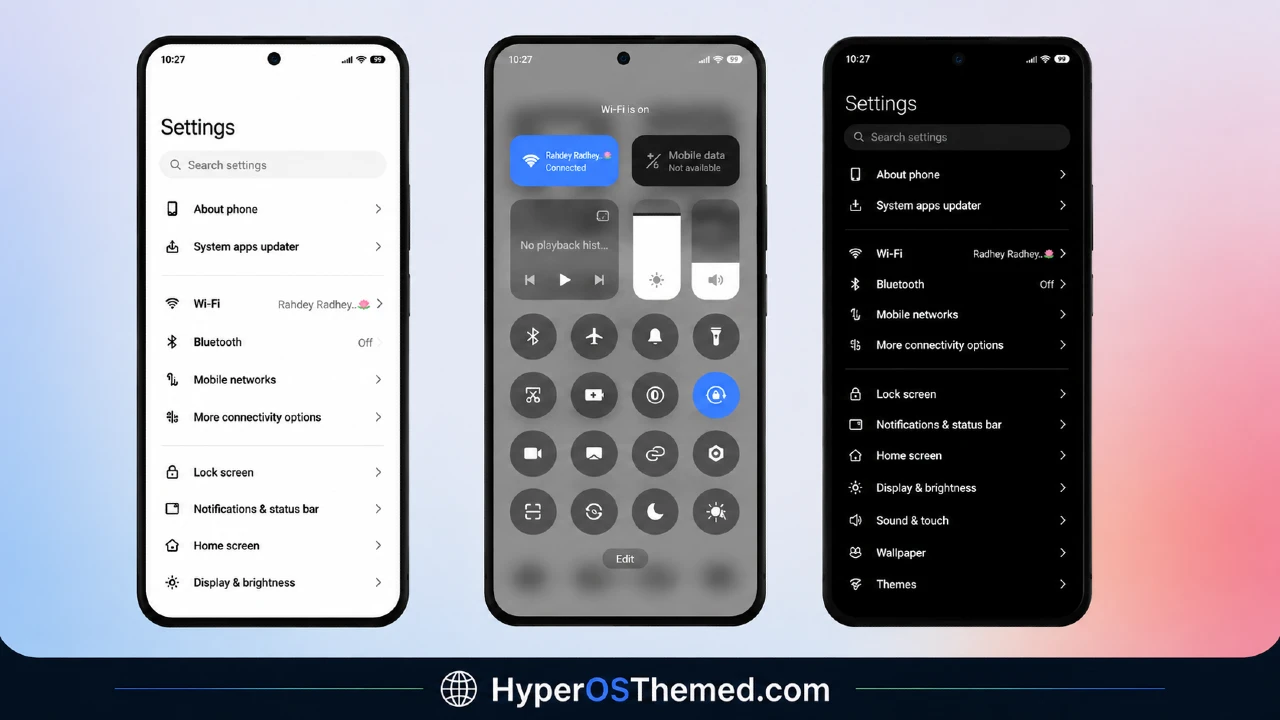
What You Get With Nothing theme for HyperOS
- Full monochrome, Nothing-inspired icon redesign for system apps
- Custom lock screen styled around the same grayscale look
- Matching black-and-white wallpaper (downloaded separately)
- Updated Dialer, Settings, Messages, and Control Center visuals
- Clean, minimal design that stays easy to navigate
- Completely free to download and apply
Nothing theme for HyperOS Information
| Detail | Info |
|---|---|
| Theme Name | AchromaticUI (Nothing-style theme for HyperOS) |
| File Size | 10.9 MB |
| Wallpaper Size | 3.4 MB (separate download) |
| Created By | JOTA |
| Compatibility | HyperOS |
Download the Theme
Installing Nothing Theme for HyperOS on Stock HyperOS / MIUI (Global Stable ROM Users)
Getting this theme onto a phone running the official Global Stable build is quick:
- Under the download section above, tap the Official Theme Store Link.
- You’ll be prompted to open the link in an app.
- Choose the Themes app when asked.
- This redirects you straight to the Theme Store page for AchromaticUI.
- Download the theme from there and tap Apply.
Installing Nothing Theme for HyperOS MTZ Files on Custom ROMs
If you’re running a custom build such as Xiaomi.eu, MIUIRoom, MIUI SR, or HyperOS CN, install the theme manually using the MTZ file instead:
- Download the MTZ file from the link above.
- Open the Theme Store app on your device.
- Tap into the Themes section.
- Scroll down until you see Import, and tap it.
- Use your file manager to locate the downloaded
.mtzfile. - Give it a moment to import — the theme will then show up in your list.
- Tap on it to apply.
Important: If anything looks overlapped or doesn’t display correctly right after applying, restart your device — that clears it up almost every time. This theme has been fully tested and installs without any issues.
A Quick Word on HyperOS Customization in General
If AchromaticUI isn’t quite your style, it’s worth remembering how much room HyperOS gives you to personalize your device beyond the stock look. Between deep lock screen customization, redesigned system icons, and full UI changes across apps like Dialer, Settings, and the Control Center, there’s a theme out there for pretty much every taste — whether that’s anime-inspired designs, minimal layouts, iOS-style interfaces, or moody dark themes.
Final Thoughts
AchromaticUI-Nothing Theme for HyperOS stands out because it commits fully to one idea instead of trying to please everyone. If you’ve been chasing that Nothing Phone look on your Xiaomi or Redmi device, this is about as close as a HyperOS theme gets — clean, monochrome, and genuinely different from the colorful defaults most people are used to. It’s a small download, it’s free, and it’s an easy way to give your phone a look that actually feels intentional.
You may also like:
