Xiaomi’s HyperOS themes make it possible to change the appearance of a smartphone without replacing the system launcher. While some themes focus mainly on wallpapers and icons, others offer more detailed customisation through lock screen layouts, widgets and redesigned system controls. The 27 Liquid Glass HyperOS Theme belongs to the second category, combining translucent interface elements with a large depth-effect clock and an adjustable lock screen.
Designed by Anzuki, with development credits to An Yue and Shuangsheng Mao, 27 Liquid Glass HyperOS Theme features rounded application icons, colourful abstract wallpapers and a glass-inspired Control Center. Its lock screen is particularly customisable, with options for changing the clock position, switching widget styles, importing wallpapers and enabling 3D gravity effects. The theme’s icon collection is described as supporting more than 1,400 mainstream applications.
With a package size of approximately 66 MB, 27 Liquid Glass HyperOS Theme brings these visual changes to compatible Xiaomi, Redmi and POCO smartphones running HyperOS. It may appeal to users who enjoy translucent interfaces and want more control over their lock screen than a fixed clock and wallpaper combination allows. Below, we’ll explore its main features, screenshots, compatibility and installation process.
27 Liquid Glass HyperOS Theme Key Highlights
1. Liquid Glass Lock Screen and 3D Depth Effects
- Large Translucent Clock: 27 Liquid Glass HyperOS Theme features an oversized digital clock with transparent, outlined numerals. The clock uses a glass-like appearance that allows the colourful wallpaper to remain visible behind the time display.
- Adjustable Clock Position: The theme allows users to change the clock’s vertical position. This is particularly useful when choosing wallpapers with prominent shapes or subjects that might otherwise be covered by the clock.
- 3D Depth-of-Field Wallpapers: The lock screen supports a layered wallpaper effect that can place foreground artwork in front of the clock. Users can import separate foreground and background images to create their own depth-style compositions.
- Customisable Gravity Effects: An optional 3D gravity effect adds interactive movement to supported wallpaper elements. The effect can be enabled or disabled through the lock screen editor.
- Animated Screen Appearance: The lock screen includes a screen-opening animation that is enabled by default. This adds a visual transition when the display wakes.
2. Custom Lock Screen Widgets and Editing Options
- Four Built-in Widget Styles: The theme includes four widget layout options, allowing users to change how information and shortcuts appear on the lock screen.
- Seven Calendar Styles: Users can choose from seven calendar designs within the lock screen customisation settings. These options provide different ways to display date information alongside the main clock.
- Custom Widget Layout: The lock screen includes several smaller information and shortcut elements arranged near the lower portion of the display. The different widget styles allow users to change the presentation without replacing the entire theme.
- Collapsible Notifications: 27 Liquid Glass HyperOS Theme supports folding notification messages on the lock screen, helping reduce the space occupied by alerts when users prefer a cleaner layout.
- Customisable Music Function: The theme includes a music-related lock screen feature that can be disabled through the available settings when it is not needed.
- Built-in Lock Screen Editor: Double-tapping the small horizontal bar at the bottom of the lock screen opens the editing interface. From there, users can access depth wallpaper settings, gravity controls and additional customisation through the circular three-dot menu.
3. Rounded Glass Icons and Custom Home Screen
- Extensive App Icon Collection: The theme is described as supporting more than 1,400 mainstream application icons. This broad icon collection is intended to maintain a consistent appearance across common system and third-party apps, although individual icon coverage can vary.
- Rounded Glass-Style Icons: The application icons use softened corners and translucent visual effects. Their light, layered appearance complements the background rather than relying on heavy, opaque icon surfaces.
- Colourful Abstract Wallpaper: The home screen preview shows a smooth abstract background combining deep blue, lavender, muted pink and warm orange tones. Curved shapes and soft highlights create a layered appearance behind the icons.
- Translucent Home Screen Dock: A rounded, semi-transparent dock holds frequently used applications at the bottom of the screen. Its frosted appearance keeps the wallpaper partially visible beneath the shortcuts.
- Coordinated Home Screen Styling: The rounded icons, glass dock and abstract wallpaper follow the same visual direction, giving the interface a consistent appearance without introducing unrelated design elements.
4. Redesigned Liquid Glass Control Center
- Frosted Glass Control Center: 27 Liquid Glass HyperOS Theme includes a customised quick settings panel with translucent backgrounds, rounded buttons and softened borders. The wallpaper colours remain partially visible through the panel.
- Large Wi-Fi and Mobile Data Tiles: The upper section features prominent connectivity controls, with active and inactive states distinguished through contrasting backgrounds.
- Vertical Brightness and Volume Sliders: Two tall rounded controls provide access to brightness and volume adjustments. Their light surfaces stand out against the translucent background.
- Custom Music Panel: A rounded media card includes playback controls and a space for media information, following the same glass-inspired styling as the surrounding quick settings.
- Smart Device Hub: The Control Center includes a wide connected-device panel, extending the custom layout beyond basic connectivity toggles.
- Circular Quick Settings Buttons: Bluetooth, airplane mode, flashlight, camera and other functions appear inside rounded controls arranged in a grid. This gives the panel a different appearance from the standard HyperOS Control Center.
27 Liquid Glass HyperOS Theme Preview
The preview screenshots show three major parts of the theme: its Control Center, lock screen and home screen.
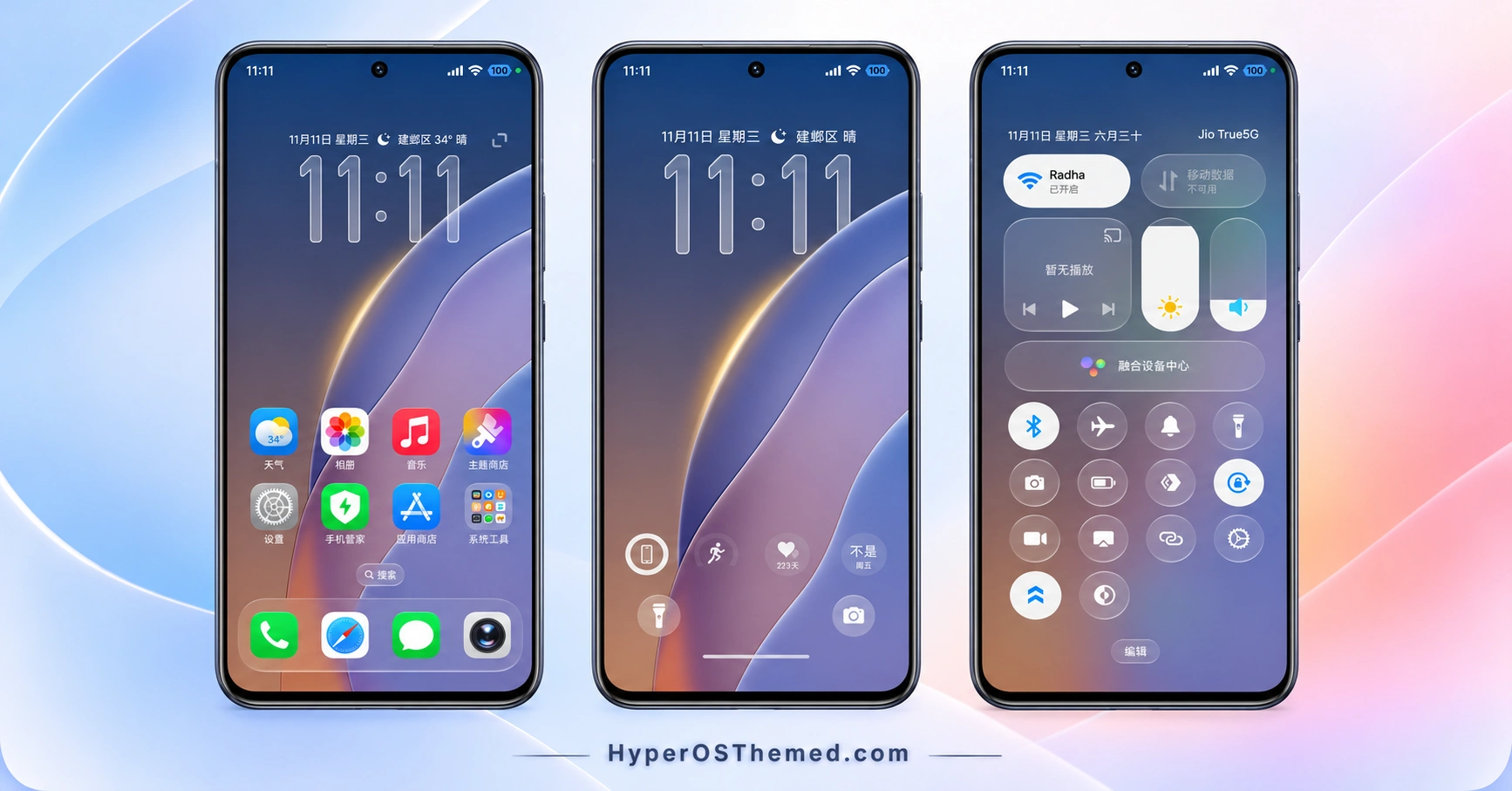
The lock screen features an oversized transparent digital clock above a colourful abstract wallpaper. A row of compact widgets and shortcuts appears near the bottom, along with flashlight and camera controls. The clock’s glass-like styling allows the background colours to remain visible through the numerals.
The home screen continues the same visual style with rounded application icons, a translucent dock and curved blue, purple and orange wallpaper elements. Its layout remains relatively simple, allowing the background artwork and icon designs to stand out.
The Control Center uses rounded translucent tiles with larger Wi-Fi and connectivity controls, vertical brightness and volume sliders, a media player and circular quick-setting buttons. The combination of soft transparency and colourful backgrounds gives the panel a layered appearance.
27 Liquid Glass HyperOS Theme Overview
| Attribute | Details |
|---|---|
| Theme Name | 27 Liquid Glass |
| Designer | Anzuki |
| Development Credits | An Yue and Shuangsheng Mao |
| Backup Credit | Suhel |
| Theme Size | 66 MB |
| Compatibility | HyperOS; exact supported versions not specified |
| Supported Devices | Compatible Xiaomi, Redmi and POCO smartphones |
| Design Style | Liquid Glass, 3D Depth Effect, Abstract Gradient |
| Icon Coverage | Over 1,400 mainstream apps, as described by the creator |
| Main Features | Depth-effect clock, wallpaper import, gravity effects, four widget layouts, seven calendar styles, glass icons, custom Control Center |
| Availability | Chinese Theme Store |
Get 27 Liquid Glass HyperOS Theme
Click the OFFICIAL THEME STORE LINK button below to open 27 Liquid Glass in the Xiaomi Themes app and apply it to your compatible device, where the theme is available.
27 Liquid Glass HyperOS Theme Compatibility
27 Liquid Glass HyperOS Theme is designed for Xiaomi’s HyperOS interface. The available theme information does not specify an exact list of supported HyperOS releases, so compatibility with HyperOS 2, HyperOS 3 or other versions should be checked for your particular device before installation.
The theme includes advanced lock screen customisation, depth effects and a modified Control Center. Some visual elements may appear differently depending on the phone model, ROM and supported HyperOS features.
The screenshots show Chinese-language interface labels, which reflect the configuration used in the previews. The language displayed after installation may depend on the phone’s system settings and the theme resources.
How to Install 27 Liquid Glass on Global Stable ROM
If 27 Liquid Glass is available for your device through the official Xiaomi Theme Store, you can apply it using the built-in Themes app.
- Open the OFFICIAL THEME STORE LINK button above on your Xiaomi, Redmi or POCO smartphone.
- Allow the link to open in the Themes application.
- On the theme page, tap Download and wait for the resources to finish downloading.
- Tap Apply to activate the theme.
- Once applied, check the lock screen, home screen and Control Center.
How to Customise the 27 Liquid Glass Lock Screen
One of the theme’s main features is its built-in lock screen editor. You can access it using the following steps:
- Open the lock screen after applying the theme.
- Double-tap the small horizontal bar at the bottom to enter editing mode.
- Use the available options to adjust the clock height and select a preferred widget layout.
- Open the depth-of-field wallpaper option near the lower-left area to configure supported depth effects.
- Use the 3D gravity switch to enable or disable gravity-based effects.
- Tap the circular three-dot icon near the lower-right area to access additional customisation settings.
- Explore the available calendar styles, foreground and background wallpaper import options, and notification or music settings.
- Tap OK to confirm your changes or Cancel to leave the editor without saving them.
Important Note: If the clock, wallpaper layers, widgets or Control Center elements overlap or do not appear correctly after applying the theme, restart your smartphone and check again. If the issue continues, leave a comment with your device model, HyperOS version and the element that is not displaying correctly.
Why Choose 27 Liquid Glass HyperOS Theme?
- Large Glass Clock: Oversized transparent numerals give the lock screen a recognisable design.
- Customisable Depth Wallpapers: Import separate foreground and background images for supported 3D effects.
- Flexible Lock Screen Layout: Adjust the clock position and switch between four widget designs.
- Seven Calendar Styles: Choose different date layouts to complement the clock and wallpaper.
- Interactive Effects: Gravity effects and screen-opening animations add movement to the lock screen.
- Extensive Icon Collection: Rounded glass-style icons are designed to cover more than 1,400 mainstream apps.
- Custom Glass Control Center: Translucent tiles, vertical sliders and rounded toggles extend the design into quick settings.
Designer and Theme Credits
27 Liquid Glass is credited to Anzuki, with An Yue and Shuangsheng Mao identified as contributors to its development and production.
The theme-sharing announcement also credits Suhel for the backup package. This backup credit is separate from the theme’s design and development credits.
Please respect the original creators’ work and use authorised distribution sources when obtaining the theme.
Conclusion
The 27 Liquid Glass HyperOS Theme combines an oversized transparent clock, colourful abstract wallpapers and extensive lock screen customisation. Its support for movable clock positioning, multiple widget and calendar styles, imported depth wallpapers and gravity effects gives users several ways to personalise the lock screen.
The rounded glass-style icon collection and redesigned Control Center carry the same visual approach into the home screen and system controls. If you prefer translucent interfaces with interactive lock screen features, 27 Liquid Glass is worth exploring on a compatible Xiaomi, Redmi or POCO smartphone.
Frequently Asked Questions
1. How do I open the 27 Liquid Glass lock screen editor?
Double-tap the small horizontal bar at the bottom of the lock screen. This opens the editor for clock positioning, widget layouts and wallpaper effects. Tap the circular three-dot icon for additional settings, then select OK to save your changes.
2. Can I create a depth-effect wallpaper using my own images?
Yes. The theme supports importing separate foreground and background images for layered wallpaper compositions. This lets foreground artwork appear in front of the clock, but automatic subject cutout from a single photo has not been confirmed.
3. Can I turn off the gravity effect without removing the theme?
Yes. Open the lock screen editor and disable the 3D gravity switch. This turns off the gravity-based effect while keeping the theme applied. The screen-opening animation is a separate feature, so this switch should not be assumed to disable every animation.
4. How many widget and calendar layouts can I choose from?
27 Liquid Glass includes four lock screen widget styles and seven calendar styles. You can explore these through the editor to find a layout that suits your wallpaper and preferred clock position.
5. Can I reduce lock screen clutter from notifications and music?
Yes. The theme supports collapsing notification messages to reduce the space occupied by alerts. You can also disable its music-related lock screen feature through the additional customisation settings if you prefer a simpler layout.
You may also like:
OX G6 V2 HyperOS Theme with Liquid Glass Clock, Depth Effects and Custom Lock Screen
OX GRAY HyperOS Theme with Premium Gray Icons and a Minimal Lock Screen
ARBITRUM HyperOS Theme with Custom Lock Screen, Scenic Wallpapers & Glass Control Centre
s4u16 HyperOS Theme with iOS 27-Inspired Lock Screen, Custom Widgets & Control Centre