
Looking for a dark theme with glossy icons and detailed lock screen controls for your Xiaomi, Redmi or POCO smartphone? The Glossix HyperOS Theme, designed by Maidul Islam, combines a gothic castle wallpaper, polished dark icons and a frosted-glass Control Centre for a distinctive, atmospheric look. Its design blends dramatic scenery with carefully styled interface elements, making it a good option for users who prefer darker themes with plenty of customisation.
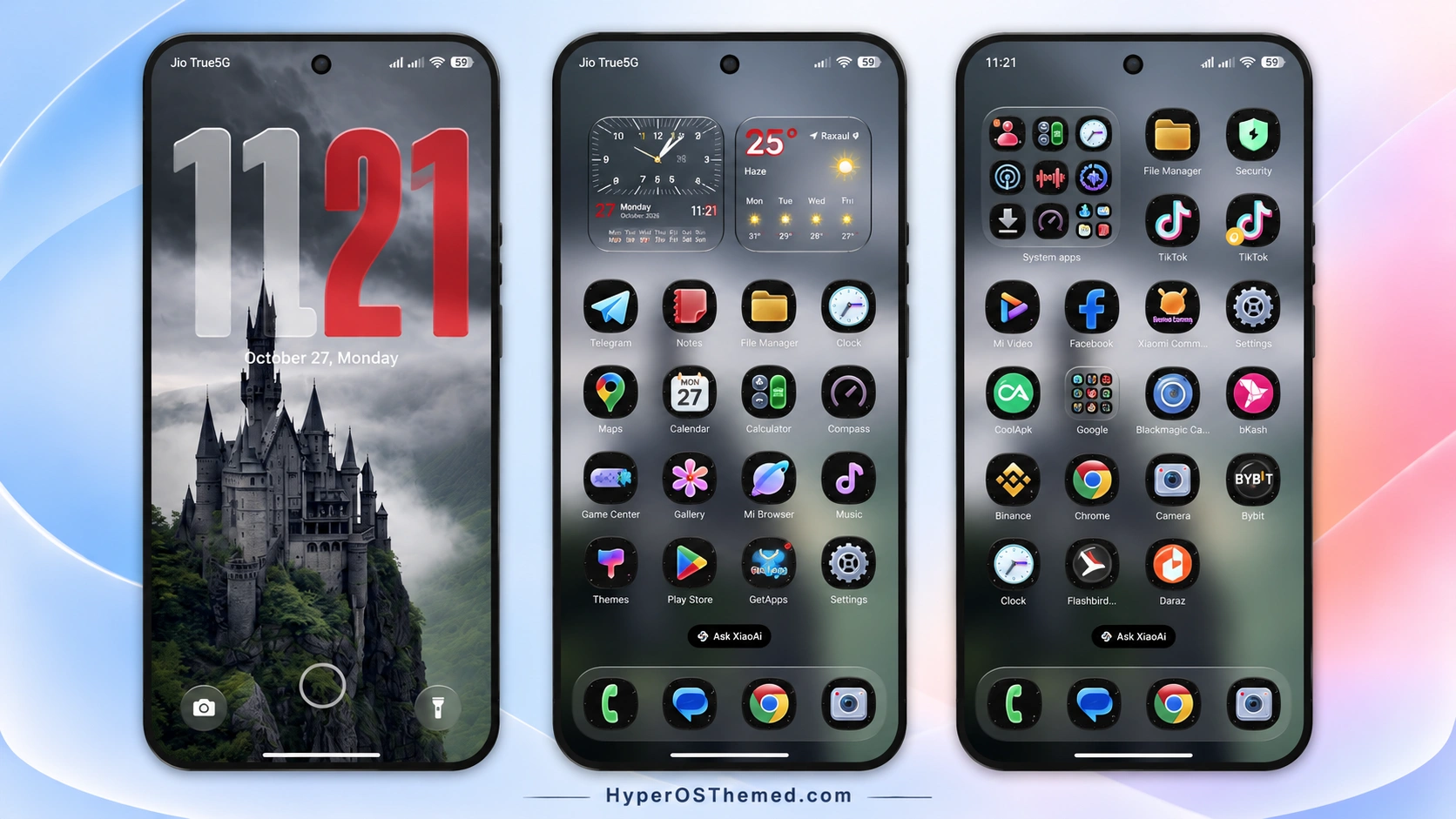
The lock screen is one of Glossix’s main highlights. It features a 3D depth-style clock that blends with background details, along with several clock layouts and controls for adjusting the hour and minute colours separately. The built-in wallpaper switcher also offers different scenes, including misty castles, snowy mountain peaks, peaceful lakes and dramatic cliffs, so you can change the appearance to match your preference.
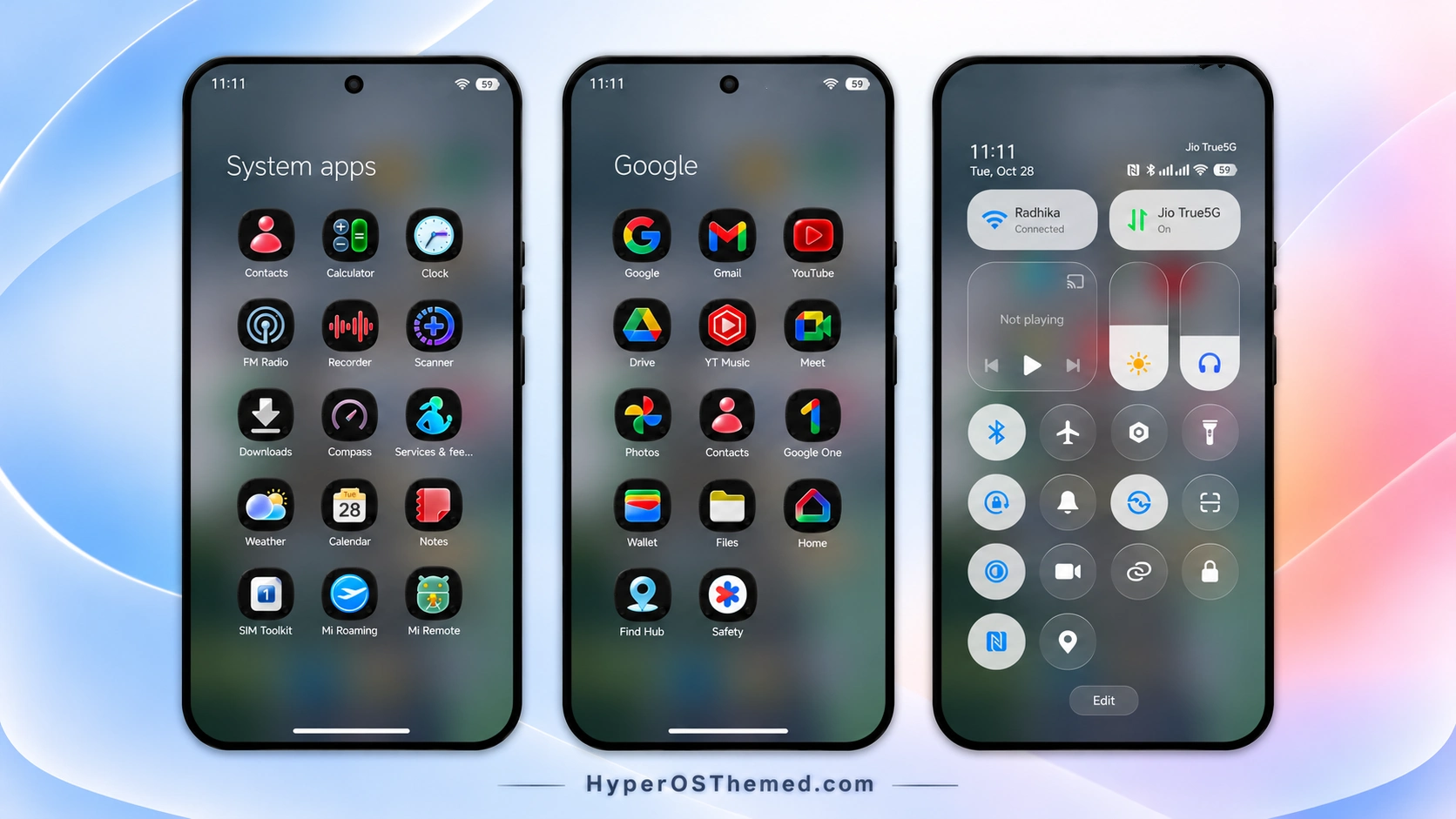
Glossix HyperOS Theme also customises the home screen with glossy dark squircle icons and clock and weather widgets. The redesigned Control Centre uses a dark frosted-glass appearance, soft white highlights and vertical pill-shaped brightness and volume sliders. Together, these elements create a coordinated interface for compatible Xiaomi, Redmi and POCO smartphones running HyperOS 3.
Glossix HyperOS Theme Key Highlights
Advanced Lockscreen Customisation
- 3D depth-style clock effects that interact visually with background scenery.
- Multiple clock layouts, including Classic Personalised Clock, Digital, Stencil and Outline.
- Separate hour and minute colour controls with RGBA colour and transparency adjustments.
- Built-in wallpaper switcher featuring gothic castles, snowy mountains, lakes and cliffs.
- Quick-access shortcuts for the flashlight and camera.
Dark Glossy Icons and Home Screen
- High-gloss dark squircle icon bases with colourful app symbols.
- Custom icon designs for system apps and selected third-party applications, including Telegram, Facebook, Chrome, TikTok, YouTube, Gmail, Binance, Bybit, bKash and Daraz.
- An analogue clock widget paired with a weather forecast card.
- A consistent dark appearance across the home screen.
Frosted-Glass Control Centre
- Dark frosted-glass background styling.
- Soft white highlights for active toggles.
- Vertical pill-shaped brightness and volume sliders.
- A coordinated interface that complements the dark icons and wallpaper.
Glossix HyperOS Theme Preview
The preview screenshots showcase the dark glossy icons, gothic-inspired lock screen, custom clock styling and frosted-glass Control Centre. Review the different views to see how the wallpaper, clock colours and system panels work together.
Glossix Theme Overview
| Detail | Information |
|---|---|
| Theme Name | Glossix |
| Designer | Maidul Islam |
| Theme Size | Approximately 59 MB |
| Region | Not specified |
| Compatibility | HyperOS 3 |
| Compatible Devices | Supported Xiaomi, Redmi and POCO smartphones |
| Main Features | Dark glossy icons, 3D depth clock, wallpaper switcher, separate hour and minute colour controls, weather widget and frosted-glass Control Centre |
| Availability | Official Xiaomi Themes app, subject to regional availability |
Get Glossix HyperOS Theme
Click the OFFICIAL THEME STORE LINK button below to view Glossix HyperOS Theme in the Xiaomi Themes app and apply it to your compatible device.
Glossix HyperOS Theme Compatibility
Glossix is designed for HyperOS 3 on supported Xiaomi, Redmi and POCO smartphones. Compatibility with other HyperOS versions has not been established, so check your device’s software version before applying the theme.
Some visual elements and customisation controls may vary depending on the phone model and system build. Review the preview and confirm the theme’s availability for your device before applying it.
How to Install Glossix on Global Stable ROM
If your phone runs a compatible Global Stable HyperOS ROM, follow these steps to apply the theme through Xiaomi’s built-in Themes app:
- Click the “OFFICIAL THEME STORE LINK” button above.
- When prompted, select the Themes app to open the link.
- You will be redirected to the theme’s page in the Xiaomi Theme Store.
- Tap Download, wait for the download to finish, and then tap Apply to activate the theme.
- Check the lock screen, home screen and Control Centre to confirm that the theme has been applied correctly.
Note: If elements overlap or do not display properly after applying the theme, restart your phone. If the issue persists, leave a comment with your device model and HyperOS version for further help.
Why Choose Glossix HyperOS Theme?
- Dark gothic aesthetic: A dramatic castle wallpaper paired with glossy dark icons.
- Detailed clock customisation: Choose different clock layouts and adjust hour and minute colours independently.
- Multiple scenic wallpapers: Switch between castles, snowy mountains, lakes and cliffs.
- Coordinated home screen: Dark squircle icons, an analogue clock widget and a weather card.
- Frosted-glass Control Centre: Dark translucent styling with white toggle highlights and pill-shaped sliders.
- HyperOS 3 compatibility: Designed for supported Xiaomi, Redmi and POCO devices running HyperOS 3.
Conclusion
The Glossix HyperOS Theme combines dark glossy icons, atmospheric wallpapers and detailed lock screen customisation in one package. Designed by Maidul Islam for HyperOS 3, it is worth exploring if you prefer a darker interface with adjustable clock colours and frosted-glass effects. Check the preview and confirm compatibility with your smartphone before applying it.
You may also like:
iOS-Inspired OX G5 v2 HyperOS Theme for Xiaomi, Redmi & POCO
TOP UI VK HyperOS Theme with HyperOS 4, 3, 2 Support
s4u12 HyperOS Theme for Xiaomi, Redmi and POCO
NEAR HyperOS Theme with Stamp-Style Icons and a Custom 3D Lockscreen for Xiaomi, Redmi & POCO
Halloween Express HyperOS Theme with Spooky Wallpapers and a Custom Control Centre
