
Hi Xiaomi, Redmi and POCO fans! Today, we’re sharing the ss24 HyperOS Theme, a customisation option for users who prefer a clean, simple smartphone interface. Designed by suhel, ss24 HyperOS Theme focuses on a minimal lock screen with an animated clock, dynamic wallpaper and several simple backgrounds. Rather than filling the screen with excessive visual elements, it keeps the design focused on the wallpaper and clock, giving you a neat and understated look.
One of the main attractions of the ss24 theme is its animated clock, which adds movement to the lock screen. You can also change the clock colours to complement your selected wallpaper, making it easier to create a look that suits your preferences. With several minimal wallpapers to choose from, you can refresh your phone’s appearance without moving away from the theme’s simple design.
If you enjoy subtle customisation instead of a heavily redesigned interface, ss24 Xiaomi Theme is worth considering for your Xiaomi, Redmi or POCO smartphone. Its combination of wallpaper options, clock animation and colour adjustments offers a straightforward way to personalise your lock screen. The theme is listed for the Global region and is available for compatible HyperOS devices.
ss24 HyperOS Theme Key Highlights
1. Dynamic Wallpaper and Minimal Backgrounds
- Dynamic wallpaper: Adds movement to the screen while maintaining the theme’s clean appearance.
- Multiple wallpapers: Choose from several simple backgrounds to change the look of your phone.
- Minimal styling: The backgrounds keep the focus on the main lock screen elements rather than excessive decoration.
2. Animated Clock and Colour Customisation
- Animated clock: Adds movement to the lock screen and gives it a more distinctive appearance.
- Adjustable clock colours: Change the clock colour to complement your chosen wallpaper.
- Personalised combinations: Pair different backgrounds and clock colours to create a look that suits your taste.
3. A Clean and Simple Interface
- Uncluttered appearance: The design prioritises the lock screen, wallpaper and clock.
- Easy visual refresh: Switch wallpapers and adjust clock colours without changing the theme’s overall style.
- Everyday customisation: A suitable option for users who want a subtle alternative to the default HyperOS appearance.
ss24 HyperOS Theme Preview
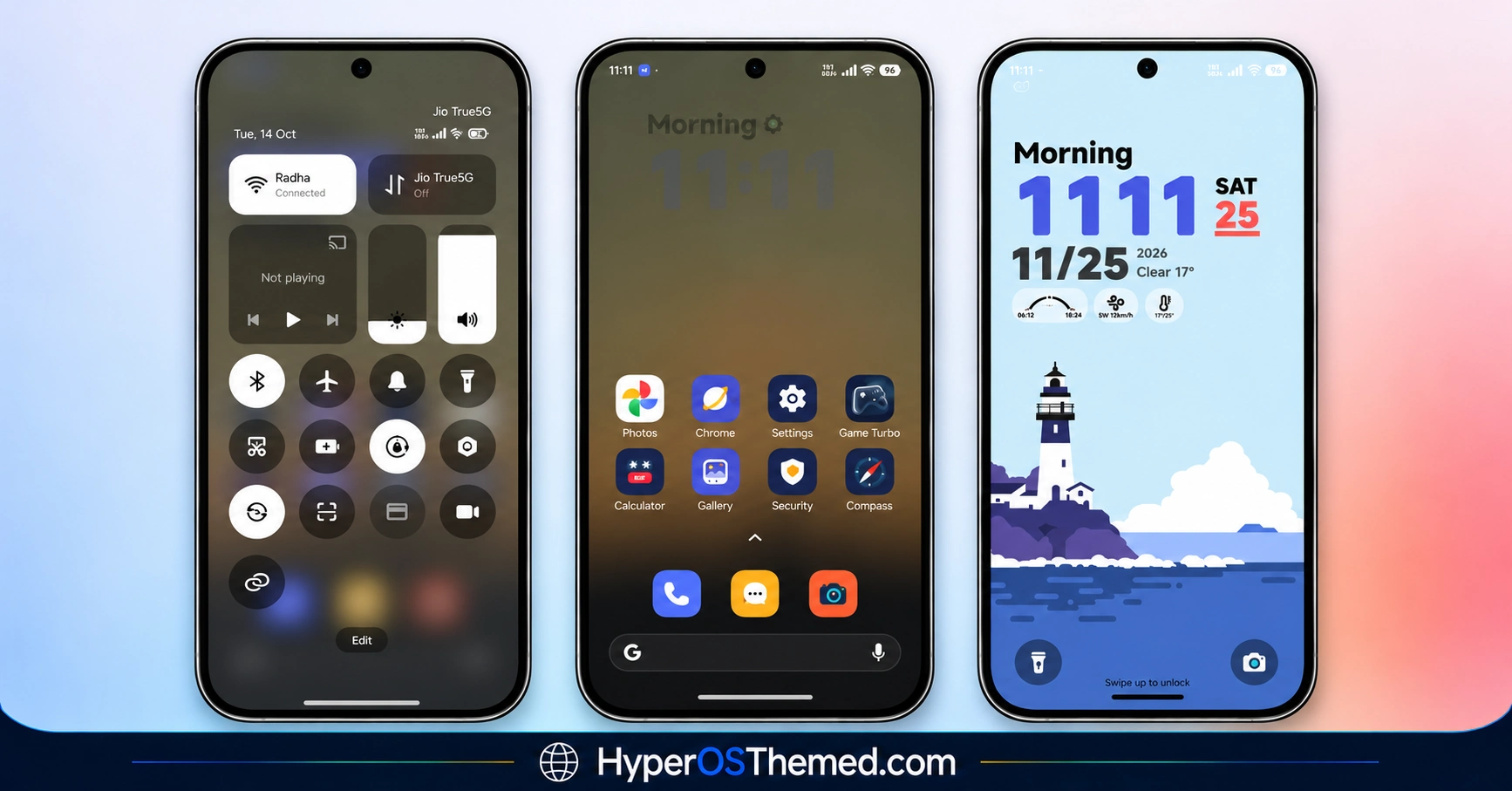
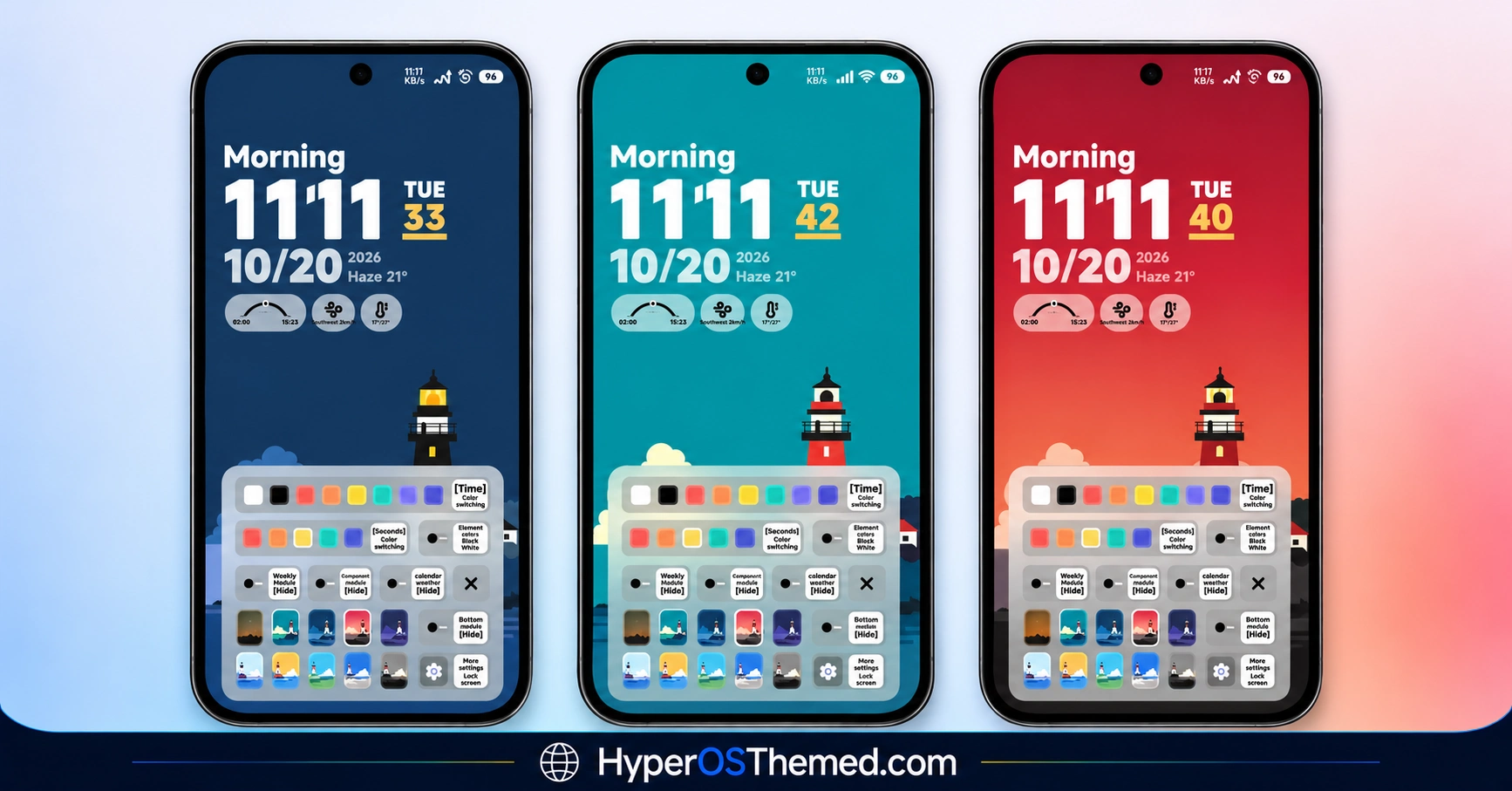
The ss24 HyperOS theme centres on a minimal lock screen with an animated clock and simple wallpapers. Its clock colour options let you coordinate the display with different backgrounds, while the dynamic wallpaper adds movement to the overall design. The result is a restrained visual style for users who prefer clean layouts over elaborate interface effects.
ss24 Theme Overview
| Detail | Information |
|---|---|
| Theme Name | ss24 |
| Designer | suhel |
| Theme Size | 21.14 MB |
| Region | Global |
| Compatibility | HyperOS |
| Supported Devices | Xiaomi, Redmi and POCO devices running compatible HyperOS versions |
| Main Features | Dynamic wallpaper, animated clock, adjustable clock colours and minimal backgrounds |
| Theme Format | Official Theme Store listing |
Get ss24 HyperOS Theme
You can look for ss24 through the official Xiaomi Theme Store if it is available for your device and region.
ss24 HyperOS Theme Compatibility
The ss24 HyperOS Theme is compatible with HyperOS. Before installing, check whether the theme appears in your device’s Theme Store. Some visual elements may vary depending on your phone model and software version.
How to Install ss24 on Global Stable ROM
If your Xiaomi, Redmi or POCO smartphone runs a compatible Global Stable ROM, follow these steps when the official Theme Store listing is available:
- Open this page on your phone and click the OFFICIAL THEME STORE LINK button above, if available.
- When prompted, select the Themes app to open the link.
- If the page opens in a browser, look for the Open in app option.
- On the theme’s page in the Xiaomi Theme Store, tap Download and wait for the download to finish.
- Tap Apply to activate the theme.
Important note: If any elements overlap or appear incorrectly after applying the theme, restart your device. If the problem persists, leave a comment with your phone model and HyperOS version so you can receive more specific help.
Why Choose ss24 HyperOS Theme?
- A minimal design centred on the lock screen.
- An animated clock that adds movement.
- Adjustable clock colours for different wallpapers.
- Dynamic wallpaper and several simple backgrounds.
- Global-region availability listed for compatible HyperOS devices.
Conclusion
The ss24 HyperOS Theme is a straightforward choice for Xiaomi, Redmi and POCO users who prefer a clean lock screen. Its animated clock adds movement, while adjustable colours help the clock complement your chosen wallpaper.
The minimal background selection adds variety without cluttering the design. Before installing, check that the theme is available for your device and HyperOS version. If you prefer a simple visual refresh rather than a complete interface redesign, ss24 is worth considering.
You may also like:
Real Glass HyperOS Theme with Blue Glass Icons and Depth Effect Lock Screen
OX EMG Theme with Minimal Black Glass UI For Xiaomi HyperOS
OX G3 HyperOS Theme with Premium Black Glass UI for Xiaomi Devices
iOS-Style Cool OS Raster Wallpaper HyperOS Theme
s4u11 HyperOS Theme with Custom Lock Screen, Premium Icons and Widgets
