
Hi Xiaomi, Redmi and POCO fans! Today, we’re introducing the Real Glass HyperOS Theme, a customisation option for users who love transparent glass effects, elegant blue accents and a modern lock screen.
Real Glass HyperOS Theme IS Designed by LFN Design BR. Real Glass brings a consistent glass-inspired appearance to multiple parts of the HyperOS interface, including app icons, folders, widgets, notifications and the Control Centre. Its combination of translucent surfaces and detailed visual elements creates a distinctive look while giving you plenty of options to personalise your phone.
One of the biggest highlights of Real Glass HyperOS Theme is its depth-effect lock screen, where the glass-style clock appears behind the landscape in the wallpaper. You can choose from seven included wallpapers or use your own photo, then customise the clock with eight fonts, three font weights and eight colours. Border and transparency adjustments let you fine-tune the clock to suit your preferred background.
Real Glass Xiaomi Theme also goes beyond visual changes to the lock screen. It includes weather charts, a holiday calendar, an upcoming-events list, music controls, quick-access shortcuts and a glass-style fingerprint effect. The glass aesthetic continues across folders, widgets, recent apps and the system interface, with four levels of liquid and frosted glass effects to choose from. If you want a more immersive, coordinated appearance on your Xiaomi, Redmi or POCO smartphone, Real Glass is worth exploring.
Real Glass HyperOS Theme Key Highlights
1. Blue Glass Icons and App Design
- Transparent glass appearance: App icons feature a clear glass-inspired design with blue accents.
- Embossed system icons: System apps use embossed symbols, while other apps feature outline-style designs.
- Animated icons: The clock, calendar and weather icons include animations.
- Matching folders: Folders follow the same glass aesthetic, helping create a consistent home screen.
2. Depth-Effect Lock Screen and Clock Customisation
- Layered clock effect: The glass-style clock sits behind the landscape in the wallpaper, creating a sense of depth.
- Seven built-in wallpapers: Choose from the included backgrounds or set your own photograph.
- Eight clock fonts: Select a font that matches your wallpaper and personal style.
- Three font weights and eight colours: Fine-tune the clock’s appearance with different weight and colour combinations.
- Border and transparency controls: Adjust the clock’s outline and transparency for a more personalised result.
3. Weather, Calendar and Useful Widgets
- Weather charts: View hourly and daily weather information on the lock screen.
- Holiday calendar: The calendar can display holidays alongside your schedule.
- Upcoming events: An Upcoming list helps show future events.
- Weather and alarm information: The date line can display the weather and your next alarm.
- Glass widgets: Available widget layouts include 2×4 and 3×4 sizes, with calculator, converter and settings elements.
- Weather details: Widgets also include a chance-of-rain display and 3D weather icons.
4. Liquid Glass Effects and System Interface
- Four glass-effect levels: Choose between different levels of liquid and frosted glass styling.
- Redesigned Control Centre: The glass treatment extends to the system’s quick settings interface.
- Notifications and recent apps: Matching effects continue across notifications and the recent apps screen.
- Glass dock and hotspot interface: Additional system elements follow the same translucent design.
- Slimmer navigation bar: The theme includes a slimmer navigation bar to complement its updated appearance.
5. Fingerprint, Charging and Quick Controls
- Glass fingerprint effect: A ripple-style visual effect adds to the lock screen’s glass aesthetic.
- Charging animation: Charging brings a matching visual animation.
- Music controls: A music capsule provides access to supported playback controls.
- Flashlight and camera shortcuts: Quick-access shortcuts are available directly from the lock screen.
Real Glass HyperOS Theme Preview
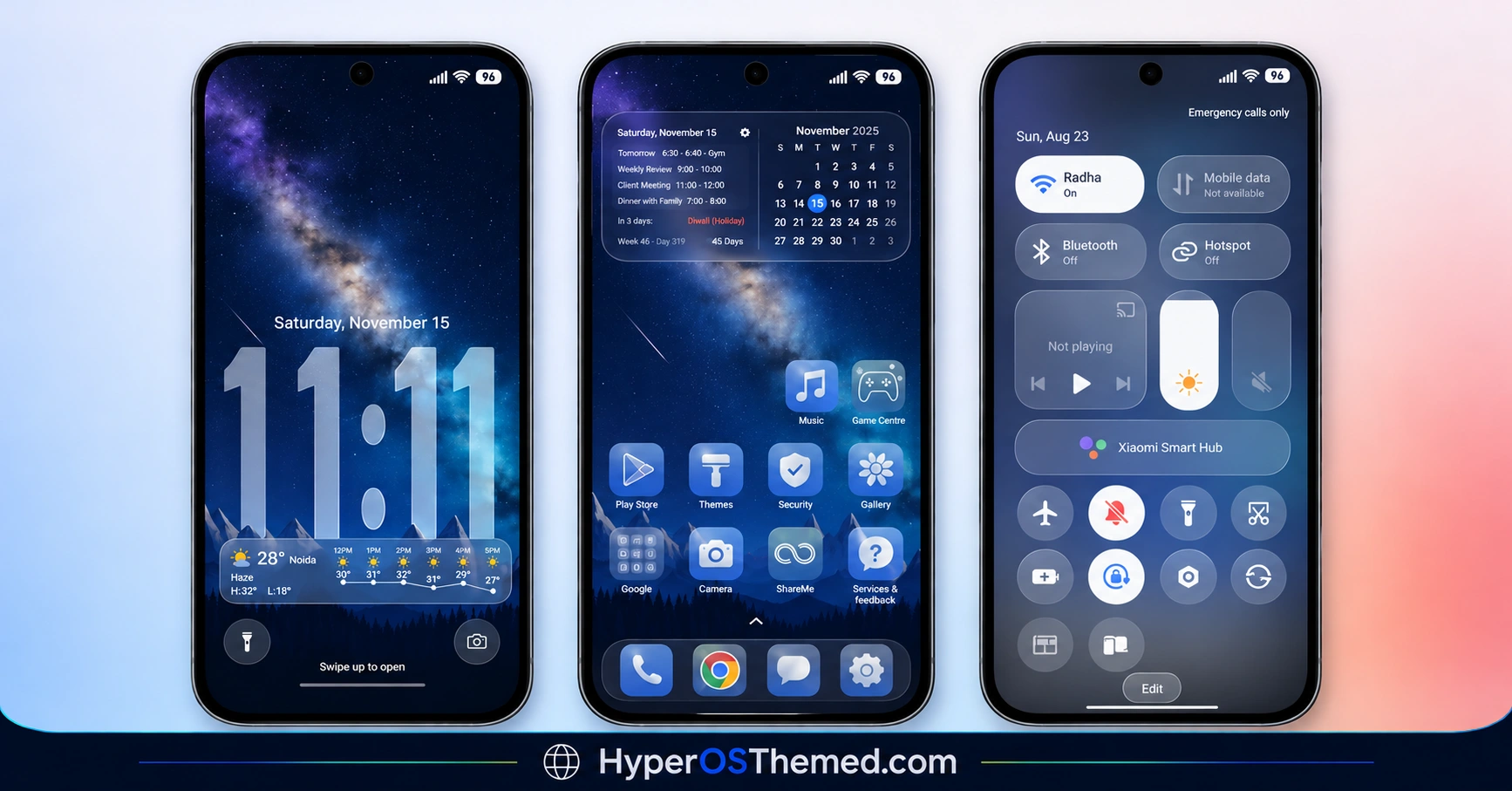
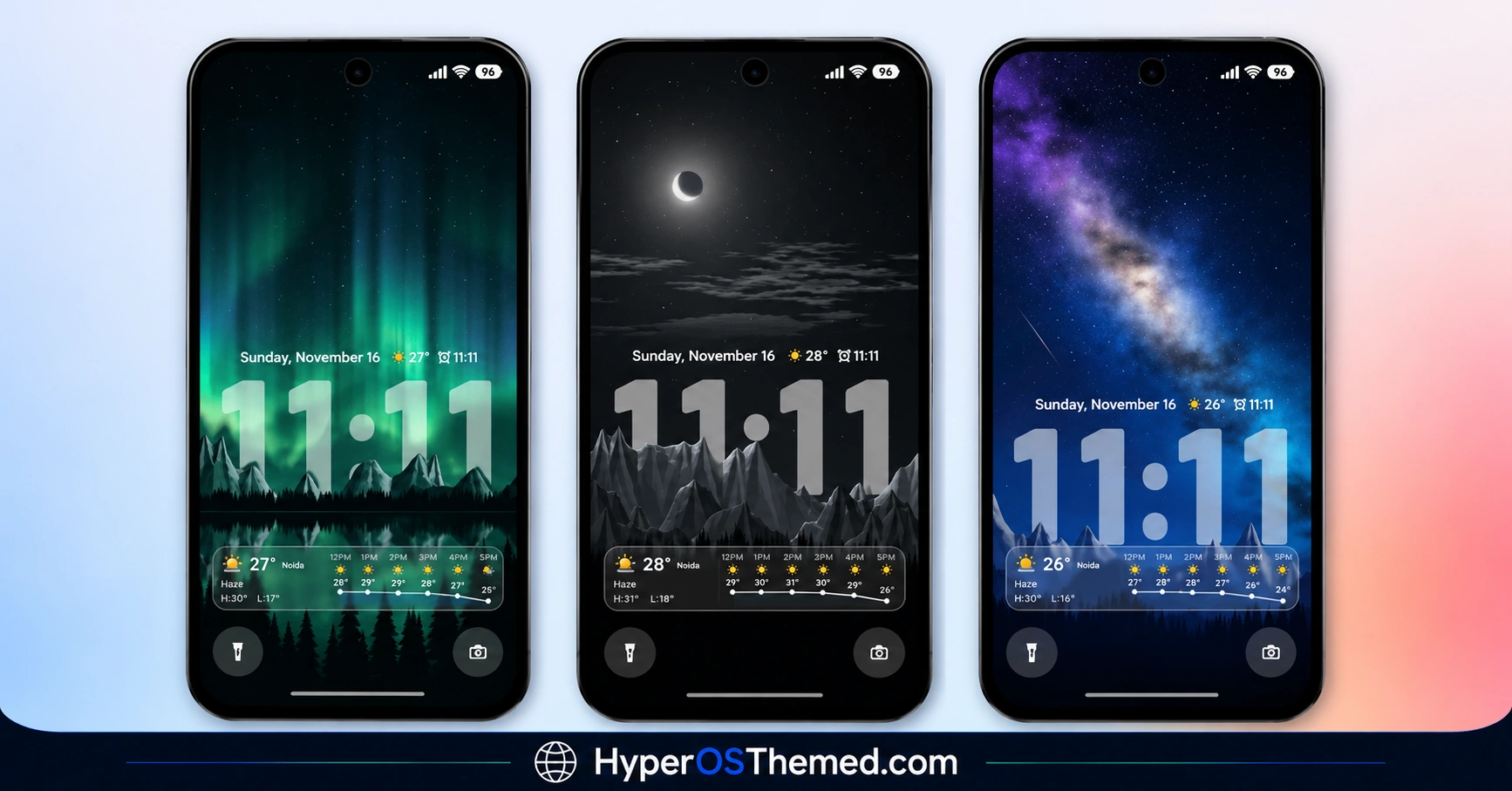
Real Glass HyperOS Theme combines blue-accented transparent icons with a lock screen built around layered glass effects. Its depth-style clock blends into the landscape wallpaper, while adjustable fonts, colours and transparency provide different styling options. The Control Centre, widgets, folders and notifications continue the same visual language, making the theme feel consistent across the interface.
Real Glass Theme Overview
| Detail | Information |
|---|---|
| Theme Name | Real Glass |
| Designer | LFN Design BR |
| Theme Size | 17.77 MB |
| Region | Global |
| Compatibility | HyperOS |
| Supported Devices | Xiaomi, Redmi and POCO devices running compatible HyperOS versions |
| Main Features | Blue glass icons, depth-effect lock screen, clock customisation, weather widgets and frosted-glass UI |
| Theme Format | Official Theme Store |
Get Real Glass HyperOS Theme
You can explore Real Glass through the official Xiaomi Theme Store if the listing is available for your device and region.
Real Glass HyperOS Theme Compatibility
Real Glass Theme is listed for the Global region and is described as compatible with HyperOS. However, the supplied information does not specify individual HyperOS subversions or confirm compatibility with every Xiaomi, Redmi and POCO model.
Some features, particularly depth effects, widgets and system-interface changes, may behave differently depending on your device and software version. Check the theme’s availability on your phone before installing it.
How to Install Real Glass on Global Stable ROM
If your Xiaomi, Redmi or POCO smartphone runs a compatible Global Stable ROM, follow these steps to apply the theme through the official Xiaomi Theme Store:
- Click the OFFICIAL THEME STORE LINK button above on your phone, if available.
- When prompted, select the Themes app to open the link.
- If the page opens in a browser, look for the Open in app option.
- On the theme’s page in the Xiaomi Theme Store, tap Download and wait for the download to finish.
- Tap Apply to activate the theme.
If the official link does not open correctly, try Chrome or your device’s default Xiaomi browser. Availability may vary by region and ROM.
Important note: If the clock, widgets or other interface elements overlap or display incorrectly after applying the theme, restart your device. If the problem persists, leave a comment with your phone model and HyperOS version so you can receive more specific help.
Why Choose Real Glass HyperOS Theme?
- Transparent glass aesthetic: Glass-inspired icons, folders, widgets and system panels create a coordinated appearance.
- Detailed lock screen customisation: Choose from multiple clock fonts, weights, and colours, plus border and transparency controls.
- Useful widgets: Weather information, calendar details, alarm information and a music capsule add practical details to the interface.
- Seven included wallpapers: Match the background to your preferred glass-style layout.
- HyperOS compatibility: Designed for supported Xiaomi, Redmi and POCO devices running HyperOS 2.0 and HyperOS 3.0.
Conclusion
Real Glass HyperOS Theme is an appealing option for Xiaomi, Redmi and POCO users who want a transparent, glass-inspired interface with blue accents. Its depth-effect clock and extensive lock screen customisation help make the wallpaper a central part of the design.
Weather information, calendar features and other widgets add useful details, while the glass treatment extends across much of the system interface. Before installing, check compatibility with your HyperOS version and device. If you use a custom ROM, make sure MTZ imports are supported so you can enjoy the theme’s features as intended.
You may also like:
OX EMG Theme with Minimal Black Glass UI For Xiaomi HyperOS
OX G3 HyperOS Theme with Premium Black Glass UI for Xiaomi Devices
iOS-Style Cool OS Raster Wallpaper HyperOS Theme
s4u11 HyperOS Theme with Custom Lock Screen, Premium Icons and Widgets
