
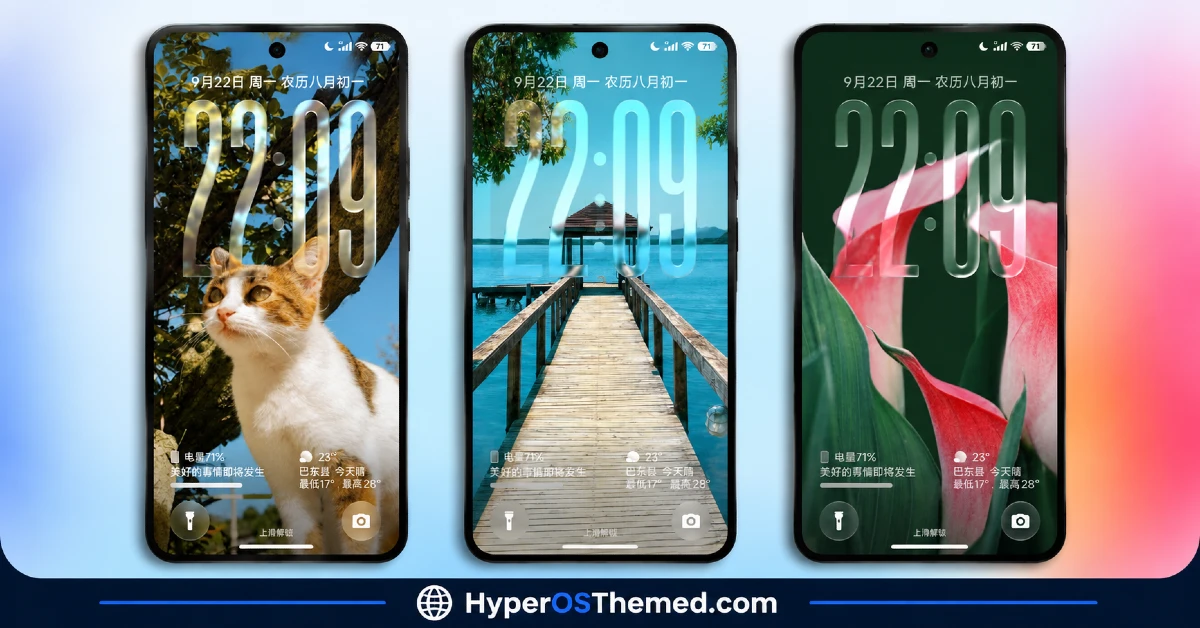
Depth effect lock screens have gotten fairly common, but most just layer a photo behind the clock and call it done. FiftyK HyperOS Theme goes further, actually mapping wallpaper depth so the clock numerals tuck naturally behind foreground elements, flowers, animals, architecture, rather than floating flatly on top of them.
Designed by Mydul Islam, it wraps that clever depth work in a soft pastel, Mediterranean floral aesthetic and backs it up with genuinely deep lock screen customization, right down to RGB sliders for the clock color itself. At 66.6 MB, it’s built for Xiaomi, Redmi and POCO devices running HyperOS 2 or HyperOS 3.
FiftyK HyperOS Theme Key Features
- Smart Depth-Mapped Lock Screen: Instead of a flat, layered wallpaper, FiftyK HyperOS Theme intelligently maps depth so clock numerals tuck behind foreground objects like flowers or architecture. That’s a noticeably more convincing effect than the usual parallax trick most depth-effect themes rely on.
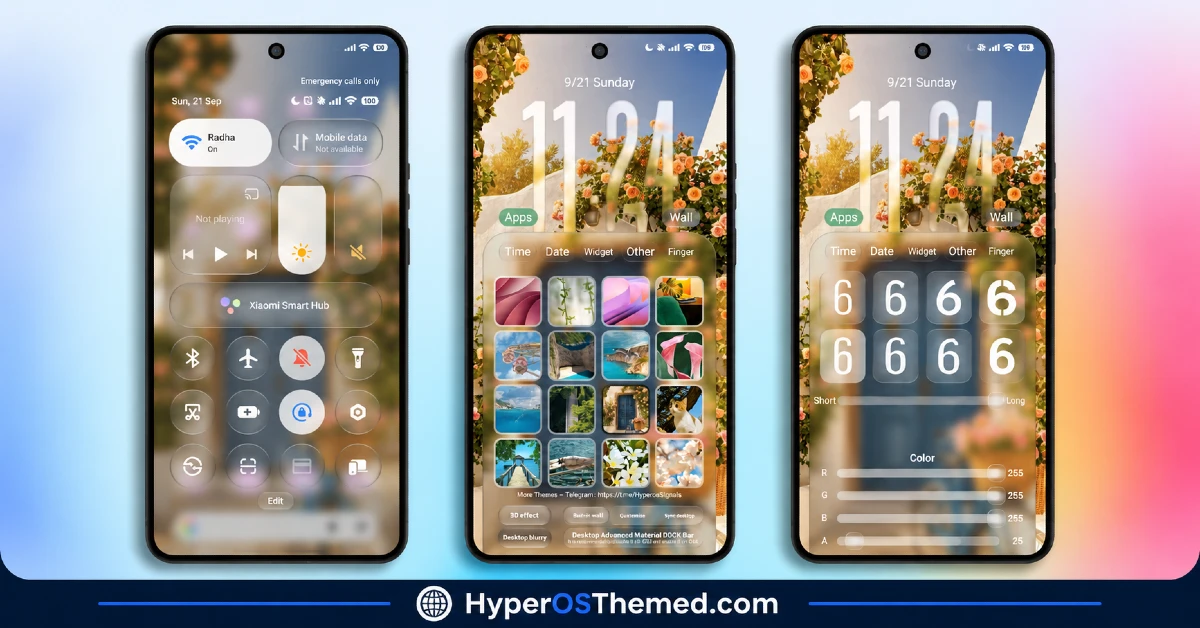
- RGB Clock Color Sliders: Precise RGB sliders let you dial the clock typography to any exact hue rather than picking from a handful of preset colors. That level of granular control is genuinely uncommon, even among themes that call themselves customizable.
- Deep Lock Screen Personalization: Beyond color, there are dedicated settings for time, date, widgets, fingerprint icon style and background blur intensity. It turns lock screen setup into something closer to a real settings panel than a fixed layout you’re stuck with.
- Multi-Category Wallpaper Switcher: A built-in wallpaper gallery spans several HD categories, Mediterranean floral streets, pets, beaches, lakes and floral close-ups, so there’s genuine variety to pick from rather than committing to one scene permanently.
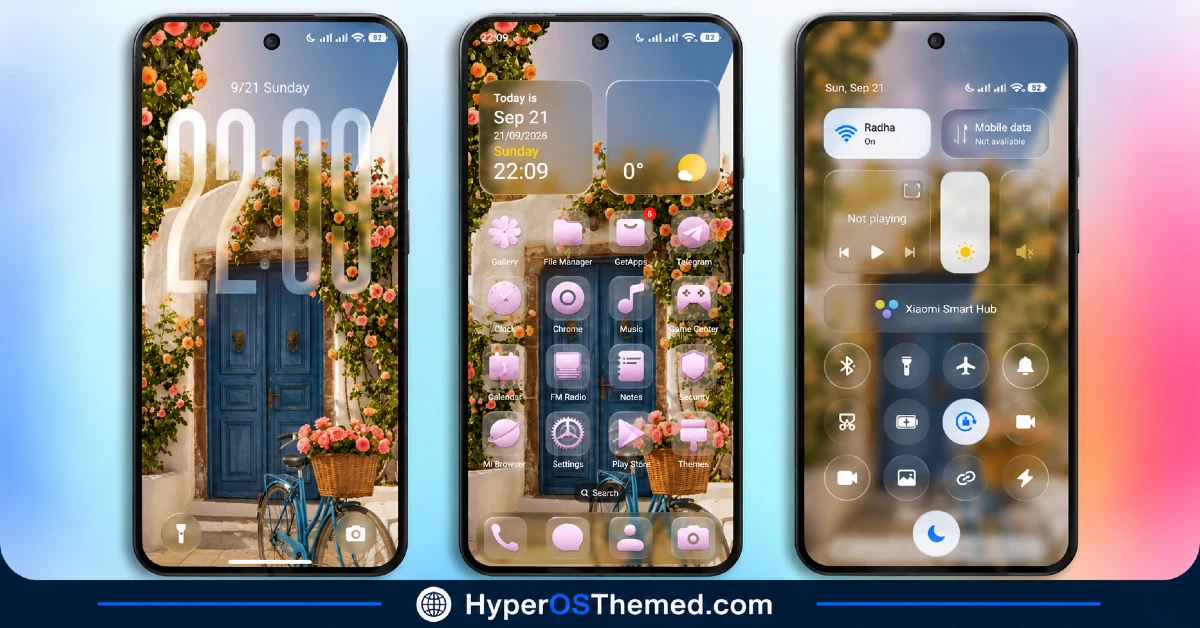
- Pastel Glossy Icon Pack: Icons use a soft lavender and pastel pink gradient finish with broad coverage extending to apps like Telegram, TikTok, ChatGPT, Binance and Discord, not just the obvious big names. That kind of extended third-party coverage is worth noting since a lot of icon packs stop short of it.
- Frosted Glass Widget Cards: Desktop clock and weather widgets sit inside frosted glass container cards rather than plain rectangular boxes, tying the widget design visually back into the same aesthetic used across the lock screen and Control Center.
- Translucent Control Center: The Control Center uses a clean, frosted glass background blur with pill-shaped volume and brightness sliders carrying soft accent highlights. It’s a clear departure from the flat default HyperOS panel.
- High-Contrast Status Bar: Network, Wi-Fi and battery indicators are designed for clarity, staying legible even against the busier floral wallpapers running in the background. That matters more here than in flatter themes, since detailed scenery can otherwise swallow small status icons.
- Integrated Quick Tools and Notifications: Notification Center cards, battery stats and bottom shortcuts for Camera and Flashlight are all built into the lock screen. It’s a practical layer on top of the purely visual customization, keeping frequently used tools within easy reach.
FiftyK HyperOS Theme Preview
The screenshots below show the depth-mapped floral lock screen, the pastel glossy icon pack and how the frosted Control Center and widgets look once the theme is applied. Given how much genuine customization is packed into the lock screen specifically, from RGB clock colors to the wallpaper switcher, it’s worth spending real time with the preview to see the range of what’s on offer.
FiftyK HyperOS Theme Overview
| Attribute | Details |
|---|---|
| Availability | Free, via Xiaomi Theme Store |
| Supported Devices | Xiaomi, Redmi and POCO phones running HyperOS |
| Theme Name | FiftyK |
| Designer | Mydul Islam |
| Compatibility OS | HyperOS 2 and HyperOS 3 |
| Features | Depth-mapped lock screen, RGB clock color sliders, multi-category wallpaper switcher, pastel glossy icons, frosted glass widgets, translucent Control Center |
| File Size | ~66.6 MB |
FiftyK HyperOS Theme Compatibility
FiftyK is built for HyperOS 2 and HyperOS 3 and works across Xiaomi, Redmi and POCO devices running either version. Since the theme leans heavily on depth mapping and RGB customization, older or lower-powered devices may render these lock screen effects with somewhat less smoothness compared to current flagship hardware.
Custom ROM users can still attempt manual installation, though given how specifically this theme relies on HyperOS 2/3 rendering capabilities, results may vary more than usual on non-stock builds. As with most themes modifying the lock screen this extensively, restarting the device after installation helps ensure the custom scripts, status bar icons and Control Center toggles all render properly.
Get FiftyK HyperOS Theme
Download FiftyK only through the official Theme Store link rather than random third-party file hosts or unofficial APK uploads. Files sourced outside verified channels are difficult to confirm as unaltered and may not reflect what Mydul Islam actually released. Sticking to the official Theme Store link keeps the installed version consistent with the intended design and ensures future updates remain accessible.
A note on installation access: if the Official Theme Store link doesn’t open automatically into the Themes app, check that your default mobile browser has permission to open system applications, since that’s the most common reason the redirect fails to trigger properly.
How to Apply FiftyK HyperOS Theme
Follow the steps below to apply the theme:
- Open the Theme Store link given above on your Xiaomi, Redmi or POCO device.
- This will redirect you to the Theme Store.
- Tap the Free or Download button to fetch all the theme resources.
- Once downloaded, tap Apply to install the theme system-wide.
- Customize specific elements such as icons, lock screen or status bar if needed.
- Reboot your device after applying, this step is recommended specifically here to make sure the custom lock screen scripts, status bar icons and Control Center toggles all render properly.
Note: If anything looks overlapped or doesn’t display correctly right after installing, restarting the device usually clears it up without further steps. This theme has been checked on HyperOS 2 and 3 without any major issues turning up during that process. Still, if something looks off on a specific device once it’s applied, leaving a comment with the details helps get it looked into.
Why Choose FiftyK HyperOS Theme?
- Genuinely smart depth mapping — clock numerals tuck behind foreground objects instead of floating flatly on top.
- True RGB clock customization — precise color control rather than a handful of preset options.
- Extensive wallpaper variety — Mediterranean streets, pets, beaches and floral close-ups all built in.
- Broad third-party icon coverage — apps like Discord, Binance and ChatGPT all get matching pastel icons.
- Deep personalization settings — time, date, widgets and blur intensity are all individually adjustable.
- Frosted glass Control Center — a clear visual upgrade over the standard flat quick settings panel.
- Practical lock screen shortcuts — Camera and Flashlight access built right into the design.
- Free official download — no cost involved through a legitimate Theme Store link.
Conclusion
FiftyK HyperOS Theme stands out through genuine depth and control, the smart depth-mapped lock screen and RGB clock sliders go well beyond what most “customizable” themes actually deliver, and the pastel floral aesthetic gives it a distinct, cohesive identity throughout. For Xiaomi, Redmi and POCO users on HyperOS 2 or 3 who want a soft, elegant look with real personalization behind it, FiftyK HyperOS Theme is well worth trying.
You may also like:
Grade A HyperOS Theme with Cyberpunk Red Neon AMOLED for Xiaomi, POCO, Redmi
Airdrop HyperOS Theme with Nature Wallpapers and 3D Depth Effect
GlassyM HyperOS Theme with Frosted Glass Rainy-Night Lock Screen for Xiaomi, POCO, Redmi
OX Clay HyperOS Theme with Minimal Design & Subtle Glass Touches for Xiaomi, POCO, Redmi
Blosug v2 HyperOS Theme with Minimal Icons, Refined Lock Screen, and a Cleaner System UI
