HyperOS themes can change much more than the appearance of app icons. Some also introduce useful lock screen controls, alternative wallpapers and redesigned system panels. The s4u14 HyperOS Theme, created by suhel, brings these elements together in a clean interface built around minimal landscape artwork, a distinctive digital clock and carefully arranged system components.
One of its main attractions is the lock screen customisation panel. You can choose different clock alignments and styles, change the colour of the seconds, and control which information appears alongside the time. The theme also includes a selection of minimalist wallpapers, a music player card and a redesigned Control Centre, giving you several ways to personalise the overall appearance of your phone.
The home screen features colourful rounded app icons, while the Phone app and Control Centre have their own visual treatment. With its combination of clock settings, wallpaper choices and system interface changes, s4u14 offers a more personal HyperOS setup without relying on an overly complicated design.
s4u14 HyperOS Theme Key Highlights
1. Customisable Lock Screen Clock & Information
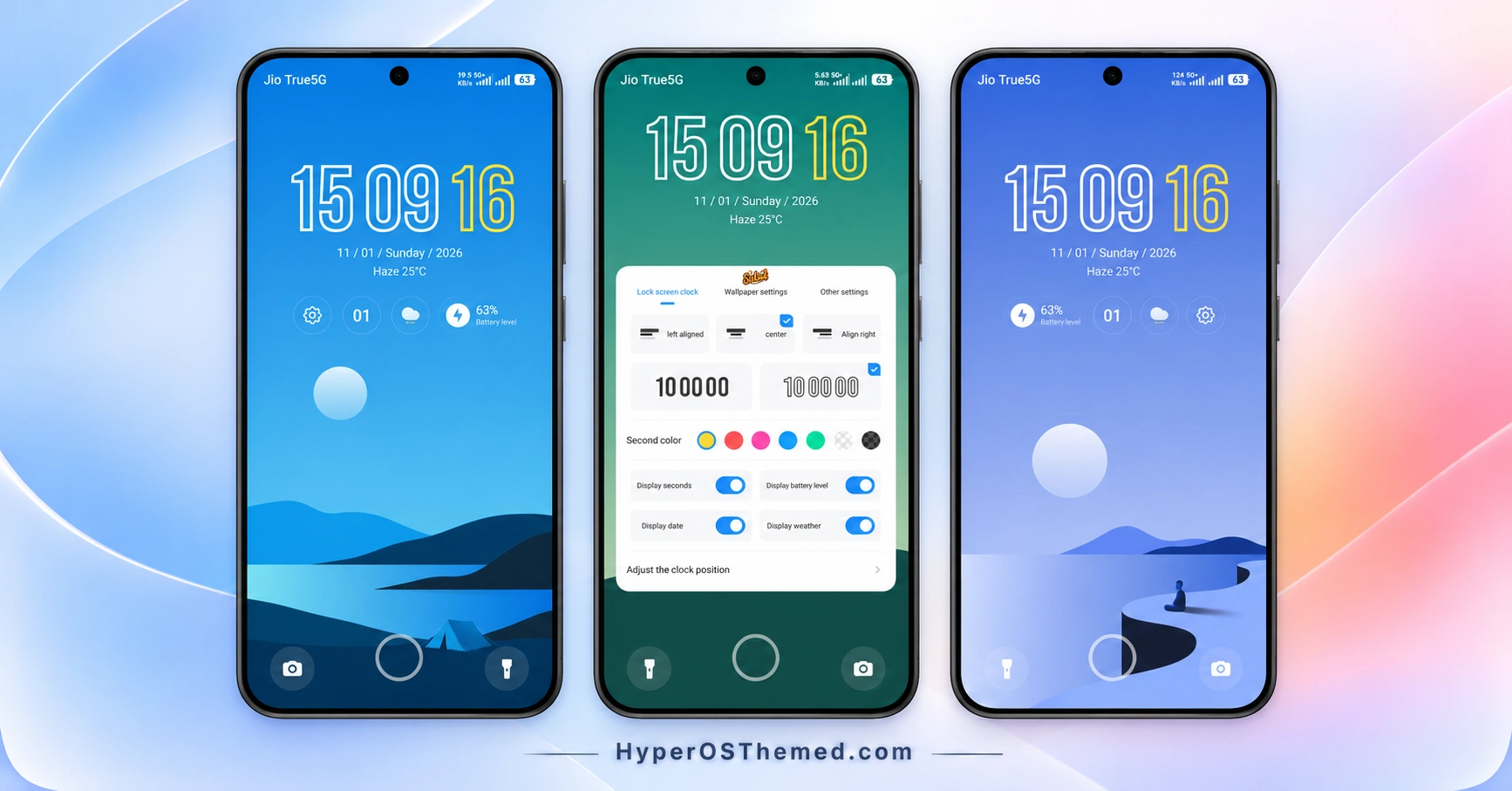
- Multiple Clock Alignments: Position the lock screen clock on the left, in the centre or on the right using the available layout options.
- Two Clock Styles: Choose between a solid digital clock and an outlined typography style.
- Separate Seconds Colour: Customise the seconds display with different colour choices, including yellow, red, pink, blue, green and monochrome options.
- Adjustable Information: Enable or disable the seconds, battery level, date and weather information according to your preference.
- Lock Screen Status Details: View useful information such as battery percentage, date and local weather beneath the clock.
2. Minimal Landscape Wallpapers & Music Player
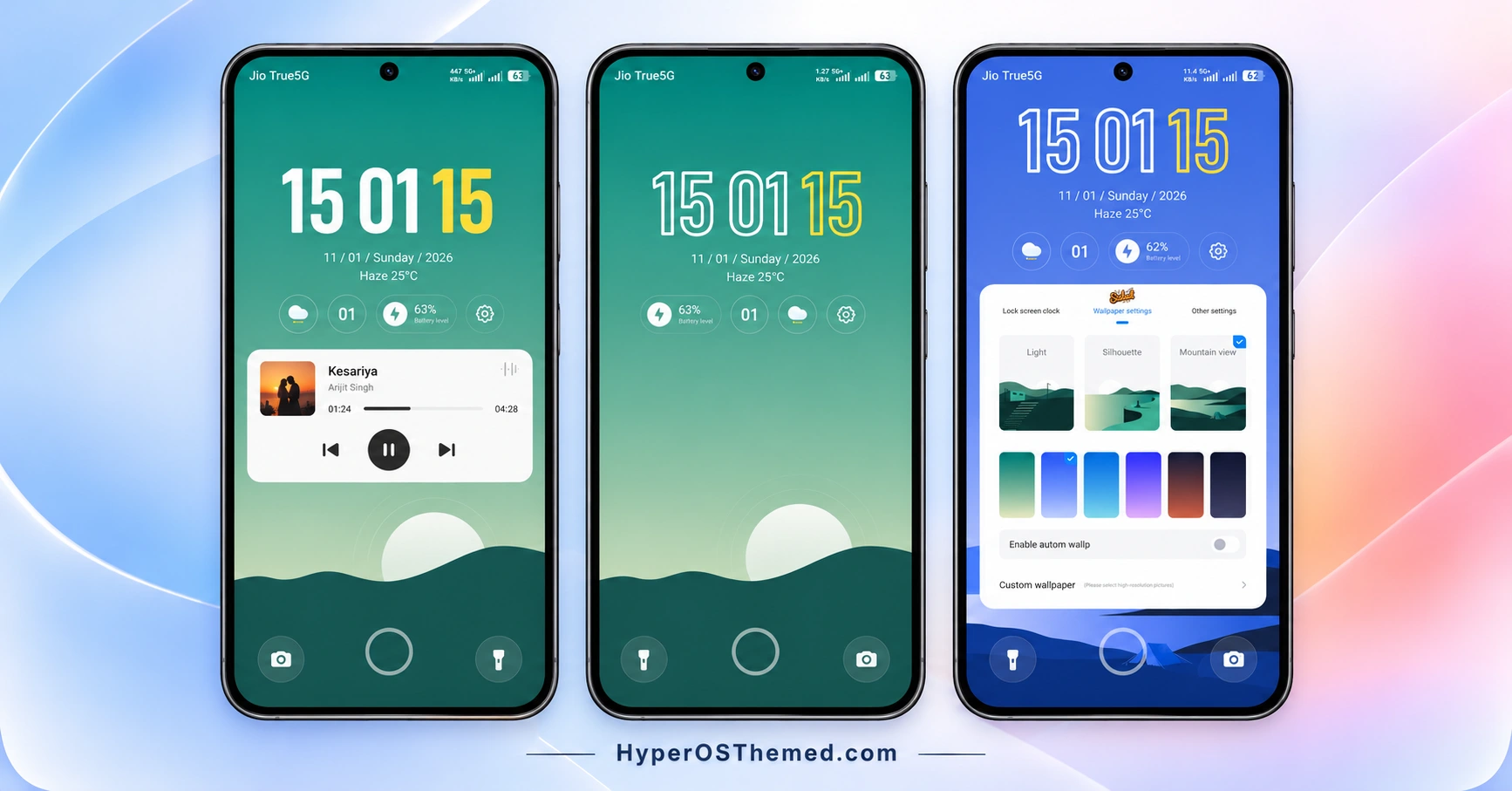
- Built-in Wallpaper Choices: Switch between minimalist designs such as Light, Silhouette and Mountain View.
- Different Colour Palettes: Select from several background colour variations, including green, blue, purple and darker shades.
- Music Player Card: Access a dedicated lock screen music widget with track information, a progress bar and playback controls.
- Minimal Landscape Artwork: The wallpapers use simple layered scenery, hills, water and sun elements to create a calm visual appearance.
3. Redesigned Home Screen & System Interface
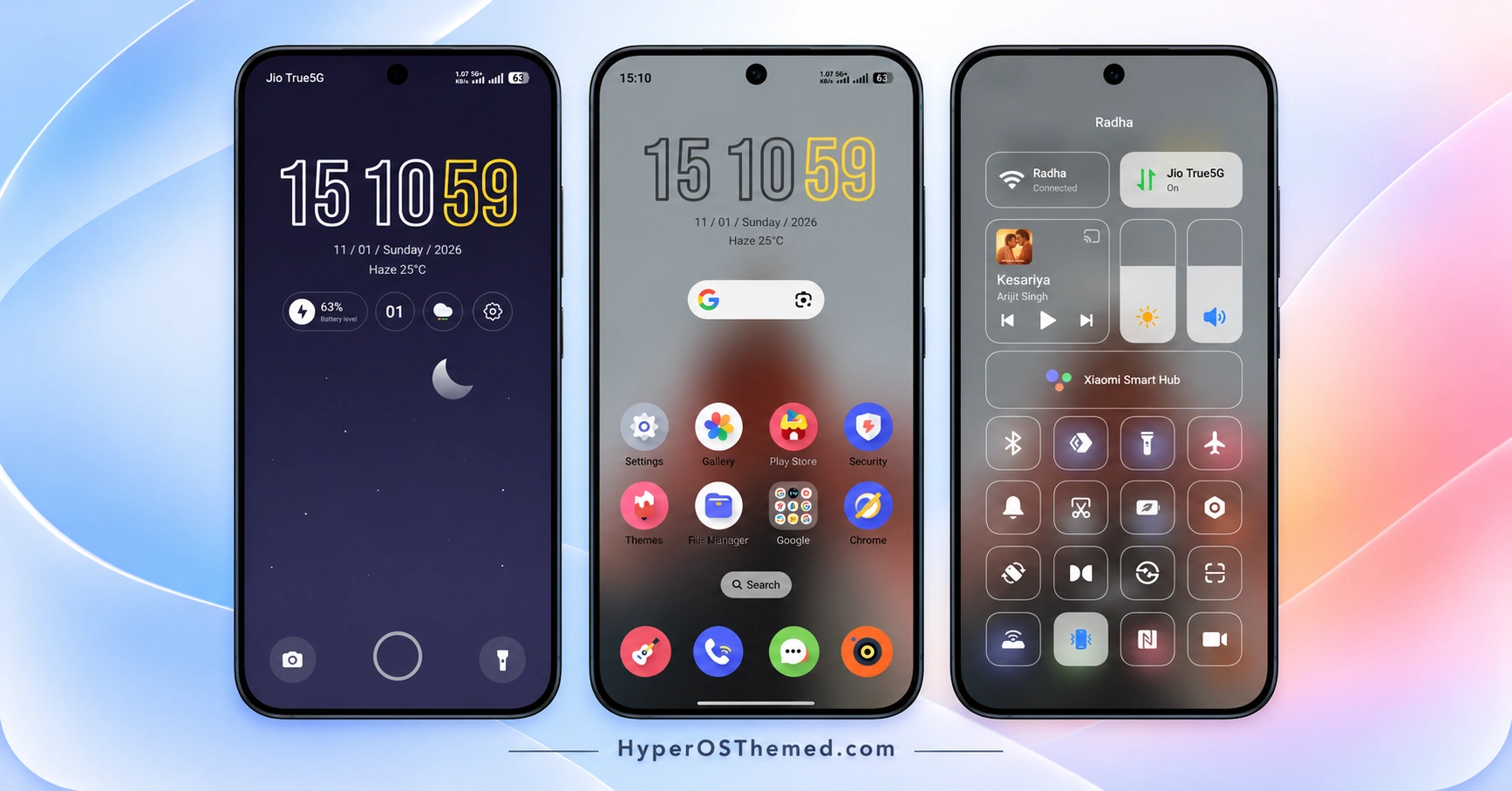
- Colourful App Icons: The home screen uses rounded icons with bright colours for applications such as Gallery, Chrome, Security, Themes, Settings and Play Store.
- Google Search Widget: A compact Google search bar sits above the main app grid.
- Updated Phone Interface: The dialer and recent calls screen feature a clean white layout with blue accents.
- Redesigned Control Centre: A translucent grey panel combines connectivity tiles, music controls, brightness and volume sliders, and additional system shortcuts.
s4u14 HyperOS Theme Preview
The preview images show the lock screen clock customisation panel, alternative landscape wallpapers, home screen icons, Phone app and redesigned Control Centre. They also demonstrate how the music player appears on the lock screen.
s4u14 Theme Overview
| Feature | Details |
|---|---|
| Theme Name | s4u14 |
| Designer | suhel |
| Theme Size | 35.89 MB |
| Region | Global |
| Compatibility | HyperOS, HyperOS 2.0 and HyperOS 3.0 |
| Main Features | Customisable lock screen clock, wallpaper options, music player, app icons and redesigned Control Centre |
| Availability | Official Xiaomi Theme Store |
Get s4u14 HyperOS Theme
You can access the s4u14 HyperOS Theme through the official Xiaomi Theme Store using the button below. Open the link on your compatible Xiaomi, Redmi or POCO smartphone to view the theme in the Themes app.
s4u14 HyperOS Theme Compatibility
s4u14 is designed for Xiaomi’s HyperOS interface and is specified as compatible with HyperOS, HyperOS 2.0 and HyperOS 3.0. It is intended for compatible Xiaomi, Redmi and POCO smartphones using the Global theme region.
Some visual elements may appear differently depending on your phone model, software version and available system features. Check the theme preview and compatibility on your device before applying it.
Why Choose s4u14 HyperOS Theme?
The s4u14 theme is particularly interesting if you enjoy adjusting your lock screen instead of using a fixed clock layout. Its left, centre and right alignment options, alternative clock typography and separate seconds-colour settings provide useful control over the way the time appears.
The wallpaper selector adds another layer of personalisation, while the music player card makes playback controls accessible from the lock screen. The colourful home screen icons and translucent Control Centre complete the visual changes across different parts of the interface.
Conclusion
The s4u14 HyperOS Theme by suhel combines minimalist landscape wallpapers with practical lock screen customisation. Its adjustable clock position, two clock styles, seconds-colour options and optional information displays are among its most useful features. The music player card, colourful app icons and redesigned Control Centre add further variety to the interface.
If you prefer a clean design but still want control over your lock screen’s appearance, s4u14 is worth exploring. Open its official Xiaomi Theme Store page, check the available preview and apply it to your compatible device.
1. Does s4u14 support HyperOS 3 and HyperOS 4?
s4u14 lists support for the original HyperOS, HyperOS 2.0 and HyperOS 3.0. HyperOS 4 compatibility is not confirmed in the available details. Check the theme’s official listing in your Xiaomi Themes app before applying it.
2. Can I change the clock position and hide information on the lock screen?
Yes. The lock screen customisation panel lets you align the clock to the left, centre or right and choose solid or outlined numbers. You can also show or hide the seconds, battery level, date and weather, and change the seconds colour separately.
3. Can I switch wallpapers without changing the whole theme?
Yes. s4u14 includes a wallpaper selector with built-in designs such as Light, Silhouette and Mountain View. You can choose different landscape backgrounds and colour variations while keeping the theme’s icons and other interface styling.
4. Can I control music from the s4u14 lock screen?
Yes. The theme includes a lock screen music card with track information, a progress bar and playback controls. Support for specific music apps is not detailed in the article, so the preview alone does not confirm that every player will work identically.
5. How do I apply s4u14, and what if some elements look wrong?
Open its official link in the Xiaomi Themes app, download the 35.89 MB theme and tap Apply. If icons, clock numbers or other elements overlap, restart your phone and check again. If the problem continues, share your phone model and HyperOS version in the article’s comments.
You may also like:
suhel13 HyperOS Theme with Scenic Wallpapers and Black Glossy Icons
s4u dark by suhel HyperOS Theme with Black UI for Xiaomi & Redmi
Glossix HyperOS Theme with Dark Glossy Icons and Advanced Lockscreen Customisation
iOS-Inspired OX G5 v2 HyperOS Theme for Xiaomi, Redmi & POCO