
Hi Xiaomi, Redmi and POCO fans! Today, we’re introducing OX EMG HyperOS Theme, a stylish HyperOS theme designed for users who prefer a clean, dark interface with subtle colour accents. Created by oxfury, this theme combines a minimal black aesthetic with fresh green icons, dark glass tiles and a bold two-tone clock. Its carefully balanced design gives your smartphone a distinctive appearance without relying on overly bright colours or busy visual elements.
One of the standout features of OX EMG HyperOS Theme 4 is the contrast between its green app icons and dark interface elements. The home screen features a soft glow that adds depth, while the frosted-glass Control Centre maintains the theme’s clean look. These elements work together to create a modern appearance for compatible Xiaomi, Redmi and POCO smartphones.
If you enjoy dark themes and prefer a minimal home screen, OX EMG is worth exploring. It offers a different look from the standard HyperOS interface, with its black surfaces, green accents and coordinated system styling. The theme is listed for the Global region and supports HyperOS 2, HyperOS 3 and HyperOS 4. An MTZ package is also available for users whose custom ROM supports manual theme imports.
OX EMG HyperOS Theme Key Highlights
1. Minimal Black and Green Design
- Dark visual style: Black interface elements create a clean, understated appearance.
- Fresh green icons: Green accents stand out against the darker background.
- Dark glass tiles: Glass-inspired tiles complement the theme’s minimal design.
- Balanced colours: The limited colour palette keeps the interface visually consistent.
2. Custom Clock and Home Screen
- Bold two-tone clock: A distinctive clock design adds contrast to the home screen.
- Soft glowing effect: A subtle glow adds visual depth to the overall layout.
- Coordinated styling: The clock, icons and dark surfaces follow the same design direction.
3. Frosted-Glass Control Centre
- Frosted appearance: Translucent styling gives the Control Centre a modern look.
- Clean interface: The minimal design complements the dark home screen.
- Consistent colour scheme: Dark elements and green accents help maintain a unified visual identity.
OX EMG HyperOS Theme Preview
OX EMG HyperOS 4 Theme focuses on a minimal black interface with green icons and dark glass tiles. Its bold two-tone clock creates a strong visual focal point, while the soft home-screen glow adds subtle depth.
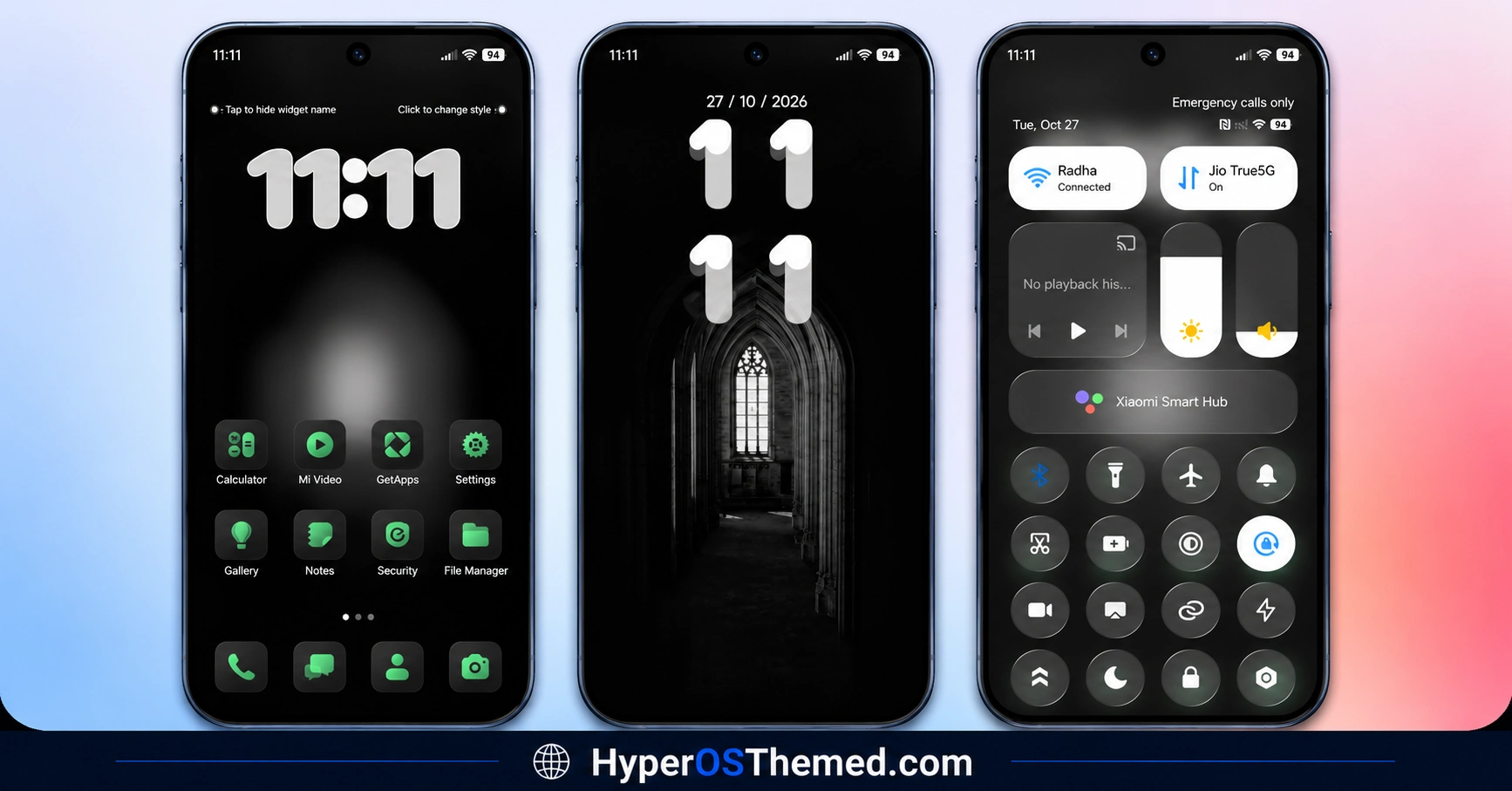
The frosted-glass Control Centre continues the same restrained aesthetic, making this theme a good option for users who prefer dark, uncluttered interface designs.
OX EMG Theme Overview
| Detail | Information |
|---|---|
| Theme Name | OX EMG |
| Designer | oxfury |
| Theme Size | 42.96 MB |
| Region | Global |
| Supported Devices | Xiaomi, Redmi and POCO |
| Compatibility | HyperOS, HyperOS 2, HyperOS 3 and HyperOS 4 |
| Main Features | Minimal black design, green icons, dark glass tiles, two-tone clock and frosted Control Centre |
| Theme Format | Official Xiaomi Theme Store |
Get OX EMG HyperOS Theme
You can check the official Xiaomi Theme Store for OX EMG if the theme is available for your device and region.
OX EMG HyperOS Theme Compatibility
OX EMG is listed for the Global region and includes compatibility information for HyperOS 2, HyperOS 3 and HyperOS 4. It is intended for Xiaomi, Redmi and POCO smartphones, but availability and the appearance of individual elements may vary depending on your device and software version.
If the theme is not available in your Theme Store, check your device’s region and ROM compatibility. For manual installation, confirm that your custom ROM supports importing MTZ theme files.
How to Install OX EMG on Global Stable ROM
If your Xiaomi, Redmi or POCO smartphone runs a compatible Global Stable ROM, follow these steps to apply OX EMG through the official Xiaomi Theme Store:
- Click the OFFICIAL THEME STORE LINK button above.
- When prompted, select the Themes app to open the link.
- If the page opens in your browser, look for the Open in app option.
- On the theme’s page in the Xiaomi Theme Store, tap Download and wait for it to finish.
- Tap Apply to activate the theme.
If the official link does not open correctly, try Chrome or your device’s default Xiaomi browser. Theme availability may vary by region.
Important note: Restart your device if any interface elements overlap or appear incorrectly after applying the theme. If the issue persists, leave a comment with your phone model and HyperOS version so you can receive more specific help.
Important Copyright and Designer Notice
OX EMG is credited to oxfury and masuod, with some resources from other creators. Please respect their work and do not copy, re-upload or modify any part of the theme without permission. The creators state that unauthorised use may be reported to Xiaomi for copyright violations. If you want to redistribute or modify the theme, obtain permission from the relevant rights holders first.
You can also visit the creators’ Telegram channels for more themes, feedback and support:
Why Choose OX EMG HyperOS Theme?
- A minimal black interface with fresh green icon accents.
- Dark glass tiles that complement the overall design.
- A bold two-tone clock and soft home screen glow.
- A frosted-glass Control Centre.
- An MTZ package for compatible custom ROMs.
- Listed support for HyperOS 2, HyperOS 3 and HyperOS 4.
Conclusion
OX EMG is a good option for Xiaomi, Redmi and POCO users who prefer a dark, minimal interface with a touch of green. Its contrasting icons, glass-inspired tiles and two-tone clock give the home screen a distinctive appearance.
The frosted-glass Control Centre carries the same styling into the system interface. Before installing, check your device’s compatibility and whether the official Theme Store listing is accessible in your region. Custom ROM users can try the supplied MTZ package if their software supports manual theme imports, while respecting the creators’ copyright notice.
You may also like:
iOS-Style Cool OS Raster Wallpaper HyperOS Theme
s4u11 HyperOS Theme with Custom Lock Screen, Premium Icons and Widgets
Bubblegum Dream HyperOS Theme for Xiaomi, POCO & Redmi
OX G3 HyperOS Theme with Premium Black Glass UI for Xiaomi Devices
