
Font selection is one of those small details most themes leave completely fixed, but Verdant HyperOS Theme hands it over to you entirely, an inline font editor lets you pick between solid line, stencil, glass outline and script styles for the clock, on top of full color slider control. Designed by Mydul Islam, that level of typography freedom sits inside a broader forest-inspired package built around mint-green icons and genuinely immersive nature wallpapers. At 49.5 MB, it’s built specifically for HyperOS 3, covering Xiaomi, Redmi and POCO devices.
Verdant HyperOS Theme Key Features
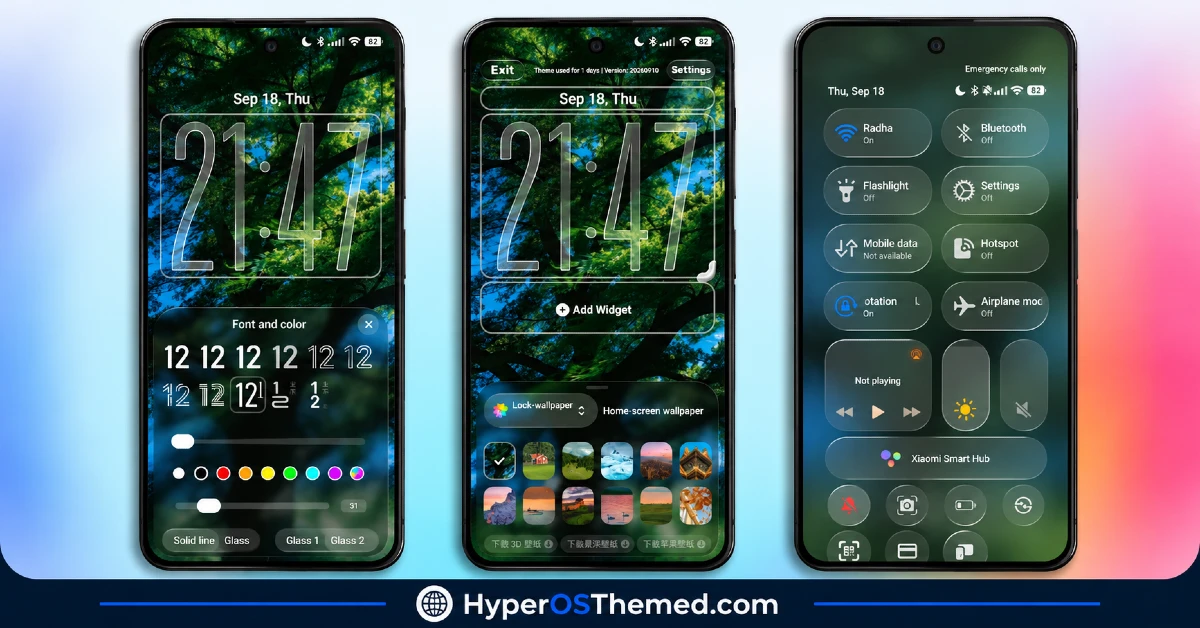
- Inline Clock Font Editor: Rather than a single fixed clock style, Verdant includes an actual font editor offering solid line, stencil, glass outline and script options, paired with color sliders to fine-tune the palette. That’s a genuinely unusual level of typography control for a phone theme.
- Scenic Nature Wallpaper Gallery: A built-in lock screen switcher offers a real variety of scenery, lush green forests, mountain ranges and stylized architectural shots, rather than locking you into one fixed backdrop. That range gives the theme staying power beyond the first week of use.
- Depth-of-Field Widget Overlays: Custom widgets can be added directly to the lock screen with depth-of-field effects layered on top, giving them genuine visual presence rather than sitting as flat boxes over the wallpaper.
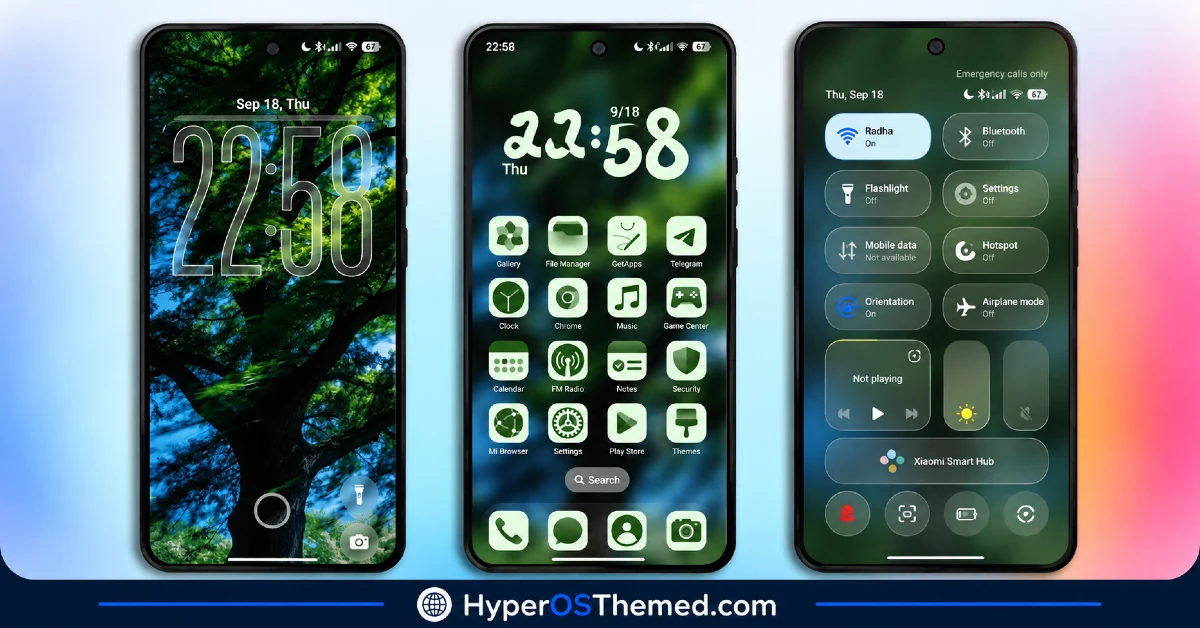
- Quick Access Shortcuts: Sleek bottom controls for Flashlight, Camera and unlock functions sit right on the lock screen, cutting down on the steps needed to reach commonly used tools without fully unlocking the phone.
- Mint Green Icon Pack: Icons use a uniform rounded-square shape in clean light-green and dark-monochrome tones, with coverage extending well beyond the obvious apps to include Telegram, TikTok, ChatGPT, Binance, bKash and Discord. That kind of broad third-party coverage is worth flagging since plenty of icon packs stop at the big five.
- Custom Desktop Clock Widget: A dedicated clock widget uses distinctive, playful typography that ties into the overall mint-green identity rather than sitting as a generic system default.
- Translucent Control Center: The quick settings panel picks up a soft, translucent background with pill-shaped sliders for volume and brightness, along with subtle green accents on active toggles. It’s a clear step up from the default flat HyperOS panel.
- High-Visibility Status Bar: Battery percentage, network coverage and signal indicators are built for clarity, staying legible even against the busier forest wallpapers running behind them.
Verdant HyperOS Theme Preview
The screenshots below show the forest-themed lock screen, the mint-green icon pack and how the translucent Control Center and custom widgets look once the theme is applied. Given how much control the font editor and wallpaper switcher offer, it’s worth spending real time with the preview to get a feel for the range of customization available.
Verdant HyperOS Theme Details
| Attribute | Details |
|---|---|
| Availability | Free, via Xiaomi Theme Store |
| Supported Devices | Xiaomi, Redmi and POCO phones running HyperOS |
| Theme Name | Verdant |
| Designer | Mydul Islam |
| Compatibility OS | HyperOS 3 |
| Features | Inline clock font editor, nature wallpaper gallery, depth-of-field widgets, mint green icon pack, translucent Control Center |
| File Size | ~49.5 MB |
Verdant HyperOS Theme Compatibility
Verdant is built specifically for HyperOS 3 and works across Xiaomi, Redmi and POCO devices running that version. Since the theme wasn’t designed with older HyperOS builds in mind, applying it on HyperOS 1.0 or 2.0 devices may result in the font editor and depth-of-field widgets rendering incompletely.
Custom ROM users can still attempt manual installation, though results may vary given how specifically this theme targets HyperOS 3’s rendering capabilities. As with most themes modifying the lock screen this extensively, restarting the device after installation helps ensure the custom scripts, status bar icons and Control Center toggles all display correctly.
Get Verdant HyperOS Theme
Download Verdant only through the official Theme Store link rather than random third-party file hosts or unofficial APK uploads. Files sourced outside verified channels are difficult to confirm as unaltered and may not reflect what Mydul Islam actually released. Sticking to the official Theme Store link keeps the installed version consistent with the intended design and ensures future updates remain accessible.
A note on installation access: if the Official Theme Store link doesn’t open automatically into the Themes app, check that your default mobile browser has permission to open system applications, since that’s the most common reason the redirect fails to trigger properly.
How to Apply Verdant HyperOS Theme
Follow the steps below to apply the theme:
- Open the Theme Store link given above on your Xiaomi, Redmi or POCO device.
- This will redirect you to the Theme Store.
- Tap the Free or Download button to begin fetching the theme resources.
- Once downloaded, tap Apply to install the theme system-wide.
- Customize specific elements such as icons, lock screen or status bar if needed.
- Reboot your device after applying, this step is recommended specifically here to make sure the custom lock screen scripts, status bar icons and Control Center toggles all render properly.
Note: If anything looks overlapped or doesn’t display correctly right after installing, restarting the device usually clears it up without further steps. This theme has been checked on HyperOS 3 without any major issues turning up during that process. Still, if something looks off on a specific device once it’s applied, leaving a comment with the details helps get it looked into.
Why Choose Verdant HyperOS Theme?
- Real typography control — a genuine font editor with multiple clock styles, not just preset color swaps.
- Wide wallpaper variety — forests, mountains and architecture all built into one switchable gallery.
- Depth-of-field lock screen widgets — genuine visual dimension rather than flat overlay boxes.
- Broad third-party icon coverage — apps like Discord, Binance and ChatGPT all get matching mint-green icons.
- Translucent Control Center — a clear upgrade over the flat default HyperOS quick settings panel.
- Practical lock screen shortcuts — Flashlight and Camera access built directly into the design.
- Free official download — no cost involved through a legitimate Theme Store link.
Conclusion
Verdant HyperOS Theme xiaomi earns its “advanced customization” claim honestly, the inline font editor and depth-of-field widgets go well past what most nature-themed packs bother offering, and the mint-green icon coverage extends far enough to keep the whole home screen looking cohesive. For Xiaomi, Redmi and POCO users on HyperOS 3 who want a calming, forest-inspired look with genuine control behind it, Verdant is well worth trying.
Conclusion
FiftyK HyperOS Theme stands out through genuine depth and control, the smart depth-mapped lock screen and RGB clock sliders go well beyond what most “customizable” themes actually deliver, and the pastel floral aesthetic gives it a distinct, cohesive identity throughout. For Xiaomi, Redmi and POCO users on HyperOS 2 or 3 who want a soft, elegant look with real personalization behind it, FiftyK HyperOS Theme is well worth trying.
You may also like:
FiftyK HyperOS Theme ~ iOS-Style Control with Floral Mediterranean Look for Xiaomi, POCO, Redmi
Grade A HyperOS Theme with Cyberpunk Red Neon AMOLED for Xiaomi, POCO, Redmi
Airdrop HyperOS Theme with Nature Wallpapers and 3D Depth Effect
GlassyM HyperOS Theme with Frosted Glass Rainy-Night Lock Screen for Xiaomi, POCO, Redmi
OX Clay HyperOS Theme with Minimal Design & Subtle Glass Touches for Xiaomi, POCO, Redmi
