A smartphone theme can look impressive through its wallpaper alone, but the experience becomes more interesting when the icons, widgets and system controls follow the same design. The WBTC HyperOS Theme combines colourful 3D metallic icons with scenic wallpapers, oversized depth-effect clocks and translucent interface elements. It offers Xiaomi, Redmi and POCO users a distinctive alternative to the standard HyperOS appearance, with plenty of visual customisation.
Designed by maidul, WBTC HyperOS Theme brings together glossy chrome-style application icons, multiple landscape wallpapers and a customisable lock screen. Its design includes a large clock that appears behind foreground scenery, an integrated wallpaper gallery and a compact music player. The theme also features a redesigned Control Centre with dark glass panels, rounded quick settings and expanded brightness and audio controls.
WBTC is available for HyperOS 1, HyperOS 2, HyperOS 3 and HyperOS 4 on compatible devices, with a package size of approximately 72.8 MB. It may appeal to users who enjoy colourful, dimensional icon designs but also want scenic lock screen wallpapers and useful customisation options. Below, we’ll explore its main features, screenshots, compatibility, lock screen password and official installation process.
WBTC HyperOS Theme Key Highlights
1. Scenic Wallpapers and 3D Depth Lock Screen
- 3D Depth Effect Clock: WBTC HyperOS Theme features large, semi-transparent digital clock numerals that appear behind foreground elements of the wallpaper. In the screenshots, the upper portion of a lakeside tree overlaps the clock, creating a layered appearance while keeping the time visible.
- Multiple Scenic Wallpapers: The theme includes a collection of landscape wallpapers featuring lakes, mountains, coastal scenery and countryside locations. The preview shows a tree reflected in a calm lake, a rocky coastline, colourful fields, village scenery and snowy mountain backgrounds.
- Built-in Wallpaper Gallery: WBTC HyperOS Theme provides a lock screen customisation panel with dedicated sections for Clock, Widgets, Wallpaper and Other. The Wallpaper section displays thumbnail previews, allowing users to choose from the included backgrounds without changing the entire theme.
- Customisable Lock Screen Layout: The theme includes options for adjusting supported lock screen elements. Its large clock and wallpaper effects can be combined with different backgrounds to create a more personalised appearance.
- Interactive Music Capsule: A compact media player appears near the bottom of the lock screen, displaying song information and playback controls. Its rounded design keeps the music interface separate from the scenic wallpaper.
- Flashlight and Camera Shortcuts: Circular shortcut buttons appear at the bottom corners of the lock screen, providing convenient access to commonly used functions.
2. Glossy 3D Metallic Icons and Home Screen Styling
- Frameless 3D Metallic Icons: WBTC features colourful application icons with glossy, sculpted surfaces. Instead of placing every symbol inside a conventional rounded-square background, the icons use individual shapes with chrome-like highlights and dimensional shading.
- Custom System App Icons: The screenshots show redesigned icons for Telegram, Notes, File Manager, Clock, FM Radio, Calculator, Security, Gallery, Settings, Calendar and other applications. Each icon uses a distinct metallic finish while maintaining the theme’s colourful appearance.
- Third-Party Application Styling: The theme also includes customised icons for popular applications such as Chrome, Telegram and other supported apps. The icon coverage extends beyond Xiaomi’s built-in applications, although individual app support may vary.
- Colourful 3D Clock Widget: The home screen features a large digital clock with a polished metallic appearance. The previews show three colour treatments, including blue-green, purple and red-orange finishes, giving users different visual styles to explore.
- Matching Weather Information: A small temperature display appears beneath the metallic clock, combining weather information with the home screen’s decorative header.
- Translucent Home Screen Dock: Frequently used applications sit inside a rounded, semi-transparent dock. The glass-like background separates the shortcuts from the scenic wallpaper while allowing the lower portion of the image to remain visible.
3. Frosted Glass Control Centre and Interactive Controls
- Custom Dark Glass Control Centre: WBTC HyperOS Theme includes a redesigned quick settings panel with translucent surfaces, rounded tiles and subtle coloured reflections. Its darker appearance creates contrast with the colourful home screen icons.
- Glossy Quick Settings Tiles: Controls for functions such as Hotspot, NFC, Flashlight, rotation lock, mute and screenshots appear in rounded rectangular panels. Some tiles use dark backgrounds, while others feature translucent glass effects.
- Expanded Brightness Controls: The screenshots show a dedicated brightness popup with a large vertical slider. Additional buttons provide access to Auto Brightness, Dark Mode and Reading Mode, keeping related display settings together.
- Multi-Slider Audio Panel: WBTC includes an expanded control panel with separate vertical sliders for supported audio categories, including media, ringtone and alarm volume.
- Quick Timer Controls: The audio popup also displays slider-style timer controls, giving the expanded panel an additional interactive function beyond volume adjustment.
- Custom Music Player: A compact media panel appears in the Control Centre with playback buttons and colourful visual accents. Its translucent design complements the surrounding quick settings.
- Coordinated System Indicators: The Control Centre uses compact network, Wi-Fi and battery indicators alongside its customised controls, maintaining a consistent appearance across the panel.
WBTC HyperOS Theme Preview
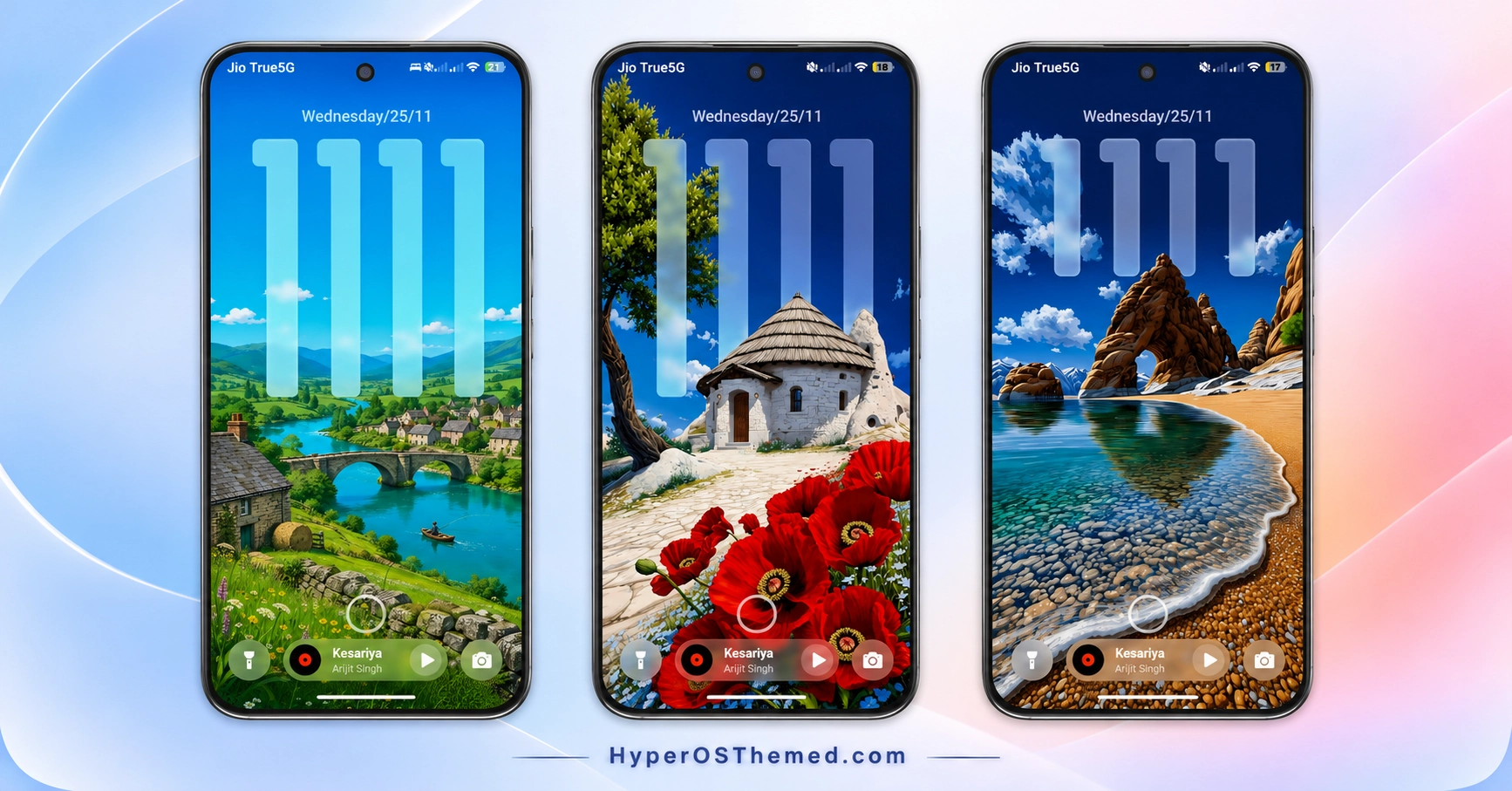
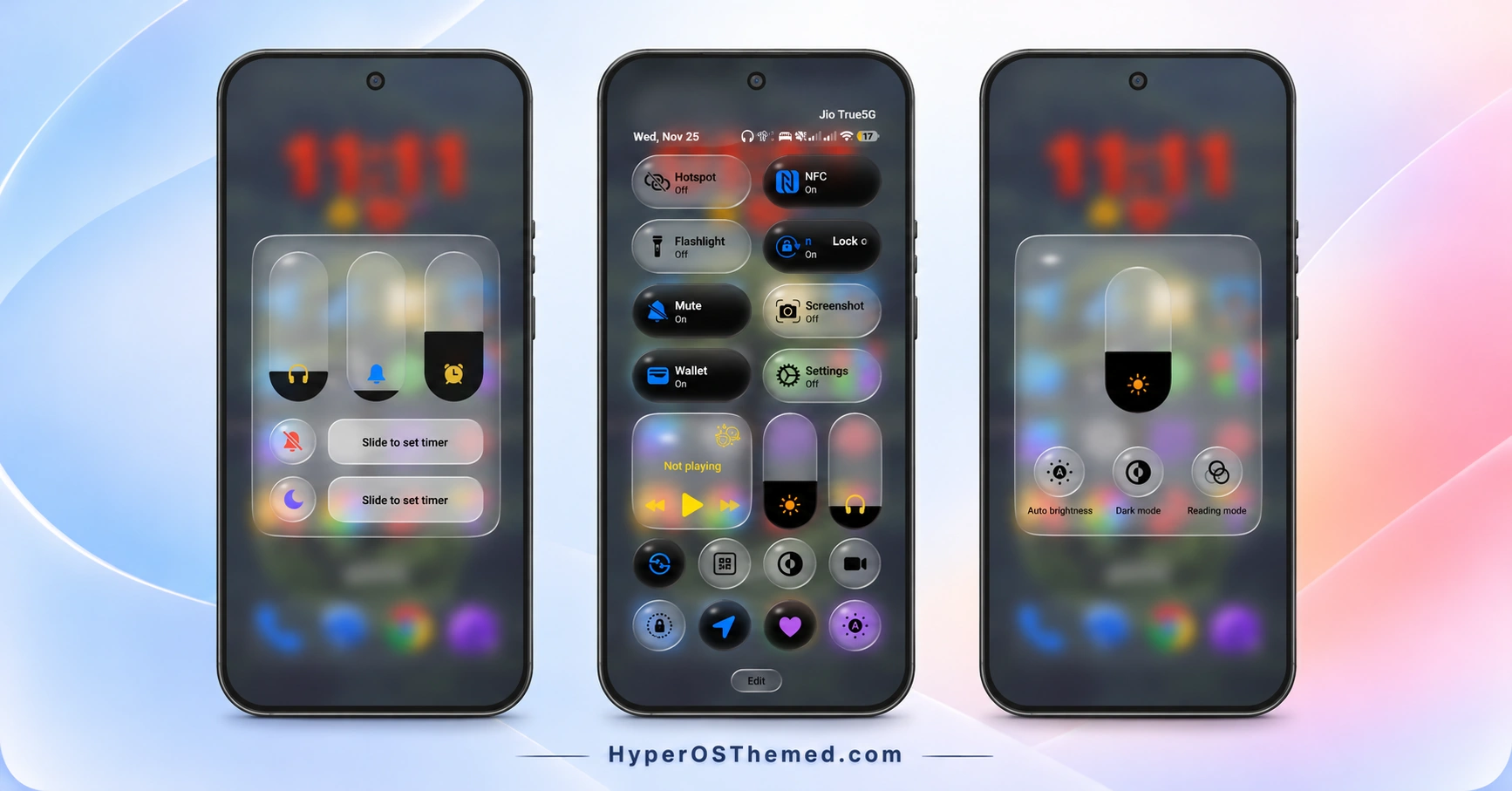
The WBTC screenshots highlight its colourful icon pack, scenic depth-effect lock screen and customised Control Centre.
The home screen preview features a peaceful lakeside wallpaper with a large tree reflected in the water. Glossy metallic icons appear across the screen, while the oversized 3D clock at the top is shown in blue-green, purple and red-orange variations. The icon designs are particularly distinctive because they use different sculpted shapes rather than identical flat backgrounds.
The lock screen screenshots show the same lakeside scene with a large translucent clock positioned behind the tree. A built-in wallpaper selection panel displays several landscape options, including coastal scenery, mountain landscapes and colourful countryside backgrounds.
The Control Centre preview uses a dark, blurred background with rounded glass-style controls. Separate screenshots also show the expanded brightness panel and multi-slider audio controls, giving a closer look at the theme’s additional interface features.
WBTC HyperOS Theme Overview
| Attribute | Details |
|---|---|
| Theme Name | WBTC |
| Designer | maidul |
| File Size | Approximately 72.8 MB |
| Availability | Free via Xiaomi Theme Store |
| Supported Devices | Compatible Xiaomi, Redmi and POCO smartphones |
| Compatibility OS | HyperOS 1, HyperOS 2, HyperOS 3 and HyperOS 4 |
| Design Style | 3D Metallic, Chrome Icons, Depth Effect, Frosted Glass |
| Main Features | Scenic wallpapers, depth-effect clock, wallpaper selector, 3D icons, music capsule, custom Control Centre |
| Lock Screen Customisation Password | 2006 |
Get WBTC HyperOS Theme
Click the appropriate OFFICIAL THEME STORE LINK button below to open WBTC in the Xiaomi Themes app and apply it to your compatible smartphone.
Choose the link that matches your installed HyperOS version.
WBTC HyperOS Theme Compatibility
WBTC HyperOS Theme is intended for Xiaomi, Redmi and POCO smartphones running HyperOS 1, HyperOS 2, HyperOS 3 or HyperOS 4. Separate Theme Store links are provided for HyperOS 1/2 and HyperOS 3/4, so selecting the appropriate version is important.
The theme includes depth-effect wallpapers, a custom lock screen editor, glossy 3D icons and modified system controls. The appearance and availability of individual features may vary depending on the phone model, software version and regional Theme Store support.
Its package size is approximately 72.8 MB, covering the theme’s wallpapers, icon resources and other visual components.
How to Install WBTC on Global Stable ROM
You can apply WBTC through the official Xiaomi Themes application on a compatible Global Stable ROM.
- Open the OFFICIAL THEME STORE LINK button above that matches your HyperOS version.
- Allow the link to open in the Xiaomi Themes app.
- Once the WBTC theme page appears, tap Free or Download, depending on the option displayed.
- Wait for the theme resources to finish downloading, then tap Apply.
- Check the lock screen, home screen and Control Centre to confirm that the theme has been applied.
If the link opens in a browser instead of Xiaomi Themes, look for an Open in app option or try Chrome or your phone’s default browser.
WBTC Lock Screen Customisation Password
Some WBTC lock screen customisation features are password-protected.
Customisation Password: 2006
When the theme’s lock screen editor requests a password, enter 2006 to access the protected settings. From there, you can explore the available clock, widget, wallpaper and other customisation options.
The exact location of the password field may vary depending on the installed theme version.
Important Note: If the depth-effect clock, app icons, widgets or Control Centre elements overlap or do not appear correctly after applying WBTC, restart your smartphone and check again. If the issue continues, leave a comment with your phone model and HyperOS version.
Why Choose WBTC HyperOS Theme?
- Scenic Wallpaper Collection: Choose from lakeside, coastal, countryside and mountain backgrounds.
- 3D Depth Clock: Large translucent numerals appear behind foreground scenery for a layered lock screen design.
- Built-in Wallpaper Selector: Change backgrounds through the theme’s lock screen customisation panel.
- Glossy Metallic Icons: Colourful chrome-style application icons give the home screen a distinctive appearance.
- Multiple Clock Colour Styles: The previews show blue-green, purple and red-orange metallic clock designs.
- Custom Media Capsule: View music information and playback controls near the bottom of the lock screen.
- Interactive Glass Control Centre: Rounded panels, expanded brightness settings and multi-slider audio controls add useful interface customisation.
Conclusion
The WBTC HyperOS Theme combines colourful 3D metallic icons with scenic wallpapers and an adjustable depth-effect lock screen. Its integrated wallpaper gallery makes it easier to explore different landscape backgrounds, while the translucent clock creates a layered appearance around foreground subjects.
The theme also extends its visual styling to the home screen and Control Centre through metallic icon designs, a custom clock widget and expanded system controls. For Xiaomi, Redmi and POCO users who prefer glossy icons, landscape wallpapers and more detailed lock screen customisation, WBTC offers several features worth exploring on a compatible HyperOS device.
You may also like:
Liquid20S HyperOS Theme with Monochrome Icons, Dark Grain Wallpaper and Custom Lock Screen
BTTC HyperOS Theme with 3D Depth Clock, Mountain Wallpaper and Frosted Glass Icons
OX G6 V2 HyperOS Theme with Liquid Glass Clock, Depth Effects and Custom Lock Screen
OX GRAY HyperOS Theme with Premium Gray Icons and a Minimal Lock Screen