A dark smartphone theme doesn’t always need colourful effects or complicated widgets to look distinctive. Sometimes, the right combination of texture, typography and matching icons can make the interface feel noticeably different. The Liquid20S HyperOS Theme follows this approach with a grain-textured monochrome wallpaper, bold digital clocks and translucent interface elements, offering Xiaomi, Redmi and POCO users an alternative to the standard HyperOS appearance.
Liquid20S combines a black and grey colour scheme with two lock screen clock layouts, a compact music player and customised app icons. Its wallpaper uses contrasting vertical sections with a fine grain texture, while the home screen features rounded-square icons with silver and grey detailing. The theme also includes calendar and weather widgets alongside a redesigned frosted-glass Control Centre.
Liquid20S is designed for HyperOS 3 on compatible devices and It may appeal to users who prefer monochrome interfaces but want more visual detail than a completely black wallpaper provides. Below, we’ll explore its lock screen designs, icon pack, home screen widgets, Control Centre and installation process.
Liquid20S HyperOS Theme Key Highlights
1. Monochrome Wallpaper and Custom Lock Screen
- Dark Grain-Textured Wallpaper: Liquid20S uses a black and grey wallpaper with a fine grain texture. The background features contrasting vertical sections, creating a subtle split-tone appearance without introducing bright colours or elaborate artwork.
- Two Digital Clock Layouts: The screenshots show two clock arrangements: a stacked design with the hours above the minutes and a conventional horizontal time display. Both use large, light-coloured numerals that remain clearly visible against the dark wallpaper.
- Minimal Date Display: The lock screen places a small date indicator below the clock, keeping the information easy to read without filling the display with additional text.
- Integrated Music Player: A compact media capsule appears near the bottom of the lock screen. The preview shows song information, artist details and a playback button, allowing supported music controls to remain accessible from the lock screen.
- Flashlight and Camera Shortcuts: Rounded shortcut buttons sit on either side of the bottom media area. These provide convenient access to the flashlight and camera while following the theme’s monochrome styling.
- Circular Unlock Indicator: A thin circular element appears above the bottom shortcuts in the showcased lock screen. It complements the minimalist design and gives the lower part of the layout a distinct visual detail.
2. Frosted Monochrome Icons and Home Screen Widgets
- Custom Rounded-Square Icons: Liquid20S includes an icon pack with dark, softly rounded backgrounds and light-coloured application symbols. The icons use grey, white and silver tones to complement the grain-textured wallpaper.
- Redesigned System App Icons: The screenshots show customised icons for Xiaomi applications such as Calculator, Calendar, Clock, Notes, Weather, File Manager, Gallery, Security and Settings. These icons help commonly used system apps maintain the same monochrome appearance.
- Third-Party Application Styling: Popular apps including Telegram, Chrome, TikTok, Facebook, Binance, Bybit, bKash and Daraz appear with matching dark icon backgrounds. This reduces the visual differences between supported system and third-party applications.
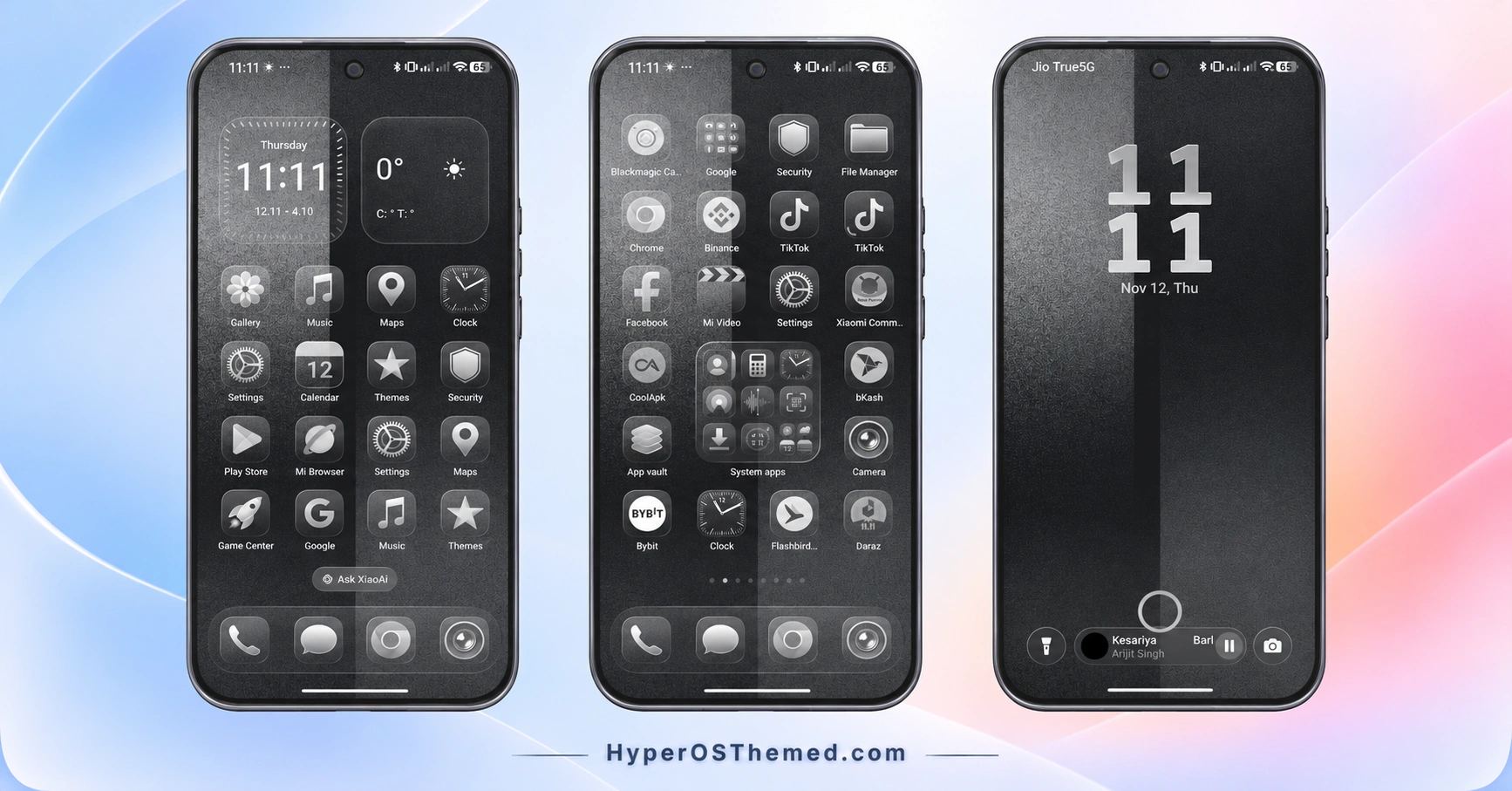
- Clock and Calendar Widget: The home screen includes a large rounded information card displaying the time, day and date. Its subtle border and translucent background complement the surrounding icons.
- Weather Information Widget: A matching card displays temperature and weather information beside the calendar widget. The two cards create an organised header at the top of the home screen.
- Translucent Home Screen Dock: Frequently used apps sit inside a rounded, semi-transparent dock at the bottom of the display. Its frosted styling separates the shortcuts from the textured wallpaper without covering the background completely.
3. Redesigned Frosted Glass Control Centre
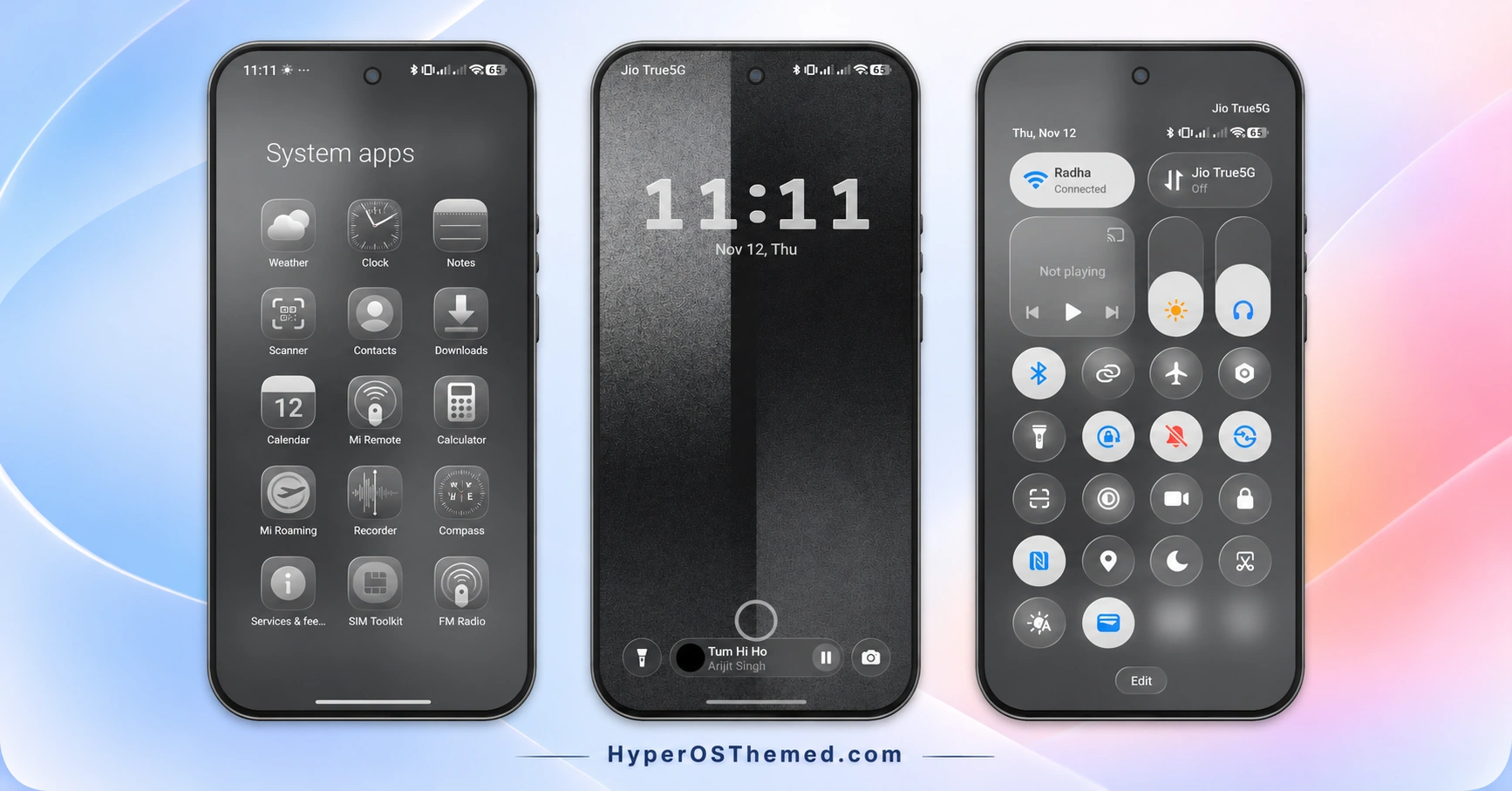
- Custom Dark Control Centre: Liquid20S changes the standard quick settings appearance with a translucent grey panel. The frosted background and rounded controls carry the theme’s monochrome design into the system interface.
- Large Connectivity Tiles: Wi-Fi and mobile data controls appear near the top of the panel in wide, rounded tiles. Their contrasting backgrounds help distinguish the displayed connection states.
- Vertical Brightness and Volume Sliders: Two tall, pill-shaped sliders provide access to brightness and volume adjustments. Their light surfaces stand out against the darker Control Centre background.
- Custom Music Panel: The Control Centre includes a rounded media player with playback controls. Its translucent appearance matches the surrounding quick settings.
- Circular Quick Settings Buttons: Bluetooth, airplane mode, flashlight, rotation lock and other controls appear in a grid of circular buttons. Active controls use brighter backgrounds, while other buttons retain the dark, frosted appearance.
- Matching Status Bar Indicators: Compact network, Wi-Fi and battery indicators appear along the top of the screen, maintaining a restrained appearance above the customised interface.
Liquid20S HyperOS Theme Preview
The Liquid20S screenshots show how its monochrome design appears across the lock screen, home screen, application folders and Control Centre.
The lock screen features a textured black and grey wallpaper divided into contrasting vertical sections. One preview shows a stacked digital clock, while another uses a horizontal clock arrangement. A compact music player, circular unlock indicator and flashlight and camera shortcuts appear near the bottom.
The home screen follows the same dark styling with rounded-square application icons and two information cards displaying time, date and weather details. Additional screenshots show customised icons for system applications and popular third-party apps.
The Control Centre uses a translucent grey background with rounded connectivity tiles, vertical sliders, circular quick-setting buttons and a media player. Its limited colour palette makes the controls visually consistent with the rest of the theme.
Liquid20S HyperOS Theme Overview
| Attribute | Details |
|---|---|
| Theme Name | Liquid20S |
| Designer | maidul |
| File Size | Approximately 48.6 MB |
| Availability | Free via Xiaomi Theme Store |
| Supported Devices | Compatible Xiaomi, Redmi and POCO smartphones |
| Compatibility OS | HyperOS 3 |
| Design Style | Monochrome, Dark Grain, Frosted Glass |
| Main Features | Dual clock layouts, music capsule, grain-textured wallpaper, custom icons, clock and weather widgets, frosted Control Centre |
Get Liquid20S HyperOS Theme
Click the OFFICIAL THEME STORE LINK button below to open Liquid20S in the Xiaomi Themes app and apply it to your compatible Xiaomi, Redmi or POCO smartphone.
Liquid20S HyperOS Theme Compatibility
Liquid20S is designed for HyperOS 3 on compatible Xiaomi, Redmi and POCO smartphones. The theme includes customised lock screen layouts, media controls, application icons and system interface elements.
The exact appearance of the clock, music capsule and Control Centre may vary depending on the phone model and installed HyperOS version. Compatibility with HyperOS 2 or earlier releases has not been confirmed.
With a package size of approximately 48.6 MB, Liquid20S includes its wallpapers, icon resources and other visual customisation elements in one theme package.
How to Install Liquid20S on Global Stable ROM
You can apply Liquid20S through the official Xiaomi Themes app if it is available for your device and region.
- Click the OFFICIAL THEME STORE LINK button above using your Xiaomi, Redmi or POCO phone.
- Allow the link to open in the Themes application.
- Once the Liquid20S theme page appears, tap Free or Download, depending on the option displayed.
- Wait for the theme resources to finish downloading, then tap Apply.
- Check the lock screen, home screen and Control Centre to confirm that the theme has been applied.
If the link opens in your browser instead of the Themes app, look for an Open in app option or try using Chrome or your phone’s default browser.
Important Note: If the clock, music capsule, icons or Control Centre elements overlap or do not appear correctly after applying Liquid20S, restart your smartphone and check again. If the issue continues, leave a comment with your phone model and HyperOS version.
Why Choose Liquid20S HyperOS Theme?
- Distinctive Monochrome Wallpaper: The grain-textured black and grey background offers an alternative to completely plain dark wallpapers.
- Two Lock Screen Clock Layouts: Choose between stacked and horizontal digital clock presentations where supported.
- Integrated Music Capsule: View song information and playback controls directly from the lock screen.
- Custom Dark App Icons: Rounded-square icons with silver and grey detailing complement the wallpaper.
- Clock and Weather Widgets: Compact home screen cards display useful daily information.
- Frosted Glass Control Centre: Translucent panels, circular toggles and vertical sliders extend the design into quick settings.
Conclusion
The Liquid20S HyperOS Theme combines a grain-textured monochrome wallpaper with bold digital clocks, custom dark icons and a frosted-glass Control Centre. Its stacked and horizontal clock layouts give the lock screen two distinct appearances, while the bottom music capsule adds a practical media control element.
The matching icon pack, clock and weather widgets, and translucent system controls carry the same black and grey styling across the interface. For Xiaomi, Redmi and POCO users who prefer dark themes with subtle texture rather than colourful effects, Liquid20S is worth exploring on a compatible HyperOS 3 device.
You may also like:
BTTC HyperOS Theme with 3D Depth Clock, Mountain Wallpaper and Frosted Glass Icons
OX G6 V2 HyperOS Theme with Liquid Glass Clock, Depth Effects and Custom Lock Screen
OX GRAY HyperOS Theme with Premium Gray Icons and a Minimal Lock Screen