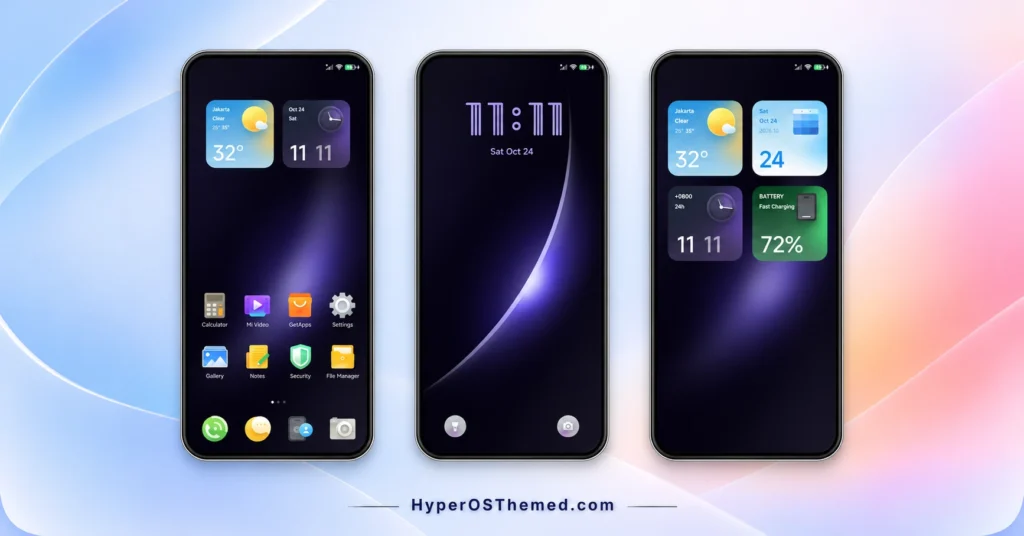
The Spark HyperOS Theme, designed by KYLOD, takes a softer approach to smartphone customisation. Instead of relying on a completely dark interface or heavy visual effects, it combines diffused purple gradients, subtle lighting and frosted-glass elements to create a smooth, layered appearance. Its deep purple wallpaper with a glowing curved light effect gives the interface a distinctive visual identity.
The lock screen is one of the most interesting parts of this theme. It features an outlined digital clock, colourful information widgets and convenient shortcuts for everyday actions. You can also access a dedicated widget panel, change wallpaper settings directly from the clock and use the lock screen shortcuts to open the camera or flashlight.
Spark also introduces bright app icons and colourful clock, weather, calendar and battery widgets. These elements complement the purple background while maintaining a consistent visual style. If you enjoy gradient-based designs, translucent surfaces and useful lock screen controls, Spark offers an interesting combination of appearance and personalisation.
Spark HyperOS Theme Key Highlights
1. Purple Gradient Design & Frosted Glass Effects
- Deep Purple Wallpaper: A gradient-based background with a glowing curved light effect that gives the home screen a distinctive appearance.
- Soft Lighting: Diffused gradients create a gentle transition between colours, rather than using harsh contrast.
- Frosted Glass Elements: Translucent surfaces add depth to the interface and create a subtle glass-inspired appearance.
- Skeuomorphic Styling: The design combines modern gradients with softer visual details to create an immersive interplay of light and shadow.
2. Custom Lock Screen & Useful Shortcuts
- Outlined Digital Clock: A distinctive outline-style clock that complements the theme’s gradient backgrounds.
- Lock Screen Widget Panel: Swipe right on the lock screen to access the additional widget panel.
- Flashlight and Camera Shortcuts: Press and hold the shortcut buttons to turn on the flashlight or launch the camera.
- Quick Wallpaper Customisation: Double-tap the lock screen clock to open the wallpaper customisation settings.
3. Colourful Widgets & App Icons
- Clock and Weather Widgets: Colourful widgets provide quick access to time and weather information.
- Calendar and Battery Information: Additional widgets help display useful date and battery details.
- Bright App Icons: A new colourful icon design complements the purple gradient background.
- Consistent Visual Style: The widgets, icons and background work together to maintain the theme’s soft and vibrant appearance.
Spark HyperOS Theme Preview
The preview images show Spark’s purple gradient wallpaper, glowing curved lighting, outlined lock screen clock and colourful widgets. They also provide a look at the theme’s updated icons and overall interface design.
Spark Theme Overview
| Feature | Details |
|---|---|
| Theme Name | Spark |
| Designer | KYLOD |
| Theme Size | 60.09 MB |
| Region | Global |
| Compatibility | HyperOS, HyperOS 2.0, HyperOS 3.0 and HyperOS 4.0 |
| Main Features | Purple gradients, frosted-glass effects, lock screen widgets, outlined clock and colourful icons |
| Availability | Official Xiaomi Theme Store |
Creator’s support: For bug reports, compatibility requests or other theme-related enquiries, contact KYLOD at kylodu4@gmail.com.
Get Spark HyperOS Theme
You can access the Spark HyperOS Theme through the official Xiaomi Theme Store using the button below. Open it on your compatible Xiaomi, Redmi or POCO smartphone to view the theme in the Themes app.
Spark HyperOS Theme Compatibility
Spark is designed for Xiaomi’s HyperOS interface, with compatibility specified for HyperOS, HyperOS 2.0, HyperOS 3.0 and HyperOS 4.0. It is intended for compatible Xiaomi, Redmi and POCO smartphones in the Global region.
Some visual elements may vary depending on your device model and software version. In particular, lock screen widgets and shortcut behaviour can depend on the features supported by your phone’s system software.
Why Choose Spark HyperOS Theme?
Spark is worth exploring if you prefer a colourful interface without an overly busy design. Its purple gradient background and frosted-glass styling give the phone a consistent appearance, while the colourful widgets make useful information accessible from the home screen and lock screen.
The gesture-based shortcuts are another practical addition. You can swipe right to access the lock screen widget panel, press and hold the flashlight or camera shortcuts, and double-tap the clock to open wallpaper settings. These small details make the theme more than just a visual change.
Conclusion
The Spark HyperOS Theme by KYLOD brings together purple gradient wallpapers, frosted-glass effects, colourful widgets and a distinctive outlined lock screen clock. Its wallpaper controls and convenient lock screen shortcuts add practical customisation options alongside the visual changes.
If you enjoy soft gradient backgrounds and a colourful yet organised interface, Spark is a theme worth checking out. Open its official Xiaomi Theme Store page and explore the available design on your compatible device.
FAQs
1. Does Spark work on HyperOS 2, HyperOS 3 and HyperOS 4?
Spark’s stated compatibility includes the original HyperOS, HyperOS 2.0, HyperOS 3.0 and HyperOS 4.0 for supported Global-region Xiaomi, Redmi and POCO phones. Check its listing in your Xiaomi Themes app before downloading, as some widgets and shortcuts may behave differently depending on your device and software version.
2. How do I open Spark’s lock screen widget panel?
Swipe right on the lock screen to access the additional widget panel. If it doesn’t appear after applying Spark, restart your phone and try again. The panel’s behaviour may depend on your phone’s software support.
3. Can I change Spark’s wallpaper from the lock screen?
Yes. Double-tap the outlined lock screen clock to open the wallpaper customisation settings. This gives you access to the theme’s wallpaper options directly from the lock screen.
4. Why don’t the camera and flashlight shortcuts respond when I tap them?
Spark’s lock screen shortcuts require a press and hold, rather than a quick tap. Hold the camera shortcut to launch the camera, or hold the flashlight shortcut to turn on the light.
5. What should I do if Spark’s widgets overlap or don’t display correctly?
Restart your phone after applying the theme, then check the affected widgets again. If the issue continues, contact the designer, KYLOD, at kylodu4@gmail.com with your phone model, HyperOS version and a description of the problem.
You may also like:
s4u14 HyperOS Theme with Customisable Clock, Music Player & Control Centre
suhel13 HyperOS Theme with Scenic Wallpapers and Black Glossy Icons
s4u dark by suhel HyperOS Theme with Black UI for Xiaomi & Redmi
Glossix HyperOS Theme with Dark Glossy Icons and Advanced Lockscreen Customisation
iOS-Inspired OX G5 v2 HyperOS Theme for Xiaomi, Redmi & POCO